Details for the issue
What did you do?
Viewed a table with a TEXT column, where at least one row contains Korean text (for example, "한국어" meaning "Korean").
What did you expect to see?
Glyphs that look like 한국어, or at worst the "unsupported character" symbol: □
What did you see instead?
Glyphs rendered as white space:
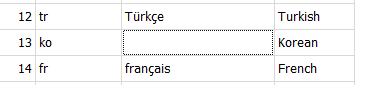
The text is actually present, as I can copy it out of the cell and into another program (like a web browser open to the Github issue tracker for sqlitebrowser 🙂). It's just being rendered as whitespace.
This is worse than just displaying □, since to a casual observer it would appear that the cell has no data and is empty.
Useful extra information
DB4S v3.12.0 [built for x86_64-little_endian-llp64] on Windows 10 (10.0) (winnt/10.0.19041) [x86_64]
using SQLite Version 3.32.2
and Qt 5.12.8
Details for the issue
What did you do?
Viewed a table with a TEXT column, where at least one row contains Korean text (for example, "한국어" meaning "Korean").
What did you expect to see?
Glyphs that look like 한국어, or at worst the "unsupported character" symbol: □
What did you see instead?
Glyphs rendered as white space:
The text is actually present, as I can copy it out of the cell and into another program (like a web browser open to the Github issue tracker for sqlitebrowser 🙂). It's just being rendered as whitespace.
This is worse than just displaying □, since to a casual observer it would appear that the cell has no data and is empty.
Useful extra information