You signed in with another tab or window. Reload to refresh your session.You signed out in another tab or window. Reload to refresh your session.You switched accounts on another tab or window. Reload to refresh your session.Dismiss alert
{{ message }}
Repository navigation
Thumbnails for images displayed directly on the table cells #2000
Thanks for the suggestion! I have just added a very basic preview of BLOB images. For performance reasons the new feature is disabled by default for now though. I'll try to speed up the relevant code in the future and maybe we can then turn it on by default. There's a second caveat too: The images aren't scaled (yet), so for very large images you'll only see the upper left corner.
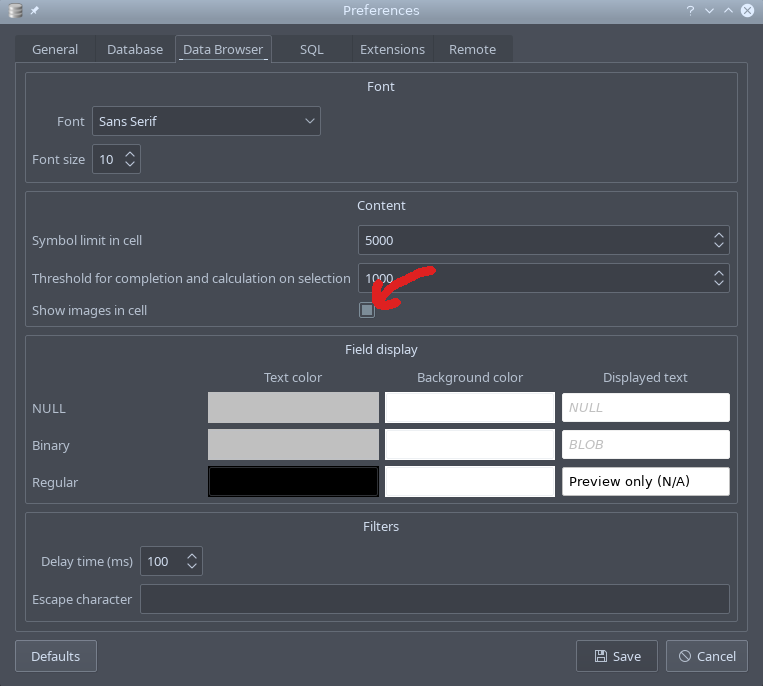
Do you want to give this a try anyway? You'll have to download tomorrow's nightly build for that. Here's the option to enable the preview feature in the Preferences dialog:
______________________________________________________
Calde salutări / Best regards / Mit freundlichen Grüßen
* Silviu Doaga*
Sibiu, România
Phone: +40 757 141 932
E-mail: l <Silviu.Doaga@continental-corporation.com>
aurentiusilviu@gmail.com
On Sun, Sep 22, 2019 at 11:22 PM Martin Kleusberg ***@***.***> wrote:
Thanks for the suggestion! I have just added a very basic preview of BLOB
images. For performance reasons the new feature is disabled by default for
now though. I'll try to speed up the relevant code in the future and maybe
we can then turn it on by default. There's a second caveat too: The images
aren't scaled (yet), so for very large images you'll only see the upper
left corner.
Do you want to give this a try anyway? You'll have to download tomorrow's
nightly build for that. Here's the option to enable the preview feature in
the Preferences dialog:
[image: Screenshot_20190922_222059]
<https://user-images.githubusercontent.com/3153504/65393894-60734000-dd87-11e9-8d36-75a85598bdb4.png>
—
You are receiving this because you authored the thread.
Reply to this email directly, view it on GitHub
<#2000?email_source=notifications&email_token=ADRPTMWSTFRB7QHL6TUXWITQK7HYFA5CNFSM4IYIRAGKYY3PNVWWK3TUL52HS4DFVREXG43VMVBW63LNMVXHJKTDN5WW2ZLOORPWSZGOD7JONSY#issuecomment-533915339>,
or mute the thread
<https://github.com/notifications/unsubscribe-auth/ADRPTMVJPV3BVOWWAHREXWDQK7HYFANCNFSM4IYIRAGA>
.
It works supper!
The only thing that is missing is to auto-height all selected rows by double click on left mouse button. Now, the auto-height works only for each row, not for all of them into one single click.
Are you sure the auto height changed? And which version were you using before? I have just tried it with and without the changes I made and with the 3.11.2 release - and at least on my system it looks like it doesn't work in any of these version.
You are right!
The height changing is not working also in the old versions. So, your change not affected the height changing of the rows. I only want to say that this is another topic which can be improved in the tool.
Activity
Support inline preview of image data in cells
MKleusberg commentedon Sep 22, 2019
Thanks for the suggestion! I have just added a very basic preview of BLOB images. For performance reasons the new feature is disabled by default for now though. I'll try to speed up the relevant code in the future and maybe we can then turn it on by default. There's a second caveat too: The images aren't scaled (yet), so for very large images you'll only see the upper left corner.
Do you want to give this a try anyway? You'll have to download tomorrow's nightly build for that. Here's the option to enable the preview feature in the Preferences dialog:

silviulaurentiu commentedon Sep 23, 2019
silviulaurentiu commentedon Sep 24, 2019
It works supper!
The only thing that is missing is to auto-height all selected rows by double click on left mouse button. Now, the auto-height works only for each row, not for all of them into one single click.
MKleusberg commentedon Oct 4, 2019
Thanks for testing!
Are you sure the auto height changed? And which version were you using before? I have just tried it with and without the changes I made and with the 3.11.2 release - and at least on my system it looks like it doesn't work in any of these version.
silviulaurentiu commentedon Oct 4, 2019
You are right!
The height changing is not working also in the old versions. So, your change not affected the height changing of the rows. I only want to say that this is another topic which can be improved in the tool.
Many thanks!
MKleusberg commentedon Feb 14, 2020
Closing this issue then because the original enhancement has been implemented and doesn't seem to break anything 😄