Repository navigation
TEXT values show as BLOB #1731

Description

Details for the issue
What did you do?
Just had compiled 3.11 from sources, opened my database and execute an query.
What did you expect to see?

Values in the res_text field actually is text and have a TEXT type accordingly. With previous version 3.10 looks as shown above.
What did you see instead?
But with 3.11 I see BLOB in the for some values, both in the Browse Data tab and in the Execute SQL tab result pane. SQLite returns typeof() as 'text'.

Useful extra information
A lot of res_text values in my database starts with a newline symbol \n. First screenshot in What did you expect to see? section was made in 3.11 too, but after manually removing leading newline \n symbol from res_text for values with doc_id 59867564 and 67412037. Trim with query ...set res_text=trim(res_text) has no effect.
Also I made a sample of my data as SQL dump, which I upload to Pastebin.
What operating system are you using?
- Windows: ( version: ___ )
- Linux: ( distro: Arch Linux )
- Mac OS: ( version: ___ )
- Other: ___
What is your DB4S version?
- 3.11.0
- 3.11.0-alpha1 or 3.11.0-beta*
- 3.10.1
- Other: ___
Did you also
- Try out the latest nightly version: https://github.com/sqlitebrowser/sqlitebrowser#nightly-builds
- Search for an existing similar issue: https://github.com/sqlitebrowser/sqlitebrowser/issues?utf8=%E2%9C%93&q=is%3Aissue%20
It seems looks like #16: Long TEXT values show as (BLOB) since version 3.1.0,
but BLOB mark appears not depends on the length of text.
Regardless of all above, new version is much faster, thank you :)
Activity
chrisjlocke commentedon Feb 7, 2019
I believe the first chunk of the field is looked at to determine whether its text or a blob - the actual fieldtype itself is not looked at. I assume its that which is mis-identifying your textfields.
In the 'Edit Cell' pane, can you change from 'Blob' to 'text' ?
ap-Codkelden commentedon Feb 7, 2019
@chrisjlocke
Yes, I tried, but it has no effect («Текст» is for "Text").
Also as I mentioned above, bulk removing of
\nwithtrim()has no effect too.UPD.:
But 3.10 understand my textfields correctly—I downgrade to 3.10 and open the same database.
mgrojo commentedon Feb 7, 2019
Out text detection test is failing for these cases. One case is the leading line-feed that you've discovered. Another row seems to have problems with these characters: № and » (row with Id 43046774). But copying only those two characters to a new cell does not raise the issue. Only copying the whole cell to another cell does, but as soon as you delete those two, the text in the cell is shown.
The test consists of converting the first 512 characters to Unicode and then back to utf-8. If the conversion is losless, we regard the data as text. Either the Qt encoding has some bug, or that conversion cannot be done in Unicode for all cases.
The responsible function is:
sqlitebrowser/src/Data.cpp
Line 13 in 0ad00af
mgrojo commentedon Feb 8, 2019
The automatic switching of the Cell editor to text means that the non-quick version of the test is working well. The problem is related to truncating the first 512 bytes. That is problably messing up the UTF-8 encoding for multibyte characters.
mgrojo commentedon Feb 9, 2019
@ap-Codkelden I have a solution but I'd like to test it for performance and for some encodings before commiting it. Since you have compiled from source, if you'd like to try, you could apply the attached patch and report whether it works for your whole database (the sample you upladed is working).
issue_1731.patch.txt
Another problem that can be seen in your screenshots is #1658. Could you report which Qt version have you used? It can be found in the About dialog.
Fix text detection check
mgrojo commentedon Feb 9, 2019
@ap-Codkelden The fix is already in the master branch, so you can simply pull it. According to callgrind, it is also quicker than the previous approach.
ap-Codkelden commentedon Feb 9, 2019
@mgrojo Thank you!
I have apply your patch, it works perfectly for me. On my database with only 36.5K records I haven't seen any slowdowns.
Regarding to #1658 I report that my Qt version is 5.12.1.
mgrojo commentedon Feb 9, 2019
Thanks. We can close this issue, then.
That matches my expectation. Qt 5.12.0 and 5.12.1 have this problem.
justinclift commentedon Feb 9, 2019
@mgrojo Want to apply the commit to the
v3.11.xbranch too? 😄6 remaining items
mgrojo commentedon Feb 28, 2019
That language is German and the product name is "Gummy bear, little gummy bear" 🐻 😄
This is working as expected, because the character encoding is not the one expected by the application (UTF-8), but ISO-8859-1. The hex editor shows text in this encoding (because, contrary to UTF-8, all characters are one byte wide, so it's better for showing the text representation of the hex-dump, which also uses byte boundaries).
The way to tell DB4S which encoding to use is clicking with the right mouse button over the column header and choosing 'Set encoding'. In your case, select ISO-8859-1. You can find more details about how DB4S behaves regarding encoding in #1461 (comment)
You'll receive a notification about the updates in this issue, since you've commented on it. Luck with your assignment.
justinclift commentedon Feb 28, 2019
Ahhh, the Bertelsmann Data Science Program. Looked through the course contents for that a while back... looks like mostly basic stats stuff. Is that how it's been so far? 😄
singminhong commentedon Mar 1, 2019
Thank you @mgrojo. :) I am able to change the encoding to ISO-8859-1 for a selected column header in Browse Data. But the results produced still give BLOB. Here I attach what I meant.
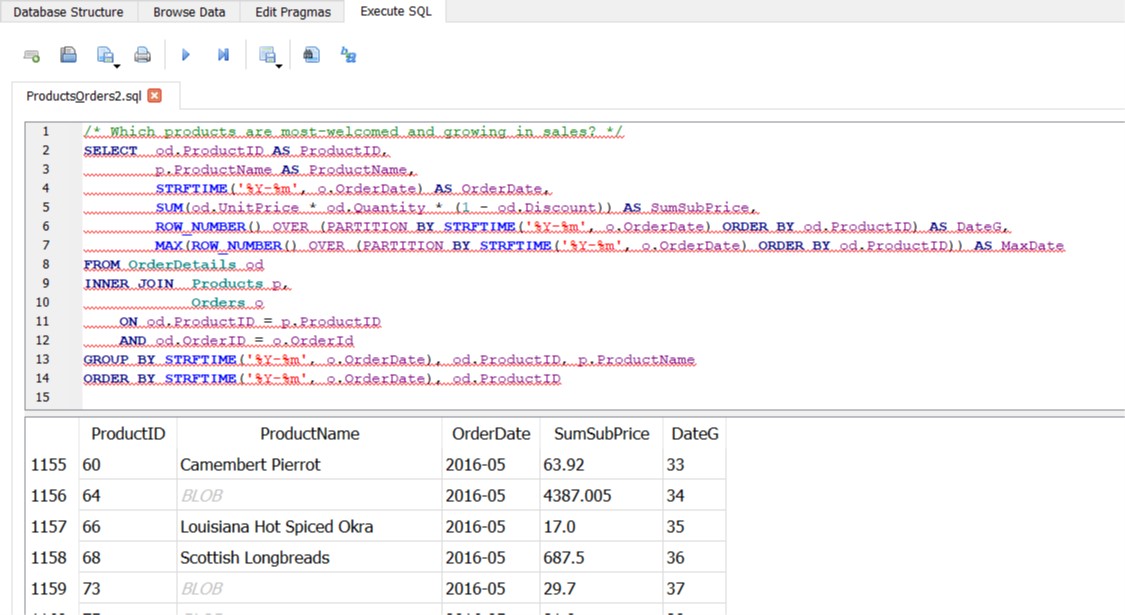
Any idea how to change the output to show the exact text according to their own language?
Please ignore the query as I am halfway coding and encountering some errors.
Another question about the errors, do you guys know where is the proper platform to ask for answers and helps to check up my query code in SQLite? Is it StackOverflow or any other platform? I have an error to solve here: I could not get the max value of the last column DateG using MAX(ROW_NUMBER() ...). It says misuse of window function ROW_NUMBER().
@chrisjlocke @mgrojo @justinclift @Shouqun
@justinclift :( It is not easy for me when I am stuck at one place for a long time, especially SQL query. I did not have a strong foundation in that prior to the Program.
justinclift commentedon Mar 1, 2019
Definitely the official SQLite Users mailing list:
http://mailinglists.sqlite.org/cgi-bin/mailman/listinfo/sqlite-users
There are lots of people on there, including the SQLite developers themselves. They're pretty helpful. 😄
justinclift commentedon Mar 1, 2019
Oops, that's not what I was meaning. Keep at it. 😄
skerit commentedon Jul 2, 2019
I'm using 3.11.2 on Linux Manjaro, but I still have this issue.
chrisjlocke commentedon Jul 2, 2019
Can you supply the database at all? With all fields recognised as blobs, looks 'suspicious'. Are you using any funky language and/or any encoding?
skerit commentedon Jul 2, 2019
Sure I can.
It's a database made by Ultrastar Deluxe, it just contains a lot of scores for karaoke sessions :)
It was made back in 2009, I believe.
Ultrastar.zip
mgrojo commentedon Jul 2, 2019
The data is null terminated. I'd say that is not a correctly encoded UTF-8 string. The workaround is to define a custom display format and use the quote function on the Artist and Title columns. This is precisely what the views scores_* are doing, so I guess someone has faced the same problem as us and created those views to display the data.
skerit commentedon Jul 2, 2019
Yeah, I created those views a long time ago
paul1149 commentedon Jan 13, 2022
I'm having the same problem here.
First, do I have the correct program? It's called DB Browser for SQLite, but it points to sqlitebrowser.org.
I have database modules to a Bible program. I run a simple command on them, such as:
update content set data = replace(data,'Open Sans Semibold', 'DejaVu Sans');And about 10% of the Topics are converted to BLOBs, unreadable by the Bible program. This mean a lot of data is being lost.
I'm on MX Linux 19.4, built of Debian and with a KDE desktop. Version 3.11.2.
DB Browser says:
Thanks
chrisjlocke commentedon Jan 13, 2022
Obviously without looking at the data or the result, that /looks/ OK, and I can't see why it would be turning it into BLOBs.
Can you delete all the data in the table apart from a couple of rows that have the BLOBs and post that database? Any chance of a 'before' for those couple of rows too, so we could replicate it here on the same database? Rather than post it publicly, you could just email it to me - issue1731@chrisjlocke [dot] co.uk
paul1149 commentedon Jan 18, 2022
Thank you for this. I will create a small database, and then edit it until the problem manifests. I'm not sure when this will happen, but I won't forget.
chrisjlocke commentedon Jan 18, 2022
Thanks for the email.
The data has clearly been mangled.
This is simply RTF text, and should be human readable, albeit not easy to understand as it contains RTF control codes.
The top line is on multiple lines and contains black diamonds, which is never a good sign. There are also no { characters like the lower line. This data has been corrupted and I don't see how the REPLACE command would have done this. This has occurred before this step.
You mentioned in the email about a corrupted database, which you don't mention in your post above. I would suspect the database has been corrupted prior to your actions.
Without looking at other parts of the database, I would suspect other fields would also be corrupted, so this database should be discarded. The data cannot be recovered or used with certainty for being valid.
paul1149 commentedon Jan 20, 2022
Thanks again, Chris. Just to follow up for the next guy, I realized that I could use the same csv sheet to rescue the lost data. It's a lot of work, though libreoffice macros help, but I'm saving over 99% of it.