Repository navigation
[Feature Request-Execute SQL] Allow bottom editor of Execute SQL tab to grow taller. #1670

Description

While debugging my SQL queries, I seem to make a lot of mistakes.
Thankfully, the errors are described in the bottom editor gadget.
But, the height of this editor is limited to only a few lines and I'm forced to constantly click and scroll to the bottom on each iteration of my edit. :((
Please allow this editor to grow to the full height of the window.
Activity
mgrojo commentedon Dec 17, 2018
Yes, I think we can let that grow to the maximum height allowed by the minimum height of the other two panels. Maybe we used to write less information there and it was considered senseless, but I think it can be changed now without paying any price.
Note that you can also use the SQL Log pane to get the history of all the SQL executions done by the user (erroneous or not).
sky5walk commentedon Dec 17, 2018
Cool, yes, the Execute SQL results editor always has more information forcing a scroll to bottom with each execution.
I rarely use the SQL log since that accumulates all SQL actions. It is important, but only when something is really really wrong!
Change the maximum size of the SQL results pane to a more flexible ap…
mgrojo commentedon Dec 18, 2018
@sky5walk It's now as suggested and you'll have it in tomorrow's nightly. I haven't seen any problem.
sky5walk commentedon Dec 18, 2018
Awesome! I will send the scrollbar on vacation. :)
justinclift commentedon Dec 19, 2018
Heh Heh Heh.
Kind of suspecting we'll be following up the 3.11.x series with a 3.12.0 release not too long after. 😉
sky5walk commentedon Dec 19, 2018
Just tried the extended Execute SQL feedback editor and it works great.
I can probably avoid scrolling for 80% of my queries.
This is a good compromise as I prefer more time spent on a future query builder... 😈
sky5walk commentedon Dec 20, 2018
Sorry, to ask after closing this topic...
I thought of another way to avoid scrolling so often.
Is it easy to place the last result line at the top of the results window?
Example query: (Imagine it is much longer than this 😈 )
20 remaining items
Move query in results panel of Execute SQL to the bottom
sky5walk commentedon May 9, 2019
Ok, I propose dropping the redundant SQL log in the Execute SQL tab altogether.
The display is noisy and compresses available workspace. I am forced to minimize the view on multiple locations. Using the built-in SQL log with User selected is far superior. 🙌
It has syntax highlighting and auto scrolls to bottom of gadget.
chrisjlocke commentedon May 9, 2019
Can 'o worms, but this is slightly related the recent 'can we knobble the import successful dialog' request.
It would be handy if running the SQL generated errors, that a little notification bar would pop up, otherwise, it was nice 'n quiet. Or even keep the panel, but hide it if its not needed. Kind of 'when the user runs a query, hide the log panel ... then .... if there was an error, show the log panel'.
sky5walk commentedon May 9, 2019
Yes, it would be helpful to promote the existing SQL log more prominently.
I make it full height and a standalone tab on the right side.
Though unpinned is less constricted if you have multiple monitors.
scottfurry commentedon May 9, 2019
That's the catch... The existing SQL log contains everything against the currently opened database. Every action taken by the user, whether it is performing a Foreign Key Check or compacting the database, is recorded there, just not necessarily the results. It is an accumulation of SQL actions against the database, as a whole.
The Log below the SQL tab is for that statement the user executed and is contained in the SQL text widget above. The statement could be some set of insert or select queries. This is analagous to the output from the command line if the user attempted to execute the same statement.
Granted, the SQL tabs can be a bit noisy. I can see @sky5walk what you're trying to achieve in cleaning up or refining the display to the user, but I'm not convinced of utility of the proposed solution.
sky5walk commentedon May 9, 2019
If you keep the main SQL log visible, it auto-scrolls. If your last action was Execute SQL, it is in effect identical and superior to the small, isolated Execute SQL log. Look to the syntax highlighting and the number of rows returned. All there without rearranging triplet windows scrollbars.
scottfurry commentedon May 9, 2019
@sky5walk: Just so that I can fully appreciate the situation, could you provide a screen shot of what you see, please?
sky5walk commentedon May 9, 2019
Here is an example of repeated queries and intentional errors. Notice the SQL log to the right is auto-scrolled to the bottom with each new query. 🤔
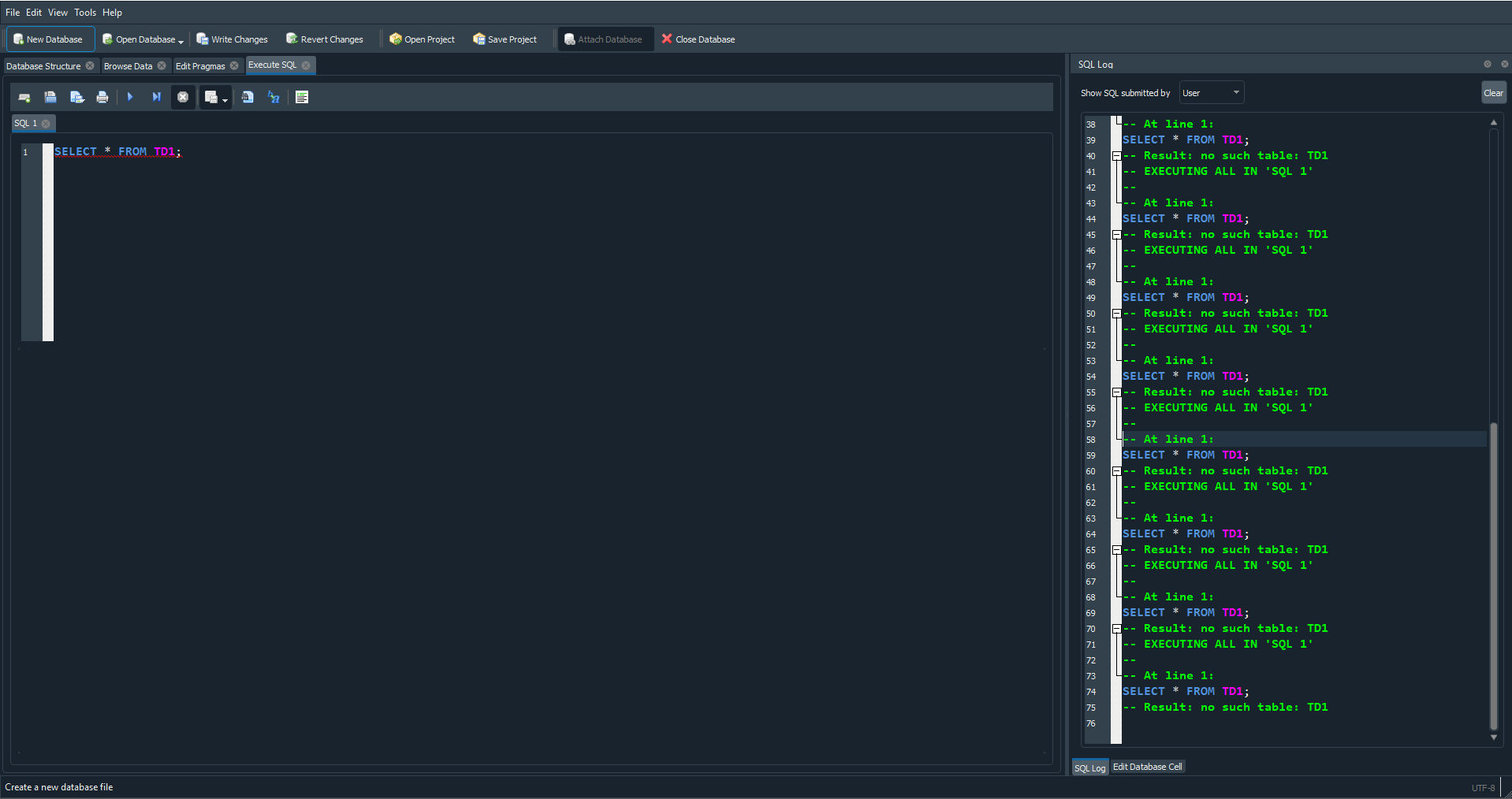
Annoying point I forgot to mention: I have to collapse the smaller Execute SQL log on every new session of DB4S. It should be remembered as a setting. 💡
Arrg, It is actually every new SQL tab applies all 3 sub windows. 😠
scottfurry commentedon May 10, 2019
One thing that seems to be missing from the log on the right is the result. I expected to see messages saying "[some number] rows affected" for insert queries or "Result: 36255 rows returned in 240ms
At line 1:" for select queries.
I can see your issue the logging (accumulating and overall) on an open database that is given in the right log window. However, the complete results(and/or errors) gets displayed in the tab (shown in the attached image as minimized). I find that result display quite useful, especially when debugging queries or table manipulations.
I don't have an easy answer to your issue. I can see a couple of things that could be done to clean up logging(which window and log window settings) but I can't advocate the radical overhaul being advocated.
sky5walk commentedon May 10, 2019
Yeah, my image was showing the scrolling and syntax highlighting and use of space. It was intended for you to duplicate and "see for yourself". If you had, you would notice the same information is present in both logs. 💡
There is nothing radical in reducing noise and redundancies especially in space constrained gui's.
Dropping the Execute SQL log would reduce DB4S code burden and allow the user to see more of their data with less scrolling!
scottfurry commentedon May 10, 2019
This is what I see executing DB4S. I actually prefer, overall, the layout. I collapsed the Cell Editor letting the DB log grow upwards. While I agree that there is some "noise" in the right SQL Log that could be reduced, I find this rather utilitarian. I see the results and logging of the last executed SQL Statement. This, to me is important. As a bonus, by closing the cell editor (selected in the View Menu), the remaining log window assumes full height to the right and this is "remembered" across open/close of DB4S(does this address #1889?).
Again, I'm not convinced. This seems like a discussion about what is the "best" work flow. Short answer is... it depends on the user.
sky5walk commentedon May 10, 2019
No, you did not select 'USER' for the right side SQL log. You have APPLICATION selected, which is not the focus of this discussion.
scottfurry commentedon May 10, 2019
Okay. There's several cumulative logging views available.
sky5walk commentedon Jul 3, 2022
Ok to close with current collapsing SQL log windows.