Repository navigation
a checkbox option in "Import CSV file" menu to Import unique entries only #1585
Description

Hi, i import many new csv files into my database every few days, and after importing entries i have to remove repeated rows (using DISTINCT or GROUP BY on multiple columns).
Fortunately "Import CSV file" menu can repeat the import process for all new csv files, i hope if it could import non-repeated rows based on multiple columns.
refer to the picture which illustrate my goal: left side shows the current menu and the right side represents what i wish.

Activity
[-]a chech mark in "Import CSV file" menu to Import uniqe enteries only[/-][+]a checkbox option in "Import CSV file" menu to Import unique entries only[/+]chrisjlocke commentedon Oct 21, 2018
Can't you create an index on a column that you don't want duplicated with a UNIQUE constraint?
antonybits commentedon Oct 23, 2018
there is not a column that i don't want duplicated , its a row i don't want to, just like DISTINCT or GROUP BY on multiple columns
the combination of lac,cell.lat,lon should be uniqe but each "lat" can be duplicated (same for lac,cell.lat,lon)
each cell may be repeated but the combination should not, in other word this is unique
lac||cell||lat||lonnot each one of them(keeping in mind that importing a csv table with N columns (e.g, N=5) into a database's table with M columns (e.g, M=6) is not permitted and returns error)
chrisjlocke commentedon Oct 23, 2018
You can create an index on multiple columns.
Not entirely true. Import into a new table, then do an 'insert ... select ....'* query. Bit messy, and long winded, but seems to work.
antonybits commentedon Oct 23, 2018
yes that's right but your answer is more about executing SQLs, than creating easy access through GUI into database, so isn't That off the scope of the enhancement feature requests ?
antonybits commentedon Oct 23, 2018
inserting pre-imported entries into a UNIQUE indexed table on multiple columns definitely returns this error "UNIQUE constraint failed: ### " which forced the GUI to create the attached error massage and made it unresponsive
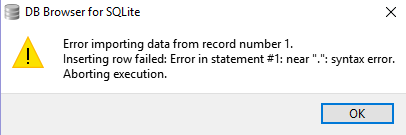
please download the zip file and try to import the test2.csv into test2 table!
that error!!! test.zip
chrisjlocke commentedon Oct 23, 2018
This does actually raise an interesting error (and not the one you have screenshotted).
We're currently looking at this part of the program, so have raised this as a separate issue.
antonybits commentedon Oct 24, 2018
this procedure create different errors (I don't know why) for different databases , testing the same procedure in my laptop resulted into the error mentioned in #1590
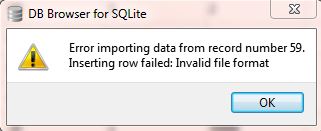
chrisjlocke commentedon Oct 24, 2018
Hopefully (in the latest nightly build) that particular error has been squished. Your previous issue may remain however - will test later today...
antonybits commentedon Oct 24, 2018
just tested the latest nightly build! #1591
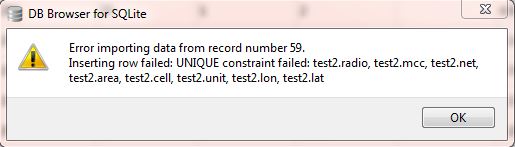
Now I get this error which is probably a rational massage, at least
chrisjlocke commentedon Oct 24, 2018
Yes, have just tested, and the right error is now displayed. However, the import still terminates when an error occurs, which isn't ideal (but expected). It would be nice if DB4S could continue, but that would depend on the error occurred, and would also throw up a lot of dialog boxes.
In the short term, as you're on Windows, I could build a .Net application which could look in a table and move across records which are unique. So import into a new table, then my program would look in this new table. Yell if that could help.
antonybits commentedon Oct 24, 2018
Shouldn't we just create a
ON CONFLICT REPLACEorON CONFLICT IGNOREoption some where ?! (not sure)refer to: https://sqlite.org/lang_conflict.html
SQLITE let the users for having unique constraint on multiple columns both in table and index
is it possible to create unique constraint on multiple columns in a "table" in DB browser (not in the index)
if possible, where
ON CONFLICTshould be for us in the index or in the table?refer to : https://stackoverflow.com/questions/2701877/sqlite-table-constraint-unique-on-multiple-columns
Allow specifying an ON CONFLICT strategy in the Import CSV dialog
MKleusberg commentedon Oct 24, 2018
@antonybits That's a really good idea! 👍 I have just added a new option for that. It is hidden behind the 'Advanced' button in the Import CSV dialog and is called 'Conflict strategy'. That's of course still not equivalent to a simple 'Unique entries only' checkbox as you suggested but should make it easy enough to simulate that behaviour by adding a unique constraint for all columns as you mentioned. So in the next nightly build you should be able to:
Do you want to give that a try tomorrow or so? 😄
antonybits commentedon Oct 24, 2018
Thanks, Sure, I will when the next nightly build is out,
keep in mind that
UNIQUE(a,b,c)could be added in that dialog either.antonybits commentedon Nov 3, 2018
hi, sorry for the delay, It took a while to finish my tests, the results were completely fine,


i had to rebuild my database from scratches. (that's because i just could not add the highlighted line to the older table)
the "ON CONFLICT strategy" was great, i can say there is no need for the users to have #1585 "a checkbox option in "Import CSV file" menu to Import unique entries only" but i hope we had a "partial clause" illustrated in the example artificial pic below so we could set the unique constraint on multiple columns as highlighted in the previous picure. ( or any other way to make that possible for the users other than executing SQLs)
chrisjlocke commentedon Nov 6, 2018
Thanks @antonybits . Will close this issue as its semi resolved, but if you have any further issues, feel free to comment further or re-open it.