Repository navigation
"select" request, the returned values are not displayed #1384

Description

Details for the issue
What did you do?
- Create dataBase.
- Copy SQL-script and perform it testSqlScript.txt
- Make a "select" request testSelectRequest.txt
What did you expect to see?
Values of requested fields
What did you see instead?
Nothing.
But if I
- save dataBase
- restart application and open database
- make "select" request
all right, values of requested fields are displayed
Useful extra information
The info below often helps, please fill it out if you're able to. :)
What operating system are you using?
- Windows: ( version: 10 )
What is your DB4S version?
- 3.10.1
Did you also
- Try out the latest nightly version: https://github.com/sqlitebrowser/sqlitebrowser#nightly-builds
- Search for an existing similar issue: https://github.com/sqlitebrowser/sqlitebrowser/issues?utf8=%E2%9C%93&q=is%3Aissue%20
Activity
karim commentedon May 10, 2018
Sorry if I do not fully understand the problem. Are you saying that SELECT query in
testSelectRequest.txtfile returns nothing if the database is not saved?I just tested it now using the same version (3.10.1) but on Win 7 and it seems to be working.
Can you show us a screenshot to help us understand the problem?
valbv commentedon May 10, 2018
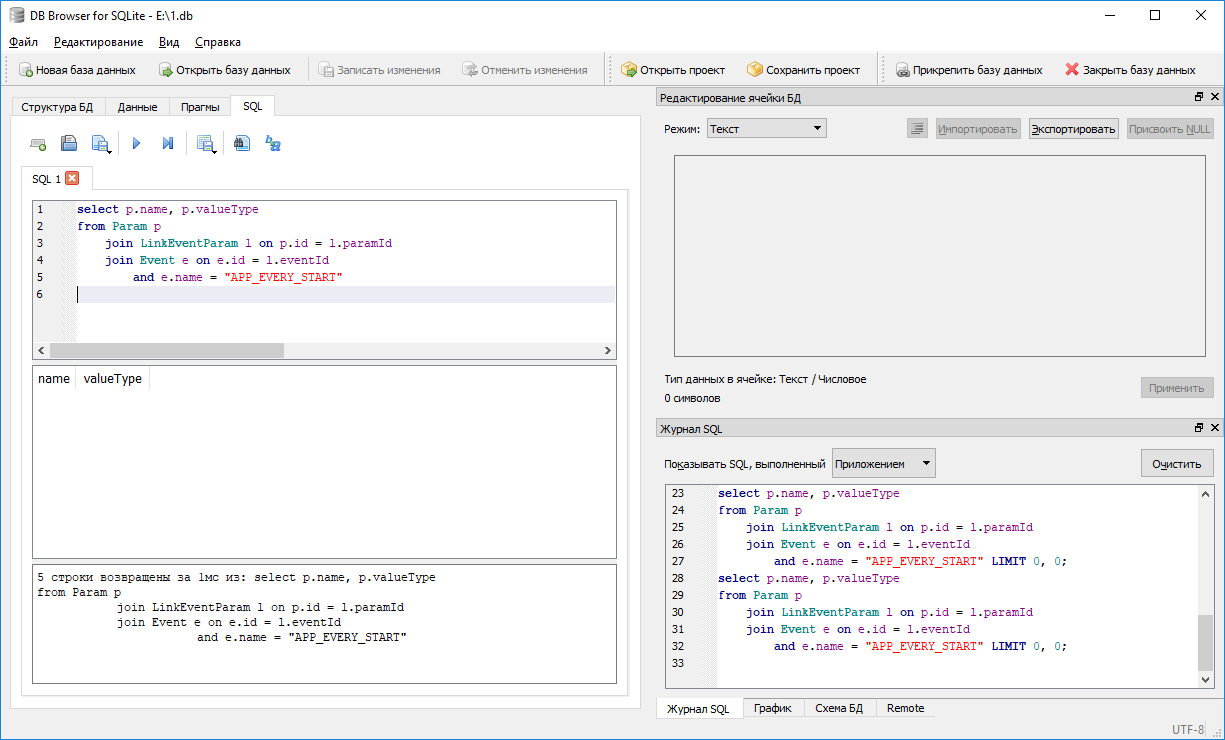
Sorry if i wrote my thoughts incorrect
Steps:
Result:
karim commentedon May 10, 2018
I see now the problem, thank you. 😃
Yes, I got the same result as you posted in your screenshot. It happens when you reuse the same SQL tab. If you paste the query from
testSqlScript.txtin the first tab (SQL 1) then reused the same tab to run the SELECT query intestSelectRequest.txtthen you get the same result.I don't know how this happened. I'm going to label this as a bug and hopefully someone can provide an answer.
chrisjlocke commentedon May 10, 2018
That is odd - even if you use 'old' tabs, it works fine - but reuse that one tab, and yes, no results, even though it says it found 5 records. Even if you change the SQL, it still doesn't create the rows....
mgrojo commentedon May 10, 2018
This is what I have discovered so far. The problem is exclusively on this pragma:
Execute it on any tab to break it.
This is the responsible code. Removing it eliminates this problem:
I' ll try to follow, unless someone has it already clear.
mgrojo commentedon Jun 10, 2018
@valbv I'm no longer able to reproduce this problem using the current code. This might have been a concurrency problem that it is now fixed by the changes done for PR #1394.
Please try with a nightly build and confirm that it is also solved for you, so we can close this issue.
https://nightlies.sqlitebrowser.org/latest/
justinclift commentedon Jun 11, 2018
Yeah, it's definitely possible. We've changed a lot of stuff, and done many bug fixes since the last major release.
valbv commentedon Jun 12, 2018
Yes, thanks!
justinclift commentedon Jun 12, 2018
@valbv That's a little bit unclear (to me). Are you meaning the problem is fixed in our nightly builds, so we should close this issue? 😄
valbv commentedon Jun 26, 2018
Problem fixed in nightly builds ;)
justinclift commentedon Jun 26, 2018
Awesome, thanks for confirming @valbv. 😄