Repository navigation
An option to switch into a Dark theme would be very useful #1324

Description

Details for the issue
In my experience most of the developers are night owls and keep looking at screens for about 16 hours a day. In my case i have a 2nd monitor where i have sqlitebrowser open pretty much all the time. Since i have to look at the light colored window all the the time it makes my eyes hurt in a little while. I use this tool a lot. So it would be amazing if it's possible to switch to a Dark theme.
Useful extra information
I'm opening this issue because:
- DB4S is crashing
- DB4S has a bug
- DB4S needs a feature
- DB4S has another problem
I'm using DB4S on:
- Windows: ( version: ___ )
- Linux: ( distro: ___ )
- Mac OS: ( version: ___ )
- Other: ___
I'm using DB4S version:
- 3.10.1
- 3.10.0
- 3.9.1
- Other: ___
I have also:
- Tried out the latest nightly version: https://github.com/sqlitebrowser/sqlitebrowser#nightly-builds
- Searched for an existing similar issue: https://github.com/sqlitebrowser/sqlitebrowser/issues?utf8=%E2%9C%93&q=is%3Aissue%20
Reacted by ccrvlh
Activity
justinclift commentedon Feb 21, 2018
As a thought, it seems like windows can set any application to a dark theme:
http://troubleshooter.xyz/wiki/enable-dark-theme-for-every-application-in-windows-10/
The "Enable a Dark Theme for Windows Desktop Applications" section on that page shows how. I just did similar for a Windows 7 desktop here to try it, and it seems to work. 😄
m4heshd commentedon Feb 21, 2018
Hi Justin. The problem is only method that works with DB4S is if you change the default Windows colors which ruins the experience of windows. I'm already using windows Dark mode and tried all of these before. I've even tried better ones like this.
DB4S looks like this when i use the above theme which is OK but not perfect. Lots of missing texts and random white backgrounds.
Also this messes up all other applications. It'll be really good if there's a native option for the theme in the app.
justinclift commentedon Feb 22, 2018
No worries, that definitely makes sense. To me anyway. 😄
m4heshd commentedon Feb 24, 2018
Thank you for understanding.
Support for dark themes in default settings and restore defaults button
mgrojo commentedon Feb 25, 2018
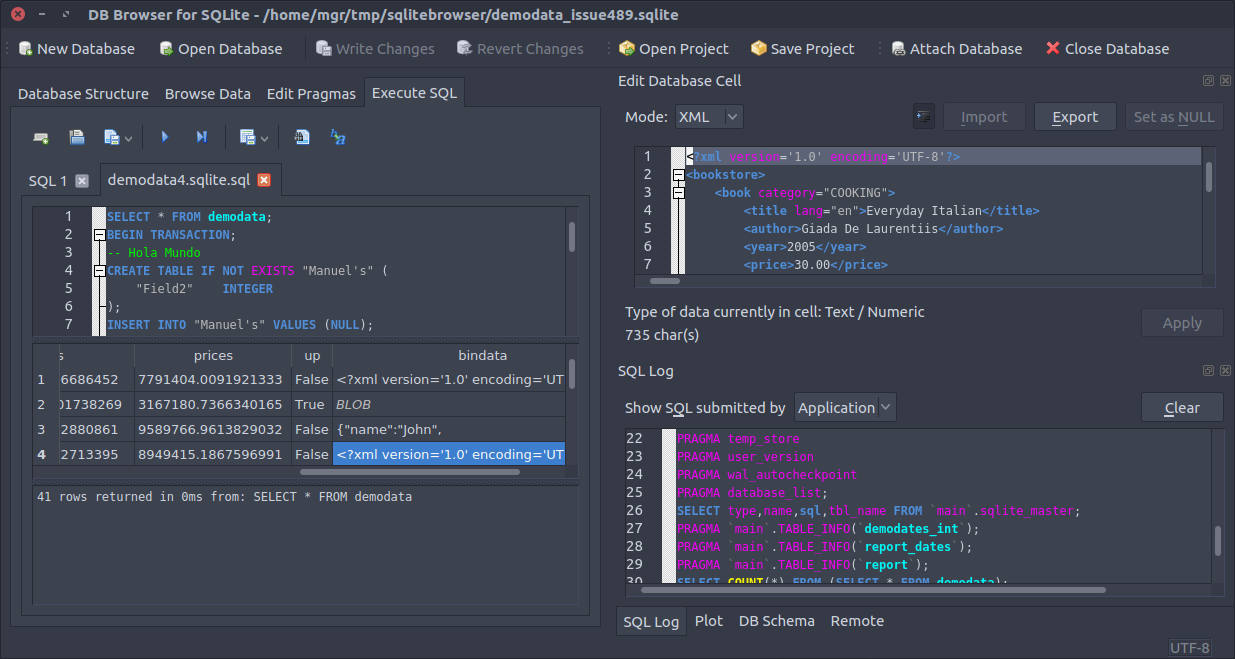
@m4heshd I've implemented a series of changes for a better support of operating system dark themes. If there aren't any saved settings the default colours adjust automatically to the light or dark system theme.
Would you have some time to test it in our next nightly build? https://nightlies.sqlitebrowser.org/latest/
Be sure to restore the default preferences using the new button for that purpose before taking into
account the changes or after having changed the system theme.
Your test would be specially needed since I use Ubuntu Linux and this might be very system dependent. This is an example using the Arc-dark theme in Ubuntu:
justinclift commentedon Feb 25, 2018
Oooooooo Aaaaaaaaaa.... just tried it out with KDE (4.x) on my CentOS 7 desktop:
This looks pretty good @mgrojo. 😁
Haven't actually played around with KDE themes before... might stick with this dark one for a while, as I was getting kind of sick of the previous KDE look. 😉
@m4heshd The button mentioned by @mgrojo is the new "Restore Defaults" button in the Preferences dialog. It's in the bottom left, on the same level as the Save and Cancel buttons. 😄
m4heshd commentedon Feb 25, 2018
Thank you for the update. Tested it out and gotta say it looks really good. The Table component still has a white bg and i understand why that's happening. Overall it looks like this.
justinclift commentedon Feb 25, 2018
@m4heshd Just to check, did you compile it yourself or did you download from our nightly builds server?
If it's the download from the nightly build server, then that only gets updated once per day (~5am UTC), so it won't have @mgrojo's changes in it yet. 😉
m4heshd commentedon Feb 25, 2018
Oops.. My bad. 😁
justinclift commentedon Feb 25, 2018
Hmmm, once the nightly builds are ready + known to work on Windows, it's probably worth mentioning this Dark Theme support on Twitter. I'll get that done tomorrow sometime. 😄
5 remaining items
m4heshd commentedon Feb 26, 2018
Everything seems to be looking good. Colored texts are bright and all the backgrounds are dark. Thanks. ☺
justinclift commentedon Feb 26, 2018
Awesome. I'll make a Twitter post about it now. Is it ok to use your screenshot in the Twitter post? (me being lazy here)
justinclift commentedon Feb 26, 2018
Meh, I used all three of our screenshots. So, Ubuntu, CentOS, and Windows. 😄
https://twitter.com/sqlitebrowser/status/967968416236785665
m4heshd commentedon Feb 26, 2018
Everything's perfect. I wish i could get into Qt right now. I'm a huge GUI nerd even though i'm not any kind of a UI specialist. But i got my hands full with trying to migrate all of my Java Swing GUI apps to ElectronJS. Definitely going to get my hands on with Qt when this framework war is done. 😥
PS: Big thanks to @mgrojo 🙏
mgrojo commentedon Feb 28, 2018
You're welcome @m4heshd. Now I'm using a dark theme for my desktop too 😄
justinclift commentedon Jun 23, 2018
Errr... it worked on Win7 when I tested it. Kind of thinking it should work on Win 8.1 too.
You do need to click the "Restore Defaults" button (bottom left) in the Preferences dialog though, to get it to use the new theme.
m4heshd commentedon Jun 23, 2018
Worked for me on Win 10. Remember it needs a system-wide theme for this to work. Not sure if the functionality will remain after Redstone 5.
Improve the size policy (and more and better icons)
Improve the size policy (toolbars and improved icons) (#1684)
Atralb commentedon Nov 25, 2020
So, this feature can only adapt to a system theme ? There isn't any choice inside SQLiteBrowser to set which theme you want to use on the fly ?
mgrojo commentedon Nov 25, 2020
Both modes are present: "Follow the desktop mode" and "Dark style". Look at Preferences > General > Application Style.