



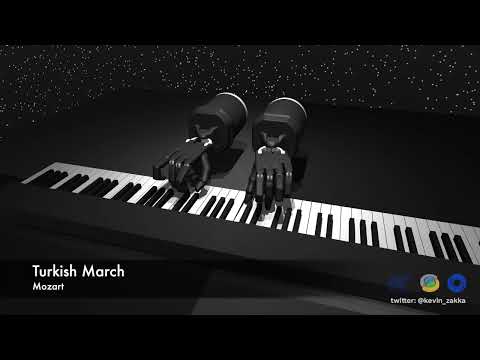
RoboPianist is a new benchmarking suite for high-dimensional control, targeted at testing high spatial and temporal precision, coordination, and planning, all with an underactuated system frequently making-and-breaking contacts. The proposed challenge is mastering the piano through bi-manual dexterity, using a pair of simulated anthropomorphic robot hands.
This codebase contains software and tasks for the benchmark, and is powered by MuJoCo.
- Latest Updates
- Getting Started
- Installation
- MIDI Dataset
- CLI
- Contributing
- FAQ
- Citing RoboPianist
- Acknowledgements
- Works that have used RoboPianist
- License and Disclaimer
- [24/12/2023] Updated install script so that it checks out the correct Menagerie commit. Please re-run
bash scripts/install_deps.shto update your installation. - [17/08/2023] Added a pixel wrapper for augmenting the observation space with RGB images.
- [11/08/2023] Code to train the model-free RL policies is now public, see robopianist-rl.
We've created an introductory Colab notebook that demonstrates how to use RoboPianist. It includes code for loading and customizing a piano playing task, and a demonstration of a pretrained policy playing a short snippet of Twinkle Twinkle Little Star. Click the button below to get started!

RoboPianist is supported on both Linux and macOS and can be installed with Python >= 3.8. We recommend using Miniconda to manage your Python environment.
The recommended way to install this package is from source. Start by cloning the repository:
git clone https://github.com/google-research/robopianist.git && cd robopianistNext, install the prerequisite dependencies:
git submodule init && git submodule update
bash scripts/install_deps.sh
Finally, create a new conda environment and install RoboPianist in editable mode:
conda create -n pianist python=3.10
conda activate pianist

pip install -e ".[dev]"
To test your installation, run make test and verify that all tests pass.
First, install the prerequisite dependencies:
bash <(curl -s https://raw.githubusercontent.com/google-research/robopianist/main/scripts/install_deps.sh) --no-soundfontsNext, create a new conda environment and install RoboPianist:
conda create -n pianist python=3.10
conda activate pianist

pip install --upgrade robopianistWe recommend installing additional soundfonts to improve the quality of the synthesized audio. You can easily do this using the RoboPianist CLI:
robopianist soundfont --downloadFor more soundfont-related commands, see docs/soundfonts.md.
The PIG dataset cannot be redistributed on GitHub due to licensing restrictions. See docs/dataset for instructions on where to download it and how to preprocess it.
RoboPianist comes with a command line interface (CLI) that can be used to download additional soundfonts, play MIDI files, preprocess the PIG dataset, and more. For more information, see docs/cli.md.
We welcome contributions to RoboPianist. Please see docs/contributing.md for more information.
See docs/faq.md for a list of frequently asked questions.
If you use RoboPianist in your work, please use the following citation:
@inproceedings{robopianist2023,
  author = {Zakka, Kevin and Wu, Philipp and Smith, Laura and Gileadi, Nimrod and Howell, Taylor and Peng, Xue Bin and Singh, Sumeet and Tassa, Yuval and Florence, Pete and Zeng, Andy and Abbeel, Pieter},
  title = {RoboPianist: Dexterous Piano Playing with Deep Reinforcement Learning},
  booktitle = {Conference on Robot Learning (CoRL)},
  year = {2023},
}We would like to thank the following people for making this project possible:
- Philipp Wu and Mohit Shridhar for being a constant source of inspiration and support.
- Ilya Kostrikov for constantly raising the bar for RL engineering and for invaluable debugging help.
- The Magenta team for helpful pointers and feedback.
- The MuJoCo team for the development of the MuJoCo physics engine and their support throughout the project.
MuJoco Menagerie's license can be found here. Soundfont licensing information can be found here. MIDI licensing information can be found here. All other code is licensed under an Apache-2.0 License.
This is not an officially supported Google product.
Algorithm and Framework
RL Algorithm: DroQ — Dropout Q-functions for doubly efficient reinforcement learning → a regularized variant of Soft Actor-Critic (SAC)
Implementation framework: JAX (from Google)
ROBOPIANIST Physics simulation: MuJoCo (versions cited from Todorov et al. 2012 and dm_control 2020) Environment source: MuJoCo Menagerie (for Shadow Dexterous Hand models) Observation frequency: 20 Hz control, 500 Hz physics update Observation space: proprioception + future goal states (lookahead horizon 𝐿 L) Action space: 45D (joint angles + sustain pedal) Reward terms:
Key press accuracy Finger proximity to target keys Energy minimization penalty
⚙️ Training Infrastructure Hardware: Google Cloud n1-highmem-64 Intel Xeon E5-2696 v3 CPU (32 cores @ 2.3 GHz) 416 GB RAM 4 × Tesla K80 GPUs Parallelization: up to 8 simultaneous runs Typical run time: ≈ 5 hours per song (5 million steps per run) Optimizer: Adam (lr = 3 × 10⁻⁴, β₁ = 0.9, β₂ = 0.999)
Network:
Actor & Critic = 3-layer MLPs (256 neurons, ReLU, dropout 0.01, layer norm)
Xavier weight initialization
Diagonal Gaussian actor (tanh-squashed)
🎹 Environment Details
Robot Hands: Two anthropomorphic Shadow Dexterous Hands, 44 DOF total
Instrument: Full 88-key digital piano modeled with linear-spring keys
Dataset: ROBOPIANIST-REPERTOIRE-150, based on annotated MIDI + fingering data from the PIG dataset
Evaluation metric: F1 score (precision × recall of correct key activations)
🧩 Baselines Used
Model-based baseline: MPC (Predictive Sampling) implemented in C++/MJPC
Evaluated on a MacBook Pro M1 Max (64 GB RAM)
0.2 s planning horizon, 0.01 s step, 0.005 s physics step
✅ In summary: ROBOPIANIST was trained in MuJoCo using JAX-based DroQ (a SAC variant) on a Google Cloud high-memory 64-core CPU + 4 K80 GPU machine. Simulation and environment were built from MuJoCo Menagerie’s Shadow Hand and a custom full-piano model, with training guided by human fingering priors and MIDI-based reward shaping.