In this example, we will use SciJava Ops to construct a 3D mesh from a binary dataset, passing the result into 3D Viewer for visualization. We use the bat cochlea volume dataset (more information here) from the ImageJ sample images. The dataset can either be downloaded here, or opened directly in Fiji via File → Open Samples → Bat Cochlea Volume
Download
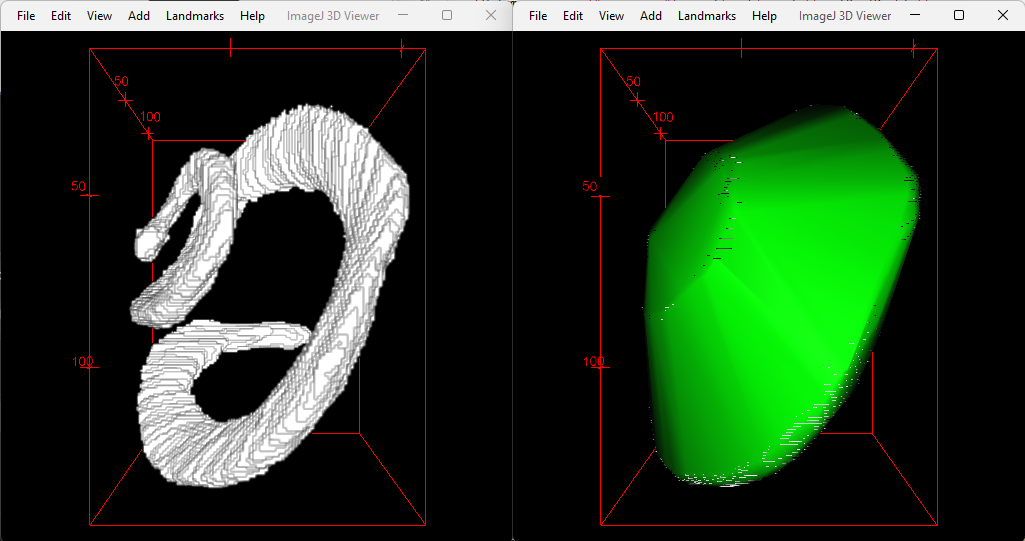
Left: The original binary bat cochlea volume, displayed as an Image. Right: The convex hull generated by SciJava Ops, overlaid on the original binary bat cochlea volume.
The following script accepts the binary dataset as its sole input, and creates the mesh using the marching cubes algorithm, which is included within SciJava Ops Image. We then use SciJava Ops to compute mesh volume, and then convert the mesh into a CustomTriangleMesh that can be passed to the 3D Viewer.
.. tabs::

    .. code-tab:: scijava-groovy

        #@ OpEnvironment ops
        #@ UIService ui
        #@ Dataset image
        #@ ImagePlus imp
        #@ StatusService status

        import java.util.ArrayList
        import java.util.List

        import net.imglib2.RandomAccessibleInterval
        import net.imglib2.mesh.Mesh
        import net.imglib2.mesh.Triangle
        import net.imglib2.type.BooleanType
        import net.imglib2.util.Util

        import org.scijava.vecmath.Color3f
        import org.scijava.vecmath.Point3f

        import customnode.CustomTriangleMesh
        import ij3d.Image3DUniverse

        if (image.getType() instanceof BooleanType) {
            // Input image is a binary image.
            mask = image
        }
        else {
            // Binarize the image using Otsu's threshold.
            status.showStatus("Thresholding...")
            bitType = ops.op("create.bit").producer().create()
            mask = ops.op("create.img").input(image, bitType).apply()
            ops.op("threshold.otsu").input(image).output(mask).compute()
        }
        println("Mask = $mask [type=${Util.getTypeFromInterval(mask).getClass().getName()}]")

        // Compute surface mesh using marching cubes.
        status.showStatus("Computing surface...")
        mesh = ops.op("geom.marchingCubes").input(mask).apply()
        println("mesh = ${mesh} [${mesh.triangles().size()} triangles, ${mesh.vertices().size()} vertices]")

        meshVolume = ops.op("geom.size").input(mesh).apply()
        println("mesh volume = " + meshVolume)

        hull = ops.op("geom.convexHull").input(mesh).apply()
        println("hull = ${hull} [${hull.triangles().size()} triangles, ${hull.vertices().size()} vertices]")

        hullVolume = ops.op("geom.size").input(hull).apply()
        println("hull volume = $hullVolume")

        // Convert ImgLib2 meshes to 3D Viewer meshes.
        def opsMeshToCustomMesh(opsMesh, color) {
            points = []
            for (t in opsMesh.triangles()) {
                points.add(new Point3f(t.v0xf(), t.v0yf(), t.v0zf()))
                points.add(new Point3f(t.v1xf(), t.v1yf(), t.v1zf()))
                points.add(new Point3f(t.v2xf(), t.v2yf(), t.v2zf()))
            }
            ctm = new CustomTriangleMesh(points)
            ctm.setColor(color)
            return ctm
        }
        mesh3dv = opsMeshToCustomMesh(mesh, new Color3f(1, 0, 1))
        hull3dv = opsMeshToCustomMesh(hull, new Color3f(0, 1, 0))
        println("Hull volume according to 3D Viewer: ${hull3dv.getVolume()}");

        // Display original image and meshes in 3D Viewer.
        univ = new Image3DUniverse()
        univ.addVoltex(imp, 1)
        univ.addCustomMesh(mesh3dv, "Surface Mesh")
        univ.addCustomMesh(hull3dv, "Convex Hull")
        univ.show()

        // Extra credit: work around 3D Viewer's lack of object inspection panel
        // with a mini-GUI that makes it easy to toggle each displayed object.
        import javax.swing.*
        togglePanel = new JPanel()
        togglePanel.setLayout(new BoxLayout(togglePanel, BoxLayout.Y_AXIS))
        def checkbox(name) {
          jcb = new JCheckBox(name)
          jcb.setSelected(univ.getContent(name).isVisible())
          jcb.addActionListener { e -> univ.getContent(name).setVisible(e.getSource().isSelected()) }
          return jcb
        }
        togglePanel.add(checkbox(imp.getTitle()))
        togglePanel.add(checkbox("Surface Mesh"))
        togglePanel.add(checkbox("Convex Hull"))
        toggleFrame = new JFrame("Toggle Mesh Visibility")
        toggleFrame.setDefaultCloseOperation(WindowConstants.DISPOSE_ON_CLOSE)
        toggleFrame.setContentPane(togglePanel)
        toggleFrame.setSize(600, 300)
        toggleFrame.setVisible(true)