In this example we will use a denoise algorithm from the external OpenCV library.
This method progressively scans through an image's pixels, comparing a patch centered around a pixel of interest (e.g. a 5x5 patch) with patches from other pixels from the image. These patches are then averaged to eliminate gaussian noise, without the requirement of additional images for comparison.
The sample data for this example can be downloaded here:
Download
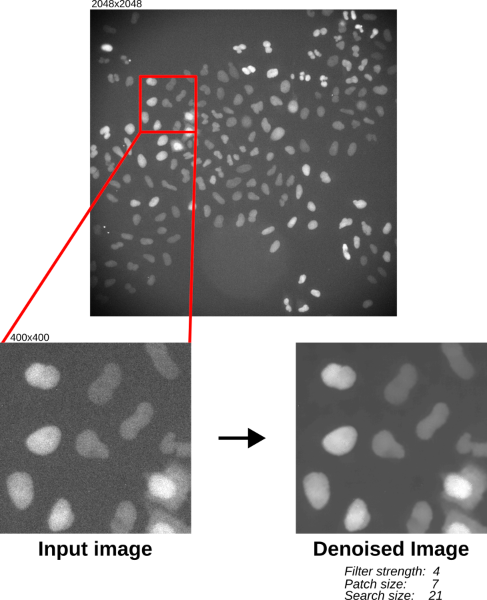
Results of OpenCV's non-local means denoise algorithm with the sample data.
| Parameter | Description | Value |
|---|---|---|
| Filter strength | Controls the decay in patch weights as a function of distance between patches. The distance between patches is a measure of how similar they are. Large filter strength values allow more distant (i.e. dissimilar) patches to have more influence on the denoise output. |
4 |
| Patch size | The size of the patches/blocks from the input image to be compared. Patch sizes should be odd (default=7). |
7 |
| Search size | The size of the area in the input image to search for similar patches to compare. Search sizes should be odd (default=21). |
21 |
SciJava Ops via Fiji's scripting engine with script parameters:
.. tabs::

    .. code-tab:: scijava-groovy

        #@ OpEnvironment ops
        #@ ImgPlus img
        #@ Integer (label="Filter strength:", value=4) strength
        #@ Integer (label="Patch size:", value=7) patch
        #@ Integer (label="Search size:", value=21) search
        #@output ImgPlus result

        import net.imglib2.type.numeric.integer.UnsignedByteType

        // Get the min and max values of our input image
        oldMin = ops.op("stats.min").input(img).apply()
        oldMax = ops.op("stats.max").input(img).apply()

        // We need to convert to 8-bit since not all data types are currently supported in OpenCV
        type = new UnsignedByteType()
        img8bit = ops.op("create.img").input(img, type).apply()

        // Normalize our input data to the 8-bit min/max
        newMin = new UnsignedByteType((int)type.getMinValue())
        newMax = new UnsignedByteType((int)type.getMaxValue())

        ops.op("image.normalize").input(img, oldMin, oldMax, newMin, newMax).output(img8bit).compute()

        // Create a container for the denoise output
        output = img8bit.copy()

        // Run the denoise op
        ops.op("filter.denoise").input(img8bit, strength, patch, search).output(output).compute()

        // Return the denoised image
        result = output

    .. code-tab:: python

        #@ OpEnvironment ops
        #@ ImgPlus img
        #@ Integer (label="Filter strength:", value=4) strength
        #@ Integer (label="Patch size:", value=7) patch
        #@ Integer (label="Search size:", value=21) search
        #@output ImgPlus result

        from net.imglib2.type.numeric.integer import UnsignedByteType

        # Get the min and max values of our input image
        old_min = ops.op("stats.min").input(img).apply()
        old_max = ops.op("stats.max").input(img).apply()

        # We need to convert to 8-bit since not all data types are currently supported in OpenCV
        type = UnsignedByteType()
        img8bit = ops.op("create.img").input(img, type).apply()

        # Normalize our input data to the 8-bit min/max
        new_min = UnsignedByteType(int(type.getMinValue()))
        new_max = UnsignedByteType(int(type.getMaxValue()))

        ops.op("image.normalize").input(img, old_min, old_max, new_min, new_max).output(img8bit).compute()

        # Create a container for the denoise output
        output = img8bit.copy()

        # Run the denoise op
        ops.op("filter.denoise").input(img8bit, strength, patch, search).output(output).compute()

        # Return the denoised image
        result = output