This page is designed to be the first resource for those wishing to extend SciJava Ops with additional algorithms. To those who are reading it, we hope you contribute your own algorithms!
You'll find this page organized into two broad sections. The first section describes some best practices that we believe Op authors should think about when writing their Ops. The second section describes concrete steps Op authors can take to actually write discoverable Ops.
SciJava Ops is designed for modularity, extensibility, and granularity - you can exploit these aspects by adhering to the following guidelines when writing Ops:
Determinism is a valuable aspect of scientific computing, as our goal is to facilitate reproducible science. As many powerful algorithms behave non-deterministically, due to factors such as internal state or parallel processing, SciJava Ops does not require Ops be deterministic. However, if your Op can be deterministic, we highly recommend you make it so. Consider the following algorithm:
/**
 * A simple noise adder
 * @param input the input data
 * @implNote op name="filter.addNoise" type=Inplace
 */
public static void addNoise(double[] data) {
    Random r = new Random();
    for(int i = 0; i < data.length; i++) {
        // Add a number in [-0.5, 0.5)
        data[i] += (r.nextDouble() - 0.5);
    }
}
We can make it deterministic by adding an @Nullable seed parameter, with a default value if the user does not pass one:
/**
 * A simple noise adder
 * @param input the input data
 * @param seed the seed to the {@link java.util.Random}
 * @implNote op name="filter.addNoise" type=Inplace
 */
public static void addNoise(double[] data, @Nullable Long seed) {
    // use default seed if not provided
    if (seed == null) {
        seed = 0xdeadbeef;
    }
    Random r = new Random(seed);
    for(int i = 0; i < data.length; i++) {
        // Add a number in [-0.5, 0.5)
        data[i] += (r.nextDouble() - 0.5);
    }
}
These small steps give workflows the best chance to return consistent results every time, even years later!
If you are writing an Op that performs many intermediate operations, there's a good chance someone else has written (and even optimized) some or all of them.
If not there's a great chance that others would benefit from you writing them separately so that they can reuse your work!
To accomodate this separation, Ops can reuse other Ops by declaring Op dependencies. When Ops returns an instance of your Op, it will also find and instantiate all of your dependencies!
To illustrate how this might work, here's a trivial example of an Op that computes the mean of a double[]:
import org.scijava.ops.spi.OpDependency;

/**
 * A simple mean calculator
 *
 * @implNote op names="stats.mean"
 */
class DoubleMeanOp implements Function<double[], Double> {

    @OpDependency(name="stats.sum")
    public Function<double[], Double> sumOp;

    @OpDependency(name="stats.size")
    public Function<double[], Double> sizeOp;

    public Double apply(final double[] inArray) {
        final Double sum = sumOp.apply(inArray);
        final Double size = sizeOp.apply(inArray);
        return sum / size;
    }
}
In this example, the two OpDependency Ops already exist within the SciJava Ops Engine module - but if they didn't, you'd define them just like any other Op:
/**
 * A simple summer
 *
 * @implNote op names="stats.sum"
 */
class DoubleSumOp implements Function<double[], Double> {
	public Double apply(final double[] inArray) {
		double sum = 0;
		for (var v : inArray) {
			sum += v;
		}
		return i;
	}
}

/**
 * A simple size calculator
 *
 * @implNote op names="stats.size"
 */
class DoubleSizeOp implements Function<double[], Double> {
	public Double apply(final double[] inArray) {
		return inArray.length;
	}
}The scijava-progress module provides a mechanism for long-running tasks to describe their progress through textual or graphical means. For example, scijava-progress enables Fiji users to observe the progress of every Op invoked within the application, as shown below.
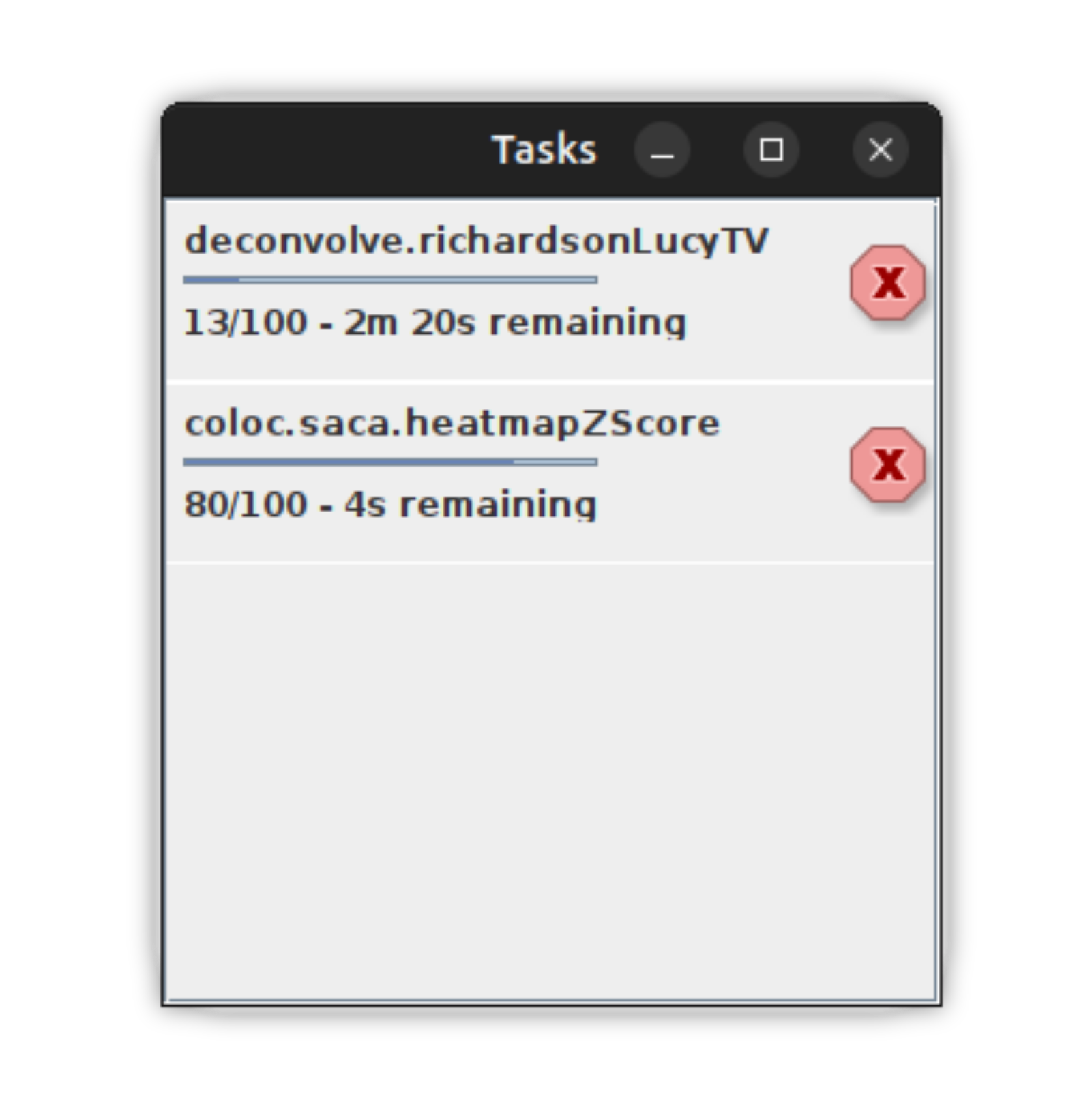
While all Ops emit "binary" progress (denoting each Op's beginning and end), your Op can provide richer updates by adding the scijava-progress module, providing user value for long-running Ops. To add progress to your Op, you must add the following steps to your Op:
- Before any significant computation, add the line
Progress.defineTotal(long elements)whereelementsis the number of "discrete packets" of computation. - At convenient spots within your Op, call
Progress.update()to denote that one packet of computation has finished.- Alternatively, it may be more convenient or performant to call
Progress.update(long numElements)to denotenumElementspackets have completed at once.
- Alternatively, it may be more convenient or performant to call
import java.util.function.Function;
import org.scijava.progress.Progress;

/**
 * A simple summer
 *
 * @implNote op names="stats.sum"
 */
class DoubleSumOp implements Function<double[], Double> {
    public Double apply(final double[] inArray) {
        // define total progress size
        Progress.defineTotal(inArray.length);
        double sum = 0;
        for (var v : inArray) {
            sum += v;
            // increment progress
            Progress.update();
        }
        return i;
    }
}
If your want to include the progress of Op dependencies within your Op's total progress, you can make the following changes.
- For each Op dependency that you want to track, pass the Hint
"progress.TRACK"within the@OpDependencyannotation. Note that it is not necessary for each Op to explicitly define its progress, but if it does so your Op will provide richer progress updates! - Replace
Progress.defineTotal(long elements)withProgress.defineTotal(long elements, long subTasks), wheresubTasksis the total number of times you will invoke Op dependencies annotated with"progress.TRACK".
import java.util.function.Function;
import org.scijava.progress.Progress;
import org.scijava.ops.spi.OpDependency;

/**
 * A simple mean calculator
 *
 * @implNote op names="stats.mean"
 */
class DoubleMeanOp implements Function<double[], Double> {

    // This Op will contribute to progress
    @OpDependency(name="stats.sum", hints={"progress.TRACK"})
    public Function<double[], Double> sumOp;

    // This Op will also contribute to progress
    @OpDependency(name="stats.size", hints={"progress.TRACK"})
    public Function<double[], Double> sizeOp;

    public Double apply(final double[] inArray) {
        // There's no significant work here, but we do have 2 subtasks.
        Progress.defineTotal(0, 2);
        final var sum = sumOp.apply(inArray);
        final Double size = sizeOp.apply(inArray);
        return sum / size;
For best results, ensure your Op records Progress updates at a reasonable frequency. If too frequent, progress updates can detract from algorithm performance, and if too infrequent, they will be of little help to the user!
Simple pixel-wise operations like addition, inversion, and more can be written on a single pixel (i.e. RealType) - therefore, SciJava Ops Image takes care to automagically adapt pixel-wise Ops across a wide variety of image types. If you would like to write a pixel-wise Op, we recommend the following structure.
/**
 * A simple pixelwise Op
 *
 * @implNote op names="pixel.op"
 */
class MyPixelwiseOp<T extends RealType<T>> implements Computers.Arity2<T, T, T> {

	@Override
    public void compute(final T in1, final T in2, final T out) {
        --- pixelwise computation here ---
    }
}
The following Op call will match your pixel-wise Op using SciJava Ops's lifting mechanisms:
ArrayImg<UnsignedByteType> in1 = ...
ArrayImg<UnsignedByteType> in2 = ...
ArrayImg<UnsignedByteType> out = ...

ops.op("pixel.op").input(in1, in2).output(out).compute();
A similar vein of thought works for simple Lists and Arrays - if you have an Op that produces a Double from another Double, there's no need to write a wrapper to work on Double[]s - Ops will do that for you!
/**
 * An element-wise Op
 *
 * @implNote op names="element.op"
 */
class MyElementOp implements Function<Double, Double> {
    @Override
    public Double apply(final Double input) {
        --- pixelwise computation here ---
    }
}
If you then have SciJava Ops, the following Op call will match on your arrays, Lists, Sets, and more - an example is shown below:
List<Double> inList = ...
List<Double> outList = ops.op("element.op").input(in1).apply();A slightly more complicated class of algorithms operate on local regions around each input pixel. For this class of algorithms, we recommend writing Ops on an imglib2-algorithm net.imglib2.algorithm.neighborhood.Neighborhood object.
/**
 * A simple neighborhood-based Op
 *
 * @implNote op names="neighborhood.op"
 */
class MyNeighborhoodOp<T extends RealType<T>> implements Computers.Arity1<Neighborhood<T>, T> {
	@Override
	public void compute(final Neighborhood<T> input, final T output) {
        ... pixelwise computation here ...
	}
}
SciJava Ops will then lift this algorithm to operate on images in parallel, requiring users to only define the shape of the neighborhoods to be used:
ArrayImg<DoubleType> input = ...
Shape neighborhoodShape = ...
ArrayImg<DoubleType> output = ...

ops.op("neighborhood.op").input(input, shape).output(output).compute()The following set of best practices apply specifically to Ops written in Java:
If you're writing granular, reusable Ops, you'll likely have many small building block Ops containing executable code. To minimize boilerplate, we advise writing Ops as either Fields or Methods, depending upon the exact Op being written:
Use methods for:
- Ops with dependencies
- Ops that have utility being called outside of the SciJava Ops framework
Use fields for:
- Ops with few lines of code
Consider a simple Op calling a single (example) line of code: list.add(1);
Here's the Op, written as a Field:
public Inplace<List<Integer>> addOne = list -> list.add(1);Pretty short, right? For comparison, here's the same Op, written as a method:
public static void addOne(final List<Integer> list) {
    list.add(1);
}
The method adds two lines of boilerplate, but has the benefit of not needing the Inplace interface.
Finally, here's the same Op written as a Class:
public class AddOne implements Inplace<List<Integer>> {
    public void mutate(List<Integer> list) {
        list.add(1);
    }
}
Even more boilerplate means larger files and more lines of code to maintain; all of this is to say, use Fields and Methods when possible!
Right now, there are two ways to write and expose Ops written in Java.
The recommended way to declare your Ops is through Javadoc. This approach requires no additional runtime dependencies—only a correctly formatted @implNote tag in the javadoc block of each routine you wish to make available as an Op, plus the SciJava Ops Indexer annotation processor component present on your annotation processor path at compile time.
At compile time, the SciJava Ops Indexer will convert each @implNote annotation into valid Op YAML.
Ops written through Javadoc are discovered by the SciJava Ops Indexer, which creates an ops.yaml file containing all of the data needed to import each Op you declare.
Until the SciJava Ops annotation processor is integrated into pom-scijava, developers must add the following block of code to the build section of their project POM:
<build>
    <plugins>
        <plugin>
            <artifactId>maven-compiler-plugin</artifactId>
            <configuration>
                <annotationProcessorPaths>
                    <path>
                        <groupId>org.scijava</groupId>
                        <artifactId>scijava-ops-indexer</artifactId>
                        <version>1.0.0</version>
                    </path>
                </annotationProcessorPaths>
                <fork>true</fork>
                <showWarnings>true</showWarnings>
                <compilerArgs>
                    <arg>-Ascijava.ops.parse=true</arg>
                    <arg>-Ascijava.ops.opVersion="${project.version}"</arg>
                </compilerArgs>
            </configuration>
        </plugin>
    </plugins>
</build>
Note: Replace the <version> property with the latest release, or omit if using a parent pom managing the indexer.
To declare a block of code as an Op, simply add the @implNote tag to that block's Javadoc. The @implNote schema for declaring Ops is as follows:
/**
 * @implNote op names='<names>' [priority='<priority>']
 */
The arguments to the @implNote op syntax are described below:
names='<names>'provides the names that the Op will match. If you'd like this Op to be searchable under one namefoo.bar, you can use the argumentnames='foo.bar'. If you'd like your Op to be searchable using multiple names, you can use a comma-delimited list. For example, if you want your Op to be searchable under the namesfoo.barandfoo.baz, then you can use the argumentnames='foo.bar,foo.baz', you can use the argumentnames='foo.bar'. If you'd like your Op to be searchable using multiple names, you can use a comma-delimited list. For example, if you want your Op to be searchable under the namesfoo.barandfoo.baz, then you can use the argumentnames='foo.bar,foo.baz'.priority='<priority>'provides a decimal-valued priority used to break ties when multiple Ops match a given Op request. We advise against adding priorities unless you experience matching conflicts. Op priorities should follow the SciJava Priority standards [insert link].
Any static method can be easily declared as an Op by simply appending the @implNote tag to the method's Javadoc:
/**
 * My static method, which is also an Op
 * @implNote op names='my.op'
 * @param arg1 the first argument to the method
 * @param arg2 the first argument to the method
 * @return the result of the method
 */
public static Double myStaticMethodOp(Double arg1, Double arg2) {
    ...computation here...
}
Additional Op characteristics are specified by placing parentheticals at the end of @param tags:
- If an Op input is allowed to be
null, you can add(nullable)to the end. This tells SciJava Ops that your Op will function with our without that parameter. - If an Op is written as a computer, you must add
(container)to the end of the@paramtag corresponding to the preallocated output buffer parameter. - If an Op is written as an inplace, you must add
(mutable)to the end of the@paramtag corresponding to the mutable input parameter.
Any Class implementing a FunctionalInterface (such as java.util.function.Function, java.util.function.BiFunction, org.scijava.computers.Computers.Arity1, etc.) can be declared as an Op using the @implNote syntax within the Javadoc of that class, as shown in the example below:
/**
 * My class, which is also an Op
 *
 * @implNote op names='my.op'
 */
public class MyClassOp
		implements java.util.function.BiFunction<Double, Double, Double>
{

	/**
     * The functional method of my Op
     * @param arg1 the first argument to the Op
     * @param arg2 the first argument to the Op
     * @return the result of the Op
   */
	@Override
    public Double apply(Double arg1, Double arg2) {
		return null;
	}
}
Note that the only supported functional interfaces that can be used without additional dependencies are java.util.function.Function and java.util.function.BiFunction - if you'd like to write an Op requiring more than two inputs, or to write an Op that takes a pre-allocated output buffer, you'll need to depend on the SciJava Function library:
<dependencies>
    <dependency>
        <groupId>org.scijava</groupId>
        <artifactId>scijava-function</artifactId>
				<version>1.0.0</version>
    </dependency>
</dependencies>
Note: Replace the <version> property with the latest release, or omit if using a parent pom managing SciJava Function.
Any Field whose type is a FunctionalInterface (such as java.util.function.Function, java.util.function.BiFunction, org.scijava.computers.Computers.Arity1, etc.) can also be declared as an Op. Function Ops are useful for very simple Ops, such as Lambda Expressions or Method references. For Fields, the @implNote syntax should be placed on Javadoc on the Field, as shown below:
public class MyOpCollection {

	/**
     * @input arg1 the first {@link Double}
     * @input arg2 the second {@link Double}
     * @output arg2 the second {@link Double}
     * @implNote op names='my.op'
   */
    public final BiFunction<Double, Double, Double> myFieldOp =
        (arg1, arg2) -> {...computation...};

}
To describe each Op parameter, add the following tags to its javadoc:
- To describe a pure input, add the Javadoc tag
@input <parameter_name> <description> - To describe a pure output (for a function Op), add the Javadoc tag
@output <description> - To describe a conatiner (for a computer Op), add the Javadoc tag
@container <parameter_name> <description> - To describe a mutable input (for an inplace Op), add the Javadoc tag
@mutable <parameter_name> <description>
Note again that the only supported functional interfaces that can be used without additional dependencies are java.util.function.Function and java.util.function.BiFunction - if you'd like to write an Op requiring more than two inputs, or to write an Op that takes a pre-allocated output buffer, you'll need to depend on the SciJava Function library, as mentioned above.
The SciJava Ops Indexer described above greatly simplifies the process of creating Op YAML descriptors. If for some reason you cannot use the SciJava Ops Indexer, you can manually curate Op YAML descriptors as well.
Assuming your project is following Maven's standard directory layout, all Op descriptors should be placed within a file ops.yaml within the src/main/resources directory. Inside the file, each Op is described using the following structure:
- op:
    names: [your.op.name1, your.op.name2, ...] # Array of Strings
    hints: [op.hint1, op.hint2, ...] # Array of Strings
    description: 'your Op description' # String
    source: yourOpSource # String - see below
    priority: 0.0 # Number
    version: '1' # String
    parameters: # Array of dictionaries - see below
      - {
          parameter type: INPUT, # String, one of: INPUT, CONTAINER, MUTABLE, OUTPUT
          name: arg0, # String
          description: '', # String
          type: org.bytedeco.opencv.opencv_core.Mat # String
        }
      - {
          parameter type: CONTAINER,
          name: arg1,
          description: '',
          type: org.bytedeco.opencv.opencv_core.Mat
        }
      - ...
    authors: [John Doe, Jane Doe] # Array of Strings
    tags: { # Dictionary, containing parameters particular to this Op type - see below
        type: Computer2 # String
      }
Of particular note are the following sections:
Each Op can define a set of hints (i.e. flags to the matcher) that can enable/disable particular aspects of the matcher.
Some of the most useful Op hints are described below:
| Hint | Use Case |
|---|---|
Adaptation.FORBIDDEN |
Some algorithms like a Fast Fourier Transform require their outputs be of a particular size (not equivalent to the input size). If they are a Computer, adaptation to Functions may cause errors. |
Conversion.FORBIDDEN |
engine.convert Ops often require this hint to avoid infinite loops in converted Op matching. |
For java objects, the source will start with one of the following prefix, followed by a :/, followed by a percent-encoded stringification of the Op (i.e. calling toString() on the object). Examples are shown below:
For java objects, the parameters array should contain one entry for each parameter and return in the functional method of the Op. For example, given the below Op, there should be three parameter dictionaries. The first should describe the INPUT String parameter foo, the second the INPUT Integer parameter bar, and the third the OUTPUT Double return parameter.
public static Double someOp(String foo, Integer bar) {...}yielding the following YAML:
    parameters:
      - {
        parameter type: INPUT,
        name: foo,
        nullable: false,
        description: '',
        type: java.lang.String
      }
      - {
        parameter type: INPUT,
        name: bar,
        nullable: false,
        description: '',
        type: java.lang.Integer
      }
      - {
        parameter type: OUTPUT,
        name: output,
        nullable: false,
        description: '',
        type: java.lang.Double
      }
The following table describes each valid key-value pair in a parameters entry:
| Key | Value Type | Required? |
|---|---|---|
| name | String | Yes |
| description | String | Yes |
| parameter type | String (INPUT, CONTAINER, MUTABLE, or OUTPUT) |
Yes |
| type | String (stringification of some Java Type) |
Yes |
| nullable | boolean | No (default false) |
The tags dictionary contains parameters that pertain only to a specific kind of Op (e.g. parameters that are only relevant for Ops written as Java methods).
Method Tags:
type- a String denoting the functional interface that the method conforms to. Can be:- A fully qualified
FunctionalInterfaceclass name Function, if the method corresponds to aFunctionOpComputer, if the method corresponds to aComputerOpInplaceN, if the method corresponds to anInplaceOp where the Nth (1-indexed) method parameter is mutableComputerN, if the method corresponds to aComputerOp where the Nth (1-indexed) method parameter is the container
- A fully qualified