Description
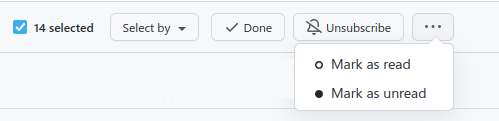
Go to your notifications and select a few checkboxes. You can easily mark them all as done or unsubscribe, but marking as read or unread requires an additional click to open the dropdown (and it's less discoverable).
unwrap-unnecessary-dropdowns could unwrap the dropdown items, so they appear as regular buttons. There is enough space in that bar for two additional buttons.
Screenshot
Example URLs
https://github.com/notifications

Description
Go to your notifications and select a few checkboxes. You can easily mark them all as done or unsubscribe, but marking as read or unread requires an additional click to open the dropdown (and it's less discoverable).
unwrap-unnecessary-dropdownscould unwrap the dropdown items, so they appear as regular buttons. There is enough space in that bar for two additional buttons.Screenshot
Example URLs
https://github.com/notifications