Repository navigation
Cannot even run basic Java (with Gradle) autogenerated project #2392
Description

Cannot even run basic Java (with Gradle) autogenerated project.
Environment
- Operating System: Windows 10
- JDK version: OpenJDK
java version "17.0.2" 2022-01-18 LTS
Java(TM) SE Runtime Environment (build 17.0.2+8-LTS-86)
Java HotSpot(TM) 64-Bit Server VM (build 17.0.2+8-LTS-86, mixed mode, sharing)
- Visual Studio Code version:
1.66.0 - Java extension version:
v0.22.2
Steps To Reproduce
- Install
Extension Pack for Java. - Click
Create Java Project. - Select Gradle (will ask to install
Gradle for Java). - Select project location.
- Wait for initialization to finish.
- Try to run autogenerated basic project.
Current Result
Cannot use Java with Gradle in VS Code.

Logs: https://gist.github.com/AgainPsychoX/c78f9c43df3f65f339e4c89aa48098ea
Terminal:
PS C:\Users\PsychoX\Desktop\Środa\Grafika\Renderer>  c:; cd 'c:\Users\PsychoX\Desktop\Środa\Grafika\Renderer'; & 'C:\Users\PsychoX\.vscode\extensions\redhat.java-1.4.0-win32-x64\jre\17.0.2-win32-x86_64\bin\java.exe' '-agentlib:jdwp=transport=dt_socket,server=n,suspend=y,address=localhost:1165' '-XX:+ShowCodeDetailsInExceptionMessages' '@C:\Users\PsychoX\AppData\Local\Temp\cp_a5r05w7gbm9zfjlzvure95lfx.argfile' 'Renderer.App'
Error: Could not find or load main class Renderer.App
Caused by: java.lang.ClassNotFoundException: Renderer.App
Expected Result
I hate Java, so ngl "not working" is expected result for me. Some could argue, it should "just" work - but not in Java world.
Activity
AgainPsychoX commentedon Apr 6, 2022
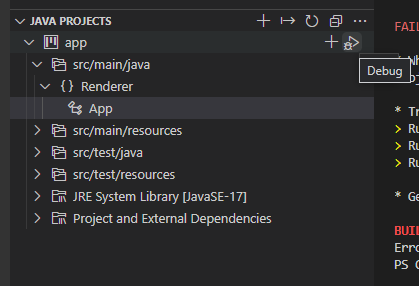
Also fails when running from "Java Projects" thingy (but different reason, malformed shell command)
AgainPsychoX commentedon Apr 6, 2022
I can't understand, why isn't it working... The file is compiled into
.class. If I decompile it, it had the proper main class. Class paths are set properly (inside file included to args@...; contains-cp "C:\\Users\\PsychoX\\Desktop\\Środa\\Grafika\\Renderer\\app\\bin\\main; ...).I tried modifying
launch.jsonbut it seems it doesn't have any effect - can't even add more class paths or pass additional arguments.When I manually do:
It works, so why isn't the built-in stuff working?
testforstephen commentedon Apr 6, 2022
The issue is that your path contains some unicode character
Środa, and Java debug extension doesn't handle it well.Could you move the issue to https://github.com/microsoft/vscode-java-debug/issues?
AgainPsychoX commentedon Apr 6, 2022
I "love" how Java brands itself as multiplatform and portable, when it can't handle Unicode characters left and right... And not even giving clear error/warning message - even working with GCC warnings is easier to read at this point...
Also, why does the issue still occur when there were similar issues in the past? https://github.com/microsoft/vscode-java-debug/issues?q=Unicode
Anyway, thanks for help.
fbricon commentedon Apr 6, 2022
@testforstephen you're a contributor to both vscode-java and vscode-java-debug, so please transfer that issue over there. Else just close it here.
testforstephen commentedon Apr 6, 2022
Tracked this issue at microsoft/vscode-java-debug#1149