I would like to provide example how to do horizontal page scrolling using UICollectionView.

Please set up isPaggingEnabled property to YES for the collection view object. Or via Interface Builder:
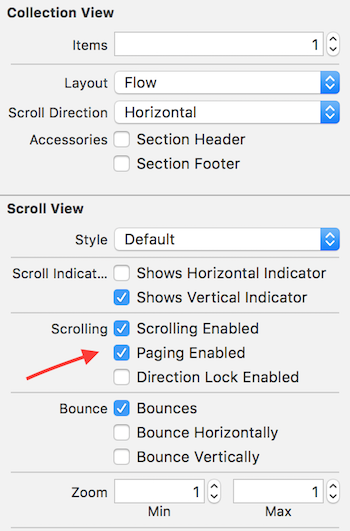
And let’s create custom class for flow layout:

Please use the following code:
import UIKit

class CenterViewFlowLayout: UICollectionViewFlowLayout {

	override func collectionViewContentSize() -> CGSize {
		// Only support single section for now.
		// Only support Horizontal scroll
		let count = self.collectionView?.dataSource?.collectionView(self.collectionView!, numberOfItemsInSection: 0)
		let canvasSize = self.collectionView!.frame.size
		var contentSize = canvasSize
		if self.scrollDirection == UICollectionViewScrollDirection.Horizontal {
			let rowCount = Int((canvasSize.height - self.itemSize.height) / (self.itemSize.height + self.minimumInteritemSpacing) + 1)
			let columnCount = Int((canvasSize.width - self.itemSize.width) / (self.itemSize.width + self.minimumLineSpacing) + 1)
			let page = ceilf(Float(count!) / Float(rowCount * columnCount))
			contentSize.width = CGFloat(page) * canvasSize.width
		}
		return contentSize
	}

	func frameForItemAtIndexPath(indexPath: NSIndexPath) -> CGRect {
		let canvasSize = self.collectionView!.frame.size
		let rowCount = Int((canvasSize.height - self.itemSize.height) / (self.itemSize.height + self.minimumInteritemSpacing) + 1)
		let columnCount = Int((canvasSize.width - self.itemSize.width) / (self.itemSize.width + self.minimumLineSpacing) + 1)

		let pageMarginX = (canvasSize.width - CGFloat(columnCount) * self.itemSize.width - (columnCount > 1 ? CGFloat(columnCount - 1) * self.minimumLineSpacing : 0)) / 2.0
		let pageMarginY = (canvasSize.height - CGFloat(rowCount) * self.itemSize.height - (rowCount > 1 ? CGFloat(rowCount - 1) * self.minimumInteritemSpacing : 0)) / 2.0

		let page = Int(CGFloat(indexPath.row) / CGFloat(rowCount * columnCount))
		let remainder = Int(CGFloat(indexPath.row) - CGFloat(page) * CGFloat(rowCount * columnCount))
		let row = Int(CGFloat(remainder) / CGFloat(columnCount))
		let column = Int(CGFloat(remainder) - CGFloat(row) * CGFloat(columnCount))

		var cellFrame = CGRectZero
		cellFrame.origin.x = pageMarginX + CGFloat(column) * (self.itemSize.width + self.minimumLineSpacing)
		cellFrame.origin.y = pageMarginY + CGFloat(row) * (self.itemSize.height + self.minimumInteritemSpacing)
		cellFrame.size.width = self.itemSize.width
		cellFrame.size.height = self.itemSize.height

		if self.scrollDirection == UICollectionViewScrollDirection.Horizontal {
			cellFrame.origin.x += CGFloat(page) * canvasSize.width
		}

		return cellFrame
	}

	override func layoutAttributesForItemAtIndexPath(indexPath: NSIndexPath) -> UICollectionViewLayoutAttributes? {
		let attr = super.layoutAttributesForItemAtIndexPath(indexPath)?.copy() as! UICollectionViewLayoutAttributes?
		attr!.frame = self.frameForItemAtIndexPath(indexPath)
		return attr
	}

	override func layoutAttributesForElementsInRect(rect: CGRect) -> [UICollectionViewLayoutAttributes]? {
		let originAttrs = super.layoutAttributesForElementsInRect(rect)
		var attrs: [UICollectionViewLayoutAttributes]? = Array()

		for attr in originAttrs! {
			let idxPath = attr.indexPath
			let itemFrame = self.frameForItemAtIndexPath(idxPath)
			if CGRectIntersectsRect(itemFrame, rect) {
				let nAttr = self.layoutAttributesForItemAtIndexPath(idxPath)
				attrs?.append(nAttr!)
			}
		}

		return attrs
	}

}