Repository navigation
Unhappy "Run Java" experience #724
Description

As filled by Johannes Rieken (@jrieken) here microsoft/vscode#86086
- open java-12 dev container
- rename .vscode folder to .vscode-off
- open debug viewlet, select "Run with Java"
- 🐛 no run... there is a progress message about generating configuration and a launch.json file is shown but that is all...
My comment: This is up to the Java extension, they can handle the No Workspace Run however the extension wants. I suggest that the Java extension handles run more gracefully and if the launch.json can get generated the program could be run as well. as part of the experience.
Jinbo Wang (@testforstephen) let me know what you think
Activity
testforstephen commentedon Dec 4, 2019
What's the expected behavior with Run with Java button? Run the active Java file directly?
Besides, if the active Java file doesn't include main method, it won't able to run directly. But Run with Java button is also enabled. What to do for this case?
isidorn commentedon Dec 4, 2019
I think the expected would be to try to figure out the project and the same way you generate the
launch.jsonyou can generate one in memory and just start running using that in memory launch configuration.So you would pick a java file that includes a main method ideally.
At least from my point of view that makes the most sense.
testforstephen commentedon Dec 5, 2019
Make sense.
One stupid question about the sequence of the buttons. Is there any reason to put Debug with Java in front? Because from our statistics, run is more commonly used than debug.
isidorn commentedon Dec 5, 2019
That is interesting data and definetely not a stupid question. If you have more statistics to share that would be very useful to us.
We first put Debug becuase Debug is a more polished experience. In order to put Run in front we would first like to improve the overall run experience which is captured via this issue microsoft/vscode#85759
Once we have that I would not mind having Run in front.
testforstephen commentedon Dec 25, 2019
In the latest improvement, the run entries such as

F5, code lens andRuncontext menu will run the program directly without generating launch.json file.If you want to persist the launch config, you need click
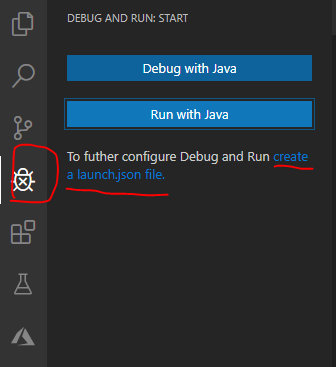
create a launch.json filebutton in the debug viewlet.isidorn commentedon Dec 27, 2019
Sounds good to me, thanks!