Use new modal w/ detail dialog for compiler list in Walkthrough#7887
Merged
Use new modal w/ detail dialog for compiler list in Walkthrough#7887
Conversation


Contributor
|
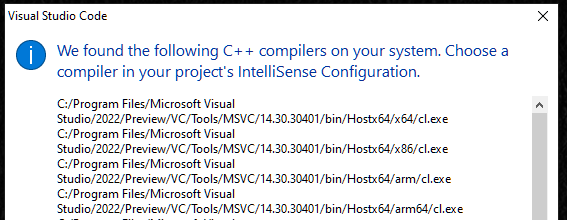
Let's shorten the message now that it's a heading. Can we try this: "We found the following C++ compilers on your system. Choose a compiler in your project's IntelliSense Configuration." I don't think we need the parentheses in compiler(s). If the list only contains 1, I think it still reads well. |
…nto coleng/compiler_list_modal_detail

sean-mcmanus
approved these changes
Jul 29, 2021


This file contains hidden or bidirectional Unicode text that may be interpreted or compiled differently than what appears below. To review, open the file in an editor that reveals hidden Unicode characters.
Learn more about bidirectional Unicode characters
Sign up for free
to subscribe to this conversation on GitHub.
Already have an account?
Sign in.
3 participants


Add this suggestion to a batch that can be applied as a single commit.This suggestion is invalid because no changes were made to the code.Suggestions cannot be applied while the pull request is closed.Suggestions cannot be applied while viewing a subset of changes.Only one suggestion per line can be applied in a batch.Add this suggestion to a batch that can be applied as a single commit.Applying suggestions on deleted lines is not supported.You must change the existing code in this line in order to create a valid suggestion.Outdated suggestions cannot be applied.This suggestion has been applied or marked resolved.Suggestions cannot be applied from pending reviews.Suggestions cannot be applied on multi-line comments.Suggestions cannot be applied while the pull request is queued to merge.Suggestion cannot be applied right now. Please check back later.
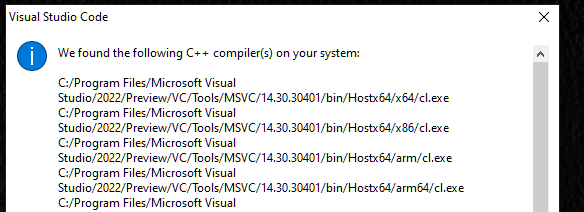
VS Code added a new modal dialog which displays details less prominently than the main message. This change switches to using that UI for the detected compiler list that can be displayed via the Getting Started walkthrough.
It was (on Windows):
It's now (on Windows):