Repository navigation
Fix bug in Axes.bar_label(label_type='center') for non-linear scales. - #23698
Conversation


…s with different scales.

|
I'm not sure what would be the best way to test this. We could check that the label's |


 stefmolin
changed the title
Axes.bar_label(label_type='center') for non-linear scales.Axes.bar_label(label_type='center') for non-linear scales.

|
Yes, I believe that an image test is good here. |
@oscargus - Can you walk me through how to do that? |

|
See https://matplotlib.org/devdocs/devel/testing.html#writing-an-image-comparison-test for a basic introduction. If you need more help, please ask. |
|
Just in case (this probably won't work directly): @image_comparison(["centered_bar_label_nonlinear.png"])
def test_centered_bar_label_nonlinear()
fig, ax = plt.subplots()
bar_container = ax.barh(['c', 'b', 'a'], [1_000, 5_000, 7_000])
ax.set_xscale('log')
ax.set_xlim(1, None)
ax.bar_label(bar_container, label_type='center')
ax.set_axis_off()You will on the first local run get a failure and a file I sometimes reduce the image size to get smaller figure sizes. I think that can probably be done here without losing anything. |

|
To add more opinions, an svg might make sense here (not sensitive to the freetype version issue but is sensitive to text placement changes). |
|
Thanks all! I'll look into it. |
|
To add more options: If we don't want an image comparison (for size, font glitch or whatever reasons) IMHO it would already be sufficient to take the example from the original post and check that the texts are anchored on the left half of the figure (i.e. transform the coordinates to figure coordinates and check that x < 0.5). Going one step further, one could also transform the bar limits to figure coordinates and then check that the text is centered between the bar limits in figure coordinates (which is the exact definition of what we expect). That said, @stefmolin don't get overwhelmed by all our ideas 😄. Either of the image comparison using an svg or the logical coordinate test would be fine. Choose the one you are more comfortable with. |
|
I added an image test with a PNG file since it says it can't do SVG or PDF comparison tests on my system. Let me know if we still need an SVG test, and if so, how to generate the file in the first place since it just skips the test.
|

We ended up talking about this in the new contributor's meeting. I might be missing some dependencies for the image test. I will look into it and report back. |
Might be Inkscape. See also https://matplotlib.org/devdocs/devel/dependencies.html#dependencies-for-testing-matplotlib. |
37afd43 to
5ffb34e
Compare
|
It was Inkscape. I see there was some new logic added to make it easier to understand what is going on 😄 matplotlib/lib/matplotlib/testing/decorators.py Lines 266 to 272 in 1fe8792 |

 greglucas
left a comment
greglucas
left a comment
There was a problem hiding this comment.
I'm glad you were able to get that to work, @stefmolin. This works great on window resizes too which is nice :)


PR Summary
Fixes #23688
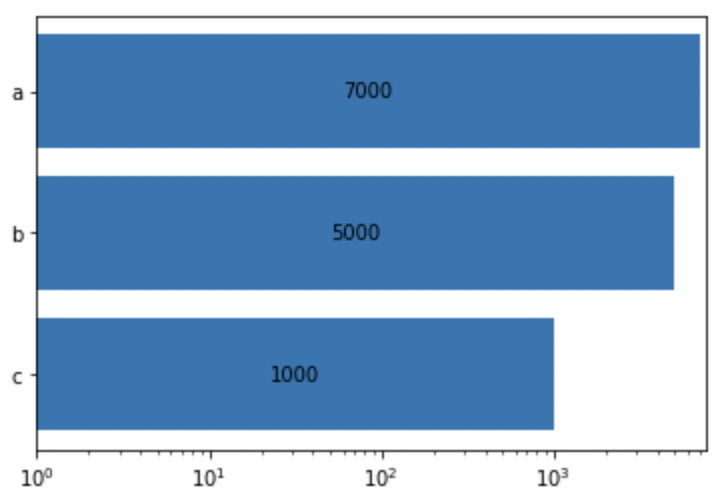
Incorporated @anntzer's solution from the issue into the
Axes.bar_label()method.Example using a log scale:
Current output:

Output with this change:
PR Checklist
Tests and Styling
pytestpasses).flake8-docstringsand runflake8 --docstring-convention=all).Documentation
doc/users/next_whats_new/(follow instructions in README.rst there).doc/api/next_api_changes/(follow instructions in README.rst there).