Skip to content

axhline/axvline broken with pint.Quantity #8910

Closed

Description

@dopplershift

With matplotlib 2.0.2, you can't use pint.Quantity with axhline or axvline:

%matplotlib inline

import matplotlib.pyplot as plt
import pint

units = pint.UnitRegistry()
fig, axes = plt.subplots(1, 1)
axes.axhline(0 * units.meter)

yields:

---------------------------------------------------------------------------
ValueError                                Traceback (most recent call last)
<ipython-input-3-b77d6298b805> in <module>()
      6 units = pint.UnitRegistry()
      7 fig, axes = plt.subplots(1, 1)
----> 8 axes.axhline(0 * units.meter)

~/miniconda3/envs/py36/lib/python3.6/site-packages/matplotlib/axes/_axes.py in axhline(self, y, xmin, xmax, **kwargs)
    720         self._process_unit_info(ydata=y, kwargs=kwargs)
    721         yy = self.convert_yunits(y)
--> 722         scaley = (yy < ymin) or (yy > ymax)
    723 
    724         trans = self.get_yaxis_transform(which='grid')

~/miniconda3/envs/py36/lib/python3.6/site-packages/pint/quantity.py in <lambda>(self, other)
   1075                   other.to_root_units().magnitude)
   1076 
-> 1077     __lt__ = lambda self, other: self.compare(other, op=operator.lt)
   1078     __le__ = lambda self, other: self.compare(other, op=operator.le)
   1079     __ge__ = lambda self, other: self.compare(other, op=operator.ge)

~/miniconda3/envs/py36/lib/python3.6/site-packages/pint/quantity.py in compare(self, other, op)
   1065                 return op(self._convert_magnitude_not_inplace(UnitsContainer()), other)
   1066             else:
-> 1067                 raise ValueError('Cannot compare Quantity and {0}'.format(type(other)))
   1068 
   1069         if self._units == other._units:

ValueError: Cannot compare Quantity and <class 'numpy.float64'>

Activity

  1. added this to the milestone on Jul 18, 2017
  2. dstansby commented on Jul 31, 2017

    @dstansby
    Member

    Looks like this is because there's not a suitible converter stored in the Matplotlib unit registry:

    import matplotlib.pyplot as plt
    import matplotlib.units as munits
    import pint
    
    units = pint.UnitRegistry()
    for unit in munits.registry:
        print(unit)

    prints

    <class 'str'>
    <class 'numpy.str_'>
    <class 'bytes'>
    <class 'numpy.bytes_'>
    <class 'datetime.date'>
    <class 'datetime.datetime'>
    
  3. dopplershift commented on Jul 31, 2017

    @dopplershift
    ContributorAuthor
    1. Quantity can quack like an array, so it should just pass through fine--like it does with plot
    2. I've tried using the converters for this as well; any converter that doesn't just drop units fails as well.

    I don't have an example for the second one above handy at the moment.

  4. dstansby commented on Aug 8, 2017

    @dstansby
    Member

    Hmm, I can't get those units to work with plot:

    import matplotlib.pyplot as plt
    import pint
    
    units = pint.UnitRegistry()
    fig, ax = plt.subplots()
    ax.plot([0 * units.meter, 1 * units.meter], [0 * units.meter, 1 * units.meter])
    # ax.axhline(0 * units.meter)
    plt.show()

    fails with

    Traceback (most recent call last):
      File "test.py", line 6, in <module>
        ax.plot([0 * units.meter, 1 * units.meter], [0 * units.meter, 1 * units.meter])
      File "/Users/dstansby/matplotlib/lib/matplotlib/__init__.py", line 1754, in inner
        return func(ax, *args, **kwargs)
      File "/Users/dstansby/matplotlib/lib/matplotlib/axes/_axes.py", line 1435, in plot
        for line in self._get_lines(*args, **kwargs):
      File "/Users/dstansby/matplotlib/lib/matplotlib/axes/_base.py", line 404, in _grab_next_args
        for seg in self._plot_args(this, kwargs):
      File "/Users/dstansby/matplotlib/lib/matplotlib/axes/_base.py", line 379, in _plot_args
        x = _check_1d(tup[0])
      File "/Users/dstansby/matplotlib/lib/matplotlib/cbook/__init__.py", line 1972, in _check_1d
        return np.atleast_1d(x)
      File "/Users/dstansby/miniconda3/lib/python3.6/site-packages/numpy/core/shape_base.py", line 52, in atleast_1d
        ary = asanyarray(ary)
      File "/Users/dstansby/miniconda3/lib/python3.6/site-packages/numpy/core/numeric.py", line 583, in asanyarray
        return array(a, dtype, copy=False, order=order, subok=True)
    ValueError: setting an array element with a sequence.
    
  5. dstansby commented on Aug 8, 2017

    @dstansby
    Member

    Quantity is not a subclass of ndarray. This might change in the future, but for this reason functions that call numpy.asanyarray are currently not supported
    (from https://pint.readthedocs.io/en/0.7.2/numpy.html#support)

    So it seems like calls to atleast_1d in our codebase means that pint.Units won't work?

  6. dopplershift commented on Aug 8, 2017

    @dopplershift
    ContributorAuthor

    You can't use pint that way. You need to do:

    import matplotlib.pyplot as plt
    import pint
    
    units = pint.UnitRegistry()
    fig, ax = plt.subplots()
    ax.plot([0 , 1] * units.meter, [0, 1] * units.meter)
    # ax.axhline(0 * units.meter)
    plt.show()

    That works fine for me.

    Regarding atleast_1d, that's correct, they completely annihilate anything that's not a subclass of ndarray.

  7. dopplershift commented on Aug 8, 2017

    @dopplershift
    ContributorAuthor

    See #4803 where I "fixed" the use of atleast_1d for plot.

  8. dopplershift commented on Aug 17, 2017

    @dopplershift
    ContributorAuthor

    Well, it seems that things are better than I last checked when implementing a proper converter, at least with master:

    from matplotlib.cbook import iterable
    import matplotlib.pyplot as plt
    import matplotlib.units as munits
    import numpy as np
    import pint
    
    units = pint.UnitRegistry()
    
    
    class PintConverter(munits.ConversionInterface):
        @staticmethod
        def convert(value, unit, axis):
            if hasattr(value, 'units'):
                return value.to(unit).magnitude
            elif iterable(value):
                try:
                    return [v.to(unit).magnitude for v in value]
                except AttributeError:
                    return [units.Quantity(v, axis.get_units()).to(unit).magnitude for v in value]
            else:
                return units.Quantity(value, axis.get_units()).to(unit).magnitude
    
        @staticmethod
        def default_units(x, axis):
            try:
                return x.units
            except AttributeError:
                return None
    
        @staticmethod
        def axisinfo(unit, axis):
            return munits.AxisInfo(label=unit)
    
    
    # Register the class
    munits.registry[units.Quantity] = PintConverter()
    
    y = np.linspace(0, 30) * units.miles
    x = np.linspace(0, 5) * units.hours
    
    fig, ax = plt.subplots()
    ax.plot(x, y, 'tab:blue')
    ax.axhline((5 * units.miles).to('feet'), color='tab:red')
    ax.axvline(120 * units.minutes, color='tab:green')
    ax.yaxis.set_units(units.inches)
    ax.xaxis.set_units(units.seconds)

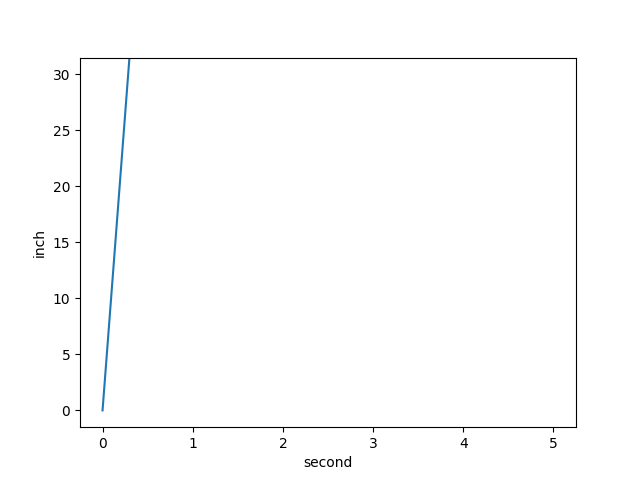
    Produces:
    test_units

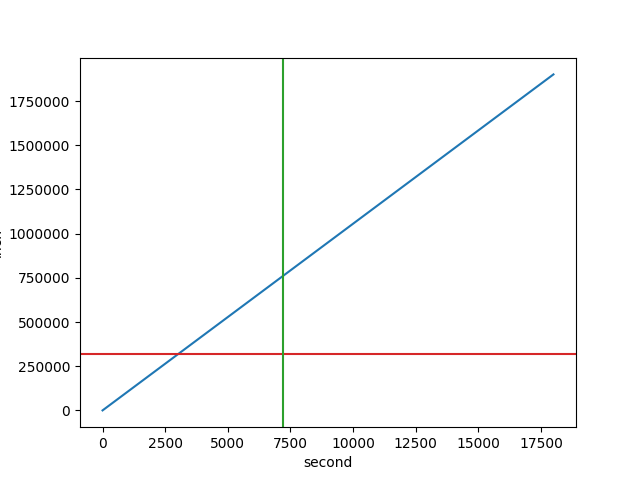
    Once you add ax.autoscale_view() you get:
    test_units

    Which is actually correct. Now the question is why the autoscale doesn't kick off.

  9. dopplershift commented on Aug 17, 2017

    @dopplershift
    ContributorAuthor

    So it looks like only relim() is called when units change, which only refreshes the data limits, not the view limits.

    I'm of the opinion we should also be calling autoscale_view when units change, what do others think?

  10. dopplershift commented on Aug 17, 2017

    @dopplershift
    ContributorAuthor

    As a side note, even if this "bug" only produces the smallest change here, I am so putting in a new test to make sure the current, desired behavior is preserved.

  11. WeatherGod commented on Aug 21, 2017

    @WeatherGod
    Member
  12. dopplershift commented on Aug 22, 2017

    @dopplershift
    ContributorAuthor

    I sense those were de-coupled for performance reasons. We could add a callback to Axes (say, _on_units_changed) that calls both relim() and autoscale_view(), replacing the existing direct connection to relim`. Thoughts?

  13. dopplershift commented on Aug 29, 2017

    @dopplershift
    ContributorAuthor

    Fixed with #9049.

Sign up for free to join this conversation on GitHub. Already have an account? Sign in to comment

Metadata

Metadata

Assignees

No one assigned

    Type

    No type

    Projects

    No projects

      Milestone

      Relationships

      None yet

      Development

      No branches or pull requests

      Issue actions