Repository navigation
[Bug]: CbarAxesBase.toggle_label doesn't seem to work properly #23595
Description

Bug summary
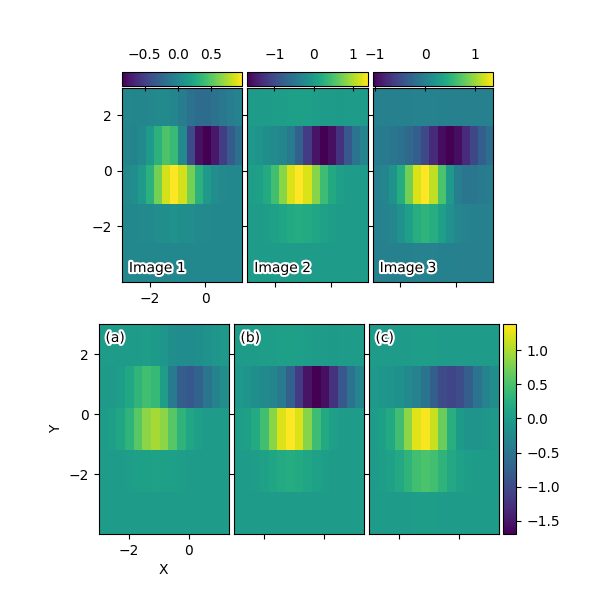
It appears as if CbarAxesBase.toggle_label and therefore, maybe, SimpleAxisArtist.toggle and possibly something else does not work as expected.
Probably related to the colorbar rewrite?
Code for reproduction
https://matplotlib.org/stable/gallery/axes_grid1/demo_axes_grid.html
Actual outcome
The two middle figures have visible tick labels for the color bar.
Expected outcome
No visible tick labels.
Additional information
There seems to be some sort of mismatch between the _axisnum property and the location of the labels. It seems to work if the labels are located at the same side as the colorbar, i.e., right and bottom.
Operating system
Arch
Matplotlib Version
3.5.2 and main
Matplotlib Backend
No response
Python version
No response
Jupyter version
No response
Installation
git checkout
Activity
oscargus commentedon Aug 30, 2022
Marking as good first issue, but medium as it requires digging in how to modify the calls here (and possibly deprecating/replacing any other methods that may be affected).
These are the lines that are not working properly:
matplotlib/lib/mpl_toolkits/axes_grid1/axes_grid.py
Lines 34 to 36 in efaedd8
vorbrodt commentedon Sep 1, 2022
I would like to be assigned to this issue.
oscargus commentedon Sep 1, 2022
@vorbrodt Thanks for your interest! We do typically not assign persons to issues, but feel free to work on it anyway. Your note will most likely lead to people focusing on other issues instead,
oscargus commentedon Sep 1, 2022
Just noting that there are some other demos that also use
toggle_label, where it appears as the output is not really as expected:https://matplotlib.org/stable/gallery/axes_grid1/demo_axes_grid2.html
https://matplotlib.org/stable/gallery/axes_grid1/demo_edge_colorbar.html
Going back to 3.4.3, they probably are as expected:
https://matplotlib.org/3.4.3/gallery/axes_grid1/demo_axes_grid2.html
https://matplotlib.org/3.4.3/gallery/axes_grid1/demo_edge_colorbar.html
https://matplotlib.org/3.4.3/gallery/axes_grid1/demo_axes_grid.html
(Although demo_edge_colorbar.html seems to be missing a label on the left figure in all available versions of the documentation...)
vorbrodt commentedon Sep 5, 2022
Okay, I see. I'll be working on this issue.
oscargus commentedon Oct 22, 2022
The problem seems related to
self._axisnumhaving the wrong value somatplotlib/lib/mpl_toolkits/axes_grid1/mpl_axes.py
Lines 118 to 120 in b298423
is not correct.
xtanion commentedon Mar 9, 2023
Hi @oscargus, I was trying to fix this issue...maybe
self._axisnumisn't incorrect (As it is 1 forbottomandleftaxes & 2 fortop&right). The issue seems to be related with thecolorbarhaving two labels when it's set totopandleft. I managed to solve it by disabling the bottom and right axes for both cases. Is it the expected outcome?anntzer commentedon May 13, 2023
Bisects to #20054.
jklymak commentedon May 13, 2023
I don't quite understand how this can bisect to #20054? That PR is for the normal colorbar axes, not the CbarAxes?
anntzer commentedon May 13, 2023
cbaraxes ultimately uses normal colorbars (it's just an axes subclass that adds a colorbar() method on the axes to draw colorbars on that axes).