Repository navigation
Overlaying imshow with transparancy / alpha yields different results in pdf and png when using savefig #18871
Description

Bug report
Bug summary
When using multiple calls to plt.imshow() with transparancy/alpha on the top image, the .pdf and .png versions are inconsistent
Code for reproduction
Code for reproduction below, also available as a binder at https://mybinder.org/v2/gist/TAdeJong/8cb84dc74bc6d2c2a1744ef465bf85d8/HEAD .
Effect can be even more noticable when overlaying actual images, but for simplicity this example keeps it a single colors:
import matplotlib.pyplot as plt
import matplotlib
import numpy as np

print(matplotlib.__version__, matplotlib.get_backend())

fig,ax = plt.subplots(ncols=11, figsize=[12,3])
for i in range(11):
    ax[i].imshow(np.full((100,100), 0.1), cmap='gray', vmin=0, vmax=1)
    ax[i].imshow(np.full((100,100), 0.9), cmap='inferno', vmin=0, vmax=1, alpha=0.1*i)
    ax[i].set_title(f"$\\alpha=${0.1*i:.1f}")
plt.tight_layout()
plt.savefig('test.png')
plt.savefig('test.pdf')
Actual outcome
Output files:

Colors in output files seem consistent between different OS and viewers.
# Mybinder version info:
3.3.2 module://ipykernel.pylab.backend_inline
# Local version info:
3.3.2 TkAgg
Expected outcome
Produced colors being consistent between different output formats, i.e. a equal color for each of the respective squares between the PNG and PDF output.
OR a clear warning in the documentation (I am not aware of such a warning existing, but I might have missed it).
Matplotlib version
- Operating system: Ubuntu/mybinder
- Matplotlib version: 3.3.2, at least down to 3.2.2
- Matplotlib backend (
print(matplotlib.get_backend())): module://ipykernel.pylab.backend_inline / TkAgg - Python version: 3.7.7, 3.7.3, 3.7.8
- Jupyter version (if applicable):
- Other libraries:
#Edit: fix mybinder link.
Activity
anntzer commentedon Nov 2, 2020
Possibly related to #8847?
TAdeJong commentedon Nov 2, 2020
Yes, they do seem related! Using the code from #8847 and save as pdf and png yields the same images as shown there:
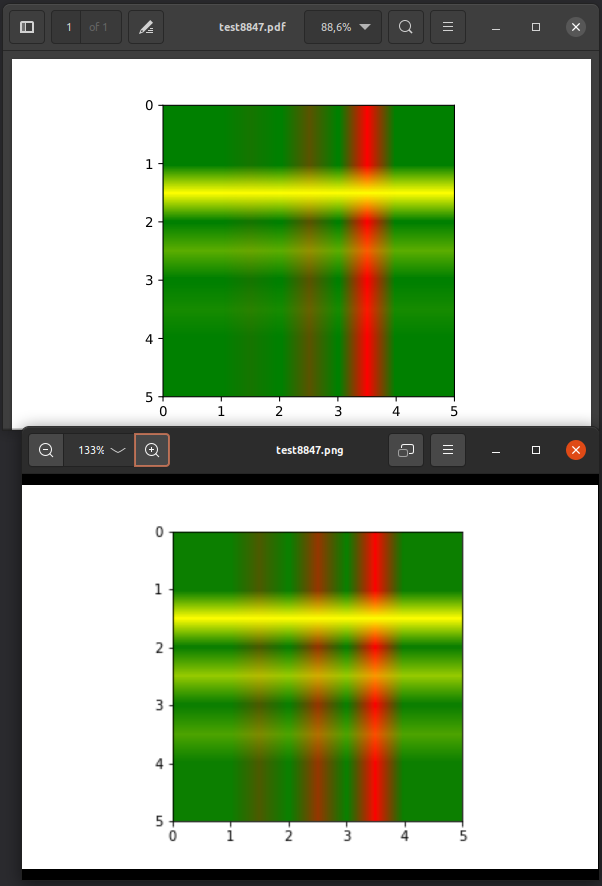
So, comparing, it seems the .png agrees with the software compositing, and the .pdf agrees with the agg style compositing
TAdeJong commentedon Nov 2, 2020
For those stumbling upon this problem: I found a workaround, as the .pdf get's the same behaviour as the .png when adding
interpolation='none'to at least one of the initial imshow calls, like such:github-actions commentedon Sep 4, 2023
This issue has been marked "inactive" because it has been 365 days since the last comment. If this issue is still present in recent Matplotlib releases, or the feature request is still wanted, please leave a comment and this label will be removed. If there are no updates in another 30 days, this issue will be automatically closed, but you are free to re-open or create a new issue if needed. We value issue reports, and this procedure is meant to help us resurface and prioritize issues that have not been addressed yet, not make them disappear. Thanks for your help!
codeceptsDE commentedon Aug 17, 2026
wow, thanks @TAdeJong for the workaround!
The issue still persists, but it seems like the referenced #8847 just recently received a fix PR #32107.
Lets see what effect this will have on this issue, and also on #25806!
ayshih commentedon Aug 18, 2026
I've confirmed that this issue has also been fixed by #32107