Repository navigation
imshow with interpolation='bicubic' on downsampled large arrays looks blurred #17490
Description

When a huge array (here 8k x 1k) with "sharp" data is displayed with imshow in a window with lower pixel resolution than that array, it looks blurred.
I'm questioning that this behaviour is right. Here is an example of the matplotlib imshow, with a standard line of code
Code for reproduction
ax.imshow(field,aspect='auto',interpolation='bicubic',cmap='jet',origin='lower')Actual outcome

However, the downsampled version (plotted without matplotlib via direct draw and actually using a bicubic algorithm for downsizing) shows the sharp lines I expected.
Expected outcome

So is matplotlib downsampling more than the display resolution and then interpolating back via bicubic interpolation? Or how can one get a blurred output, if the input array is much larger and is "sharp"?
Do not misunderstand, I'm not interested in "nearest" etc.
Unfortunately, the examples with imshow/bicubic only show interpolation while upsampling.
Thank you,
Tom
Matplotlib version
Operating system: Windows 10
Matplotlib version: 3.1.3
Matplotlib backend (print(matplotlib.get_backend())): TkAgg
Python version: 3.7.7
installed Anaconda and packages via conda in a separated env.
Activity
timhoffm commentedon May 23, 2020
interpolation="linear"? In particular for downsampling it should not bee too different from bicubic.tacaswell commentedon May 23, 2020
Are you resampling before or after color mapping?
The relevant code is
matplotlib/lib/matplotlib/image.py
Lines 399 to 510 in 6ed975c
This discussion in #13724 may also be of interest.
Without a minimal example to test with or any context as to how you generated your second image there isn't much we can do to help you.
TomFD commentedon May 24, 2020
Thank you so far. I checked and its not a resultion / windows magnification issue. The other hint of how the image is resampled gets closer. However, I'm a user and don't know where to find the "_resample" code.
Nevertheless, I made a minimum example. The array is much larger than the pixel resolution of the figure and I'm plotting this array with interpolation of 'none','nearest' and 'bicubic'.
The 'bicubic' looks nice .. but I still don't understand, when the bicubic DOWN-sampling does (that much) blurring.
For comparision, I made a last plot where I manually downsampled. I expected something like this to see in the high res 'bicubic' version as well. You can change the downsampling factor to e.g. 1/4 or the order to 2, but as it then does not need any interpolation, no blurring occurs.
Code for reproduction
jklymak commentedon May 24, 2020
https://matplotlib.org/devdocs/gallery/images_contours_and_fields/image_antialiasing.html Basically if you sub-sample you should smooth first so you don’t get aliasing of small scales into large scales.
TomFD commentedon May 24, 2020
Ok, I hope I understand: When downsampling, the original is smoothed first (antialiased?), then downsampled. It means, that any of the interpolations are then actually not used, but indicate, that the smoothing should be done? Only for 'none' and 'nearest' there is no smoothing before the downsampling. Thats why, I was confused. I think I have seens an intermediate parameter named "antialiased" in one of the posted discussions, but it did not make it to a release ...
jklymak commentedon May 24, 2020
If you downsample the “interpolation” operation is still applied to get the downsampled points. This acts as a smoothing unless you choose nearest. But nearest is a terrible way to down sample a signal because it causes moire patterns.
The “antialiased” method applies the smoothing (Hanning) if downsampling or resembling within a factor of two and no interpolation if not. I’m not at my computer so can’t check what version that will be released in. Maybe 3.3
jklymak commentedon May 25, 2020
interpolation='antialiased'is in version 3.2, which is released.How are you diagnosing "blur"? If I set the dpi of the figure to 100 or so and save as a png, then I get speckles for the subsampled data, and a straight line about one or two pixels wide for the smoothed version. (I've zoomed and screenshotted to see the detail). Thats basically how anti-aliasing works: you smooth at slightly larger scale than your new Nyquist wavelength and then sub-sample. The cost is that the resulting signal is a bit smoothed out.
None:
Bicubic:
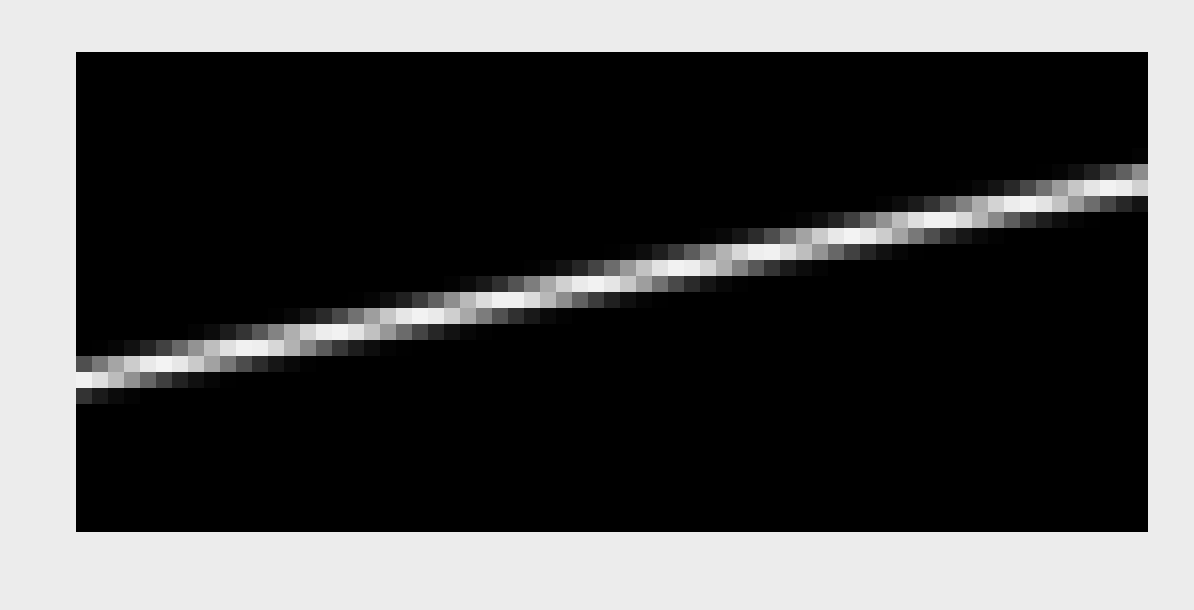
TomFD commentedon May 26, 2020
I think this clarifies it, thank you very much. Saving it to a png helped, it might be that the original screenshot was an overlay of bicubic downsampling and the windows screen zoom settings.
jklymak commentedon May 26, 2020
Right it’s confusing to try and figure these things out when the number of pixels In the image changes when you zoom.