Repository navigation
logitlocator misses tick at edge of axis #14743
Description

Bug report
Bug summary
When no data is plotted, a logit scale ignores calls to set_{x/y}lim and sticks to the default(?) of [1e-7, 1-1e-7]
edit: fixed, but see follow up at #14743 (comment).
Code for reproduction
gca().set(yscale="logit", ylim=(.9, .999)) # or (.001, .1), or etc.Actual outcome

This image is made with the formatter provided by #14512 for legibility (the formatter before that PR is impossible to read), but that doesn't change the axes limits.
Expected outcome
limits respecting the set ylims.
Note that adding a call to e.g. plot(<any values>) (within or without the given limits) fixes the issue.
Matplotlib version
- Operating system: linux
- Matplotlib version: 3.1 or master, perhaps earlier?
- Matplotlib backend (
print(matplotlib.get_backend())): any - Python version: 3.7
- Jupyter version (if applicable):
- Other libraries:
Activity
LogitLocator: allows nonsingular works with no plotted values
TestLogitLocator: append a test on nonsingular to avoid issues as mat…
LogitLocator: allows nonsingular works with no plotted values
TestLogitLocator: append a test on nonsingular to avoid issues as mat…
TestLogitLocator: append a test on nonsingular to avoid issues as mat…
TestLogitLocator: append a test on nonsingular to avoid issues as mat…
lukelbd commentedon Aug 8, 2019
This issue seems to be more complicated. When I try to explicitly set the axis limits, axis limits revert to the default (i.e. the opposite of what I want). This is independent of whether I run a plot command afterward. Also the default range is too large and default number of ticks is too high.
timhoffm commentedon Aug 10, 2019
As of master, the results are
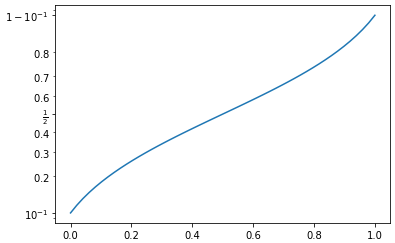
So at least the number of ticks issue is solved (cf. #14512).
anntzer commentedon Sep 10, 2019
The original issue was fixed in #14928, but there's a small followup: when doing
gca().set(yscale="logit", ylim=(.9, .999)), there is no tick at x=0.999, but it shows up if the upper limit is 0.999001 for example. Probably just a matter of < vs <=...[-]logit scale ignores limits when no data is plotted[/-][+]logitlocator misses tick at edge of axis[/+]RiazCharania commentedon Mar 2, 2020
Is anyone else currently working on this? If not I'll give it a try.
timhoffm commentedon Mar 4, 2020
Go for it.
5 remaining items
oscargus commentedon Jun 4, 2022
The remaining example
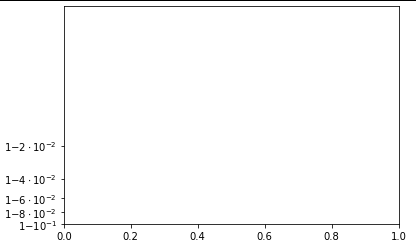
gca().set(yscale="logit", ylim=(.9, .999))now gives:which seems different from the description, but hardly correct.
anntzer commentedon Jul 15, 2022
I think that's what I said: a tick is missing at the top (1-1e-3).