Repository navigation
Weird behaviour of suptitle() when horizontalalignment is not 'center' #12197
Description

Bug report
Bug summary
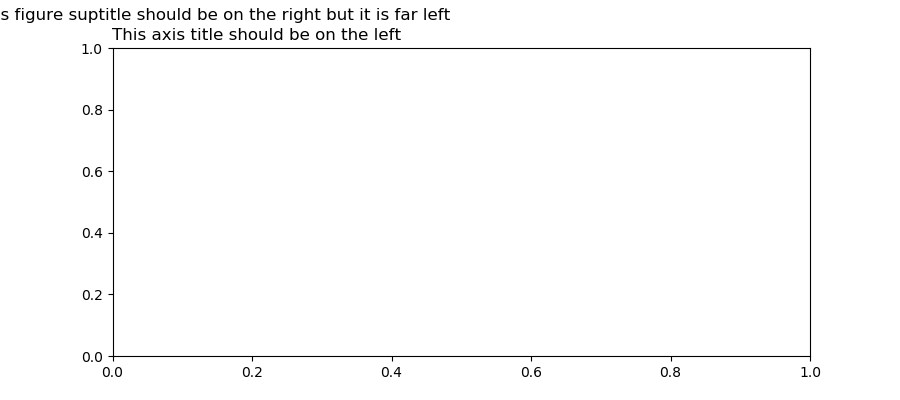
horizontalalignment = 'left' aligns the title on the right, horizontalalignment = 'right' aligns a short title on the left, horizontalalignment = 'right' displaces a longer title on the far left
Code for reproduction
# Left alignment test, short title
fig = plt.figure(figsize=(9,4))
ax = fig.add_subplot(111)
fig.suptitle('This figure suptitle should be on the left', horizontalalignment = 'left')
ax.set_title('This axis title should be on the left', loc='left');
fig.savefig('left_align.png')

# Right alignment test, short title
fig = plt.figure(figsize=(9,4))
ax = fig.add_subplot(111)
fig.suptitle('This figure suptitle should be on the right', horizontalalignment = 'right')
ax.set_title('This axis title should be on the right', loc='right');
fig.savefig('right_align.png')

# Right alignment test, longer title
fig = plt.figure(figsize=(9,4))
ax = fig.add_subplot(111)
fig.suptitle('This figure suptitle should be on the right but it is far left', horizontalalignment = 'right')
ax.set_title('This axis title should be on the left', loc='left')
fig.savefig('far_left.png');
Actual outcome
-
Left alignment test, short title

-
Right alignment test, short title

-
Right alignment test, longer title


Expected outcome
The following code manually sets the figure title at the expected position:
fig = plt.figure(figsize=(9,4))
ax = fig.add_subplot(111)
fig.suptitle('This figure suptitle is long but it is manually positioned', x = 0.38)
ax.set_title('This axis title should be on the left', loc='left')
fig.savefig('manual_pos.png');
Which gives:

Matplotlib version
- Operating system: Windows
- Matplotlib version: 2.1.2 and 2.2.3
- Matplotlib backend: agg
- Python version: 3.6.4
- Jupyter version: 4.4.0
Activity
ImportanceOfBeingErnest commentedon Sep 21, 2018
This is all expected. The
suptitleis in all cases positionned in the horizontal center of the figure.horizontalalignmentaligns the text relative to this center position, i.e. if forhorizontalalignment=left, the left end of the text is at the center position, forhorizontalalignment=rightthe right end of the text is at the center.The
suptitledoes not have alocparameter. In order to position asuptitleyou may however use thexandyarguments. The position is in figure coordinates. So if you want to have a suptitle aligned with the (only) subplot in a figure you may set its position according to the subplot paramters, e.g. the left parameter (fig.subplotpars.left) is 0.125. You will still need to set the aligment as well.I will close this because I don't think there is anything wrong with the library here. Feel free to reopen in case you disagree.
gansanay commentedon Sep 21, 2018
Thank you for your answer!
Do you agree this should be documented?
ImportanceOfBeingErnest commentedon Sep 21, 2018
subtitledocumentsmatplotlib.text.TextdocumentsThere is the Text alignment example which shows the different alignments.
At which point exactly do you think the documentation should be extended? We're always open to improvements of the docs, so feel free to make a suggestion here.
timhoffm commentedon Sep 21, 2018
suptitlecould be more precise in documentinghorizontalalignmentandverticalalignmente.g.The horizontal alignment of the text relative to (*x*, *y*).Feel free to open a PR.
ImportanceOfBeingErnest commentedon Sep 21, 2018
Since
horizontalalignmentisn't really an argument ofsuptitlebut part of the kwargs, which are passed on toText, do you feel one should make an exception here and document this kwarg explicitely?I would have though maybe documenting
Text's horizontalalignment in a bit more than half a sentence could make sense?(reopening this to let the discussion evolve)
timhoffm commentedon Sep 21, 2018
It's already documented separately, because the defaults are different from
Text.https://matplotlib.org/api/_as_gen/matplotlib.figure.Figure.html#matplotlib.figure.Figure.suptitle
ImportanceOfBeingErnest commentedon Sep 22, 2018
True, I must have looked at a completely different page, despite linking the correct one. 😳
@gansanay Is the above proposal by @timhoffm
how you imagine this to be clearified? Would you like to change it yourself?
thoo commentedon Oct 18, 2018
Should I also need to generate any file? Thanks.