Repository navigation
legend is not present in the generated image if I use 'tight' for bbox_inches #10194
Description

summary of the problem
I tried to put legend outside of the axes. If I use fig.legend() method to produce legend and use bbox_inches='tight' in savefig() method. The legend is not present in the produced image (using the argument bbox_extra_artists also does not work). If I use ax.legend() instead, the legend is present in the saved image.
Code for reproduction
import matplotlib.pyplot as plt
import numpy as np
import matplotlib as mpl

x = np.arange(-5, 5, 0.1)
y1 = np.sin(x)
y2 = np.cos(x)

y3 = np.sin(2*x)
y4 = np.cos(2*x)

fig, (ax1, ax2) = plt.subplots(ncols=1, nrows=2, figsize=(10, 6))

ax1.plot(x, y1, label='sin')
ax1.plot(x, y2, label='cos')

ax2.plot(x, y3, label='sin')
ax2.plot(x, y4, label='cos')

handles, labels = ax1.get_legend_handles_labels()
# following code does not work
legend = fig.legend(handles, labels, loc='lower left', ncol=2, frameon=False,
              bbox_to_anchor=(0.12, 0.88))
plt.savefig('test.jpg', bbox_extra_artists=[legend,], bbox_inches='tight')

# following code works
# legend = ax1.legend(handles, labels, ncol=2, frameon=False,
#                     loc='lower left', bbox_to_anchor=(-0.01, 1.2))
# plt.savefig('test.jpg', bbox_inches='tight')
plt.show()
outcome
The saved images are different if I use different legend method.
using fig.legend method

using ax.legend method

Matplotlib version
- Operating system: Windows 8.1 and Linux (CentOS 7) (This problem is maybe platform independent)
- Matplotlib version: 2.0.2(Linux), 2.0.0 (Windows)
- Matplotlib backend: Qt5Agg
- Python version: 3.5.2 (Windows), 3.6.2 (Linux)
The matplotlib and python are all distributed with Anaconda.
quesiton
Is this a bug or something I do not know. Maybe there is difference between fig.legend and ax.legend method?
Reacted by Chenlu Ji, Nicholas Geneva, Xutan Peng, Carlos Ramos Carreño, Vast-stars, Gurtej Kanwar and Kishwar-E Hasin
Activity
tacaswell commentedon Jan 8, 2018
Suspect that this is a bug in the tight bbox code which is not taking the figure legend into account.
jdhao commentedon Jan 8, 2018
Thanks, right now, I will just stick to the
ax.legendmethod.anntzer commentedon Jan 8, 2018
Probably the fix will be similar to #9164...
david's solution for legend bug 10194
dstansby commentedon Apr 21, 2019
Odd, the bbox caclulation is including the legend, but the legend just isn't being drawn. This is obvious to see if one does
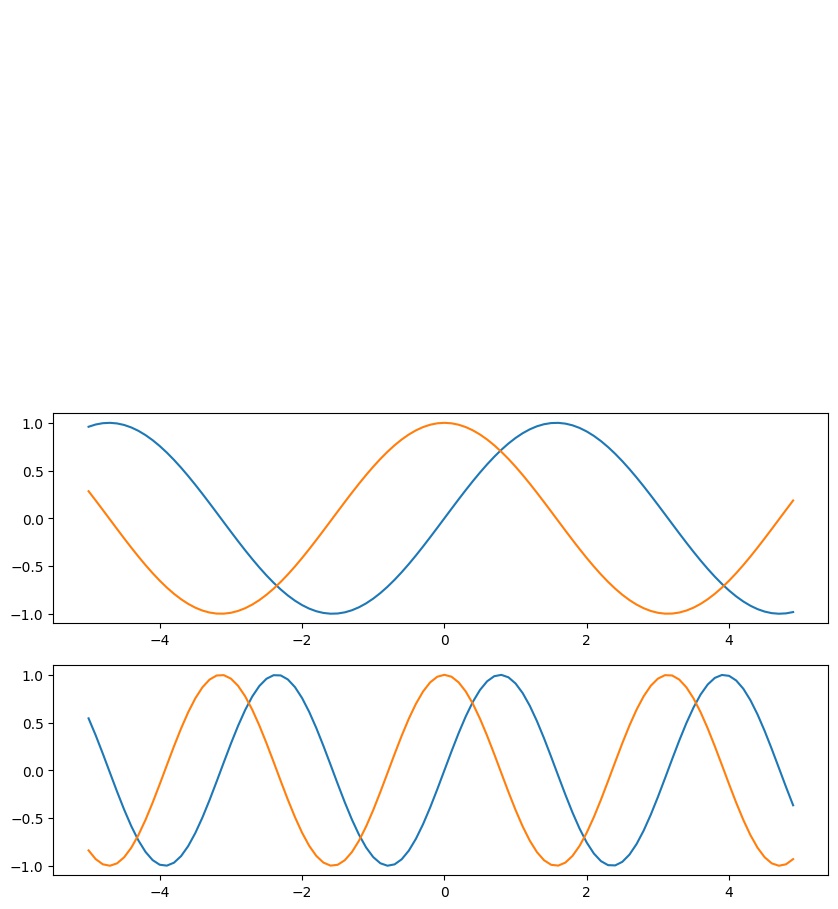
bbox_to_anchor=(0.12, 1.5):tacaswell commentedon Apr 21, 2019
I think the bug is that the legend is, under the hood, drawn with an
OffsetBoxsubclass which does not properly take into account the changed bounding box so draws its self outside of the active area.If you change it to
bbox_to_anchor=(0.5, .5)then you do see the legend both on the screen and in the jpg, but they are in different places in relation to the axes.danijar commentedon Sep 12, 2019
Curious what's the status of this? Is there a workaround besides placing the legend in a different location?
ImportanceOfBeingErnest commentedon Sep 12, 2019
The next step here would be to find out why this happens for a legend, but not for an
AnchoredOffsetbox. Both should be pretty similar, so any difference can already lead to a practical solution.Vast-Stars commentedon Dec 2, 2019
The same problem trapped me for hours.
samuelmiver commentedon Feb 6, 2020
Same problem
tacaswell commentedon Feb 6, 2020
This needs someone to dig into the two classes and sort out why they are behaving differently. It is very likely that something is being cached that should not be (which is why the the legend moves around).
jklymak commentedon May 25, 2020
Right, so the issue is that somehow the offset for the box is being calculated relative to the current figures origin rather than the original figures origin. Still not quite sure why, but you can
easily see this by setting
bbox_inches=mtransforms.Bbox.from_extents([1, 0, 3, 3]or some such and see it move up or to the right.jklymak commentedon May 26, 2020
bbox_inches works by re-defining
transFigureto put the origin up and to the right to be tight with the axes decorations. However, so far as I can see,legendand offsetBbox do not participate in the transform logic. So the offset inlegendis relative the the bottom left of the current figure, and not transformed.I have a fix, but I thinkt the proper fix is to fix
offsetBoxto actually have a transform. But I find the architecture ofoffsetBoxextremely hard to understand, so I'm not even sure if that is possible.QuLogic commentedon May 26, 2020
I spent too long last night trying to figure this out. This seems to only occur with
bbox_to_anchor, because then the offset is determined by:matplotlib/lib/matplotlib/legend.py
Line 577 in 9ccdb1d
which uses
widthandheightfromVPacket.get_extent_offsets, and somewhere in there I guess is where the problem starts happening, but it was too roundabout to figure out just yet.jklymak commentedon May 26, 2020
As noted in #17511, what happens is that
legenddoesbbox_tight.pynever changes the parent bbox, but rather directly changestransFigure. So the legend never hears that it should move relative to the bottom left, and stays in the same spot.The fix in #17511 is to explicitly set the default
bbox_transform=fig.transFigureforfigure.legend. There is really no reason for it to be generic (as a default).amir-rahnama commentedon Nov 11, 2023
This problem is showing up again in version 3.1.2 and Python 3.7 and 3.8 btw.
jklymak commentedon Nov 11, 2023
@amir-rahnama please open a new reproducible issue. The code above works fine for me.