Repository navigation
Some documentation on main page points to obsolete subdirectories #10016

Description

EDIT (jklymak) Old title is below:
Fundamental issue is that If you do a search on "radar plot matplotlib" you get sent here:
https://matplotlib.org/examples/api/radar_chart.html
This of course refers to 2.0.2 and /examples/ isn't a directory any more in our tree.
- Robots should probably be redirected to the proper page.
- It'd be nice if the old docs could get a version marker as per PR Add version to documentation header #10065
Example of radar chart (matplotlib v.2.1.1) doesn't work
I just tried to run the radar chart example on a Mac (MacOS 10.13.1) with python 3.5.4 and matplotlib 2.1.1. and the radars aren't displayed correctly.

I found that this is the set_varlabels function which shifts the radars. Without the line 189 : ax.set_varlabels(spoke_labels) the radars look like that (but without the labels).

As I'm new on matplotlib and python I didn't succeed in finding a solution.
Thank's for your help
Activity
jklymak commentedon Dec 15, 2017
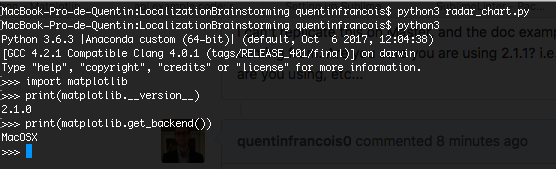
I can't replicate this on Master, and the doc example built OK, so I'm not clear where your error is coming from. Are you sure you are using 2.1.1? i.e.
print(matplotlib.__version__). What backend are you using, etc...quentinfrancois0 commentedon Dec 15, 2017
jklymak commentedon Dec 15, 2017
Hmmm, well I can't replicate using 2.1.1 and MacOSX as well, so... My guess would be your install is slightly messed up. Try a fresh install?
quentinfrancois0 commentedon Dec 15, 2017
I tried with python 3.6.3 installed with Homebrew and the same problem
jklymak commentedon Dec 15, 2017
How are you running the example from inside
ipython? If possible, put the print statements in the example just to be sure that is actually the environment you are using. BTW< the above indicates you are still using the Anaconda build. I'm not sure what "Anaconda custom" means. Maybe thats what brew installs...quentinfrancois0 commentedon Dec 15, 2017
I run the example from the terminal, not from
ipython. I deleted the Anaconda app and tried with the python 2.7.10 from MacOS and it is ok but it's not with the 3.6.3 installed with Homebrewjklymak commentedon Dec 15, 2017
Not convinced you were actually running w 2.1.1 then. Copy the example locally and run w the print statements.
If it was me I’d stick w Anaconda. Make sure you install pip and IPython into your environment. Don’t install matpltolib w pip. Conda works really well but can still lead to conflicting versions of things lying around.
quentinfrancois0 commentedon Dec 15, 2017
You're right, it's the 1.3.1 version with the python 2.7.10. So, the only way to run properly the example is with another version than the 2.1.1. Sorry, I'm very slow because I'm a little lost with the different version of python and the conflicts between the versions.
So you think it's better to work with Conda than the version with Homebrew ?
jklymak commentedon Dec 15, 2017
No I’m not convinced you were using 2.1.1 when you got the error. Can you please reproduce the error with the version number printed from the script. I can not reproduce the error on a Mac using 2.1.1 so the most likely problem is your setup.
Again strongly suggest anaconda and using conda to install matplotlib not pip.
jklymak commentedon Dec 16, 2017
I'll close. Feel free to reopen if you really think there is a matplotlib bug and you have solid debug info. If you continue to have install problems please try the mailing list or stack overflow.
quentinfrancois0 commentedon Dec 18, 2017
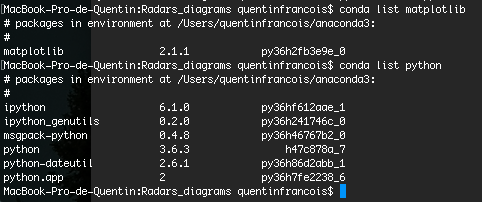
I come back after some tests. I reinstalled conda, updated matplotlib with conda. When I installed conda, I had the 2.1.0 version but the update didn't solve the issue. I still have the problem.
Reminder
MacOS 10.13.1
jklymak commentedon Dec 18, 2017
Please put the print statements in the example. Otherwise you can easily trick yourself as to what version of python you are running.
quentinfrancois0 commentedon Dec 18, 2017
I'm really sorry and I feel very noob but what's the print statement you talk about ? Did you mean that I have to ask clearly the version of python with
python -Vrather than withconda list python?I'm continuing to try to find a solution and I found a weird thing. If I make

conda update matplotlibI obtain a custom version of anaconda. If I don't make it I have the version 2.1.0.I tested with the two possibilities and none is working
Here is the sequence I used to run the 2 tests

Thanks for helping me ! Really !
43 remaining items
tacaswell commentedon Dec 22, 2017
What is different between the two examples? The only change I can see is 202f40f and I do not understand why that would cause this...
And yes, we definitely need to clean up the 'canonical' docs...
@quentinfrancois0 Sorry for the frustration and thanks for sticking with us!
jklymak commentedon Dec 22, 2017
No
self.set_theta_zero_location('N')in the old code?jklymak commentedon Dec 22, 2017
Theta changed meaning in one of the calls.
dstansby commentedon Feb 13, 2018
I'm going to close this, as the example in the current version of the docs works fine.
tapajyoti-ghosh commentedon Jun 30, 2018
I am having the same problem using W10, python 3.6 and matplotlib v2.2
dstansby commentedon Jun 30, 2018
Could you upgrade to Matplotlib 2.2.2 (the latest version) and try again?
tapajyoti-ghosh commentedon Jun 30, 2018
They should make the v2.2.2 bigger in the websites from where we are copying tho code and have a specific warning for that . It took me 2 hours to figure the version problem.
jklymak commentedon Jun 30, 2018
I'll re-open. Someone needs to sort out how to get the old pages to at least have a big blaring banner across them that says they are obsolete.
[-]Example of radar chart (matplotlib v.2.1.1) doesn't work[/-][+]Some documentation on main page points to obsolete subdirectories[/+]JazzTap commentedon Jul 14, 2018
@JLegs and I are working on documentation duplication at the sprint.
The static site has a ton* of old-version docs, that are manually propagated to the top-level on release.
Our plan is to inject old-version docs with approximate canonical links (for bots) and banners (for humans) via script, one folder at a time.
The first-approximation canonical link (#9556) is to delete the version string from the url.
More sophisticated approaches (#10854) to identifying similar-content/different-named descendants are punted. In the future, such would improve cleanup on docs release, relevant to OP's issue.
* All versions of matplotlib will remain documented in the (huge) static site because scientific users need reproducibility but can't maintain local packages. (Notably, 2.2.2 is long-term support officially; 1.5.3 is not.)
Edit: PR submitted. But - nothing apparent forwards to a 404 because nothing, not even 'examples' transitioned to 'gallery', has been cleanup'd. We could begin cautiously: instead of deleting, add warnings to 'current' (unversioned) docs which aren't in latest version?
QuLogic commentedon Feb 12, 2021
Canonical links and redirects were added in matplotlib/matplotlib.github.com#49. There is also a banner noting that the page is outdated at the top of the page.