|
| 1 | +--- |
| 2 | +sidebar_position: 4 |
| 3 | +title: Integrations Dashboards |
| 4 | +description: View and use Logz.io out-of-the-box dashboards for your integrations. |
| 5 | +image: https://dytvr9ot2sszz.cloudfront.net/logz-docs/social-assets/docs-social.jpg |
| 6 | +keywords: [logz.io, Open 360 AI, dashboards, Integrations Dashboards, unified dashboards, logzio dashboards, out of the box, visualize, visualizations] |
| 7 | +toc_max_heading_level: 3 |
| 8 | +--- |
| 9 | + |
| 10 | +:::note |
| 11 | +Integrations Dashboards are currently in beta and available only in Open 360 AI. To enable access, contact [Support](mailto:help@logz.io) or your account manager. |
| 12 | +::: |
| 13 | + |
| 14 | +Integrations Dashboards are prebuilt, Logz.io-provided dashboards for your integrations. They give immediate visibility into key metrics, performance, and error trends—no manual setup required. Use them as-is to monitor your environment, or duplicate a dashboard to edit and adapt it to your needs. |
| 15 | + |
| 16 | +### Find & filter |
| 17 | + |
| 18 | +Open [Dashboards](https://app.logz.io/360/dashboards/dashboards-hub) and expand the Integrations Dashboards folder. |
| 19 | + |
| 20 | +The list shows all dashboards provisioned from your installed integrations. |
| 21 | + |
| 22 | +Use the **Categories** filter to switch views between your custom dashboards and ones created by Logz.io. |
| 23 | + |
| 24 | +Once you send data with a supported integration, Logz.io automatically provisions one or more dashboards associated with that integration. |
| 25 | + |
| 26 | +### Use dashboards |
| 27 | + |
| 28 | +Logz.io dashboards are intentionally read only to preserve a reliable baseline and prevent accidental edits. |
| 29 | + |
| 30 | +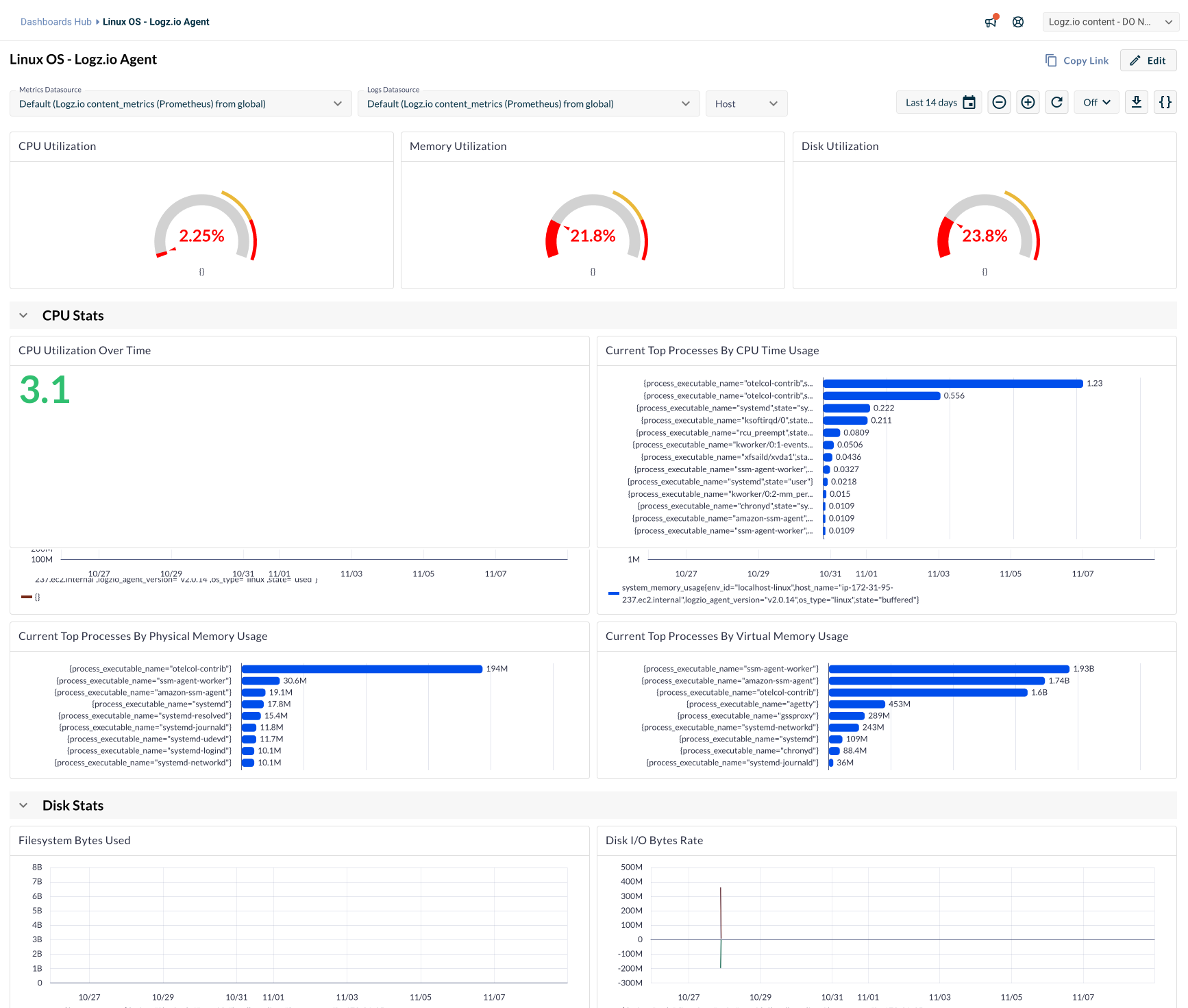 |
| 31 | + |
| 32 | +To create an editable copy: |
| 33 | + |
| 34 | +1. From the [Dashboards hub](https://app.logz.io/360/dashboards/dashboards-hub) or from within a dashboard, select **Duplicate**. |
| 35 | +2. In the modal, enter a name and choose a destination folder. |
| 36 | +3. Create the dashboard, then open the copy to edit panels, change filters, move folders, and more. |
| 37 | + |
| 38 | +### Supported integrations |
| 39 | + |
| 40 | +The following list includes available integrations and their dashboards: |
| 41 | + |
| 42 | +| Integration | Dashboard | |
| 43 | +| ------------------------------------- | --------------------------------------------------- | |
| 44 | +| AKS | Kubernetes Cluster Summary | |
| 45 | +| AKS | Kubernetes Pods | |
| 46 | +| Apache Cassandra | Apache Cassandra | |
| 47 | +| Apache Tomcat | Apache Tomcat | |
| 48 | +| Apache Web Server | Apache Web Server | |
| 49 | +| AWS CloudWatch | API Gateway - via Metrics Stream Integration | |
| 50 | +| AWS CloudWatch | DynamoDB - via Metrics Stream Integration | |
| 51 | +| AWS CloudWatch | EBS - via Metrics Stream Integration | |
| 52 | +| AWS CloudWatch | EC2 - via Metrics Stream Integration | |
| 53 | +| AWS CloudWatch | ECS - via Metrics Stream Integration | |
| 54 | +| AWS CloudWatch | EFS - via Metrics Stream Integration | |
| 55 | +| AWS CloudWatch | Kafka - via Metrics Stream Integration | |
| 56 | +| AWS CloudWatch | S3 - via Metrics Stream Integration | |
| 57 | +| AWS CloudWatch | SNS - via Metrics Stream Integration | |
| 58 | +| AWS CloudWatch | SQS - via Metrics Stream Integration | |
| 59 | +| AWS EC2 | AWS EC2 | |
| 60 | +| AWS EC2 | Linux OS - Logz.io Agent | |
| 61 | +| AWS EC2 | Windows OS - Logz.io Agent | |
| 62 | +| AWS CloudWatch | Classic ELB | |
| 63 | +| AWS CloudWatch | Classic ELB 7.6+ | |
| 64 | +| Darwin OS | Logz.io Agent | |
| 65 | +| Docker | Docker Containers Overview | |
| 66 | +| GCP | Cloud Functions | |
| 67 | +| GCP | Compute Engine | |
| 68 | +| Kubernetes 360 | K8s 360 - Cluster Stats | |
| 69 | +| Kubernetes 360 | K8s 360 - DaemonSet Stats | |
| 70 | +| Kubernetes 360 | K8s 360 - Deployment Stats | |
| 71 | +| Kubernetes 360 | K8s 360 - Job & CronJob Stats | |
| 72 | +| Kubernetes 360 | K8s 360 - Node Stats | |
| 73 | +| Kubernetes 360 | K8s 360 - Pod Stats | |
| 74 | +| Kubernetes 360 | K8s 360 - ReplicaSet Stats | |
| 75 | +| Kubernetes 360 | K8s 360 - StatefulSet Stats | |
| 76 | +| Linux OS | Logz.io Agent | |
| 77 | +| MySQL | MySQL | |
| 78 | + |
| 79 | + |
| 80 | +### Troubleshooting |
| 81 | + |
| 82 | +* **I don’t see the Integrations Dashboards folder** |
| 83 | + |
| 84 | + This feature is in beta. Confirm it’s enabled for your account (contact [Support](mailto:help@logz.io) or your account manager), verify that at least one supported integration is installed, then refresh the Dashboards hub. |
| 85 | + |
| 86 | +* **I cannot edit a system dashboard** |
| 87 | + |
| 88 | + This is expected. Use **Duplicate** to create an editable copy. |
| 89 | + |
| 90 | +* **I duplicated a dashboard but don’t see it** |
| 91 | + |
| 92 | + You can search for a dashboard by name or filter by Categories. |
| 93 | + |
| 94 | +### FAQ |
| 95 | + |
| 96 | +* **What is the difference between system dashboards and custom dashboards?** |
| 97 | + |
| 98 | + System dashboards are provided by Logz.io and are read‑only. Custom dashboards are user‑owned and fully editable. |
| 99 | + |
| 100 | +* **Why are system dashboards read‑only?** |
| 101 | + |
| 102 | + To preserve a clean, reliable baseline that can be referenced or cloned without risk of accidental changes. |
| 103 | + |
| 104 | +* **Can I rename the Integrations Dashboards folder?** |
| 105 | + |
| 106 | + No. The folder name is fixed to help users quickly find out‑of‑the‑box content. |
| 107 | + |
| 108 | +* **Will dashboards be added automatically for new integrations?** |
| 109 | + |
| 110 | + Yes, when a newly‑installed integration includes system dashboards, they will be provisioned automatically. |

0 commit comments