Sky Compass Card
The Sky Compass Card is one of the three custom elements in the Adaptive Cover Pro Card bundle, alongside the full Panel Card and the Tile Card. It renders only the polar sun-vs-FOV compass, and it accepts multiple Adaptive Cover Pro config entries at once, overlaying each window's field of view, blind spot, window-normal arrow, and cover-closure wedge onto a single compass that shares one sun dot.
Useful when you have several ACP instances facing different directions and want a single dashboard tile that tells you at a glance which windows currently see the sun.
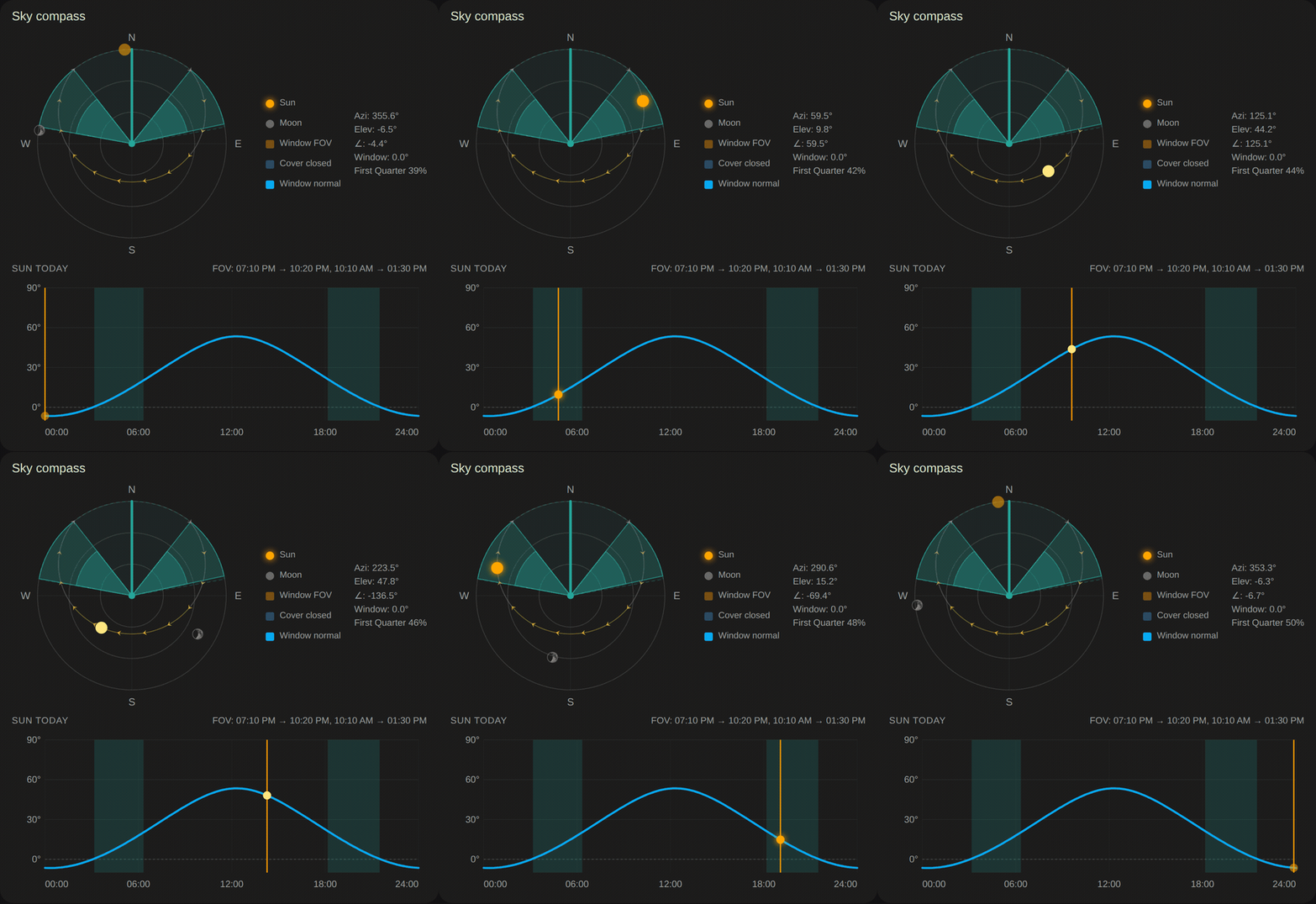
The card across a simulated day: the sun rises, arcs through the window's field of view, and sets, while the shaded wedge tracks the cover closing as the sun enters the FOV. The dimmed disc is the sun below the horizon at night. The "Sun Today" strip below plots elevation against the same FOV window.
- You have 2+ ACP config entries (e.g. one per window or one per façade) and want a compact "which window is active right now" overview.
- You want the sky compass on its own, without the decision strip, cover bars, or overrides panel that come with the Panel Card.
- You're building a custom layout and need the compass as a standalone, fine-grained tile.
If you only have one ACP instance and want everything at a glance, the full Panel Card is usually a better fit.
-
Single sun dot: azimuth and elevation are global, so one dot is accurate regardless of how many entries you overlay. The dot is color-coded so daytime always reads warm and night reads grey: gold with a soft glow when the sun is actually hitting a window (valid direct sun), gold (no glow) when it sits inside a window's field of view but isn't a valid hit yet, light yellow when it's above the horizon but outside every FOV, and a dim grey night disc when it's below the horizon. The state comes straight from the integration's
decision_trace.sun_stateattribute when available, and falls back to deriving it fromdirect_sun_valid+sun_position.in_fovon older integration builds. - One FOV wedge per entry, color-coded from a fixed palette (blue, orange, green, red, purple, teal, pink, wrapping at 8). Wedges are translucent so overlapping areas darken, a useful visual cue when two windows share a direction.
- One window-normal arrow per entry in the matching color.
- One blind-spot wedge per entry (hatched, matching color).
- One cover-closure wedge per entry: an inner fill showing how closed each cover currently is.
- Shared layers (drawn once): today's sun path, sunrise / sunset markers, cardinal labels, moon (opt-in), concentric grid rings.
- Legend + stats: in multi-entry mode, the legend lists each entry's title with its color swatch and live FOV status; the stats block shows one compact row per window with γ (gamma) and window azimuth.
type: custom:adaptive-cover-pro-sky-compass-card
entry_ids:
  - KITCHEN_ENTRY_ID
  - LIVING_ROOM_ENTRY_ID
# optional:
title: West-facing windows
compact: false
show_legend: true
show_stats: true
show_moon: false
show_cardinals: true
show_blind_spot: true
show_window_arrow: true
show_cover_fill: true
show_sun_path: true
show_sunrise_sunset: true
show_elevation_chart: true     # "Sun today" elevation-vs-time strip below the compass
north_offset: 0                # rotate compass clockwise (degrees). 90 = East at top
cover_colors:                  # per-entry overlay colors, aligned to entry_ids order
  - '#4f9eff'                  #   Kitchen   (omit or null to keep the palette default)
- null # Living room → keep default| Option | Type | Default | Description |
|---|---|---|---|
entry_ids |
string[] |
(required) | One or more ACP config entry IDs. Each adds an overlay. |
title |
string |
unset | Optional header text above the compass. |
compact |
bool |
false |
Smaller SVG; hides the legend. |
show_legend |
bool |
true |
Color-swatch rows below the compass. |
show_stats |
bool |
true |
Sun + per-window numeric rows. |
show_moon |
bool |
false |
Moon position and phase. |
show_cardinals |
bool |
true |
N/E/S/W letters. |
show_blind_spot |
bool |
true |
Hatched blind-spot wedges. |
show_window_arrow |
bool |
true |
Arrow from center to each window azimuth. |
show_cover_fill |
bool |
true |
Inner wedge showing each cover's closure. |
show_sun_path |
bool |
true |
Today's sun arc. |
show_sunrise_sunset |
bool |
true |
Rise and set dot markers. |
show_elevation_chart |
bool |
true |
The "Sun today" elevation-vs-time strip below the compass. Reflects the integration's elevation limits when present. |
north_offset |
number |
0 |
Rotate the whole compass clockwise by this many degrees (90 = East at top). The stats line still reports true azimuth. |
cover_colors |
(string | null)[] |
palette | Per-entry overlay colors, aligned to entry_ids order. Use null (or omit a trailing entry) to keep that entry's automatic palette color. |
Every toggle and the north offset have a control in the visual editor; dropping the card onto a dashboard walks you through selecting entries, picking which layers to show, and recoloring each overlay. Per-entry color swatches appear once you've selected at least one entry.
Open Settings → Devices & Services, click each Adaptive Cover Pro instance you want to include, and copy the value from config_entry=… in the browser URL. The visual editor lists every instance with a checkbox, so you don't normally need to look these up manually.
The card detects how many valid entries you gave it and adjusts the legend and stats:
- Single entry: legend shows generic labels (a single "Sun" entry whose swatch tracks the live sun-dot state, plus "Window FOV", "Cover position", etc.), effectively the same presentation as the sky compass inside the full Panel Card.
- Multiple entries: legend shows one row per entry with its color swatch, entry title, and a live "in FOV" chip. Stats show one row per entry with γ and window azimuth.
Entries whose sun_sensor hasn't populated yet (integration still warming up, or the entry was deleted) are silently skipped from the overlay and the legend. If every entry is missing, the card renders a placeholder.
- Home Assistant: 2024.5.0+
- Adaptive Cover Pro: v2.14.0+
- Card bundle: ships in the same JS file as the Panel Card and Tile Card; installing the bundle installs all three. See Dashboard Cards → Installation.
Card issues → https://github.com/jrhubott/adaptive-cover-pro-card/issues
A browser devtools console screenshot almost always gets the fastest fix.

🏠 Home · ✨ Features · 📰 What's New
🚀 Getting Started
- Installation
- Migrating from Custom Repository
- Migrating from Adaptive Cover
- First-Time Setup
- Cover Types
🧠 Core Concepts
📐 Cover Types
⚙️ Configuration
- Sun Tracking
- Position
- Glare Zones
- Automation
- Custom Position
- Force Override
- Weather Safety
- Climate
- Blindspot
- Summary Screen
- Debug & Diagnostics
🔌 Entities & Services
- Entities
- Proxy Cover Entity
- Position Verification
- My Position Support (Somfy RTS)
- Runtime Configuration Services
🛠️ Operations
🔧 Advanced Use Cases
- Dynamic Temperature Thresholds
- Dynamic Tracking Window
- Bedroom Sleep Mode
- Handling Variable Cloud Cover
- Venetian Tilt-Only on Overcast Days
🎨 Dashboard
🧪 Testing & Simulation
📚 Reference
👩💻 For Developers