Configuration Glare Zones
Vertical blinds only. Glare Zones let you pin down specific floor areas (a sofa, a desk, a TV) and lower the blind only as far as needed to keep direct sun off those spots, instead of using one "shaded distance" value for the whole room. The dedicated glare_zone handler runs at priority 45, between climate (50) and the base solar handler (40), so when a zone needs deeper coverage than solar tracking alone would give, it wins.
The handler evaluates each active zone's effective nearest point (the zone edge closest to the window along the current sun angle) and compares it to the cover's configured Shaded Distance. The zone whose nearest edge is closest to the window wins: that zone is the first one the sun reaches and is the one that demands the most blind coverage. When every active zone is already beyond the Shaded Distance (already in shadow from normal solar tracking), the handler falls through.
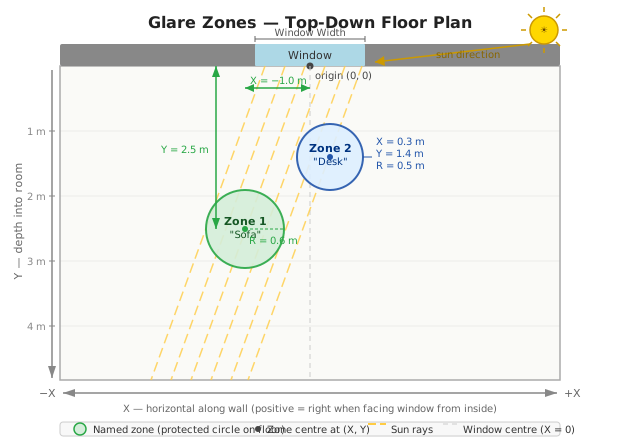
Zone positions use a coordinate system with its origin at the centre of the window, projected onto the floor:
-
X: horizontal position along the wall.
0= directly in front of the window centre. Positive = right when standing inside facing the window; negative = left. - Y: distance into the room, perpendicular to the window. Must be positive (can't be behind the glass). Typical range: 0.5–3.0 m.
- Radius: the radius of the circular protection zone centred at (X, Y). Set this to approximately half the width of the item you want to protect (e.g. 0.6 m for a 1.2 m wide sofa).
Units: X, Y, and Radius are entered in metres as of v2.18.2-beta.1. Stable releases prior to that used centimetres: divide your existing values by 100 when upgrading.
Example (metres): A sofa centred 1.5 m in front of the window and 0.6 m to the left: X = −0.6, Y = 1.5, Radius = 0.6.
Example (centimetres, stable ≤ v2.18.1): X = −60, Y = 150, Radius = 60.
Use this guide to translate your room into X, Y, and Radius values.
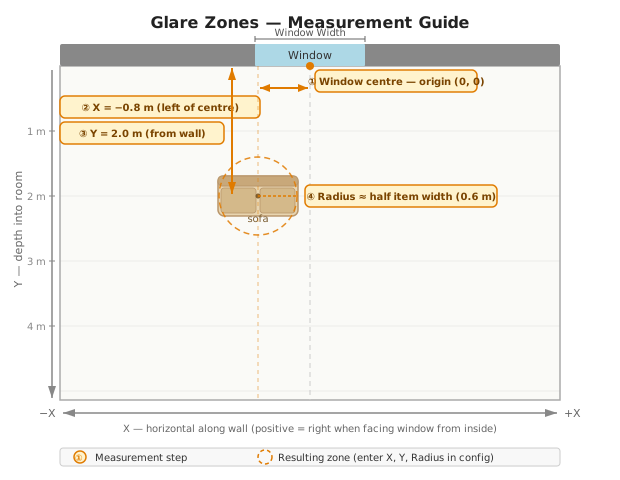
Stand inside your room facing the window. The centre of the window opening is the origin: the point where X = 0 and Y = 0, projected onto the floor. You do not need to mark the floor; keep it as your mental reference point.
From the window centre, measure horizontally along the wall to the point on the wall directly above your furniture centre.
- Right of centre → positive X
- Left of centre → negative X
Example: Sofa centre is 0.8 m to the left of the window centre → X = −0.8
From the window wall (the plane of the glass), measure straight into the room to the centre of your furniture.
- Y is always positive.
- A sofa 2 m from the window → Y = 2.0
Tip: For a sofa, aim for the centre of the seat cushions rather than the back.
Set the radius to approximately half the width of the item you want to protect. A slightly larger value is safer: it adds a cushion for measurement imprecision.
| Item | Typical width | Suggested Radius |
|---|---|---|
| Single armchair | 0.8 m | 0.4 m |
| 2-seat sofa | 1.4 m | 0.6–0.7 m |
| 3-seat sofa | 2.0 m | 0.9–1.0 m |
| Monitor / desk screen | 0.6 m | 0.3 m |
| Wall-mounted TV | 1.2 m | 0.5–0.6 m |
When configuring a zone in the Options flow, have these ready:
- X: horizontal distance from window centre (negative = left, positive = right)
- Y: depth from the window wall to the item centre
- Radius: approximately half the item's width
The glare zone handler fires only when all of these are true:
- Sun is inside the field of view: the sun's azimuth is within your configured Left/Right FOV angles (see Sun Tracking).
- Direct sun is valid: the sun's elevation is above the minimum elevation and the current time is within the configured start/end window (and outside sunrise/sunset offsets).
-
The zone's HA switch is
on: each named zone gets its own switch entity in HA (e.g. "Glare Zone: Sofa"). Zones are active when their switch is on; the switch is created automatically when you give a zone a name and defaults to on. Unnamed zone slots do not get a switch and are inactive. - The zone needs more blind than solar tracking: the handler calculates the nearest sun-facing edge of the zone circle using the current sun angle, then checks whether that point is closer to the window than the cover's Shaded Distance. If the zone's nearest edge is already beyond the Shaded Distance (in shadow), the handler passes through.
When multiple zones are active, the one whose nearest sun-facing edge is closest to the window wins: that is the zone being hit by direct sun soonest, and it demands the most blind coverage.
Enable Glare Zones is configured in Sun Tracking settings, not here. The glare zones step is hidden in the options menu until that master toggle is on.
Up to 4 zones per instance:
| Variable | Default | Range | Description |
|---|---|---|---|
| Window Width | 1.0 m | 0.1–5.0 m | Width of the window opening. Used to geometrically check whether a sun ray at the current angle can physically reach a zone through the window. |
| Zone Name 1–4 | (empty) | Friendly name (e.g. "Sofa", "Desk"). Required to activate the zone: unnamed slots are ignored. Creates an HA switch entity for per-zone on/off control. | |
| Zone X 1–4 | 0 m | −5.0 to 5.0 m | Horizontal offset from window centre. Positive = right when facing window from inside. |
| Zone Y 1–4 | 1.0 m | 0.0–10.0 m | Distance into the room from the window glass. Must be positive. |
| Zone Radius 1–4 | 0.3 m | 0.1–2.0 m | Radius of the circular protection area on the floor. Set to approximately half the width of the item you are protecting. |
| Zone Z 1–4 | 0 m | 0.0–3.0 m | Optional height of the protected target above the floor. 0 (default) protects a floor disk and reproduces the pre-v2.23 behaviour exactly. Set to the height of the surface or person you actually want shaded — desk surface ≈ 0.75 m, seated eyes ≈ 1.1 m, wall-mounted TV ≈ 1.5 m. See the Z height section below for the geometry. |
Stable units (≤ v2.18.1): all values above are in centimetres: defaults are Window Width 100 cm, Zone Y 100 cm, Zone Radius 30 cm, and ranges are −500 to 500 cm for X, 0–1000 cm for Y, 10–200 cm for radius. (Z was added in v2.23 and is metres-only — there is no cm legacy.)
By default a glare zone models a floor disk: the handler decides whether direct sun reaches a circle of radius r centred at (X, Y). That works well for "no sun past my desk-front" but not for "no sun in my eyes": eyes sit ~1.1 m above the floor, so floor-only protection over- or under-closes the blind depending on sun elevation.
The optional Zone Z field lifts the protected target off the floor. With Z > 0 the effective distance the blind must protect is
nearest_y + Z / tan(sun_elevation)
This is the same trigonometric construction as the Sill Height offset on the Vertical page, signed in the opposite direction. The Z / tan(elevation) term is largest when the sun is low (the shallow angle stretches the offset across the floor) and smallest when the sun is high (a steep angle contributes almost nothing). At the elevation cap (≈ 2.9°) the term is clamped to keep the math finite.
Practical examples (range 0.0–3.0 m, step 5 cm):
| Target | Z |
|---|---|
| Floor / pet bed / low planter |
0.00 m |
| Desk or coffee-table surface |
0.75 m |
| Seated eye height (couch, desk chair) |
1.10 m |
| Standing eye height |
1.65 m |
| Wall-mounted TV or artwork centre |
1.50–2.00 m |
When at least one contributing zone uses Z > 0, the cover's pipeline_trace.glare_zone.reason string gains a (Z-adjusted) parenthetical so you can confirm the corrected geometry fired.
If your glare zones are configured but never fire, work through these checks:
1. Enable Glare Zones toggle Confirm "Enable Glare Zones" is turned on in Sun Tracking settings. The glare zone step is hidden in the options menu until this is on.
2. Zone switch must be on
Each named zone has its own switch entity in HA (e.g. "Glare Zone: Sofa"). Confirm the switch for the relevant zone is on.
3. Sun must be inside the FOV
The handler only runs when the sun's azimuth is within your configured Left/Right FOV angles. If the sun is outside the FOV, the handler is skipped entirely. Check the sun_in_fov attribute on the cover's position sensor.
4. Zone must be in the illuminated area The handler only fires when the zone's nearest sun-facing edge is closer to the window than your Shaded Distance setting (configured on the cover type page). Roughly: Zone Y minus Zone Radius must be less than your Shaded Distance.
For example: Shaded Distance = 0.5 m, Zone Y = 1.5 m, Radius = 0.3 m → nearest edge ≈ 1.2 m → 1.2 > 0.5 → zone is already beyond the shaded area and will never activate. Move the zone closer (reduce Zone Y) or increase your Shaded Distance.
5. Check the time window The handler respects the configured start/end time window and sunrise/sunset offsets. Outside those windows, it is skipped.
6. Use diagnostics
Download the diagnostics for the cover (HA → Settings → Devices & Services → Adaptive Cover Pro → Download Diagnostics) and look for pipeline_trace → glare_zone. The describe_skip field shows exactly which gate blocked it: "outside time window", "no active glare zones or sun not in FOV", etc.
The active_zone_names attribute on sensor.{device}_cover_position lists which zones are contributing. If it is empty when you expect zones to be active, start with the diagnostics trace.
- Requires the sun to be in the field of view and a valid direct-sun angle. Outside the time window or on a non-blind cover type, the handler is skipped.
- v2.17.5 (#213): fixed zone selection to pick the zone with the nearest sun-facing edge (most restrictive) rather than the farthest. If you configured zones before v2.17.5 and the blind looked "too open," re-check your zone positions.
-
v2.18.0 (#231): glare zones now take effect when climate mode is active and presence is detected. Climate's
GLARE_CONTROLstrategy now defers to the glare zone handler instead of short-circuiting to a solar position. - v2.18.2-beta.1+: zone coordinates changed from centimetres to metres. Existing configurations are migrated automatically on upgrade; no manual change needed.
- The
active_zone_namesattribute onsensor.{device}_cover_positionlists which zones are contributing, and thereasonattribute names the winning zone and its effective distance.

🏠 Home · ✨ Features · 📰 What's New
🚀 Getting Started
- Installation
- Migrating from Custom Repository
- Migrating from Adaptive Cover
- First-Time Setup
- Cover Types
🧠 Core Concepts
📐 Cover Types
⚙️ Configuration
- Sun Tracking
- Position
- Glare Zones
- Automation
- Custom Position
- Force Override
- Weather Safety
- Climate
- Blindspot
- Summary Screen
- Debug & Diagnostics
🔌 Entities & Services
- Entities
- Proxy Cover Entity
- Position Verification
- My Position Support (Somfy RTS)
- Runtime Configuration Services
🛠️ Operations
🔧 Advanced Use Cases
- Dynamic Temperature Thresholds
- Dynamic Tracking Window
- Bedroom Sleep Mode
- Handling Variable Cloud Cover
- Venetian Tilt-Only on Overcast Days
🎨 Dashboard
🧪 Testing & Simulation
📚 Reference
👩💻 For Developers