-
Notifications
You must be signed in to change notification settings - Fork 1
Expand file tree
/
Copy path23.html
More file actions
278 lines (278 loc) · 30.8 KB
/
Copy path23.html
File metadata and controls
278 lines (278 loc) · 30.8 KB
1
2
3
4
5
6
7
8
9
10
11
12
13
14
15
16
17
18
19
20
21
22
23
24
25
26
27
28
29
30
31
32
33
34
35
36
37
38
39
40
41
42
43
44
45
46
47
48
49
50
51
52
53
54
55
56
57
58
59
60
61
62
63
64
65
66
67
68
69
70
71
72
73
74
75
76
77
78
79
80
81
82
83
84
85
86
87
88
89
90
91
92
93
94
95
96
97
98
99
100
101
102
103
104
105
106
107
108
109
110
111
112
113
114
115
116
117
118
119
120
121
122
123
124
125
126
127
128
129
130
131
132
133
134
135
136
137
138
139
140
141
142
143
144
145
146
147
148
149
150
151
152
153
154
155
156
157
158
159
160
161
162
163
164
165
166
167
168
169
170
171
172
173
174
175
176
177
178
179
180
181
182
183
184
185
186
187
188
189
190
191
192
193
194
195
196
197
198
199
200
201
202
203
204
205
206
207
208
209
210
211
212
213
214
215
216
217
218
219
220
221
222
223
224
225
226
227
228
229
230
231
232
233
234
235
236
237
238
239
240
241
242
243
244
245
246
247
248
249
250
251
252
253
254
255
256
257
258
259
260
261
262
263
264
265
266
267
268
269
270
271
272
273
274
275
276
277
278
<!doctype html>
<html lang="zh-CN">
<head>
<meta charset="utf-8" />
<meta name="viewport" content="width=device-width, initial-scale=1" />
<meta name="description" content="CodeClub - Nginx 安装配置" />
<meta name="author" content="Jackson" />
<title>Nginx 安装配置 - CodeClub</title>
<link rel="icon" type="image/x-icon" href="../../img/logo.png" />
<link rel="preconnect" href="https://fonts.googleapis.com" />
<link rel="preconnect" href="https://fonts.gstatic.com" crossorigin />
<link
href="https://fonts.googleapis.com/css2?family=Inter:wght@300;400;500;600;700&display=swap"
rel="stylesheet"
/>
<link
rel="stylesheet"
href="https://cdnjs.cloudflare.com/ajax/libs/font-awesome/6.5.1/css/all.min.css"
crossorigin="anonymous"
referrerpolicy="no-referrer"
/>
<link rel="stylesheet" href="../../css/main.css" />
<link rel="stylesheet" href="../../css/dark-mode.css" />
<link rel="stylesheet" href="../../css/mobile-optimizations.css" />
<script src="https://cdnjs.cloudflare.com/ajax/libs/marked/12.0.0/marked.min.js"></script>
<style>
.tutorial-page {
max-width: 1200px;
margin: 70px auto 40px;
padding: 0 20px;
display: flex;
gap: 20px;
}
.tutorial-sidebar {
width: 240px;
flex-shrink: 0;
position: sticky;
top: 70px;
max-height: calc(100vh - 90px);
overflow-y: auto;
background: var(--bg-secondary, #fff);
border-radius: 8px;
padding: 16px;
box-shadow: 0 2px 8px rgba(0, 0, 0, 0.08);
}
.tutorial-sidebar h3 {
font-size: 15px;
margin: 0 0 12px;
color: var(--text-primary, #1a1a2e);
padding-bottom: 8px;
border-bottom: 2px solid var(--primary, #3b82f6);
}
.tutorial-sidebar a {
display: block;
padding: 5px 8px;
color: var(--text-secondary, #666);
text-decoration: none;
font-size: 13px;
border-radius: 4px;
line-height: 1.4;
}
.tutorial-sidebar a:hover {
background: var(--primary, #3b82f6);
color: #fff;
}
.tutorial-sidebar a.active {
background: var(--primary, #3b82f6);
color: #fff;
font-weight: 600;
}
.tutorial-main {
flex: 1;
min-width: 0;
}
.tutorial-article {
background: var(--bg-secondary, #fff);
border-radius: 8px;
padding: 32px;
box-shadow: 0 2px 8px rgba(0, 0, 0, 0.08);
}
.tutorial-article h1 {
font-size: 26px;
margin-bottom: 16px;
color: var(--text-primary, #1a1a2e);
border-bottom: 2px solid var(--primary, #3b82f6);
padding-bottom: 12px;
}
.markdown-body {
font-size: 15px;
line-height: 1.8;
color: var(--text-secondary, #333);
}
.markdown-body h1 {
font-size: 24px;
border-bottom: 1px solid var(--border, #e5e7eb);
padding-bottom: 8px;
}
.markdown-body h2 {
font-size: 20px;
border-bottom: 1px solid var(--border, #e5e7eb);
padding-bottom: 6px;
}
.markdown-body h3 {
font-size: 17px;
}
.markdown-body pre {
background: #1e1e2e;
color: #cdd6f4;
padding: 16px;
border-radius: 8px;
overflow-x: auto;
}
.markdown-body code {
font-family: 'Fira Code', 'Cascadia Code', monospace;
font-size: 14px;
}
.markdown-body p code {
background: #f1f5f9;
padding: 2px 6px;
border-radius: 4px;
color: #e83e8c;
}
.markdown-body blockquote {
border-left: 4px solid var(--primary, #3b82f6);
padding: 12px 20px;
margin: 16px 0;
background: #f8fafc;
border-radius: 0 8px 8px 0;
}
.markdown-body img {
max-width: 100%;
border-radius: 8px;
}
.markdown-body table {
border-collapse: collapse;
width: 100%;
margin: 16px 0;
}
.markdown-body table th,
.markdown-body table td {
border: 1px solid var(--border, #e5e7eb);
padding: 8px 12px;
text-align: left;
}
.markdown-body table th {
background: var(--bg-primary, #f8fafc);
font-weight: 600;
}
.markdown-body table tr:nth-child(2n) {
background: var(--bg-primary, #f8fafc);
}
.markdown-body ul,
.markdown-body ol {
padding-left: 24px;
margin: 12px 0;
}
.markdown-body li {
margin: 4px 0;
}
.markdown-body hr {
border: none;
border-top: 1px solid var(--border, #e5e7eb);
margin: 24px 0;
}
.markdown-body a {
color: var(--primary, #3b82f6);
text-decoration: none;
}
.markdown-body a:hover {
text-decoration: underline;
}
.page-navigation {
display: flex;
justify-content: space-between;
margin-top: 24px;
padding-top: 16px;
border-top: 1px solid var(--border, #e5e7eb);
}
.page-nav-link {
color: var(--primary, #3b82f6);
text-decoration: none;
font-weight: 500;
font-size: 14px;
}
.page-nav-link:hover {
text-decoration: underline;
}
.source-link {
margin-top: 16px;
font-size: 13px;
color: var(--text-secondary, #999);
}
.source-link a {
color: var(--primary, #3b82f6);
}
@media (max-width: 768px) {
.tutorial-page {
flex-direction: column;
}
.tutorial-sidebar {
width: 100%;
position: static;
max-height: 200px;
}
}
</style>
</head>
<body>
<nav class="navbar">
<div class="navbar-container">
<a class="navbar-brand" href="../../index.html">
<img src="../../img/logo.png" alt="CodeClub" width="32" height="32" />
<span>CodeClub</span>
</a>
<button class="mobile-menu-toggle" aria-label="切换导航菜单"><span></span><span></span><span></span></button>
<ul class="navbar-nav">
<li><a class="nav-link" href="../../index.html">首页</a></li>
<li><a class="nav-link" href="../../nav.html">网址导航</a></li>
<li><a class="nav-link" href="../../blog/">博客</a></li>
<li><a class="nav-link" href="../../wiki/index.html" target="_blank">WiKi</a></li>
<li><a class="nav-link active" href="../index.html">教程</a></li>
<li><a class="nav-link" href="../../book.html">图书</a></li>
<li><a class="nav-link" href="../../contact.html">联系我</a></li>
<li><a class="nav-link" href="../../about.html">关于我</a></li>
</ul>
</div>
</nav>
<div class="tutorial-page">
<div class="tutorial-sidebar">
<h3>📖 Shell</h3>
<a href="0.html">Linux</a>
<a href="1.html">Linux 简介</a>
<a href="2.html">Linux 安装</a>
<a href="3.html">Linux 云服务器</a>
<a href="4.html">WSL 安装 Linux</a>
<a href="5.html">Linux 系统启动过程</a>
<a href="6.html">Linux 系统目录结构</a>
<a href="7.html">Linux 忘记密码解决方法</a>
<a href="8.html">Linux 远程登录</a>
<a href="9.html">Linux 文件基本属性</a>
<a href="10.html">Linux 文件与目录管理</a>
<a href="11.html">Linux 用户和用户组管理</a>
<a href="12.html">Linux 磁盘管理</a>
<a href="13.html">Linux vi/vim</a>
<a href="14.html">linux yum 命令</a>
<a href="15.html">Linux apt 命令</a>
<a href="16.html">Shell 教程</a>
<a href="17.html">Shell 变量</a>
<a href="18.html">Shell echo 命令</a>
<a href="19.html">Shell test 命令</a>
<a href="20.html">Shell 流程控制</a>
<a href="21.html">Shell 函数</a>
<a href="22.html">Linux 命令大全</a>
<a href="23.html" class="active">Nginx 安装配置</a>
<a href="24.html">MySQL 安装配置</a>
</div>
<div class="tutorial-main">
<div class="tutorial-article">
<div class="markdown-body" id="md-content"></div>
<div class="page-navigation">
<a href="22.html" class="page-nav-link">← Linux 命令大全</a>
<a href="24.html" class="page-nav-link">MySQL 安装配置 →</a>
</div>
<div class="source-link">原文来源:<a href="https://www.runoob.com" target="_blank">菜鸟教程</a></div>
</div>
</div>
</div>
<footer class="footer">
<div class="footer-content"><p>© 2024 CodeClub. All rights reserved.</p></div>
</footer>
<script src="../../js/dark-mode.js"></script>
<script src="../../js/mobile-menu.js"></script>
<script>
const md = `# Nginx 安装配置\n\n\n \nNginx("engine x")是一款是由俄罗斯的程序设计师Igor Sysoev所开发高性能的 Web和 反向代理 服务器,也是一个 IMAP/POP3/SMTP 代理服务器。 \n\n\n在高连接并发的情况下,Nginx是Apache服务器不错的替代品。\n\n\n\n\n---\n\n\n## Nginx 安装\n\n\n系统平台:CentOS release 6.6 (Final) 64位。\n\n\n\n### 一、安装编译工具及库文件\n\n\n\`\`\`\n\nyum -y install make zlib zlib-devel gcc-c++ libtool openssl openssl-devel\n\n\`\`\`\n\n### \n二、首先要安装 PCRE\n\n\nPCRE 作用是让 Nginx 支持 Rewrite 功能。\n\n\n1、下载 PCRE 安装包,下载地址: [http://downloads.sourceforge.net/project/pcre/pcre/8.35/pcre-8.35.tar.gz](http://downloads.sourceforge.net/project/pcre/pcre/8.35/pcre-8.35.tar.gz)\n\n\n\n\`\`\`\n\n[root@bogon src]# cd /usr/local/src/\n[root@bogon src]# wget http://downloads.sourceforge.net/project/pcre/pcre/8.35/pcre-8.35.tar.gz\n\n\`\`\`\n\n\n2、解压安装包:\n\n\n\n\`\`\`\n\n[root@bogon src]# tar zxvf pcre-8.35.tar.gz\n\n\`\`\`\n\n\n3、进入安装包目录\n\n\n\n\`\`\`\n\n[root@bogon src]# cd pcre-8.35\n\n\`\`\`\n\n\n4、编译安装 \n\n\n\n\`\`\`\n\n[root@bogon pcre-8.35]# ./configure\n[root@bogon pcre-8.35]# make && make install\n\n\`\`\`\n\n\n5、查看pcre版本\n\n\n\n\`\`\`\n\n[root@bogon pcre-8.35]# pcre-config --version\n\n\`\`\`\n\n\n\n### 安装 Nginx\n\n\n1、下载 Nginx,下载地址:[https://nginx.org/en/download.html](https://nginx.org/en/download.html)\n\n\n\n\`\`\`\n\n[root@bogon src]# cd /usr/local/src/\n[root@bogon src]# wget http://nginx.org/download/nginx-1.6.2.tar.gz\n\n\`\`\`\n\n\n\n2、解压安装包\n\n\n\n\`\`\`\n\n[root@bogon src]# tar zxvf nginx-1.6.2.tar.gz\n\n\`\`\`\n\n\n3、进入安装包目录\n\n\n\n\`\`\`\n\n[root@bogon src]# cd nginx-1.6.2\n\n\`\`\`\n\n\n4、编译安装\n\n\n\n\`\`\`\n\n[root@bogon nginx-1.6.2]# ./configure --prefix=/usr/local/webserver/nginx --with-http_stub_status_module --with-http_ssl_module --with-pcre=/usr/local/src/pcre-8.35\n[root@bogon nginx-1.6.2]# make\n[root@bogon nginx-1.6.2]# make install\n\n\`\`\`\n\n\n5、查看nginx版本\n\n\`\`\`\n\n[root@bogon nginx-1.6.2]# /usr/local/webserver/nginx/sbin/nginx -v\n\n\`\`\`\n\n\n到此,nginx安装完成。\n\n\n\n---\n\n\n## Nginx 配置\n\n\n创建 Nginx 运行使用的用户 www:\n\n\n\n\`\`\`\n\n[root@bogon conf]# /usr/sbin/groupadd www \n[root@bogon conf]# /usr/sbin/useradd -g www www\n\n\`\`\`\n\n配置nginx.conf\n,将/usr/local/webserver/nginx/conf/nginx.conf替换为以下内容\n\n\n\n\n\n\`\`\`\n\n[root@bogon conf]# cat /usr/local/webserver/nginx/conf/nginx.conf\n\nuser www www;\nworker_processes 2; #设置值和CPU核心数一致\nerror_log /usr/local/webserver/nginx/logs/nginx_error.log crit; #日志位置和日志级别\npid /usr/local/webserver/nginx/nginx.pid;\n#Specifies the value for maximum file descriptors that can be opened by this process.\nworker_rlimit_nofile 65535;\nevents\n{\n use epoll;\n worker_connections 65535;\n}\nhttp\n{\n include mime.types;\n default_type application/octet-stream;\n log_format main \'$remote_addr - $remote_user [$time_local] "$request" \'\n \'$status $body_bytes_sent "$http_referer" \'\n \'"$http_user_agent" $http_x_forwarded_for\';\n \n#charset gb2312;\n \n server_names_hash_bucket_size 128;\n client_header_buffer_size 32k;\n large_client_header_buffers 4 32k;\n client_max_body_size 8m;\n \n sendfile on;\n tcp_nopush on;\n keepalive_timeout 60;\n tcp_nodelay on;\n fastcgi_connect_timeout 300;\n fastcgi_send_timeout 300;\n fastcgi_read_timeout 300;\n fastcgi_buffer_size 64k;\n fastcgi_buffers 4 64k;\n fastcgi_busy_buffers_size 128k;\n fastcgi_temp_file_write_size 128k;\n gzip on; \n gzip_min_length 1k;\n gzip_buffers 4 16k;\n gzip_http_version 1.0;\n gzip_comp_level 2;\n gzip_types text/plain application/x-javascript text/css application/xml;\n gzip_vary on;\n \n #limit_zone crawler $binary_remote_addr 10m;\n #下面是server虚拟主机的配置\n server\n {\n listen 80;#监听端口\n server_name localhost;#域名\n index index.html index.htm index.php;\n root /usr/local/webserver/nginx/html;#站点目录\n location ~ .*\\.(php|php5)?$\n {\n #fastcgi_pass unix:/tmp/php-cgi.sock;\n fastcgi_pass 127.0.0.1:9000;\n fastcgi_index index.php;\n include fastcgi.conf;\n }\n location ~ .*\\.(gif|jpg|jpeg|png|bmp|swf|ico)$\n {\n expires 30d;\n # access_log off;\n }\n location ~ .*\\.(js|css)?$\n {\n expires 15d;\n # access_log off;\n }\n access_log off;\n }\n\n}\n\n\`\`\`\n\n\n检查配置文件nginx.conf的正确性命令:\n\n\n\n\`\`\`\n[root@bogon conf]# /usr/local/webserver/nginx/sbin/nginx -t\n\n\`\`\`\n\n\n\n---\n\n\n## 启动 Nginx\n\nNginx 启动命令如下:\n\n\n\n\`\`\`\n\n[root@bogon conf]# /usr/local/webserver/nginx/sbin/nginx\n\n\`\`\`\n\n\n\n---\n\n## \n访问站点\n\n从浏览器访问我们配置的站点ip:\n\n\n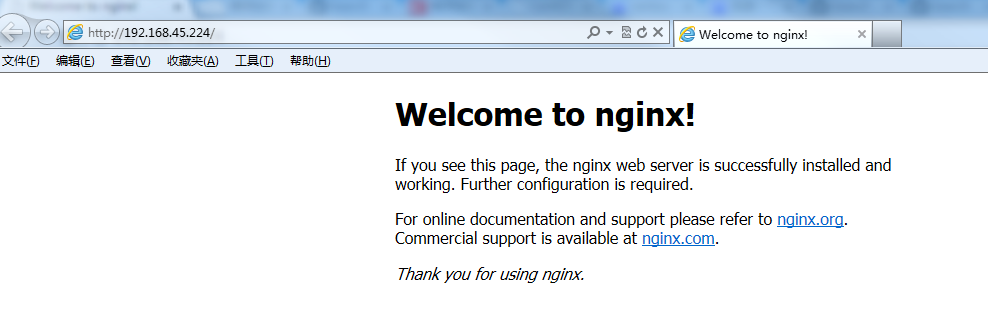\n\n---\n\n## Nginx 其他命令\n\n以下包含了 Nginx 常用的几个命令:\n\n\n\n\`\`\`\n\n/usr/local/webserver/nginx/sbin/nginx -s reload # 重新载入配置文件\n/usr/local/webserver/nginx/sbin/nginx -s reopen # 重启 Nginx\n/usr/local/webserver/nginx/sbin/nginx -s stop # 停止 Nginx\n\n\`\`\`\n\n\n \n \n \n \n \n\n \n \n [ MySQL 安装配置](http://www.runoob.com/linux/mysql-install-setup.html)\n \n\n \n \n \n \n \n\n\n\n\n\n \n## \n \n \n \n 4 篇笔记\n 写笔记\n\n\n\n\n\n \n\n #0 三好小青年\n\n 450***506@qq.com\n\n 6**worker_processes** 这个参数最好是设置成 auto 自动匹配进程数。\n\n\n语法:\n\n \n\`\`\`\nworker_processes number | auto;\n\`\`\`\n\n\nauto 在 nginx 1.3.8 和 1.2.5 之后的版本开始支持。\n\n\n默认:\n\n \n\n\`\`\`\nworker_processes 1;\n\`\`\`\n\n**proxy_next_upstream** 这个参数默认的是超时跟错误都会重发,对于一些请求时间过长的连接,最好只设置成错误重发,不然的话会造成二重数据。\n\n[三好小青年](https://www.runoob.comjavascript:;) 三好小青年\n\n 450***506@qq.com\n\n8年前 (2018-04-09)\n#0 alexanderonepills\n\n 840***717@qq.com\n\n [ 参考地址](https://www.cnblogs.com/cnsanshao/p/3652510.html)\n\n 13nginx 启动时提示错误:\n\n\n\n\n\`\`\`\n# /usr/local/nginx/sbin/nginx -t\n/usr/local/nginx/sbin/nginx: error while loading shared libraries: libpcre.so.1: cannot open shared object file: No such file or directory\n\`\`\`\n\n\n解决方法:\n\n\n64 位系统:\n\n\n\n\`\`\`\nln -s /usr/local/lib/libpcre.so.1 /lib64\n\`\`\`\n\n32 位系统:\n\n\n\n\`\`\`\nln -s /usr/local/lib/libpcre.so.1 /lib\n\`\`\`\n \n\n/usr/local/lib/libpcre.so.1 为 prce 安装后的文件地址。\n\n\n低版本 prce 对应的 libpcre.so.1 为 libpcre.so.0。\n\n[alexanderonepills](https://www.runoob.comjavascript:;) alexanderonepills\n\n 840***717@qq.com\n\n [ 参考地址](https://www.cnblogs.com/cnsanshao/p/3652510.html)\n\n8年前 (2018-05-02)\n#0 匿名者\n\n gra***ang@fibocom.com\n\n 21\n## 关于 uri 的截取\n\n\n**location 中的 root 和 alias**\n\n\n\n- \nroot 指令只是将搜索的根设置为 root 设定的目录,即不会截断 uri,而是使用原始 uri 跳转该目录下查找文件\n\n- \naias 指令则会截断匹配的 uri,然后使用 alias 设定的路径加上剩余的 uri 作为子路径进行查找\n\n\n示例 1:root\n\n\n\n\n\`\`\`\n#------------目录结构----------\n/www/x1/index.html\n/www/x2/index.html\n\n#--------配置-----------------------\nindex index.html index.php;\nlocation /x/ {\n root "/www/";\n}\n\n#-------访问--------------\ncurl http://localhost/x1/index.html\ncurl http://localhost/x2/index.html\n\`\`\`\n\n\n示例 2:alias\n\n\n\n\n\`\`\`\n#----------配置-----------------\nlocation /y/z/ {\n alias /www/x1/;\n}\n\n#---------访问--------------\ncurl http://localhost/y/z/index.html\n\`\`\`\n\n**location 中的 proxy_pass 的 uri**\n\n\n\n如果 proxy_pass 的 url 不带 uri\n\n\n\n如果尾部是"/",则会截断匹配的uri\n\n\n\n如果尾部不是"/",则不会截断匹配的uri\n\n\n\n如果proxy_pass的url带uri,则会截断匹配的uri\n\n\n\n示例:\n\n\n\n\n\`\`\`\n#-------servers配置--------------------\nlocation / {\n echo $uri #回显请求的uri\n}\n\n#--------proxy_pass配置---------------------\nlocation /t1/ { proxy_pass http://servers; } #正常,不截断\nlocation /t2/ { proxy_pass http://servers/; } #正常,截断\nlocation /t3 { proxy_pass http://servers; } #正常,不截断\nlocation /t4 { proxy_pass http://servers/; } #正常,截断\nlocation /t5/ { proxy_pass http://servers/test/; } #正常,截断\nlocation /t6/ { proxy_pass http://servers/test; } #缺"/",截断\nlocation /t7 { proxy_pass http://servers/test/; } #含"//",截断\nlocation /t8 { proxy_pass http://servers/test; } #正常,截断\n#---------访问----------------------\nfor i in $(seq 6)\ndo\n url=http://localhost/t$i/doc/index.html\n echo "-----------$url-----------"\n curl url\ndone\n\n#--------结果---------------------------\n----------http://localhost:8080/t1/doc/index.html------------\n/t1/doc/index.html\n\n----------http://localhost:8080/t2/doc/index.html------------\n/doc/index.html\n\n----------http://localhost:8080/t3/doc/index.html------------\n/t3/doc/index.html\n\n----------http://localhost:8080/t4/doc/index.html------------\n/doc/index.html\n\n----------http://localhost:8080/t5/doc/index.html------------\n/test/doc/index.html\n\n----------http://localhost:8080/t6/doc/index.html------------\n/testdoc/index.html\n\n----------http://localhost:8080/t7/doc/index.html------------\n/test//doc/index.html\n\n----------http://localhost:8080/t8/doc/index.html------------\n/test/doc/index.html\n\`\`\`\n\n\n[匿名者](https://www.runoob.com/note/29162) 匿名者\n\n gra***ang@fibocom.com\n\n8年前 (2018-07-05)\n#0 Rls\n\n 892***40967@qq.com\n\n [ 参考地址](https://www.runoob.com/w3cnote/nginx-setup-intro.html)\n\n 38**Nginx 配置文件结构**\n\n\n默认的 nginx 配置文件 nginx.conf 内容如下:\n\n\n\n\`\`\`\n#user nobody;\nworker_processes 1;\n\n#error_log logs/error.log;\n#error_log logs/error.log notice;\n#error_log logs/error.log info;\n\n#pid logs/nginx.pid;\n\n\nevents {\n worker_connections 1024;\n}\n\n\nhttp {\n include mime.types;\n default_type application/octet-stream;\n\n #log_format main \'$remote_addr - $remote_user [$time_local] "$request" \'\n # \'$status $body_bytes_sent "$http_referer" \'\n # \'"$http_user_agent" "$http_x_forwarded_for"\';\n\n #access_log logs/access.log main;\n\n sendfile on;\n #tcp_nopush on;\n\n #keepalive_timeout 0;\n keepalive_timeout 65;\n\n #gzip on;\n\n server {\n listen 80;\n server_name localhost;\n\n #charset koi8-r;\n\n #access_log logs/host.access.log main;\n\n location / {\n root html;\n index index.html index.htm;\n }\n\n #error_page 404 /404.html;\n\n # redirect server error pages to the static page /50x.html\n #\n error_page 500 502 503 504 /50x.html;\n location = /50x.html {\n root html;\n }\n\n # proxy the PHP scripts to Apache listening on 127.0.0.1:80\n #\n #location ~ \\.php$ {\n # proxy_pass http://127.0.0.1;\n #}\n\n # pass the PHP scripts to FastCGI server listening on 127.0.0.1:9000\n #\n #location ~ \\.php$ {\n # root html;\n # fastcgi_pass 127.0.0.1:9000;\n # fastcgi_index index.php;\n # fastcgi_param SCRIPT_FILENAME /scripts$fastcgi_script_name;\n # include fastcgi_params;\n #}\n\n # deny access to .htaccess files, if Apache\'s document root\n # concurs with nginx\'s one\n #\n #location ~ /\\.ht {\n # deny all;\n #}\n }\n\n\n # another virtual host using mix of IP-, name-, and port-based configuration\n #\n #server {\n # listen 8000;\n # listen somename:8080;\n # server_name somename alias another.alias;\n\n # location / {\n # root html;\n # index index.html index.htm;\n # }\n #}\n\n\n # HTTPS server\n #\n #server {\n # listen 443 ssl;\n # server_name localhost;\n\n # ssl_certificate cert.pem;\n # ssl_certificate_key cert.key;\n\n # ssl_session_cache shared:SSL:1m;\n # ssl_session_timeout 5m;\n\n # ssl_ciphers HIGH:!aNULL:!MD5;\n # ssl_prefer_server_ciphers on;\n\n # location / {\n # root html;\n # index index.html index.htm;\n # }\n #}\n\n}\n\`\`\`\n\n\n**nginx 文件结构**\n\n\n\n\n\`\`\`\n... #全局块\n\nevents { #events块\n ...\n}\n\nhttp #http块\n{\n ... #http全局块\n server #server块\n { \n ... #server全局块\n location [PATTERN] #location块\n {\n ...\n }\n location [PATTERN] \n {\n ...\n }\n }\n server\n {\n ...\n }\n ... #http全局块\n}\n\`\`\`\n\n\n- \n1、**全局块**:配置影响nginx全局的指令。一般有运行nginx服务器的用户组,nginx进程pid存放路径,日志存放路径,配置文件引入,允许生成worker process数等。\n\n- \n2、**events块**:配置影响nginx服务器或与用户的网络连接。有每个进程的最大连接数,选取哪种事件驱动模型处理连接请求,是否允许同时接受多个网路连接,开启多个网络连接序列化等。\n\n- \n3、**http块**:可以嵌套多个server,配置代理,缓存,日志定义等绝大多数功能和第三方模块的配置。如文件引入,mime-type定义,日志自定义,是否使用sendfile传输文件,连接超时时间,单连接请求数等。\n\n- \n4、**server块**:配置虚拟主机的相关参数,一个http中可以有多个server。\n\n- \n5、**location块**:配置请求的路由,以及各种页面的处理情况。\n\n\n下面给大家上一个配置文件,作为理解。\n\n\`\`\`\n\n########### 每个指令必须有分号结束。#################\n#user administrator administrators; #配置用户或者组,默认为nobody nobody。\n#worker_processes 2; #允许生成的进程数,默认为1\n#pid /nginx/pid/nginx.pid; #指定nginx进程运行文件存放地址\nerror_log log/error.log debug; #制定日志路径,级别。这个设置可以放入全局块,http块,server块,级别以此为:debug|info|notice|warn|error|crit|alert|emerg\nevents {\n accept_mutex on; #设置网路连接序列化,防止惊群现象发生,默认为on\n multi_accept on; #设置一个进程是否同时接受多个网络连接,默认为off\n #use epoll; #事件驱动模型,select|poll|kqueue|epoll|resig|/dev/poll|eventport\n worker_connections 1024; #最大连接数,默认为512\n}\nhttp {\n include mime.types; #文件扩展名与文件类型映射表\n default_type application/octet-stream; #默认文件类型,默认为text/plain\n #access_log off; #取消服务日志 \n log_format myFormat \'$remote_addr–$remote_user [$time_local] $request $status $body_bytes_sent $http_referer $http_user_agent $http_x_forwarded_for\'; #自定义格式\n access_log log/access.log myFormat; #combined为日志格式的默认值\n sendfile on; #允许sendfile方式传输文件,默认为off,可以在http块,server块,location块。\n sendfile_max_chunk 100k; #每个进程每次调用传输数量不能大于设定的值,默认为0,即不设上限。\n keepalive_timeout 65; #连接超时时间,默认为75s,可以在http,server,location块。\n\n upstream mysvr { \n server 127.0.0.1:7878;\n server 192.168.10.121:3333 backup; #热备\n }\n error_page 404 https://www.baidu.com; #错误页\n server {\n keepalive_requests 120; #单连接请求上限次数。\n listen 4545; #监听端口\n server_name 127.0.0.1; #监听地址 \n location ~*^.+$ { #请求的url过滤,正则匹配,~为区分大小写,~*为不区分大小写。\n #root path; #根目录\n #index vv.txt; #设置默认页\n proxy_pass http://mysvr; #请求转向mysvr 定义的服务器列表\n deny 127.0.0.1; #拒绝的ip\n allow 172.18.5.54; #允许的ip \n } \n }\n}\n\`\`\`\n\n\n上面是nginx的基本配置,需要注意的有以下几点:\n\n\n\n1、几个常见配置项:\n\n- \n1.$remote_addr 与 $http_x_forwarded_for 用以记录客户端的ip地址;\n- \n2.$remote_user :用来记录客户端用户名称;\n- \n3.$time_local : 用来记录访问时间与时区;\n- \n4.$request : 用来记录请求的url与http协议;\n- \n5.$status : 用来记录请求状态;成功是200;\n- \n6.$body_bytes_s ent :记录发送给客户端文件主体内容大小;\n- \n7.$http_referer :用来记录从那个页面链接访问过来的;\n- \n8.$http_user_agent :记录客户端浏览器的相关信息;\n\n\n2、惊群现象:一个网路连接到来,多个睡眠的进程被同事叫醒,但只有一个进程能获得链接,这样会影响系统性能。\n\n\n\n3、每个指令必须有分号结束。\n\n[Rls](https://www.runoob.com/note/34639) Rls\n\n 892***40967@qq.com\n\n [ 参考地址](https://www.runoob.com/w3cnote/nginx-setup-intro.html)\n\n8年前 (2018-08-31)\n \n\n \n \n\n \n \n \n### 点我分享笔记\n\n \n \n \n \n \n \n [取消](https://www.runoob.comjavascript:;)\n\n\n \n \n \n \n \n \n\n\n 分享笔记\n \n \n \n \n \n \n\n 昵称昵称 (必填)\n 邮箱邮箱 (必填)\n 引用地址引用地址\n \n\n \n \n \n \n\n \n \n\n\n\n\n\n\n\n\n\n \n\n \n\n\n\n\n\n\n \n \n \n \n \n \n\n\n \n \n \n \n \n \n \n \n \n\n\n\n\n\n 在线实例\n\n\n ·[HTML 实例](https://www.runoob.com/html/html-examples.html)\n\n\n ·[CSS 实例](https://www.runoob.com/css/css-examples.html)\n\n\n ·[JavaScript 实例](https://www.runoob.com/js/js-examples.html)\n\n\n ·[Ajax 实例](https://www.runoob.com/ajx/ajax-examples.html)\n\n\n ·[jQuery 实例](https://www.runoob.com/jquery/jquery-examples.html)\n\n\n ·[XML 实例](https://www.runoob.com/xml/xml-examples.html)\n\n\n ·[Java 实例](https://www.runoob.com/java/java-examples.html)\n\n\n\n\n\n 字符集&工具\n\n\n · [HTML 字符集设置](https://www.runoob.com/charsets/html-charsets.html)\n\n\n · [HTML ASCII 字符集](https://www.runoob.com/tags/html-ascii.html)\n\n\n · [JS 混淆/加密](https://www.jyshare.com/front-end/6939/)\n\n\n · [PNG/JPEG 图片压缩](https://www.jyshare.com/front-end/6232/)\n\n\n · [HTML 拾色器](https://www.runoob.com/tags/html-colorpicker.html)\n\n\n · [JSON 格式化工具](https://www.jyshare.com/front-end/53)\n\n\n · [随机数生成器](https://www.jyshare.com/front-end/6680/)\n\n\n\n\n 最新更新\n\n\n ·\n [\n OpenCode 自定义... ](http://www.runoob.com/opencode/opencode-custom-tools.html)\n\n\n ·\n [\n OpenCode Skills ](http://www.runoob.com/opencode/opencode-skills.html)\n\n\n ·\n [\n OpenCode MCP 服... ](http://www.runoob.com/opencode/opencode-mcp.html)\n\n\n ·\n [\n OpenCode LSP 服... ](http://www.runoob.com/opencode/opencode-lsp.html)\n\n\n ·\n [\n OpenCode 权限配置 ](http://www.runoob.com/opencode/opencode-permissions.html)\n\n\n ·\n [\n OpenCode 格式化... ](http://www.runoob.com/opencode/opencode-formatter.html)\n\n\n ·\n [\n OpenCode 自定义... ](http://www.runoob.com/opencode/opencode-commands.html)\n\n\n\n\n 站点信息\n\n\n ·\n [意见反馈](https://www.runoob.commailto:admin@runoob.com)\n\n\n ·\n [免责声明](https://www.runoob.com/disclaimer)\n\n\n ·\n [关于我们](https://www.runoob.com/aboutus)\n\n\n ·\n [文章归档](https://www.runoob.com/archives)\n\n\n\n\n\n\n\n **关注微信**\n\n\n\n \n\n\n\n\n\n\n Copyright © 2013-2026 **[菜鸟教程](https://www.runoob.com//www.runoob.com/)** \n **[runoob.com](https://www.runoob.com//www.runoob.com/)** All Rights Reserved. 备案号:[闽ICP备15012807号-1](https://beian.miit.gov.cn/)\n\n\n\n [ ](https://www.runoob.comjavascript:void(0))\n [](https://www.runoob.comjavascript:void(0))\n [](https://www.runoob.comjavascript:void(0))\n\n\n\n#### 微信关注\n\n `;
document.getElementById('md-content').innerHTML = marked.parse(md);
</script>
</body>
</html>