-
Notifications
You must be signed in to change notification settings - Fork 1
Expand file tree
/
Copy path6.html
More file actions
273 lines (273 loc) · 16.9 KB
/
Copy path6.html
File metadata and controls
273 lines (273 loc) · 16.9 KB
1
2
3
4
5
6
7
8
9
10
11
12
13
14
15
16
17
18
19
20
21
22
23
24
25
26
27
28
29
30
31
32
33
34
35
36
37
38
39
40
41
42
43
44
45
46
47
48
49
50
51
52
53
54
55
56
57
58
59
60
61
62
63
64
65
66
67
68
69
70
71
72
73
74
75
76
77
78
79
80
81
82
83
84
85
86
87
88
89
90
91
92
93
94
95
96
97
98
99
100
101
102
103
104
105
106
107
108
109
110
111
112
113
114
115
116
117
118
119
120
121
122
123
124
125
126
127
128
129
130
131
132
133
134
135
136
137
138
139
140
141
142
143
144
145
146
147
148
149
150
151
152
153
154
155
156
157
158
159
160
161
162
163
164
165
166
167
168
169
170
171
172
173
174
175
176
177
178
179
180
181
182
183
184
185
186
187
188
189
190
191
192
193
194
195
196
197
198
199
200
201
202
203
204
205
206
207
208
209
210
211
212
213
214
215
216
217
218
219
220
221
222
223
224
225
226
227
228
229
230
231
232
233
234
235
236
237
238
239
240
241
242
243
244
245
246
247
248
249
250
251
252
253
254
255
256
257
258
259
260
261
262
263
264
265
266
267
268
269
270
271
272
273
<!doctype html>
<html lang="zh-CN">
<head>
<meta charset="utf-8" />
<meta name="viewport" content="width=device-width, initial-scale=1" />
<meta name="description" content="CodeClub - Docker Hello World" />
<meta name="author" content="Jackson" />
<title>Docker Hello World - CodeClub</title>
<link rel="icon" type="image/x-icon" href="../../img/logo.png" />
<link rel="preconnect" href="https://fonts.googleapis.com" />
<link rel="preconnect" href="https://fonts.gstatic.com" crossorigin />
<link
href="https://fonts.googleapis.com/css2?family=Inter:wght@300;400;500;600;700&display=swap"
rel="stylesheet"
/>
<link
rel="stylesheet"
href="https://cdnjs.cloudflare.com/ajax/libs/font-awesome/6.5.1/css/all.min.css"
crossorigin="anonymous"
referrerpolicy="no-referrer"
/>
<link rel="stylesheet" href="../../css/main.css" />
<link rel="stylesheet" href="../../css/dark-mode.css" />
<link rel="stylesheet" href="../../css/mobile-optimizations.css" />
<script src="https://cdnjs.cloudflare.com/ajax/libs/marked/12.0.0/marked.min.js"></script>
<style>
.tutorial-page {
max-width: 1200px;
margin: 70px auto 40px;
padding: 0 20px;
display: flex;
gap: 20px;
}
.tutorial-sidebar {
width: 240px;
flex-shrink: 0;
position: sticky;
top: 70px;
max-height: calc(100vh - 90px);
overflow-y: auto;
background: var(--bg-secondary, #fff);
border-radius: 8px;
padding: 16px;
box-shadow: 0 2px 8px rgba(0, 0, 0, 0.08);
}
.tutorial-sidebar h3 {
font-size: 15px;
margin: 0 0 12px;
color: var(--text-primary, #1a1a2e);
padding-bottom: 8px;
border-bottom: 2px solid var(--primary, #3b82f6);
}
.tutorial-sidebar a {
display: block;
padding: 5px 8px;
color: var(--text-secondary, #666);
text-decoration: none;
font-size: 13px;
border-radius: 4px;
line-height: 1.4;
}
.tutorial-sidebar a:hover {
background: var(--primary, #3b82f6);
color: #fff;
}
.tutorial-sidebar a.active {
background: var(--primary, #3b82f6);
color: #fff;
font-weight: 600;
}
.tutorial-main {
flex: 1;
min-width: 0;
}
.tutorial-article {
background: var(--bg-secondary, #fff);
border-radius: 8px;
padding: 32px;
box-shadow: 0 2px 8px rgba(0, 0, 0, 0.08);
}
.tutorial-article h1 {
font-size: 26px;
margin-bottom: 16px;
color: var(--text-primary, #1a1a2e);
border-bottom: 2px solid var(--primary, #3b82f6);
padding-bottom: 12px;
}
.markdown-body {
font-size: 15px;
line-height: 1.8;
color: var(--text-secondary, #333);
}
.markdown-body h1 {
font-size: 24px;
border-bottom: 1px solid var(--border, #e5e7eb);
padding-bottom: 8px;
}
.markdown-body h2 {
font-size: 20px;
border-bottom: 1px solid var(--border, #e5e7eb);
padding-bottom: 6px;
}
.markdown-body h3 {
font-size: 17px;
}
.markdown-body pre {
background: #1e1e2e;
color: #cdd6f4;
padding: 16px;
border-radius: 8px;
overflow-x: auto;
}
.markdown-body code {
font-family: 'Fira Code', 'Cascadia Code', monospace;
font-size: 14px;
}
.markdown-body p code {
background: #f1f5f9;
padding: 2px 6px;
border-radius: 4px;
color: #e83e8c;
}
.markdown-body blockquote {
border-left: 4px solid var(--primary, #3b82f6);
padding: 12px 20px;
margin: 16px 0;
background: #f8fafc;
border-radius: 0 8px 8px 0;
}
.markdown-body img {
max-width: 100%;
border-radius: 8px;
}
.markdown-body table {
border-collapse: collapse;
width: 100%;
margin: 16px 0;
}
.markdown-body table th,
.markdown-body table td {
border: 1px solid var(--border, #e5e7eb);
padding: 8px 12px;
text-align: left;
}
.markdown-body table th {
background: var(--bg-primary, #f8fafc);
font-weight: 600;
}
.markdown-body table tr:nth-child(2n) {
background: var(--bg-primary, #f8fafc);
}
.markdown-body ul,
.markdown-body ol {
padding-left: 24px;
margin: 12px 0;
}
.markdown-body li {
margin: 4px 0;
}
.markdown-body hr {
border: none;
border-top: 1px solid var(--border, #e5e7eb);
margin: 24px 0;
}
.markdown-body a {
color: var(--primary, #3b82f6);
text-decoration: none;
}
.markdown-body a:hover {
text-decoration: underline;
}
.page-navigation {
display: flex;
justify-content: space-between;
margin-top: 24px;
padding-top: 16px;
border-top: 1px solid var(--border, #e5e7eb);
}
.page-nav-link {
color: var(--primary, #3b82f6);
text-decoration: none;
font-weight: 500;
font-size: 14px;
}
.page-nav-link:hover {
text-decoration: underline;
}
.source-link {
margin-top: 16px;
font-size: 13px;
color: var(--text-secondary, #999);
}
.source-link a {
color: var(--primary, #3b82f6);
}
@media (max-width: 768px) {
.tutorial-page {
flex-direction: column;
}
.tutorial-sidebar {
width: 100%;
position: static;
max-height: 200px;
}
}
</style>
</head>
<body>
<nav class="navbar">
<div class="navbar-container">
<a class="navbar-brand" href="../../index.html">
<img src="../../img/logo.png" alt="CodeClub" width="32" height="32" />
<span>CodeClub</span>
</a>
<button class="mobile-menu-toggle" aria-label="切换导航菜单"><span></span><span></span><span></span></button>
<ul class="navbar-nav">
<li><a class="nav-link" href="../../index.html">首页</a></li>
<li><a class="nav-link" href="../../nav.html">网址导航</a></li>
<li><a class="nav-link" href="../../blog/">博客</a></li>
<li><a class="nav-link" href="../../wiki/index.html" target="_blank">WiKi</a></li>
<li><a class="nav-link active" href="../index.html">教程</a></li>
<li><a class="nav-link" href="../../book.html">图书</a></li>
<li><a class="nav-link" href="../../contact.html">联系我</a></li>
<li><a class="nav-link" href="../../about.html">关于我</a></li>
</ul>
</div>
</nav>
<div class="tutorial-page">
<div class="tutorial-sidebar">
<h3>📖 Docker</h3>
<a href="0.html">Docker 教程</a>
<a href="1.html">Docker Desktop</a>
<a href="2.html">Ubuntu Docker 安装</a>
<a href="3.html">CentOS Docker 安装</a>
<a href="4.html">Windows Docker 安装</a>
<a href="5.html">Docker 镜像加速</a>
<a href="6.html" class="active">Docker Hello World</a>
<a href="7.html">Docker 容器使用</a>
<a href="8.html">Docker 镜像使用</a>
<a href="9.html">Docker 容器连接</a>
<a href="10.html">Docker 安装 Nginx</a>
<a href="11.html">Docker 安装 PHP</a>
<a href="12.html">Docker 安装 MySQL</a>
<a href="13.html">Docker 安装 Tomcat</a>
<a href="14.html">Docker 安装 Python</a>
<a href="15.html">Docker 安装 Redis</a>
<a href="16.html">Docker 安装 MongoDB</a>
<a href="17.html">Docker 安装 Apache</a>
<a href="18.html">Docker 命令大全</a>
<a href="19.html">Docker 资源汇总</a>
</div>
<div class="tutorial-main">
<div class="tutorial-article">
<div class="markdown-body" id="md-content"></div>
<div class="page-navigation">
<a href="5.html" class="page-nav-link">← Docker 镜像加速</a>
<a href="7.html" class="page-nav-link">Docker 容器使用 →</a>
</div>
<div class="source-link">原文来源:<a href="https://www.runoob.com" target="_blank">菜鸟教程</a></div>
</div>
</div>
</div>
<footer class="footer">
<div class="footer-content"><p>© 2024 CodeClub. All rights reserved.</p></div>
</footer>
<script src="../../js/dark-mode.js"></script>
<script src="../../js/mobile-menu.js"></script>
<script>
const md = `# Docker Hello World\n\nDocker 允许你在容器内运行应用程序, 使用 **docker run** 命令来在容器内运行一个应用程序。\n\n\n\n输出Hello world\n\n\n\n\`\`\`\n\nrunoob@runoob:~$ docker run ubuntu:15.10 /bin/echo "Hello world"\nHello world\n\n\`\`\`\n\n\n\n\n各个参数解析:\n\n\n\n- \n**docker:** Docker 的二进制执行文件。\n\n- \n**run:** 与前面的 docker 组合来运行一个容器。\n\n- \n**ubuntu:15.10** 指定要运行的镜像,Docker 首先从本地主机上查找镜像是否存在,如果不存在,Docker 就会从镜像仓库 Docker Hub 下载公共镜像。\n\n- \n**/bin/echo "Hello world": **在启动的容器里执行的命令\n\n\n\n以上命令完整的意思可以解释为:Docker 以 ubuntu15.10 镜像创建一个新容器,然后在容器里执行 bin/echo "Hello world",然后输出结果。\n\n\n\n\n---\n\n\n## 运行交互式的容器\n\n我们通过 docker 的两个参数 -i -t,让 docker 运行的容器实现**"对话"**的能力:\n\n\n\n\`\`\`\n\nrunoob@runoob:~$ docker run -i -t ubuntu:15.10 /bin/bash\nroot@0123ce188bd8:/#\n\n\`\`\`\n\n\n各个参数解析:\n\n\n\n- \n**-t:** 在新容器内指定一个伪终端或终端。\n\n- \n**-i:** 允许你对容器内的标准输入 (STDIN) 进行交互。\n\n\n\n注意第二行 root@0123ce188bd8:/#,此时我们已进入一个 ubuntu15.10 系统的容器\n\n\n\n我们尝试在容器中运行命令** cat /proc/version**和**ls**分别查看当前系统的版本信息和当前目录下的文件列表\n\n\n\n\`\`\`\nroot@0123ce188bd8:/# cat /proc/version\nLinux version 4.4.0-151-generic (buildd@lgw01-amd64-043) (gcc version 5.4.0 20160609 (Ubuntu 5.4.0-6ubuntu1~16.04.10) ) #178-Ubuntu SMP Tue Jun 11 08:30:22 UTC 2019\nroot@0123ce188bd8:/# ls\nbin boot dev etc home lib lib64 media mnt opt proc root run sbin srv sys tmp usr var\nroot@0123ce188bd8:/#\n\`\`\`\n\n我们可以通过运行 exit 命令或者使用 CTRL+D 来退出容器。\n\n\n\n\`\`\`\nroot@0123ce188bd8:/# exit\nexit\nroot@runoob:~#\n\`\`\`\n\n注意第三行中 root@runoob:~# 表明我们已经退出了当前的容器,返回到当前的主机中。\n\n\n\n---\n\n\n## 启动容器(后台模式)\n\n使用以下命令创建一个以进程方式运行的容器\n\n\n\n\`\`\`\n\nrunoob@runoob:~$ docker run -d ubuntu:15.10 /bin/sh -c "while true; do echo hello world; sleep 1; done"\n2b1b7a428627c51ab8810d541d759f072b4fc75487eed05812646b8534a2fe63\n\n\`\`\`\n\n在输出中,我们没有看到期望的 "hello world",而是一串长字符\n\n\n**2b1b7a428627c51ab8810d541d759f072b4fc75487eed05812646b8534a2fe63**\n\n\n这个长字符串叫做容器 ID,对每个容器来说都是唯一的,我们可以通过容器 ID 来查看对应的容器发生了什么。\n\n\n\n首先,我们需要确认容器有在运行,可以通过 **docker ps** 来查看:\n\n\n\n\`\`\`\n\nrunoob@runoob:~$ docker ps\nCONTAINER ID IMAGE COMMAND ... \n5917eac21c36 ubuntu:15.10 "/bin/sh -c \'while t…" ...\n\n\`\`\`\n\n输出详情介绍:\n\n\n**CONTAINER ID:** 容器 ID。\n\n\n**IMAGE:** 使用的镜像。\n\n\n\n**COMMAND:** 启动容器时运行的命令。\n\n\n**CREATED:** 容器的创建时间。\n\n\n\n**STATUS:** 容器状态。\n\n\n状态有7种:\n\n\n\n- \ncreated(已创建)\n- \nrestarting(重启中)\n- \nrunning 或 Up(运行中)\n- \nremoving(迁移中)\n- \npaused(暂停)\n- \nexited(停止)\n- \ndead(死亡)\n\n\n**PORTS:** 容器的端口信息和使用的连接类型(tcp\\udp)。\n\n\n**NAMES:** 自动分配的容器名称。\n\n\n在宿主主机内使用 docker logs 命令,查看容器内的标准输出:\n\n\n\n\`\`\`\n\nrunoob@runoob:~$ docker logs 2b1b7a428627\n\n\`\`\`\n\n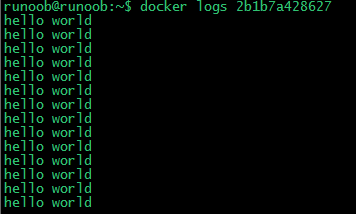\n\n\n\n\`\`\`\n\nrunoob@runoob:~$ docker logs amazing_cori\n\n\`\`\`\n\n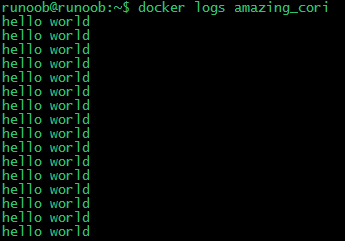\n\n\n\n---\n\n\n## 停止容器\n\n我们使用 **docker stop** 命令来停止容器:\n\n\n\n\n\n通过 docker ps 查看,容器已经停止工作:\n\n\n\n\`\`\`\n\nrunoob@runoob:~$ docker ps\n\n\`\`\`\n\n可以看到容器已经不在了。\n\n\n也可以用下面的命令来停止:\n\n\n\n\`\`\`\n\nrunoob@runoob:~$ docker stop amazing_cori\n\n\`\`\`\n\n \n \n \n \n \n\n \n \n [ Ubuntu Docker 安装](http://www.runoob.com/docker/ubuntu-docker-install.html)\n \n\n \n \n \n \n \n\n\n\n\n \n \n \n### 点我分享笔记\n\n \n \n \n \n \n \n [取消](https://www.runoob.comjavascript:;)\n\n\n \n \n \n \n \n \n\n\n 分享笔记\n \n \n \n \n \n \n\n 昵称昵称 (必填)\n 邮箱邮箱 (必填)\n 引用地址引用地址\n \n\n \n \n \n \n\n \n \n\n\n\n\n\n\n\n\n\n \n\n \n\n\n\n\n\n\n \n \n \n \n \n \n\n\n \n \n \n \n \n \n \n \n \n\n\n\n\n\n 在线实例\n\n\n ·[HTML 实例](https://www.runoob.com/html/html-examples.html)\n\n\n ·[CSS 实例](https://www.runoob.com/css/css-examples.html)\n\n\n ·[JavaScript 实例](https://www.runoob.com/js/js-examples.html)\n\n\n ·[Ajax 实例](https://www.runoob.com/ajx/ajax-examples.html)\n\n\n ·[jQuery 实例](https://www.runoob.com/jquery/jquery-examples.html)\n\n\n ·[XML 实例](https://www.runoob.com/xml/xml-examples.html)\n\n\n ·[Java 实例](https://www.runoob.com/java/java-examples.html)\n\n\n\n\n\n 字符集&工具\n\n\n · [HTML 字符集设置](https://www.runoob.com/charsets/html-charsets.html)\n\n\n · [HTML ASCII 字符集](https://www.runoob.com/tags/html-ascii.html)\n\n\n · [JS 混淆/加密](https://www.jyshare.com/front-end/6939/)\n\n\n · [PNG/JPEG 图片压缩](https://www.jyshare.com/front-end/6232/)\n\n\n · [HTML 拾色器](https://www.runoob.com/tags/html-colorpicker.html)\n\n\n · [JSON 格式化工具](https://www.jyshare.com/front-end/53)\n\n\n · [随机数生成器](https://www.jyshare.com/front-end/6680/)\n\n\n\n\n 最新更新\n\n\n ·\n [\n OpenCode 自定义... ](http://www.runoob.com/opencode/opencode-custom-tools.html)\n\n\n ·\n [\n OpenCode Skills ](http://www.runoob.com/opencode/opencode-skills.html)\n\n\n ·\n [\n OpenCode MCP 服... ](http://www.runoob.com/opencode/opencode-mcp.html)\n\n\n ·\n [\n OpenCode LSP 服... ](http://www.runoob.com/opencode/opencode-lsp.html)\n\n\n ·\n [\n OpenCode 权限配置 ](http://www.runoob.com/opencode/opencode-permissions.html)\n\n\n ·\n [\n OpenCode 格式化... ](http://www.runoob.com/opencode/opencode-formatter.html)\n\n\n ·\n [\n OpenCode 自定义... ](http://www.runoob.com/opencode/opencode-commands.html)\n\n\n\n\n 站点信息\n\n\n ·\n [意见反馈](https://www.runoob.commailto:admin@runoob.com)\n\n\n ·\n [免责声明](https://www.runoob.com/disclaimer)\n\n\n ·\n [关于我们](https://www.runoob.com/aboutus)\n\n\n ·\n [文章归档](https://www.runoob.com/archives)\n\n\n\n\n\n\n\n **关注微信**\n\n\n\n \n\n\n\n\n\n\n Copyright © 2013-2026 **[菜鸟教程](https://www.runoob.com//www.runoob.com/)** \n **[runoob.com](https://www.runoob.com//www.runoob.com/)** All Rights Reserved. 备案号:[闽ICP备15012807号-1](https://beian.miit.gov.cn/)\n\n\n\n [ ](https://www.runoob.comjavascript:void(0))\n [](https://www.runoob.comjavascript:void(0))\n [](https://www.runoob.comjavascript:void(0))\n\n\n\n#### 微信关注\n\n `;
document.getElementById('md-content').innerHTML = marked.parse(md);
</script>
</body>
</html>