-
Notifications
You must be signed in to change notification settings - Fork 1
Expand file tree
/
Copy path12.html
More file actions
273 lines (273 loc) · 12.4 KB
/
Copy path12.html
File metadata and controls
273 lines (273 loc) · 12.4 KB
1
2
3
4
5
6
7
8
9
10
11
12
13
14
15
16
17
18
19
20
21
22
23
24
25
26
27
28
29
30
31
32
33
34
35
36
37
38
39
40
41
42
43
44
45
46
47
48
49
50
51
52
53
54
55
56
57
58
59
60
61
62
63
64
65
66
67
68
69
70
71
72
73
74
75
76
77
78
79
80
81
82
83
84
85
86
87
88
89
90
91
92
93
94
95
96
97
98
99
100
101
102
103
104
105
106
107
108
109
110
111
112
113
114
115
116
117
118
119
120
121
122
123
124
125
126
127
128
129
130
131
132
133
134
135
136
137
138
139
140
141
142
143
144
145
146
147
148
149
150
151
152
153
154
155
156
157
158
159
160
161
162
163
164
165
166
167
168
169
170
171
172
173
174
175
176
177
178
179
180
181
182
183
184
185
186
187
188
189
190
191
192
193
194
195
196
197
198
199
200
201
202
203
204
205
206
207
208
209
210
211
212
213
214
215
216
217
218
219
220
221
222
223
224
225
226
227
228
229
230
231
232
233
234
235
236
237
238
239
240
241
242
243
244
245
246
247
248
249
250
251
252
253
254
255
256
257
258
259
260
261
262
263
264
265
266
267
268
269
270
271
272
273
<!doctype html>
<html lang="zh-CN">
<head>
<meta charset="utf-8" />
<meta name="viewport" content="width=device-width, initial-scale=1" />
<meta name="description" content="CodeClub - Docker 安装 MySQL" />
<meta name="author" content="Jackson" />
<title>Docker 安装 MySQL - CodeClub</title>
<link rel="icon" type="image/x-icon" href="../../img/logo.png" />
<link rel="preconnect" href="https://fonts.googleapis.com" />
<link rel="preconnect" href="https://fonts.gstatic.com" crossorigin />
<link
href="https://fonts.googleapis.com/css2?family=Inter:wght@300;400;500;600;700&display=swap"
rel="stylesheet"
/>
<link
rel="stylesheet"
href="https://cdnjs.cloudflare.com/ajax/libs/font-awesome/6.5.1/css/all.min.css"
crossorigin="anonymous"
referrerpolicy="no-referrer"
/>
<link rel="stylesheet" href="../../css/main.css" />
<link rel="stylesheet" href="../../css/dark-mode.css" />
<link rel="stylesheet" href="../../css/mobile-optimizations.css" />
<script src="https://cdnjs.cloudflare.com/ajax/libs/marked/12.0.0/marked.min.js"></script>
<style>
.tutorial-page {
max-width: 1200px;
margin: 70px auto 40px;
padding: 0 20px;
display: flex;
gap: 20px;
}
.tutorial-sidebar {
width: 240px;
flex-shrink: 0;
position: sticky;
top: 70px;
max-height: calc(100vh - 90px);
overflow-y: auto;
background: var(--bg-secondary, #fff);
border-radius: 8px;
padding: 16px;
box-shadow: 0 2px 8px rgba(0, 0, 0, 0.08);
}
.tutorial-sidebar h3 {
font-size: 15px;
margin: 0 0 12px;
color: var(--text-primary, #1a1a2e);
padding-bottom: 8px;
border-bottom: 2px solid var(--primary, #3b82f6);
}
.tutorial-sidebar a {
display: block;
padding: 5px 8px;
color: var(--text-secondary, #666);
text-decoration: none;
font-size: 13px;
border-radius: 4px;
line-height: 1.4;
}
.tutorial-sidebar a:hover {
background: var(--primary, #3b82f6);
color: #fff;
}
.tutorial-sidebar a.active {
background: var(--primary, #3b82f6);
color: #fff;
font-weight: 600;
}
.tutorial-main {
flex: 1;
min-width: 0;
}
.tutorial-article {
background: var(--bg-secondary, #fff);
border-radius: 8px;
padding: 32px;
box-shadow: 0 2px 8px rgba(0, 0, 0, 0.08);
}
.tutorial-article h1 {
font-size: 26px;
margin-bottom: 16px;
color: var(--text-primary, #1a1a2e);
border-bottom: 2px solid var(--primary, #3b82f6);
padding-bottom: 12px;
}
.markdown-body {
font-size: 15px;
line-height: 1.8;
color: var(--text-secondary, #333);
}
.markdown-body h1 {
font-size: 24px;
border-bottom: 1px solid var(--border, #e5e7eb);
padding-bottom: 8px;
}
.markdown-body h2 {
font-size: 20px;
border-bottom: 1px solid var(--border, #e5e7eb);
padding-bottom: 6px;
}
.markdown-body h3 {
font-size: 17px;
}
.markdown-body pre {
background: #1e1e2e;
color: #cdd6f4;
padding: 16px;
border-radius: 8px;
overflow-x: auto;
}
.markdown-body code {
font-family: 'Fira Code', 'Cascadia Code', monospace;
font-size: 14px;
}
.markdown-body p code {
background: #f1f5f9;
padding: 2px 6px;
border-radius: 4px;
color: #e83e8c;
}
.markdown-body blockquote {
border-left: 4px solid var(--primary, #3b82f6);
padding: 12px 20px;
margin: 16px 0;
background: #f8fafc;
border-radius: 0 8px 8px 0;
}
.markdown-body img {
max-width: 100%;
border-radius: 8px;
}
.markdown-body table {
border-collapse: collapse;
width: 100%;
margin: 16px 0;
}
.markdown-body table th,
.markdown-body table td {
border: 1px solid var(--border, #e5e7eb);
padding: 8px 12px;
text-align: left;
}
.markdown-body table th {
background: var(--bg-primary, #f8fafc);
font-weight: 600;
}
.markdown-body table tr:nth-child(2n) {
background: var(--bg-primary, #f8fafc);
}
.markdown-body ul,
.markdown-body ol {
padding-left: 24px;
margin: 12px 0;
}
.markdown-body li {
margin: 4px 0;
}
.markdown-body hr {
border: none;
border-top: 1px solid var(--border, #e5e7eb);
margin: 24px 0;
}
.markdown-body a {
color: var(--primary, #3b82f6);
text-decoration: none;
}
.markdown-body a:hover {
text-decoration: underline;
}
.page-navigation {
display: flex;
justify-content: space-between;
margin-top: 24px;
padding-top: 16px;
border-top: 1px solid var(--border, #e5e7eb);
}
.page-nav-link {
color: var(--primary, #3b82f6);
text-decoration: none;
font-weight: 500;
font-size: 14px;
}
.page-nav-link:hover {
text-decoration: underline;
}
.source-link {
margin-top: 16px;
font-size: 13px;
color: var(--text-secondary, #999);
}
.source-link a {
color: var(--primary, #3b82f6);
}
@media (max-width: 768px) {
.tutorial-page {
flex-direction: column;
}
.tutorial-sidebar {
width: 100%;
position: static;
max-height: 200px;
}
}
</style>
</head>
<body>
<nav class="navbar">
<div class="navbar-container">
<a class="navbar-brand" href="../../index.html">
<img src="../../img/logo.png" alt="CodeClub" width="32" height="32" />
<span>CodeClub</span>
</a>
<button class="mobile-menu-toggle" aria-label="切换导航菜单"><span></span><span></span><span></span></button>
<ul class="navbar-nav">
<li><a class="nav-link" href="../../index.html">首页</a></li>
<li><a class="nav-link" href="../../nav.html">网址导航</a></li>
<li><a class="nav-link" href="../../blog/">博客</a></li>
<li><a class="nav-link" href="../../wiki/index.html" target="_blank">WiKi</a></li>
<li><a class="nav-link active" href="../index.html">教程</a></li>
<li><a class="nav-link" href="../../book.html">图书</a></li>
<li><a class="nav-link" href="../../contact.html">联系我</a></li>
<li><a class="nav-link" href="../../about.html">关于我</a></li>
</ul>
</div>
</nav>
<div class="tutorial-page">
<div class="tutorial-sidebar">
<h3>📖 Docker</h3>
<a href="0.html">Docker 教程</a>
<a href="1.html">Docker Desktop</a>
<a href="2.html">Ubuntu Docker 安装</a>
<a href="3.html">CentOS Docker 安装</a>
<a href="4.html">Windows Docker 安装</a>
<a href="5.html">Docker 镜像加速</a>
<a href="6.html">Docker Hello World</a>
<a href="7.html">Docker 容器使用</a>
<a href="8.html">Docker 镜像使用</a>
<a href="9.html">Docker 容器连接</a>
<a href="10.html">Docker 安装 Nginx</a>
<a href="11.html">Docker 安装 PHP</a>
<a href="12.html" class="active">Docker 安装 MySQL</a>
<a href="13.html">Docker 安装 Tomcat</a>
<a href="14.html">Docker 安装 Python</a>
<a href="15.html">Docker 安装 Redis</a>
<a href="16.html">Docker 安装 MongoDB</a>
<a href="17.html">Docker 安装 Apache</a>
<a href="18.html">Docker 命令大全</a>
<a href="19.html">Docker 资源汇总</a>
</div>
<div class="tutorial-main">
<div class="tutorial-article">
<div class="markdown-body" id="md-content"></div>
<div class="page-navigation">
<a href="11.html" class="page-nav-link">← Docker 安装 PHP</a>
<a href="13.html" class="page-nav-link">Docker 安装 Tomcat →</a>
</div>
<div class="source-link">原文来源:<a href="https://www.runoob.com" target="_blank">菜鸟教程</a></div>
</div>
</div>
</div>
<footer class="footer">
<div class="footer-content"><p>© 2024 CodeClub. All rights reserved.</p></div>
</footer>
<script src="../../js/dark-mode.js"></script>
<script src="../../js/mobile-menu.js"></script>
<script>
const md = `# Docker 安装 MySQL\n\nMySQL 是世界上最受欢迎的开源数据库。凭借其可靠性、易用性和性能,MySQL 已成为 Web 应用程序的数据库优先选择。\n\n\n\n### \n1、查看可用的 MySQL 版本\n\n访问 MySQL 镜像库地址:[https://hub.docker.com/_/mysql?tab=tags](https://hub.docker.com/_/mysql?tab=tags) 。\n\n\n可以通过 Sort by 查看其他版本的 MySQL,默认是最新版本 **mysql:latest** 。\n\n\n[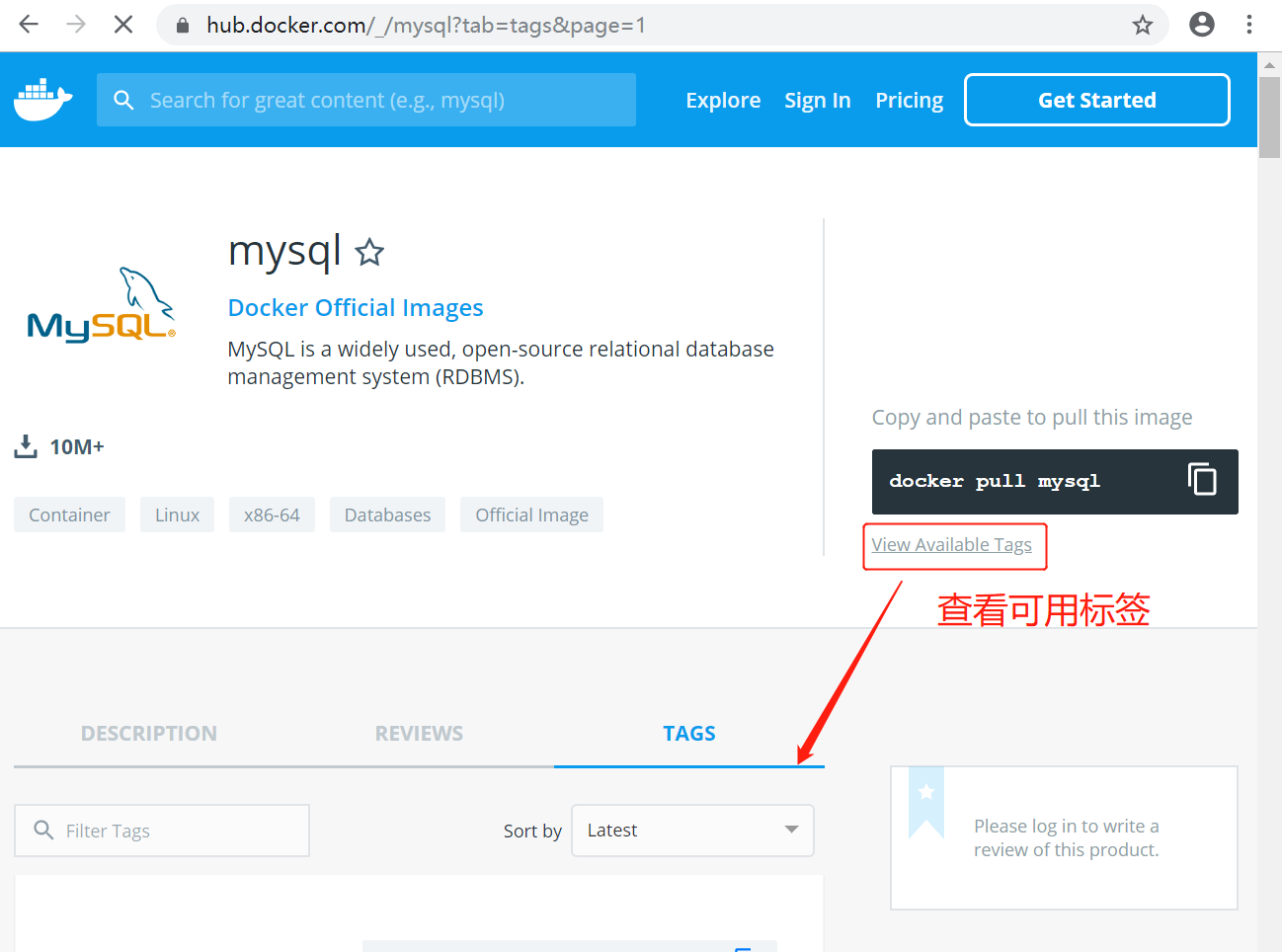](https://www.runoob.com/wp-content/uploads/2016/06/docker-mysql1.png)\n\n\n你也可以在下拉列表中找到其他你想要的版本:\n[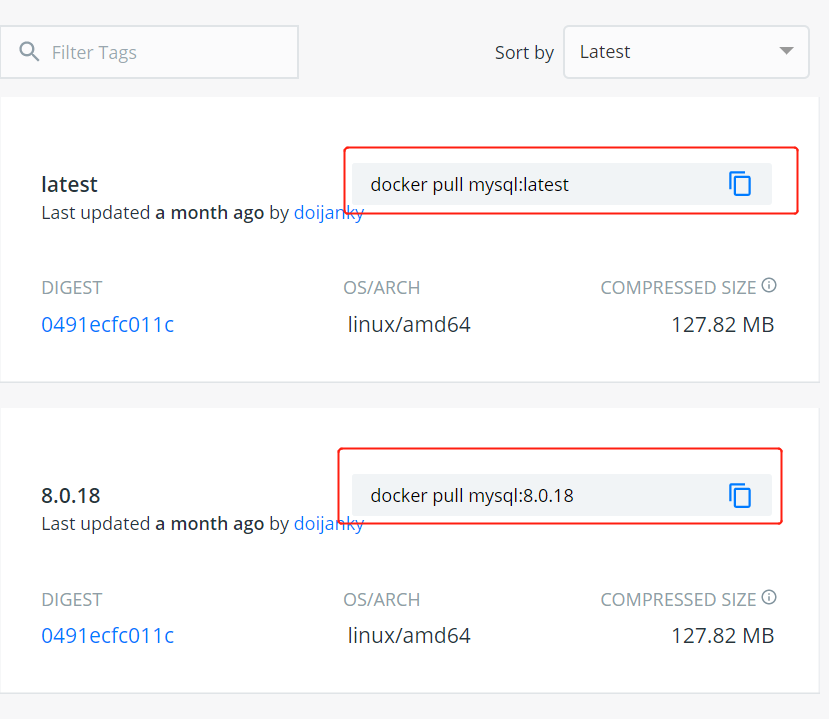](https://www.runoob.com/wp-content/uploads/2016/06/docker-mysql2.png)\n\n\n此外,我们还可以用 docker search mysql 命令来查看可用版本:\n\n\n\n\n\n\n\n\`\`\`\n\n$ docker search mysql\nNAME DESCRIPTION STARS OFFICIAL AUTOMATED\nmysql MySQL is a widely used, open-source relati... 2529 [OK] \nmysql/mysql-server Optimized MySQL Server Docker images. Crea... 161 [OK]\ncenturylink/mysql Image containing mysql. Optimized to be li... 45 [OK]\nsameersbn/mysql 36 [OK]\ngoogle/mysql MySQL server for Google Compute Engine 16 [OK]\nappcontainers/mysql Centos/Debian Based Customizable MySQL Con... 8 [OK]\nmarvambass/mysql MySQL Server based on Ubuntu 14.04 6 [OK]\ndrupaldocker/mysql MySQL for Drupal 2 [OK]\nazukiapp/mysql Docker image to run MySQL by Azuki - http:... 2 [OK]\n...\n\n\`\`\`\n\n\n### 2、拉取 MySQL 镜像\n\n这里我们拉取官方的最新版本的镜像:\n\n\n\n\`\`\`\n$ docker pull mysql:latest\n\`\`\`\n\n[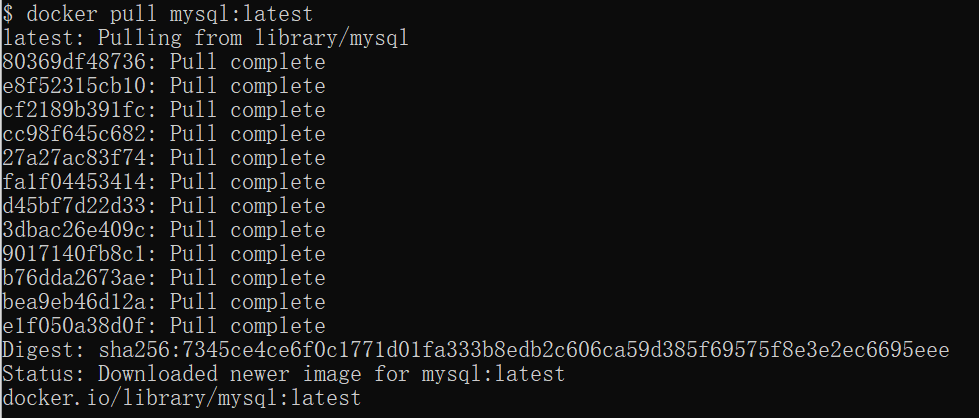](https://www.runoob.com/wp-content/uploads/2016/06/docker-mysql3.png)\n\n\n\n\n### 3、查看本地镜像\n\n使用以下命令来查看是否已安装了 mysql:\n\n\`\`\`\n$ docker images\n\`\`\`\n\n[](https://www.runoob.com/wp-content/uploads/2016/06/docker-mysql6.png)\n\n\n在上图中可以看到我们已经安装了最新版本(latest)的 mysql 镜像。\n\n\n\n### 4、运行容器\n\n安装完成后,我们可以使用以下命令来运行 mysql 容器:\n\n\n\n\`\`\`\n$ docker run -itd --name mysql-test -p 3306:3306 -e MYSQL_ROOT_PASSWORD=123456 mysql\n\`\`\`\n\n参数说明:\n\n\n\n- \n**-p 3306:3306** :映射容器服务的 3306 端口到宿主机的 3306 端口,外部主机可以直接通过 宿主机ip:3306 访问到 MySQL 的服务。\n\n- \n**MYSQL_ROOT_PASSWORD=123456**:设置 MySQL 服务 root 用户的密码。\n\n\n[](https://www.runoob.com/wp-content/uploads/2016/06/docker-mysql4.png)\n\n\n\n\n### 5、安装成功\n\n通过 docker ps 命令查看是否安装成功:\n\n\n[](https://www.runoob.com/wp-content/uploads/2016/06/docker-mysql5.png)\n\n\n本机可以通过 root 和密码 123456 访问 MySQL 服务。\n\n\n[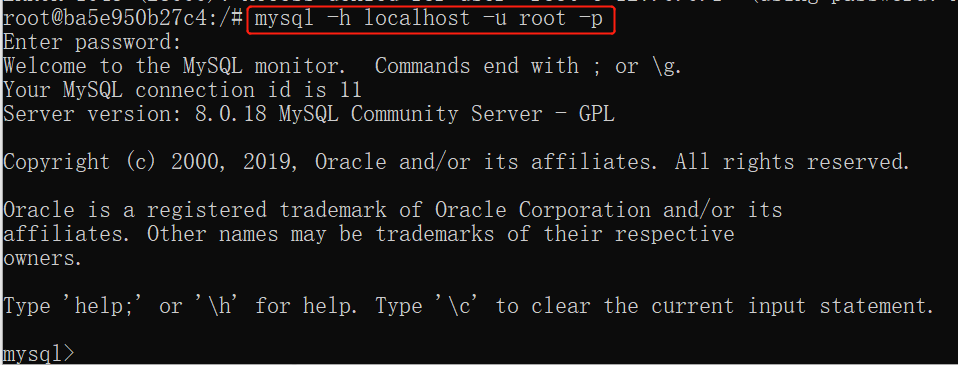](https://www.runoob.com/wp-content/uploads/2016/06/docker-mysql7.png)`;
document.getElementById('md-content').innerHTML = marked.parse(md);
</script>
</body>
</html>