Django-celery-tutorial 基本教學 - 從無到有 Django-celery-tutorial 📝
建議對 Django 不熟悉的朋友,可以先觀看我之前寫的文章( 進入 Django 的世界)
請在 cmd ( 命令提示字元 ) 輸入以下指令
pip install -r requirements.txtCelery is a simple, flexible, and reliable distributed system to process vast amounts of messages, while providing operations with the tools required to maintain such a system. It's a task queue with focus on real-time processing, while also supporting task scheduling.
為什麼我們要用 Celery ? Celery 該使用在什麼情境下呢?
千萬不要讓使用者在你的網站等很久 😱 以下舉幾個情境,
情境一:
當一個影片需要轉檔時,你是該讓這影片在後台轉檔,然後這段時間,
使用者可以去操作網頁上的其他東西,還是說你要讓他在轉檔的那個
畫面一直等,等到轉檔結束,才能開始做其他事情 ?
情境二:
當我們需要寄送 e-mail 時,我們是該讓寄信這個工作在背景處理,使用
者這段時間可以繼續操作網頁,還是說我們要讓使用者等到信件寄出後
,才可以開始做其他事情呢?
寄送 e-mail 時,會有遇到 SMTP 連接很慢或是失敗的可能,這時候就有
可能會讓使用者等,你覺得使用者願意讓你等幾秒 😡
情境三:
有時候我們需要大量的推播,你覺得當你推播的時候,使用者完全不能
執行網站的東西他們能接受嗎?
以上這三種情境,就非常適合使用 Celery 解決這些問題 😃
將這些事情將給 Celery 執行,使用者就可以繼續操作網頁不受影響。
如果你有其他的使用情境分享,歡迎提供,大家一起學習 😆
Celery requires a solution to send and receive messages; usually this comes in the form of a separate service called a message broker.
以下將介紹 Broker ,建議使用 RabbitMQ( 官方推薦 ),本篇教學
也會使用 RabbitMQ 來介紹,其他的 Broker 使用就留給大家去研究 😜
RabbitMQ is feature-complete, stable, durable and easy to install. It's an excellent choice for a production environment.
以下將介紹 Linux,macOS,Windows 安裝 RabbitMQ 的方法,除了
Linux 沒嘗試之外,macOS 以及 Windows 我都有在電腦上安裝成功。
Linux 執行以下指令
sudo apt-get install rabbitmg由於我自己沒嘗試過,如果你有嘗試並且安裝成功,歡迎分享 😍
macOS 執行以下指令
brew install rabbitmq接下來我們到安裝的路徑
cd /usr/local/sbinStart RabbitMQ
./rabbitmq-server如果順利啟動,你應該會看到如下資訊
             RabbitMQ 3.6.9. Copyright (C) 2007-2016 Pivotal Software, Inc.
  ##  ##      Licensed under the MPL.  See http://www.rabbitmq.com/
  ##  ##
  ##########  Logs: /usr/local/var/log/rabbitmq/rabbit@localhost.log
  ######  ##        /usr/local/var/log/rabbitmq/rabbit@localhost-sasl.log
  ##########
              Starting broker...
 completed with 10 plugins.
Stop RabbitMQ
./rabbitmqctl stop也可以到這邊看更詳細的教學 https://www.rabbitmq.com/install-standalone-mac.html
Windows 需下載兩個東西
請先去下載 Erlang ( 請注意自己電腦的位元數 )
先著再去下載 RabbitMQ
https://www.rabbitmq.com/install-windows.html
基本上,都是無腦 ( 一直下一步 ) 安裝,應該不會有什麼問題~
也可以直接安裝 RabbitMQ,他會提醒你去安裝 Erlang ( 假如你沒安裝的話 )
在 Windows 上啟動 RabbitMQ,直接打開 RabbitMQ Service - start 即可

啟動 RabbitMQ

Redis is also feature-complete, but is more susceptible to data loss in the event of abrupt termination or power failures.
也有其他的選擇,請參考 Broker Overview
Install Celery
pip install celeryCelery 目前最新的版本為 v4.1.0 ,假如你是 Windows 用戶,請安裝 v3.1.24 ,
因為 v4.1.0 不支援 Windows
Windows 請安裝 Celery v3.1.24
pip install celery==3.1.24先建立一個 celery.py,路徑如下,
django_celery_tutorial/django_celery_tutorial/celery.py
from __future__ import absolute_import, unicode_literals
import os
from celery import Celery

# set the default Django settings module for the 'celery' program.
os.environ.setdefault('DJANGO_SETTINGS_MODULE', 'django_celery_tutorial.settings')

app = Celery('django_celery_tutorial')

# Using a string here means the worker doesn't have to serialize
# the configuration object to child processes.
# - namespace='CELERY' means all celery-related configuration keys
#   should have a `CELERY_` prefix.
app.config_from_object('django.conf:settings', namespace='CELERY')

# Load task modules from all registered Django app configs.
app.autodiscover_tasks()


@app.task(bind=True)
def debug_task(self):
    print('Request: {0!r}'.format(self.request))
這邊補充一下,假如你是 Windows 用戶
因為 Windows 用戶 Celery 是安裝 v3.1.24 版本,所以有一些地方
不太一樣,可以參考 django_celery_tutorial/django_celery_tutorial/celery_windows.py
from __future__ import absolute_import, unicode_literals
import os
from celery import Celery
from django.conf import settings

# set the default Django settings module for the 'celery' program.
os.environ.setdefault('DJANGO_SETTINGS_MODULE', 'django_celery_tutorial.settings')

app = Celery('django_celery_tutorial')

# Using a string here means the worker doesn't have to serialize
# the configuration object to child processes.
# - namespace='CELERY' means all celery-related configuration keys
#   should have a `CELERY_` prefix.
# app.config_from_object('django.conf:settings', namespace='CELERY')

app.config_from_object('django.conf:settings')

# Load task modules from all registered Django app configs.
# app.autodiscover_tasks()
app.autodiscover_tasks(lambda: settings.INSTALLED_APPS)


@app.task(bind=True)
def debug_task(self):
    print('Request: {0!r}'.format(self.request))
接著我們再修改 init.py,路徑如下
django_celery_tutorial/django_celery_tutorial/init.py
from __future__ import absolute_import, unicode_literals

# This will make sure the app is always imported when
# Django starts so that shared_task will use this app.
from .celery import app as celery_app

__all__ = ['celery_app']
再建立一個 tasks.py,路徑如下
django_celery_tutorial/tutorial/tasks.py
from __future__ import absolute_import, unicode_literals
from celery import shared_task
from django.core.mail import send_mail


@shared_task
def task_mail():
    subject = 'subject test'
    message = 'message test'
    mail_sent = send_mail(subject,
                          message,
                          'admin@celery_test.com',
                          ['xxxxxxx@gmail.com',
                           'xxxxxxx@gmail.com', 'xxxxxxx@yahoo.com.tw'])
    return mail_sent
Django 寄送信箱的方法可以參考我之前寫的 使用 Django 發送信件
最後,在 views.py 中直接呼叫即可
django_celery_tutorial/tutorial/views.py
from django.core.mail import send_mail
from django.shortcuts import render

from tutorial.tasks import task_mail

def task_use_celery(request):
    task_mail.delay()
    return render(request,
                  'tutorial/process_done.html')
                  'tutorial/process_done.html')
當信件寄出時,會到下一個畫面。

畫面很簡單,基本上就是使用寄送 e-mail 來看有使用和沒使用 Celery 的差異 😃
啟動 Worker 時,記得 Broker要先啟動,也就是要先 Start RabbitMQ,然後再啟動 Celery Worker
第一步,請先確認 RabbitMQ 已經啟動,接著我們再啟動 celery worker,
請再開啟一個 shell ,使用以下指令啟動 celery worker
Run the Celery worker server
celery -A proj worker -l infoproj 也就是你的名稱,我們在 celery.py 設定為 django_celery_tutorial,所以
我們需要修改為
celery -A django_celery_tutorial worker -l info
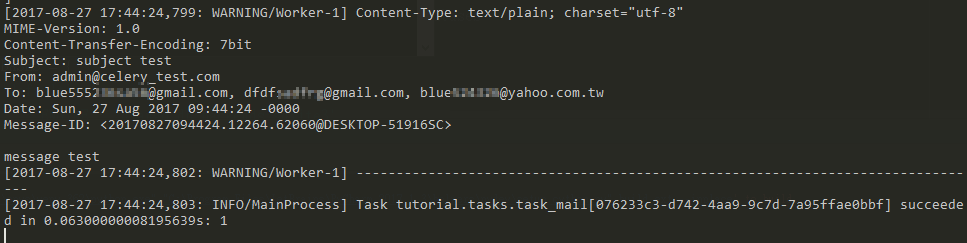
假如你發生如下錯誤,並且你是 Windows 用戶,請回到 Celery Tutorial 觀看說明
[2017-08-27 17:35:27,348: ERROR/MainProcess] Task handler raised error: ValueError('not enough values to unpack (expected 3, got 0)',)
Traceback (most recent call last):
  File "c:\users\twtrubiks\anaconda3\envs\venv_362\lib\site-packages\billiard\pool.py", line 358, in workloop
    result = (True, prepare_result(fun(*args, **kwargs)))
  File "c:\users\twtrubiks\anaconda3\envs\venv_362\lib\site-packages\celery\app\trace.py", line 525, in _fast_trace_task

    tasks, accept, hostname = _loc
ValueError: not enough values to unpack (expected 3, got 0)Flower is a web based tool for monitoring and administrating Celery clusters
http://flower.readthedocs.io/en/latest/
pip install flowerlaunch from Celery
celery flower -A proj --address=127.0.0.1 --port=5555proj 也就是你的名稱,我們也可以直接使用下方指令啟動 flower
celery flower -A django_celery_tutorial

更多說明可參考官網
http://flower.readthedocs.io/en/latest/
- Python 3.6.2
MIT licens