|
1 | | -# AdvancedDotNetDevIntersection |
| 1 | +# Tutorial |
| 2 | + |
| 3 | +**Goal**: In this exercise, the participants will be asked to build the backend of a TodoReact App. The user will be exploring the functionality of FeatherHttp, a server-side framework. |
| 4 | + |
| 5 | +**What is FeatherHttp**: FeatherHttp makes it **easy** to write web applications. |
| 6 | + |
| 7 | +**Why FeatherHttp**: FeatherHttp is lightweight server-side framework designed to scale-up as your application grows in complexity. |
| 8 | + |
| 9 | +# Prerequisites |
| 10 | + |
| 11 | +1. Install [.NET Core 5.0 Preview 7 SDK ](https://dotnet.microsoft.com/download/dotnet/5.0) |
| 12 | +1. Install [Node.js](https://nodejs.org/en/) |
| 13 | + |
| 14 | +# Setup |
| 15 | + |
| 16 | +1. Install the FeatherHttp template using the `dotnet CLI`. Copy the command below into a terminal or command prompt to install the template. |
| 17 | + ``` |
| 18 | + dotnet new -i FeatherHttp.Templates::0.1.67-alpha.g69b43bed72 --nuget-source https://f.feedz.io/featherhttp/framework/nuget/index.json |
| 19 | + ``` |
| 20 | + This will make the `FeatherHttp` templates available in the `dotnet new` command (more below). |
| 21 | +
|
| 22 | +1. Download this [repository](https://github.com/featherhttp/tutorial/archive/master.zip). Unzip it, and navigate to the Tutorial folder, this consists of the frontend application `TodoReact` app. |
| 23 | + > If using [Visual Studio Code](https://code.visualstudio.com/), install the [C# extension](https://marketplace.visualstudio.com/items?itemName=ms-vscode.csharp) for C# support. |
| 24 | +
|
| 25 | +**Task**: Build the backend portion using FeatherHttp |
| 26 | +------------------------------------------------------- |
| 27 | +## Tasks |
| 28 | +**Please Note: The completed exercise is available in the [samples folder](https://github.com/featherhttp/tutorial/tree/master/Sample). Feel free to reference it at any point during the tutorial.** |
| 29 | +### Run the frontend application |
| 30 | +
|
| 31 | +1. Once you clone the Todo repo, navigate to the `TodoReact` folder inside of the `Tutorial` folder and run the following commands |
| 32 | +``` |
| 33 | +TodoReact> npm i |
| 34 | +TodoReact> npm start |
| 35 | +``` |
| 36 | +- The commands above |
| 37 | + - Restores packages `npm i ` |
| 38 | + - Starts the react app `npm start` |
| 39 | +1. The app will load but have no functionality |
| 40 | +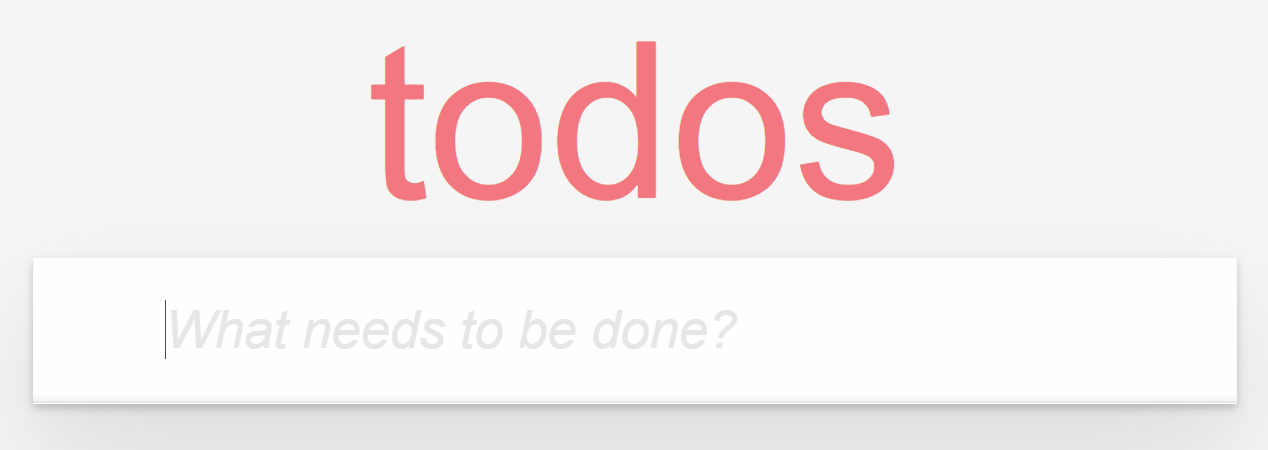 |
| 41 | +
|
| 42 | + > Keep this React app running as we'll need it once we build the back-end in the upcoming steps |
| 43 | +
|
| 44 | +### Build backend - FeatherHttp |
| 45 | +**Create a new project** |
| 46 | +
|
| 47 | +1. Create a new FeatherHttp application and add the necessary packages in the `TodoApi` folder |
| 48 | +
|
| 49 | +``` |
| 50 | +Tutorial>dotnet new feather -n TodoApi |
| 51 | +Tutorial> cd TodoApi |
| 52 | +TodoApi> dotnet add package Microsoft.EntityFrameworkCore.InMemory --version 5.0.0-preview.7.20365.15 |
| 53 | +``` |
| 54 | + - The commands above |
| 55 | + - create a new FeatherHttp application `dotnet new feather -n TodoApi` |
| 56 | + - Adds the NuGet packages required in the next section `dotnet add package Microsoft.EntityFrameworkCore.InMemory --version 5.0.0-preview.7.20365.15` |
| 57 | +
|
| 58 | +2. Open the `TodoApi` Folder in editor of your choice. |
| 59 | +
|
| 60 | +## Create the database model |
| 61 | +
|
| 62 | +1. Create a file called `TodoItem.cs` in the TodoApi folder. Add the content below: |
| 63 | + ```C# |
| 64 | + using System.Text.Json.Serialization; |
| 65 | +
|
| 66 | + public class TodoItem |
| 67 | + { |
| 68 | + [JsonPropertyName("id")] |
| 69 | + public int Id { get; set; } |
| 70 | +
|
| 71 | + [JsonPropertyName("name")] |
| 72 | + public string Name { get; set; } |
| 73 | +
|
| 74 | + [JsonPropertyName("isComplete")] |
| 75 | + public bool IsComplete { get; set; } |
| 76 | + } |
| 77 | + ``` |
| 78 | + The above model will be used for reading in JSON and storing todo items into the database. |
| 79 | +1. Create a file called `TodoDbContext.cs` with the following contents: |
| 80 | + ```C# |
| 81 | + using Microsoft.EntityFrameworkCore; |
| 82 | + |
| 83 | + public class TodoDbContext : DbContext |
| 84 | + { |
| 85 | + public DbSet<TodoItem> Todos { get; set; } |
| 86 | + |
| 87 | + protected override void OnConfiguring(DbContextOptionsBuilder optionsBuilder) |
| 88 | + { |
| 89 | + optionsBuilder.UseInMemoryDatabase("Todos"); |
| 90 | + } |
| 91 | + } |
| 92 | + ``` |
| 93 | + This code does 2 things: |
| 94 | + - It exposes a `Todos` property which represents the list of todo items in the database. |
| 95 | + - The call to `UseInMemoryDatabase` wires up the in memory database storage. Data will only be persisted as long as the application is running. |
| 96 | +1. Now we're going to use `dotnet watch` to run the server side application: |
| 97 | + ``` |
| 98 | + dotnet watch run |
| 99 | + ``` |
| 100 | + |
| 101 | + This will watch our application for source code changes and will restart the process as a result. |
| 102 | + |
| 103 | +## Expose the list of todo items |
| 104 | + |
| 105 | +1. Add the appropriate `usings` to the top of the `Program.cs` file. |
| 106 | + ``` |
| 107 | + using System.Threading.Tasks; |
| 108 | + using Microsoft.AspNetCore.Builder; |
| 109 | + using Microsoft.AspNetCore.Http; |
| 110 | + using Microsoft.EntityFrameworkCore; |
| 111 | + ``` |
| 112 | + This will import the required namespaces so that the application compiles successfully. |
| 113 | + |
| 114 | +1. In `Program.cs`, create a method called `GetTodos` inside of the `Program` class: |
| 115 | + |
| 116 | + ```C# |
| 117 | + static async Task GetTodos(HttpContext http) |
| 118 | + { |
| 119 | + using var db = new TodoDbContext(); |
| 120 | + var todos = await db.Todos.ToListAsync(); |
| 121 | + |
| 122 | + await http.Response.WriteJsonAsync(todos); |
| 123 | + } |
| 124 | + ``` |
| 125 | + |
| 126 | + This method gets the list of todo items from the database and writes a JSON representation to the HTTP response. |
| 127 | + |
| 128 | +1. Wire up `GetTodos` to the `api/todos` route by modifying the code in `Main` to the following: |
| 129 | + ```C# |
| 130 | + static async Task Main(string[] args) |
| 131 | + { |
| 132 | + var app = WebApplication.Create(args); |
| 133 | + |
| 134 | + app.MapGet("/api/todos", GetTodos); |
| 135 | + |
| 136 | + await app.RunAsync(); |
| 137 | + } |
| 138 | + ``` |
| 139 | +1. Navigate to the URL http://localhost:5000/api/todos in the browser. It should return an empty JSON array. |
| 140 | +
|
| 141 | + <img src="https://user-images.githubusercontent.com/2546640/75116317-1a235500-5635-11ea-9a73-e6fc30639865.png" alt="empty json array" style="text-align:center" width =70% /> |
| 142 | + |
| 143 | +## Adding a new todo item |
| 144 | + |
| 145 | +1. In `Program.cs`, create another method called `CreateTodo` inside of the `Program` class: |
| 146 | + ```C# |
| 147 | + static async Task CreateTodo(HttpContext http) |
| 148 | + { |
| 149 | + var todo = await http.Request.ReadJsonAsync<TodoItem>(); |
| 150 | + |
| 151 | + using var db = new TodoDbContext(); |
| 152 | + await db.Todos.AddAsync(todo); |
| 153 | + await db.SaveChangesAsync(); |
| 154 | + |
| 155 | + http.Response.StatusCode = 204; |
| 156 | + } |
| 157 | + ``` |
| 158 | + |
| 159 | + The above method reads the `TodoItem` from the incoming HTTP request and as a JSON payload and adds |
| 160 | + it to the database. |
| 161 | + |
| 162 | +1. Wire up `CreateTodo` to the `api/todos` route by modifying the code in `Main` to the following: |
| 163 | + ```C# |
| 164 | + static async Task Main(string[] args) |
| 165 | + { |
| 166 | + var app = WebApplication.Create(args); |
| 167 | + |
| 168 | + app.MapGet("/api/todos", GetTodos); |
| 169 | + app.MapPost("/api/todos", CreateTodo); |
| 170 | + |
| 171 | + await app.RunAsync(); |
| 172 | + } |
| 173 | + ``` |
| 174 | +1. Navigate to the `TodoReact` application which should be running on http://localhost:3000. The application should be able to add new todo items. Also, refreshing the page should show the stored todo items. |
| 175 | +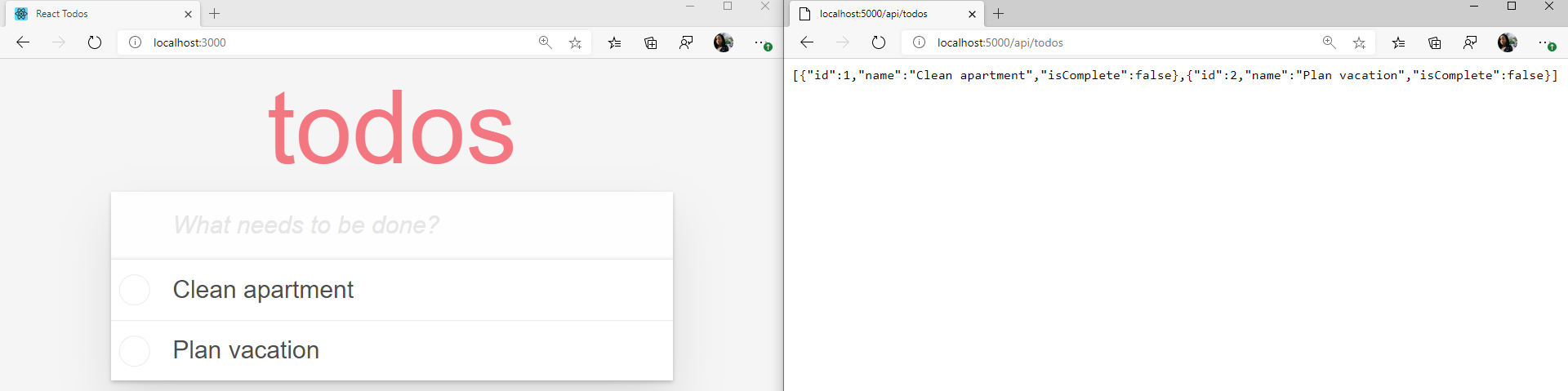 |
| 176 | +
|
| 177 | +## Changing the state of todo items |
| 178 | +1. In `Program.cs`, create another method called `UpdateCompleted` inside of the `Program` class: |
| 179 | + ```C# |
| 180 | + static async Task UpdateCompleted(HttpContext http) |
| 181 | + { |
| 182 | + if (!http.Request.RouteValues.TryGet("id", out int id)) |
| 183 | + { |
| 184 | + http.Response.StatusCode = 400; |
| 185 | + return; |
| 186 | + } |
| 187 | + |
| 188 | + using var db = new TodoDbContext(); |
| 189 | + var todo = await db.Todos.FindAsync(id); |
| 190 | + |
| 191 | + if (todo == null) |
| 192 | + { |
| 193 | + http.Response.StatusCode = 404; |
| 194 | + return; |
| 195 | + } |
| 196 | + |
| 197 | + var inputTodo = await http.Request.ReadJsonAsync<TodoItem>(); |
| 198 | + todo.IsComplete = inputTodo.IsComplete; |
| 199 | + |
| 200 | + await db.SaveChangesAsync(); |
| 201 | + |
| 202 | + http.Response.StatusCode = 204; |
| 203 | + } |
| 204 | + ``` |
| 205 | + |
| 206 | + The above logic retrieves the id from the route parameter "id" and uses it to find the todo item in the database. It then reads the JSON payload from the incoming request, sets the `IsComplete` property and updates the todo item in the database. |
| 207 | +1. Wire up `UpdateCompleted` to the `api/todos/{id}` route by modifying the code in `Main` to the following: |
| 208 | + ```C# |
| 209 | + static async Task Main(string[] args) |
| 210 | + { |
| 211 | + var app = WebApplication.Create(args); |
| 212 | + |
| 213 | + app.MapGet("/api/todos", GetTodos); |
| 214 | + app.MapPost("/api/todos", CreateTodo); |
| 215 | + app.MapPost("/api/todos/{id}", UpdateCompleted); |
| 216 | + |
| 217 | + await app.RunAsync(); |
| 218 | + } |
| 219 | + ``` |
| 220 | + |
| 221 | +## Deleting a todo item |
| 222 | + |
| 223 | +1. In `Program.cs` create another method called `DeleteTodo` inside of the `Program` class: |
| 224 | + ```C# |
| 225 | + static async Task DeleteTodo(HttpContext http) |
| 226 | + { |
| 227 | + if (!http.Request.RouteValues.TryGet("id", out int id)) |
| 228 | + { |
| 229 | + http.Response.StatusCode = 400; |
| 230 | + return; |
| 231 | + } |
| 232 | + |
| 233 | + using var db = new TodoDbContext(); |
| 234 | + var todo = await db.Todos.FindAsync(id); |
| 235 | + if (todo == null) |
| 236 | + { |
| 237 | + http.Response.StatusCode = 404; |
| 238 | + return; |
| 239 | + } |
| 240 | + |
| 241 | + db.Todos.Remove(todo); |
| 242 | + await db.SaveChangesAsync(); |
| 243 | + |
| 244 | + http.Response.StatusCode = 204; |
| 245 | + } |
| 246 | + ``` |
| 247 | + |
| 248 | + The above logic is very similar to `UpdateCompleted` but instead. it removes the todo item from the database after finding it. |
| 249 | + |
| 250 | +1. Wire up `DeleteTodo` to the `api/todos/{id}` route by modifying the code in `Main` to the following: |
| 251 | + ```C# |
| 252 | + static async Task Main(string[] args) |
| 253 | + { |
| 254 | + var app = WebApplication.Create(args); |
| 255 | + |
| 256 | + app.MapGet("/api/todos", GetTodos); |
| 257 | + app.MapPost("/api/todos", CreateTodo); |
| 258 | + app.MapPost("/api/todos/{id}", UpdateCompleted); |
| 259 | + app.MapDelete("/api/todos/{id}", DeleteTodo); |
| 260 | + |
| 261 | + await app.RunAsync(); |
| 262 | + } |
| 263 | + ``` |
| 264 | + |
| 265 | +## Test the application |
| 266 | + |
| 267 | +The application should now be fully functional. |
| 268 | +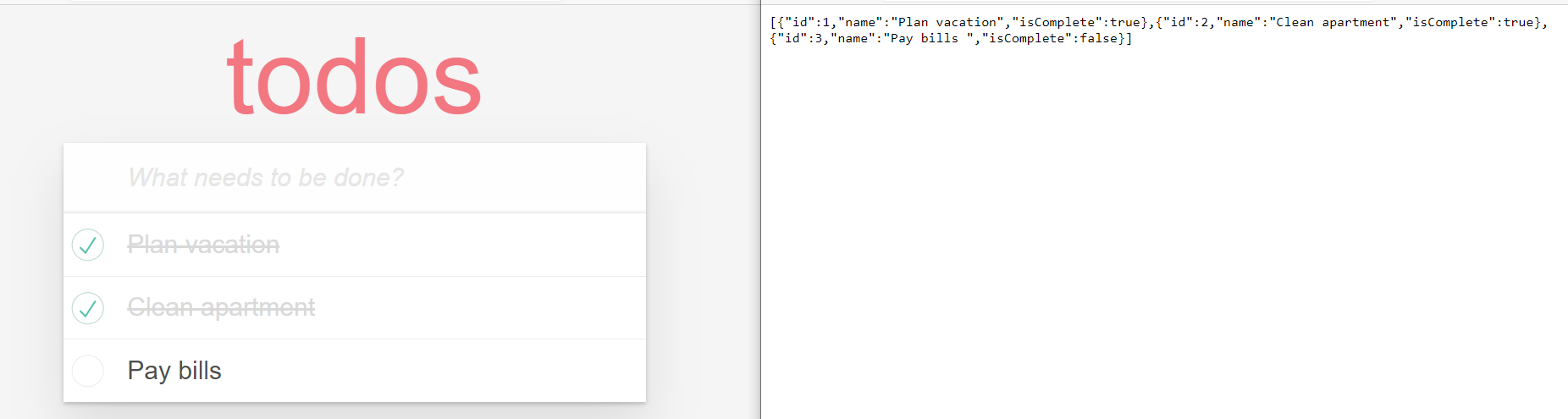 |
| 269 | +
|

0 commit comments