| Try Catch Block | Try Multiple Catch | Try Catch Finally Block |
| Throw | Throw exception In Signature | Custom Exception |
| Try Catch Resource | Management Resource |
| Exception | Checked Exception | Unchecked Exception |
  try{
    // code here
    }catch(Exception e){
    //handle exception here
}- one exception is a subclass of another
   try{
        // code here
    }catch(RuntimeException e){
        //handle RuntimeException here
    }
    catch(Exception e){
        //handle exception here
}- One Exception is independent of another
Not ok
        import java.io_nio2.FileNotFoundException;try{
FileInputStream inputStream = new FileInputStream("sdsd");
        }catch(IOException |FileNotFoundException e2){} //for FileNotFoundException is Subclass of IOException
Ok
        try {
FileInputStream inputStream = new FileInputStream("sdsd");
}catch (IOException | NumberFormatException e2) {} //it's Oke because IoEx and NumEx are not dependent try{
// code here
}catch(Exception e){
//handle exception here
}finally{
//Always run althought exception or not
} if(a > 10){
throw new Exception("message");
}void readFirstByteFromFile(File fileName)throws IOException {}public class OutOfMilkException extends Exception{
String message;
public OutOfMilkException(String message) {
super(message);
}
}
public static void main(String[] args) {
new OutOfMilkException("sadsadas");
}- automatic to close the Resource
- should use when Open connecting Database File and etc
  import java.io_nio2.FileInputStream;

public void readFile(String file) {
  try (FileInputStream is = new FileInputStream("path") // fileInputStream will automatic closing
  ){
      //read File Data
  }catch (Exception e){
      e.printStackTrace();
  }
}public class TryCatchResource {
public static void main(String[] args) throws Exception {
try(MyFileClass myClass = new MyFileClass(1)) {
System.out.println("Try block");
}
try(MyFileClass myClass2 = new MyFileClass(2)) {
System.out.println("Try Block");
}
catch (Exception e) {
e.printStackTrace();
}finally {
System.out.println("Finally Block");
}
}
}
class MyFileClass implements AutoCloseable {
private final int num;
public MyFileClass(int num) {
this.num = num;
}
@Override
public void close() throws Exception {
System.out.println("Closing myFileClass #" + num);
}
}- In Java, when you're using try-with-resources, the
close()method of the resource is automatically called, even if an exception occurs in the try block. - If an exception is thrown inside the
tryblock (e.g.,res.use()), and another exception is also thrown while closing the resource (res.close()), then:- Java will keep the first exception (from
res.use()) as the main exception. - The second one (
from close()) is suppressed and added to the first.
- Java will keep the first exception (from
class MyResource implements AutoCloseable {
    public void close() throws Exception {
        System.out.println("Closing resource");
        throw new Exception("Exception in close");
    }

    public void use() throws Exception {
        System.out.println("Using resource");
        throw new Exception("Exception in use");
    }
}

public class TestResource {
    public static void main(String[] args) {
        try (MyResource res = new MyResource()) {
            res.use();
        } catch (Exception e) {
            System.out.println("Caught: " + e.getMessage());
            for (Throwable t : e.getSuppressed()) {
                System.out.println("Suppressed: " + t);
            }
        }
    }
}
Using resource
Closing resource
Caught: Exception in use
Suppressed: java.lang.Exception: Exception in close
- Any external data sources (files, databases, etc.) are referred to as resources
- dealing with resource almost always requests three steps:
- opening the source
- dealing with the resource (e.g. read/write)
- closing the resource
- forgetting to closing the resource can cause many bad things
- resource leak resource in resource becoming inaccessible
- e.g inability to connect to database by your or other program, etc.
=> Suggeust: Use try-catch Resource Because Try-catch Resource will automatic to close Resource after try
We have two kind of exception
- Checked Exception (Exception) can catch
- Unchecked Exception (Error) can't catch
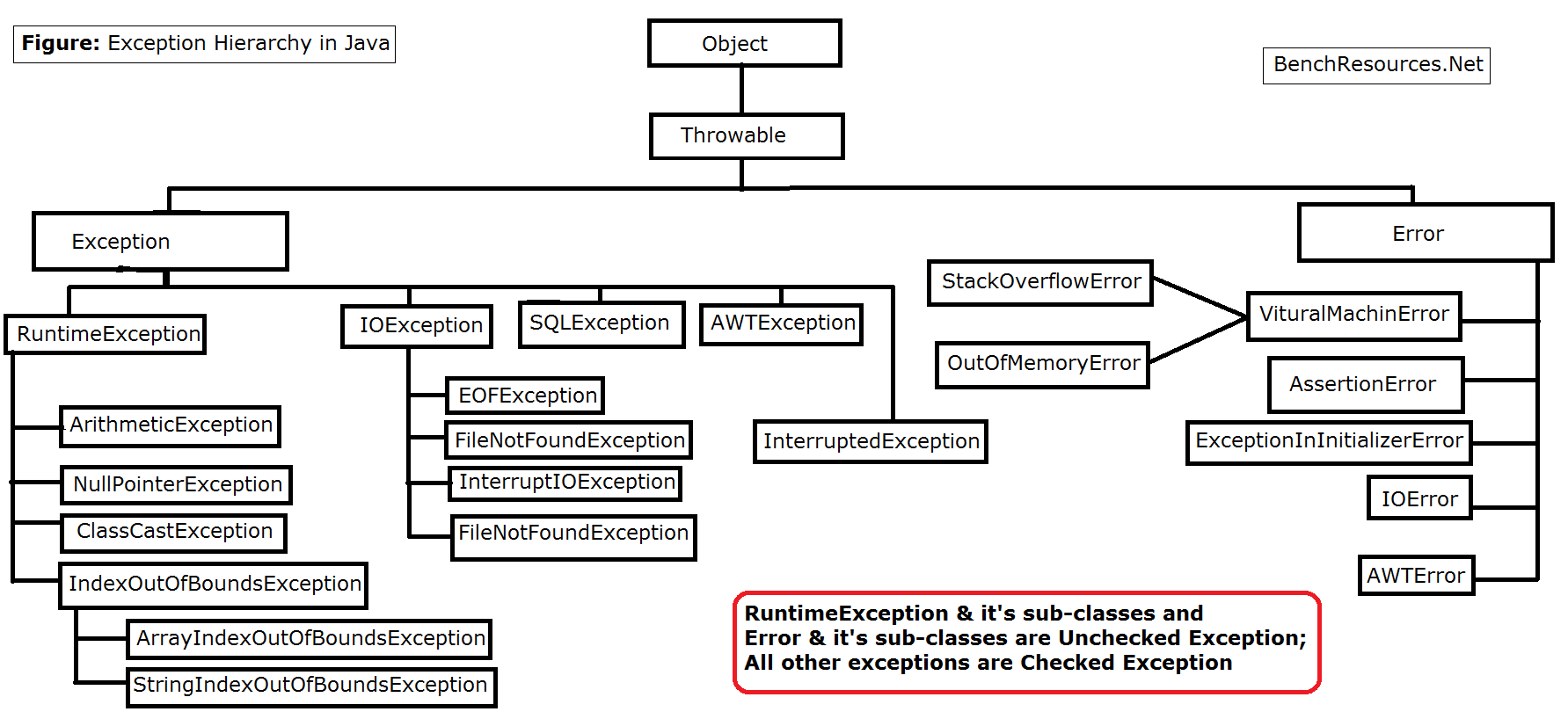
- Must be declared or handled by the application code where it is thrown
- All checked exception is declared when defining a method
- using keyword throws
Exception is handled using try-catch block
Example:
void readFirstByteFromFile(File fileName){
    FileInputStream file = new FileInputStream(fileName);
    byte x = (byte) file.read();
    System.out.println(x);
}
//this does not compile because there is a possibility that checked exception
//IOException to be thrown by this method
Fix 1
//declare the exception after signature of method
void readFirstByteFromFile(File fileName)throws IOException {}
Fix 2
//use try-catch block to catch the exception
void readFirstByteFromFile(File fileName){
        FileInputStream file = null;
        try {
            file = new FileInputStream(fileName);
            byte x = (byte) file.read();
            System.out.println(x);
        } catch (IOException e) {
            throw new RuntimeException(e);
        }
}- An unchecked exception in Java is an exception that is not checked at compile-time. This means:
- You are not required to declare it using throws in method signatures.
- You are not forced to handle it using try-catch.
- Unchecked exceptions are subclasses of RuntimeException.
- java.lang.Error is Also unchecked (but not typically caught)
private static void printFourthElement(int[] a){
  System.out.println(a[3]);
}
public static void main(String[] args) {
    int[] a = {-7,11,3};
    printFourthElement(a);
}
Exception in thread "main" java.lang.ArrayIndexOutOfBoundsException: Index 3 out of bounds for length 3
at App.printFourthElement(App.java:18)
at App.main(App.java:14)
Common Unchecked Exception:
| ArithmeticException | Throw when code tries to divide with zero |
| ArrayIndexOutOfBoundException | Throw when code use illegal index to access array element |
| ClassCastException | throw when code tries to cast Object to a class of which it is not an instance |
| NullPointerException | throw when there is a null reference where object is require |
| IllegalArgumentException | throw by a programmer to indicate that the illegal or inappropriate argument has been passed to a method |
| NumberFormatException | Subclass of IllegalArgumentException, thrown then the code tries to convert String to a numeric type, but String doesn't have an appropriate format |