| Common | List | Set Interface |
| Queue Interface | Deque Interface | Deque interface as Double-ended Queue |
| Sorting |
What is Collection?
A Collection is a framework that provides a set of classes and interfaces for storing and manipulating a group of objects.
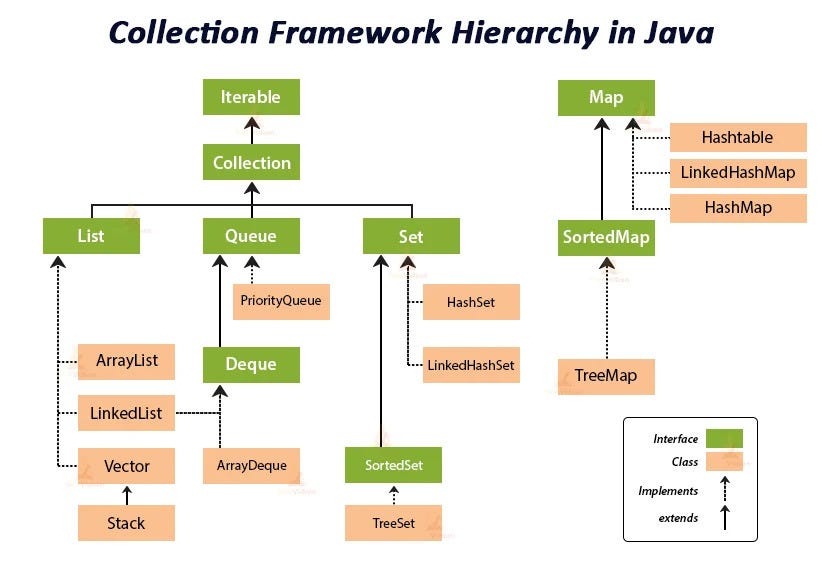
- These interfaces are commonly referred to as collections
- List, Set, Queue(Deque), Map
- The end we want to work with classes:
- interfaces List, Set and Queue implement Collection
- class ArrayList implement List
- class HashSet and TreeSet implement Set
- interface deque implements Queue
- class LinkedList implement Queue and List
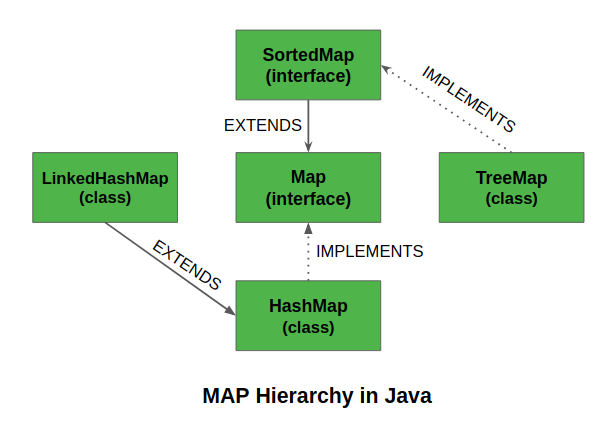
- interface Map doesn't implement Collection
- classes HashMap and ThreeMap implement Map interface
Diamond operator (<>) is used to imply the type of the element in collection
List<String> names = new ArrayList<>(); // it's ok- You don't need to define Type for right side, for Collection can automatic understanding
But not on the left-hand side!
List<> names = new ArrayList<String>();// does not compileIf you use var you have to specify the type on right-hand side:
- ArrayList
- add() ==> return boolean
- remove() ==> return boolean
- isEmpty() ==> return boolean
- size() ==> return size
- clear() ==> clear all element in ArrayList
- contains() ==> check element (is exist in ArrayList)
var names = new ArrayList<String>(); //okvar type just supported from Java 10 and Above
Some method Support in interfaces
Collection<String> namesInList = new ArrayList<>();
System.out.println(namesInList.add("Join")) //==> true
System.out.println(namesInList.add("Join"))//==> true

Collection<String> namesInSet = new HashSet<>();
System.out.println(namesInSet.add("Join")) //==> true
System.out.println(namesInSet.add("Join"))//==> false
//because Set doesn't allow duplicates
Remove method
Collection<String> names = new ArrayList<>();
names.add("Join");
names.add("Alan");
names.add("Join");
System.out.println(names); //==> [Join, Alan, Join]
System.out.println(names.remove("Join"));//==> true

System.out.println(names); //==> [Alan, Join] only the first match is removed

System.out.println(names.remove("Luka")); // false because Luka doesn't exist in ArrayList
removeIf() method
Collection<String> names = new ArrayList<>();
names.add("Join");
names.add("Alan1");
names.add("Alan2");
names.add("Join");

names.removeIf(s -> s.length() > 4); // use predicate as an argument, implemented by lambda expression
System.out.println(names); //==> [Join, Join] // remove all element have length greater than 4
forEach() method
Collection<String> names = new ArrayList<>();
names.add("Join");
names.add("Alan1");
names.add("Alan2");
names.add("Join");

names.forEach(name -> System.out.println(name + ", ")); // takes Consumer as an argument, implemented by lambda expression
Result
Join, Alan1, Alan2, Join,
what is a List?
- an ordered collection which can contain duplicate entries
- items can be reached and inserted using the index(int)
- unlike array, list can change in size after being declared
- there are two classes which implement List interface:
- arrayList and LinkedList
- ArrayList is better when you read more than you write
- LinkedList inplements both List and Deque
==> For OCA Exam you only need to know ArrayList
Create a List using factory methods
- Arrays.asList(varargs) //fixed size list backed by an array
- List.of(varargs) // return immutable list
- List.copyOf(collection) //immutable list with copy of original value
- when you create a List in this way, it's sized is fixed (no adding and removing)
import java.util.Arrays;
import java.util.List;

public class MyClass {
    public static void main(String[] args) {
        String[] names = new String[]{"Join", "George","Like"};

        List<String> namesAsList = Arrays.asList(names);
        List<String> namesOf = List.of(names);
        List<String> namesCopyOf = List.copyOf(namesAsList);

        names[1] = "Ben";
        System.out.println(namesAsList);
        System.out.println(namesOf);
        System.out.println(namesCopyOf);

    }
}
Result:
    [Join, Ben, Like] //because the list is "backed" by the array
    [Join, George, Like] // no change
    [Join, George, Like] // no change
Backing up works both ways
import java.util.Arrays;
import java.util.List;

public class MyClass {
    public static void main(String[] args) {
        String[] names = new String[]{"Join", "George","Luka"};

        List<String> namesAsList = Arrays.asList(names);

        namesAsList.set(2, "Paul");
        System.out.println(namesAsList);
        System.out.println(Arrays.toString(names));
    }
}
Result:
[Join, George, Paul]
[Join, George, Paul]
- Arrays.asList() does not create a new copy of the array; instead, it returns a fixed-size list backed by the original array.
- This means that when you modify an element in the namesAsList, it directly affects the underlying array (names), and vice versa.
Create a List with a constructor
List<String> myList1 = new ArrayList<>();
//==> create new empty List myList1
List<String> myList2 = new ArrayList<>(myList1);
//==> makes a copy off myList1 and stores it in myList2ArrayList<String> arrayList1 = new ArrayList<>();
//==> creates new empty ArrayList myList1
ArrayList<String> arrayList2 = new ArrayList<String>(arrayList1);
//=> makes a copy of arrayList1 and stores it in arrayList2ArrayList<String> arrayList3 = new ArrayList<String>(5);
//==> you have reserved 5 slots, but you can always add more if you wantList methods
- add(E element)
- add(int index, E element)
- get(int index)
- remove(int index)
- remove(E element)
- replaceAll(UnaryOperator op)
- set(int index, E element)
- sort(Comparator<? super E> c)
Example
import java.util.ArrayList;
import java.util.List;

public class MyClass {
    public static void main(String[] args) {
        List<String> names = new ArrayList<>();
        names.add("Join");
        names.add("George");
        names.add("Paul");
        names.add("Ringo");
    }
}
1.Add
        names.add(1, "Alan");
        System.out.println(names);
Result:
[Join, Alan, George, Paul, Ringo] //index 1 changed from George to Alan
2.Set
System.out.println("Before: "+names.get(2));
        names.set(2,"Alan2");
        System.out.println("After: "+names.get(2));
Result:
Before: George
After: Alan2
3.Remove
        names.remove(1);
        System.out.println("Remove George at index 1: "+names);

        names.remove("Join");
        System.out.println("Remove Join: "+names);
Result:
    Remove George at index 1: [Join, Paul, Ringo]
    Remove Join: [Paul, Ringo]
Special case Remove ArrayList reserved Interger:
        List<Integer> numbers = new ArrayList<>();
        numbers.add(2);
        numbers.add(-11);
        numbers.add(7);

        System.out.println(numbers);
        numbers.remove(2);
        System.out.println(numbers);

        numbers.add(7);
        numbers.remove(Integer.valueOf(2));
        System.out.println(numbers);
Result:
[2, -11, 7]
[2, -11]
[-11, 7]
what element will be removed, 2 or 7?
- since 2 is primitive, remove(int index) will be used
- number 7 will be removed
- if you want to remove element 2, you must use Integer.valueOf(2), for Integer.valueOf() will be converted from primitive type to object
- and remove(E element) will be used
4.ReplaceAll
        names.replaceAll(String::toUpperCase);
        System.out.println(names);

        names.replaceAll(s -> s.toLowerCase(Locale.ROOT));
        System.out.println(names);
Result:
[JOIN, GEORGE, PAUL, RINGO]
[join, george, paul, ringo]
Convert List to Array using toArray() methods
List<Integer> myList = new ArrayList<>();
myList.add(3);
myList.add(5);
myList.add(7);

Object[] objArray = myList.toArray();// => Array of Object in the List
Integer[] intArray = myList.toArray(new Integer[0]);
//=> array Integer
//=> initial size is 0, but Java will automatically adJust sizes to fit- doesn't allow duplicate entries
- implementations: hashSet, TreeSet
- hashSet store(key, value), elements in hash table
- key is hashCode(), value is Object
- doesn't keep the other
- adding each element takes the same time
- TreeSet stores elements in a sorted tree structure
- keeps the order
- adding each element take more time as tree goes trigger
HashSet Example:
        Set<String> names = new HashSet<>();
        System.out.println(names.add("John"));
        System.out.println(names.add("George"));
        System.out.println(names.add("John"));
        System.out.println(names.add("Ben"));

        System.out.println(names);
Result
true
true
false // false because John existed in Set
true
[George, John, Ben] //arbitrary order!
TreeSet Example:
        TreeSet<String> names = new TreeSet<>();
        System.out.println(names.add("John"));
        System.out.println(names.add("George"));
        System.out.println(names.add("John"));
        System.out.println(names.add("Ben"));

        System.out.println(names);
Result
true
true
false // false because John existed in Set
true
[Ben, George, John] //keeping the order (last added is first on the list)!
- Implemented by LinkedList class
- adds element in the back, reads from the front
- FIFO: First In, First Out
- proper methods
- peek(), offer(E e), Poll()
- methods inherited from Collection
- element(), add(E e), remove()
        Queue<String> colors = new LinkedList<String>();
        colors.offer("blue"); //--> similar add() method, use to add a element into queue
        colors.offer("green");
        colors.offer("red");
        colors.offer("yellow");
        System.out.println(colors); //print all colors in queue
        System.out.println(colors.peek()); // get First but not poll
        colors.poll(); // poll to push the first element out your queue
        System.out.println(colors);
        System.out.println(colors.peek()); // .peek() similar element() in linkedList Interface
Result:
[blue, green, red, yellow]
blue
[green, red, yellow]
green
What happen when you use poll() and peek() with the queue empty?
        Queue<String> colors = new LinkedList<String>();
        colors.offer("blue");
        colors.offer("green");
        colors.offer("red");
        colors.offer("yellow");
        System.out.println(colors.poll());
        System.out.println(colors.poll());
        System.out.println(colors.poll());
        System.out.println(colors.poll());
        System.out.println(colors.poll());
        System.out.println(colors.peek());
blue
green
red
yellow
null
null
--> return null
- Deque Interface used as a Stack
- implemented by LinkedList and ArrayQueue
- adds element in the front, reads from the back
- LIFO: Last In, First Out
- proper method
- peek(), push(), poll()
- method inherited from Collection
- element(), add(E e), remove()
- avoid use inherit methods, for Inherit method will throw exception when the deque or queue is empty
        Deque<String> colors = new LinkedList<String>();
        colors.push("blue");
        colors.offer("green");
        colors.push("red");
        colors.push("yellow");
        System.out.println(colors);
        System.out.println(colors.peek());
        colors.pop();
        System.out.println(colors.peek());
        colors.pop();
        colors.pop();
        colors.pop();
        System.out.println(colors.peek());
[yellow, red, blue, green]
yellow
red
null
- can use deque as a queue and opposite
- proper method:
- peedFirst(), offerFirst(E e), poolFirst()
- peekLast(), offerLast(E e), poolLast()
- methods inherited from Collection
- getFirst(), addFirst(E e), removeFirst()
- getLast(), addLast(E e), removeLast()
- avoid use inherit methods, for Inherit method will throw exception when the deque or queue is empty
        Deque<Integer> nums = new ArrayDeque<Integer>();
        nums.addLast(9);
        nums.offerFirst(-11);
        nums.addLast(5);

        System.out.println(nums);
        System.out.println(nums.getFirst());
        System.out.println(nums.peekLast());
        nums.pollFirst();
        System.out.println(nums);
        System.out.println(nums.getFirst());
        System.out.println(nums.peekLast());
[-11, 9, 5] //nums
-11 //nums.getFirst()
5 //nums.peekLast()
[9, 5] //less a element because we polled First Element
9 //First
5 //last
- we are already partly familiar with sort() method
- if elements in the collection are primitives, they are sorted by natural order
- if elements are Strings, then numbers sort before letters, and uppercase letters sort before lowercase letters
- in order to do this you can choose one of two approaches
- use a class which implements Comparable interface, or
- pass the implementation of Comparator interface in sort() method
- this interface has one abstract method: int compareTo(T o)
- these methods have to be implemented in a concrete class
- this method returns an integer according to these rules:
- if the current object is equivalent to the argument it returns 0
- if the current object is smaller than the argument it returns a negative number
- if the current object is larger than the argument it returns a positive number
public class Person implements Comparable<Person> {
    private String name;
    private int age;

    public Person(String name, int age) {
        this.name = name;
        this.age = age;
    }

    @Override
    public String toString() {
      return "{" +
              "name='" + name + '\'' +
              ", age=" + age +
              '}' +"\n";
    }
}
Sort by age:
    //sort by age
    @Override
    public int compareTo(Person o) {
        return this.age - o.age;
    }
    //0 if ages are equal
    // <0 if age is smaller than age in the argument
    //>0 if age is greater than age in the argument
[{name='Alan', age=25}
, {name='Peter', age=29}
, {name='Z', age=40}
, {name='Hero', age=50}
]
Sort by name:
    //sort by name
    @Override
    public int compareTo(Person o) {
        return this.name.compareTo(o.name);
    }
    //String class has the implementation of compareTo() Method
    // , so you can just use it here
[{name='Alan', age=25}
, {name='Hero', age=50}
, {name='Peter', age=29}
, {name='Z', age=40}
]
Main Class:
public static void main(String[] args) {
        List<Person> people = new ArrayList<Person>();
        people.add(new Person("Alan", 25));
        people.add(new Person("Peter", 29));
        people.add(new Person("Z", 40));
        people.add(new Person("Hero", 50));

        Collections.sort(people);
        System.out.println(people.toString());
}- in the last example we had to define a criterium for sorting when designing a class Person (either by name or age)
- but what if we don't want to make that commitment?
- i.e. what if we want to sort by name in one case, and by age in another?
- in that case we can use Comparator interface
- and provide the implementation for compare(T o1, T o2) method
- this implementation is than passed to sort() method
- to do this we usually use lambda expression or method reference
public class Person { //no implements Comparable
  private String name;
  private int age;
  public Person(String name, int age) {
    this.name = name;
    this.age = age;
  }
  public String getName() { return name; }
  public int getAge() { return age; }
  // toString() implementation
}
public class Main {
  public static void main(String[] args) {
    List<Person> people = Arrays.asList(
            new Person("John", 25),
            new Person("George", 20),
            new Person("Ben", 30)
    );

    //sort by age
    Collections.sort(people, (p1, p2) -> p1.getAge() - p2.getAge());
    System.out.println(people);


    //sort by name
    Collections.sort(people, (p1, p2) -> p1.getName().compareTo(p2.getName()));
    System.out.println(people);
  }
}public class Main {
public static void main(String[] args) {
List<Person> people = Arrays.asList(
new Person("John", 25), new Person("George", 20), new Person("Ben", 30));
Comparator<Person> byAge = new Comparator<Person>() {
public int compare (Person p1, Person p2) {
return p1.getAge() - p2.getAge();
}
};
Collections.sort(people, byAge);
System.out.println(people);
}
}// using comparing() method with method reference
// to sort by name
Comparator<Person> c = Comparator.comparing(Person::getName);

// to sort by name in reversed order
Comparator<Person> c = Comparator.comparing(Person::getName).reversed();

// to sort by name and then by age (if names are the same)
Comparator<Person> c =
        Comparator.comparing(Person::getName).thenComparingInt(Person::getAge);
| Comparable | Comparator | |
|---|---|---|
| package name (for import) | java.lang | java.util |
| must me implemented by a class | Yes | No |
| method name in interface | compareTo() | compare() |
| number of method parameters | 1 | 2 |
| usually used with lambda | No | Yes |