[UI] Missing custom IOPS fields in deploy instance wizard #5192


Description

When trying to create a disk using a disk offering having custom IOPS enabled, UI is not showing fields to provide min and max IOPS.
Deploy VM wizard

Create Volume wizard

Custom disk offering used in above cases

Disk offering response has "iscustomizediops: true" but not in UI.
Fixed required in
- Deploy VM wizard
- Create Volume wizard
- Add custom IOPS parameter from response in Disk offering details in UI
For reference old UI

ISSUE TYPE
- Bug Report
STEPS TO REPRODUCE
-
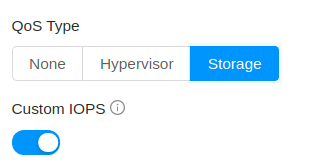
Create Disk offering with custom IOPS enabled under QoS type storage
-
In deploy VM wizard, select this disk offering in data disk section
-
In create volume wizard, select this disk offering

EXPECTED RESULTS
Min and max IOPS fields should be there like below
