feat(docs-infra): add dark mode to documentation web site#40257
feat(docs-infra): add dark mode to documentation web site#40257shane99a wants to merge 4 commits into
Conversation


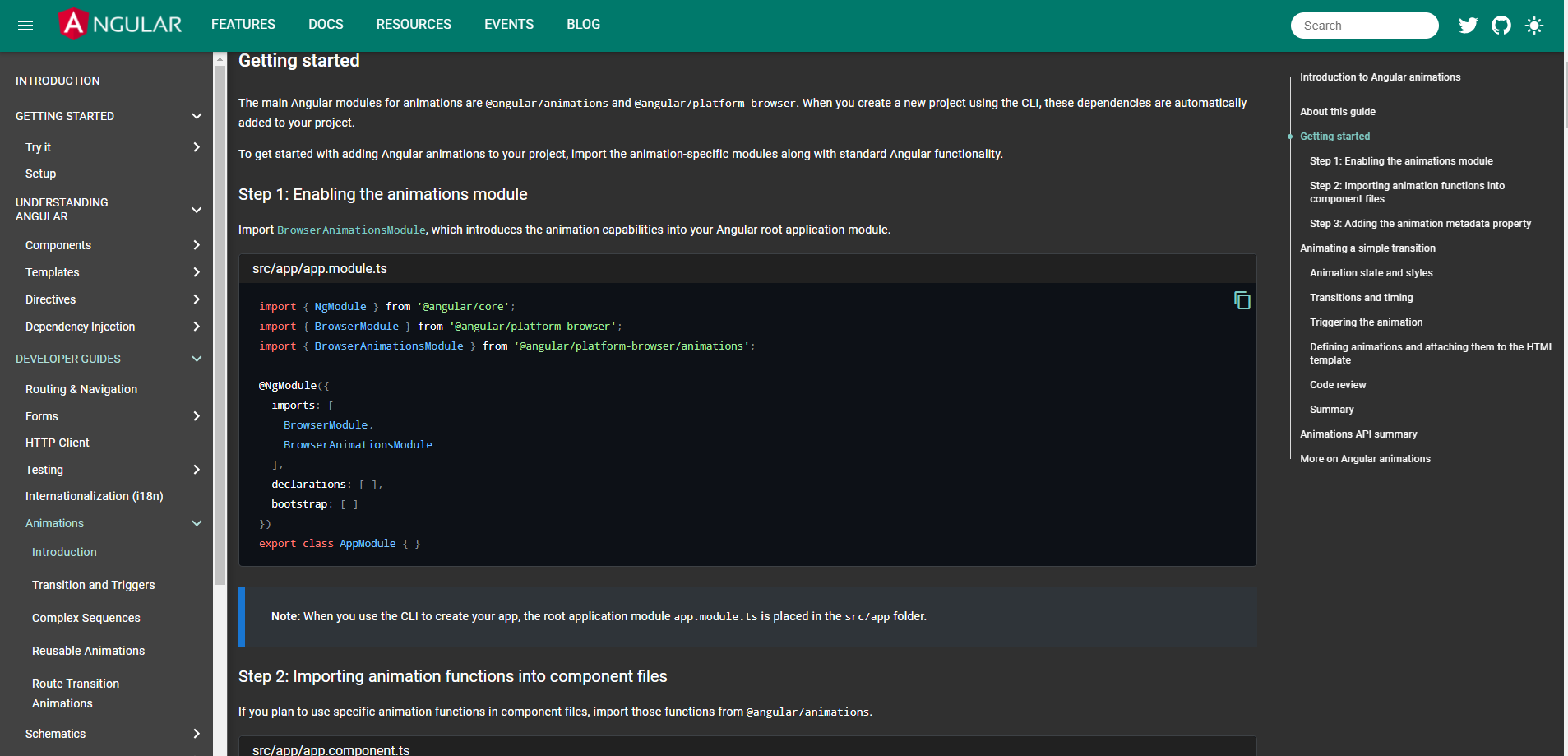
Add dark mode to angular.io web site to make it easier to read

Add a button to the top right of the web site to toggle dark mode
Save user selected theme using local storage
Use theme picker component source code from angular material with some modifications

Do not run dark mode when printing is enabled

Modify the current styles spead accross many files by placing the relevant styles into one file for dark mode

Closes angular#40102


|
You can preview a4e170a at https://pr40257-a4e170a.ngbuilds.io/. |
    Moved hardcoded colors to variables

    Fixed color issue for table of contents on mobile

    Fixed edit icon color issue for github links

    Closes angular#40102
|
You can preview 788a2a9 at https://pr40257-788a2a9.ngbuilds.io/. |

|
The colours on the API list page need some work. When not hovered over the contrast of list items seems too low, and when you do hover we get an ugly white box.
|

 petebacondarwin
added
the
action: cleanup
petebacondarwin
added
the
action: cleanup
|
I think it would be wise to get some buy-in from @IgorMinar and @aikidave on this before you spend much more time on it. |

|
Reviewing per @aikidave's request. @shane99a thank you so much for doing this. I imagine you are still working out all of the details, but I'm including the things I noticed here in case you iterate further. What's your reasoning for switching from blue to green for the toolbar? In terms of contrast, there are a couple of places that could use tweaking. As @petebacondarwin pointed out, the API page contrast is low. We would need to brighten that font color to get it to pass the WebAIM contrast checker. Tables and alerts would also need some contrast either in their background or border (something to differentiate those elements). In light mode they're set off by a box shadow, but this gets lost with dark colors. Maybe a bright border (#1976d2)? Here's a table from the cheat sheet.
This next image is from the style guide. We would want to make sure that code snippets stand out consistently (the red really stands out on the dark background, but the regular ones fade away a bit).
I love dark mode and really like where you're going with this. If our leads support this, I'm happy to help move it forward in any way I can. |


|
This looks like a really good feature! Thank you for proposing it. If we can sort out all of the accessibility/contrast issues then I'd love for us to land this change. |
Added style tweaks based on feedback and what looks right

Fixed styles that were missed before

Closes angular#40102
|
You can preview fdce7a6 at https://pr40257-fdce7a6.ngbuilds.io/. |
Added elevation to table to make it stand out
Tweaked search results page for dark mode
Fixed styles that were missed before

Closes angular#40102
|
You can preview f41ac5c at https://pr40257-f41ac5c.ngbuilds.io/. |

|
@jelbourn can you please help review this one? I believe you were involved in building some other dark themes for material apps. |
|
@twerske can you please review this PR for visual appeal and accessibility issues? I spoke with Minko and he suggested that you'd be a good person from devrel to take a look. Can you please manually review the main pages as well as sample of content under api and guides sections? thank you! |

 twerske
left a comment
twerske
left a comment
twerske
left a comment
There was a problem hiding this comment.
Reviewing focused on a11y per @mgechev's request.
Thank you for working on this - yay for dark mode!
I've outlined a few values that need changes to meet contrast guidelines. I'd recommend using an accessibility scanner like: https://www.deque.com/axe/ to ensure all dark-mode specific contrast changes meet WCAG. I'd aim for AAA as a best practice since a majority of this text is small (especially on devices or mobile).
Some overall changes that need to be addressed are looking at text selection, hover status and highlighting. The blue accent color on links combats a bit with the blue text selection:


| $ng-io-theme: mat-light-theme($ng-io-primary, $ng-io-accent, $ng-io-warn); | ||
|
|
||
| $night-primary: mat-palette($mat-blue, 800, 700, 900); | ||
| $night-accent: mat-palette($mat-blue, 300, 200, 400); |
There was a problem hiding this comment.
| $night-accent: mat-palette($mat-blue, 300, 200, 400); | |
| $night-accent: mat-palette($mat-blue, 200, 100, 400); |
|
|
||
| .is-helpful { | ||
| &.alert, &.callout { | ||
| background-color: $theme-hover-background-color; |
There was a problem hiding this comment.
In this use case, this callout/alert section looses it's visual impact - I'd test a higher contrast value for $theme-hover-background-color such as black (going darker increases the contrast of the light text on top).

| } | ||
|
|
||
| .card-footer { | ||
| color: $theme-accent-color; |
There was a problem hiding this comment.
This is an example of the contrast being lost on hover - if the ratio can meet WCAG AAA (7.0 contrast) that'd meet best practices for our small text.

| color: $theme-foreground-color; | ||
|
|
||
| &:hover { | ||
| background-color: $theme-hover-background-color; |
There was a problem hiding this comment.
Spot check contrast here since this is the primary site navigation - 


| @@ -0,0 +1,3 @@ | |||
| <button mat-icon-button aria-label="Theme switcher button" (click)="currentTheme.name === 'night-theme' ? selectTheme('ng-io-theme') : selectTheme('night-theme')"> | |||
There was a problem hiding this comment.
I think the aria-label here should be either "Switch to light mode" or "Switch to dark mode" (based on the active theme).
There was a problem hiding this comment.
Since the icon also conveys valuable information of if the site is currently in light or dark mode, I'd recommend adding "sun icon" and "moon icon" to aria-labels
|
|
||
|
|
||
| describe('ThemePicker', () => { | ||
| let themeStorageService: any; |
There was a problem hiding this comment.
Rather than using any, it would be good to match the interface of the actual class here
| changeDetection: ChangeDetectionStrategy.OnPush, | ||
| encapsulation: ViewEncapsulation.None | ||
| }) | ||
| export class ThemePickerComponent { |
There was a problem hiding this comment.
Just ThemePicker should be sufficient
| encapsulation: ViewEncapsulation.None | ||
| }) | ||
| export class ThemePickerComponent { | ||
| readonly themes: DocsSiteTheme[] = [ |
There was a problem hiding this comment.
I don't think this theme data structure is necessary for angular.io. On the material site, we need these fields for additional behavior. For example, we need a display name because we show the options in a dropdown menu, which is not necessary here.
I think this can be simplified down to a single string value, theme: 'light' | 'dark, with the icon based on that string value. I would also generate the applied CSS class based on that value like `${activeTheme}-theme`
| ]; | ||
|
|
||
| readonly defaultTheme: DocsSiteTheme = this.themes[0]; | ||
| currentTheme: DocsSiteTheme = this.themes[0]; |
There was a problem hiding this comment.
This is more a style preference, but I would use activeTheme over currentTheme
| } | ||
| } | ||
|
|
||
| selectTheme(themeName: string) { |
There was a problem hiding this comment.
Since this is only doing light/dark, I would make this toggleTheme, dropping the parameter.
|
|
||
| @Injectable() | ||
| export class ThemeStorageService { | ||
| static storageKey = 'docs-theme-storage-current-name'; |
|
|
||
|
|
||
| @Injectable() | ||
| export class ThemeStorageService { |
There was a problem hiding this comment.
I would just do ThemeStorage
| } | ||
| } | ||
|
|
||
| clearStorage() { |
There was a problem hiding this comment.
This method doesn't appear to ever be called in the app so it can probably be dropped
| @media not print { | ||
| .night-theme { | ||
| @include angular-material-color($night-theme); | ||
| @include custom-styles($night-theme); | ||
| } | ||
| } |
There was a problem hiding this comment.
This is going to include all of the CSS for light and dark themes at the same time, which we don't particularly want. On the material site, we swap out the href on the link to point to a different css file based on the theme preference so that we only load one theme at a time.
One concern with this approach is that, on slower devices, you can sometimes see a flash of the default theme before your preferred theme is loaded, since that isn't resolved until Angular has bootstrapped.
There was a problem hiding this comment.
If you go network panels and slow it down to 3g for https://material.angular.io. You'll notice the same issue happening.
There was a problem hiding this comment.
Yeah, it's something we decided we were okay with on the material site, but other folks would have to weigh in on angular.io. If you didn't have the saved preference, you could use the media attribute of the link element to target prefers-color-scheme. But with the preference, you'd need a small snippet to read/set the href before anything else happened.
There was a problem hiding this comment.
If the sass is all compiled to a single css file like it is here, then I don't know if you would notice the change in styling. If anything you would notice it if you tried the approach of href and dynamically loading another css file (as I have ran into that issue in other projects). I'm trying to see if slowing it to 3g does cause what you talked about, but I couldn't reproduce it.
Media attribute is a bit more risky as I wanted the user to have the option to opt out if they don't want it.
There was a problem hiding this comment.
The issue with using CSS classes to toggle the theme isn't that you'll get a flash of the default theme, it's that the browser has to download a nontrivial amount of additional CSS that they aren't using. I don't know the total size offhand, but we do our best to keep the payload size of angular.io as small as we can, and doubling the theme styles would be something we'd want to avoid.
There was a problem hiding this comment.
Yeah if the concern is size, then my PR is not gonna meet the standard. It's meant to not infringe the current code as much as possible without affecting the feature. Feel free to close it, and maybe someone can tackle the refactoring at some point.
| @@ -0,0 +1,598 @@ | |||
| @mixin custom-styles($theme) { | |||
There was a problem hiding this comment.
Looking through this file, I don't think we can move forward with it in its current form. The biggest problem is that it's relying on global styles to override component-specific styles with greater specificity. These global overrides, though, are disconnected from the code they're affecting. This disconnect will make any maintenance going forward exceptionally difficult. This is compounded by the fact that this single file has implicit knowledge of every hard-coded color style in the app. Another side-effect here is that it becomes very easy to introduce a style into this file that accidentally affects more than it intends, since anything in this file affects the entire app all at once.
Another issue is that the app ends up delivering the hard-coded and the dark-mode overrides. The end result is that we're delivering more CSS than really necessary. This also has the side-effect of making the code harder to debug in devtools since there's more going on with any particular element.
Another issue is that these overrides seem to target the internals of Angular Material components in many cases, which is rather brittle since it's tied into the exact DOM structure of the component today. All of the Angular Material components support dark themes, so I'm guess the problem here is that those styles are already being overridden elsewhere in the app here without doing through their theme mixns?
There are a few general approaches we could go about resolving these issues. The first is what Angular Material does: splitting color styles for the app into separate Sass files, and combining those into a theme CSS file, which can then be dynamically loaded/swapped. I suspect this would be a large-ish undertaking for aio since you'd have to do a nontrivial refactoring for every component in the app.
The second approach would be to eliminate the hard-coded colors across the app and replace them with a fixed set of theme CSS classes derived from the Sass theme. For example, if a component current has something like
.content-projection-example {
  color: darkgray;
}
You would eliminate this style and instead apply a predefined CSS class like .theme-foreground-color to the element in the template. This class would be defined in the theme CSS file, which would be dynamically loaded based on the light/dark preference, something like
.theme-foreground-color {
  color: mat-color($foreground-palette, text);
}
I think this would also be a large-ish undertaking that touches a lot of the app.
The third approach would be to use CSS Variables, redefining the hard-coded colors within each component to be based on a limited set CSS Variables, which are in turn based off values coming from the theme in Sass. The blocker here, though, is that CSS Variables aren't supported in IE11, which we still support for Angular. This will become a much more attractive option in the future, but for now I don't think we can feasibly adopt it. (as a side note, you unfortunately wouldn't be able to use Sass variables to implement this approach due to the way Angular bundles component CSS into JavaScript).
At the very least I think @gkalpak @IgorMinar and @mgechev would want to weigh in on this. I'm biased, but I think that using the same approach as Angular Material is the "best" end result here, though it's likely a fair amount of work to get there.
There was a problem hiding this comment.
Yeah I understand what you mean. I decided to go with this approach, as I am not sure if that level of refactoring would bring that much value relative to the feature itself, especially with this being my first time touching this repo.
What about a fourth option to make all the corresponding sass files take in the theme input, similar to how custom_styles does it? Would that work? Probably the only other way I can think of that reduces significant refactoring.
There was a problem hiding this comment.
That unfortunately would be the same as trying to use Sass variables, which I mentioned in the block for the third approach. The problem here is that Angular bundles a component's CSS into its JS output. This lets the styles participate in the JS module system (i.e., you only get the styles for a component when you use it), but also means that you can't swap out the style at runtime.
| @@ -0,0 +1,598 @@ | |||
| @mixin custom-styles($theme) { | |||
There was a problem hiding this comment.
This @mixin file is quite a bit of custom overriding of the current dark theming included in Material
There should be a cleaner way to use material theming and not need this amount of overriding - making use of things like defining theme scss variables: $mat-dark-theme-background and $mat-dark-theme-foreground

|
Ack, sorry we weren't able to move forward with this. I do want this feature a ton- it's a running joke on the team how much I want a dark mode for everything. I hope to take a pass at it when there's an opening in the roadmap. |


|
I'm really sad to see this PR close. @jelbourn with your permission I'd like to attempt this. I'm familiar with how https://material.angular.io/ handles theming and I threw together a quick example branch porting over similar functionality here for one component style. This branch has the theming infrastructure from material and the theming created for the In particular the implementation differs from this PR by:
See master...AleksanderBodurri:aio-theming Demo: angular-io-theming.movRefactoring out all the styles would be a non-trivial undertaking but I think it would be worth it. It would open up the door for more themes in the future and could lead to other optimizations like lazy loading the archive, release candidate, and next version css for old/rc/next versions of the angular docs, instead of including them in the stable release version of the docs. |

|
I'm just now seeing this @AleksanderBodurri -- I'd love to see you take this on! I'm tagging @jelbourn to see what he thinks about this approach, the general infra of lazy loaded theme looks good though. |
|
Yeah, I somehow missed the notification on this one. If you're up to send a PR that
Then I'd be happy to take a look |


|
This issue has been automatically locked due to inactivity. Read more about our automatic conversation locking policy. This action has been performed automatically by a bot. |

9 participants


Add dark mode to angular.io web site to make it easier to read
Add a button to the top right of the web site to toggle dark mode
Save user selected theme using local storage
Use theme picker component source code from angular material with some modifications
Do not run dark mode when printing is enabled
Modify the current styles spead accross many files by placing the relevant styles into one file for dark mode
Closes #40102
PR Checklist
Please check if your PR fulfills the following requirements:
PR Type
What kind of change does this PR introduce?
What is the current behavior?
Web site currently has no dark mode
Issue Number: #40102
What is the new behavior?
Adds dark mode and ability to toggle it
Does this PR introduce a breaking change?
Other information
Please try it out as well locally to see if there's something missing.