Repository navigation
Inputs are not inherited when Ivy is enabled #30080

Description

🐞 bug report
Is this a regression?
No
Description
We build our app with ngc and closure compiler. After enabling Ivy ngc fails almost immediately. Could not find any instructions for this case.
🔬 Minimal Reproduction
        import {platformBrowser} from '@angular/platform-browser';
        import {AppModuleNgFactory} from './application.module.ngfactory';

        platformBrowser()
            .bootstrapModuleFactory(AppModuleNgFactory)
            .catch(e => console.error('Application bootstrap failed', e));
🔥 Exception or Error
[11:51:23] Spa_Source/main.aot.ts:7:34 - error TS2307: Cannot find module './application.module.ngfactory'.

7 import {AppModuleNgFactory} from './application.module.ngfactory';
🌍 Your Environment
Angular Version:
8.0.0-beta.14
Reacted by Dominik, Tsvetomir Tsonev, Aleš, Vladimir Yakovlev, earshinov, Cédric Belin, Logan Dam, Edoardo Luppi, Michael Prentice, Makla and 3 more
Activity
alan-agius4 commentedon Apr 24, 2019
Hi,
ngfactoryare only created when using NGC, Ivy uses a different compiler (NGTSC) which doesn't generate factories.Which means you need to remove the factory references.
Ie from
to
Alternatively you can enable factory shims by adding
"allowEmptyCodegenFiles": trueunderangularCompilerOptionsin yourtsconfig.json. However it's worth mentioning that the later is not recommended.kemsky commentedon Apr 24, 2019
@alan-agius4, thanks for information. I've tried recommended approach, but still no success:
JoostK commentedon Apr 24, 2019
@kemsky From that error I can tell that ngcc has not processed those libraries. Are you using latest Angular CLI to build your application?
P3tronius commentedon Apr 26, 2019
@kemsky did you added ivy-ngcc in postinstall steps of package.json?
kemsky commentedon Apr 26, 2019
@Petronious, Yep, it was my fault, I did not invoke
ivy-ngcc. There are a couple of problems with Ivy though.If you disable Ivy and try to build as usual with regular
ngc- it fails and you have to remove node_modules and install again.I received a lot of strange compiler errors:
Corresponding template:
Code:
Looks like alias is ignored...
Also I'd like to know is ivy-ngcc documented anywhere? I need to skip processing of certain modules.
P3tronius commentedon Apr 26, 2019
Strange, Ivy is supposed to support extends on
@Component: https://is-angular-ivy-ready.firebaseapp.com/#/statusGuess you'll have to add
@Input('caption')in the concrete classes meanwhile...kemsky commentedon Apr 26, 2019
@JoostK @alan-agius4 what do you think?
alan-agius4 commentedon Apr 26, 2019
NGCC is integrated as part of @ngtools/webpack which is used in the Angular CLI.
Unless you have a custom build system and not using any of the above, you need to run NGCC as a post install hook.
If opting out of ivy is not working, ie a build which used to work is no longer working, we’d need to take a look at it.
Which version of the framework are you using?
JoostK commentedon Apr 26, 2019
@kemsky
As part of running ngcc, existing code in
node_modulesis AOT compiled into Ivy instructions. If you run ngcc using its executableivy-ngccthen this step overwrites library files in-place, with a backup file suffixed with.bakbeing produced as well. Besides the generation of Ivy code, the original Angular decorators such as@Componentand@Inputetc. are removed from the code, as Ivy conveys such metadata in a different, tree-shakeable way. Therefore, thenode_modulesdirectory has then been modified in a way that it can no longer be used when disabling Ivy, as vital information is no longer present in the library files.The same is not true when using the Angular CLI, as its execution of ngcc under the covers will use a different approach that does not suffer from the same problem: instead of overwriting files in-place, a dedicated
__ivy_ngcc__subdirectory is created in each library that gets compiled for Ivy. The CLI will then redirect Webpack to use the sources from the subdirectory, instead of the non-Ivy code originally shipped to NPM. Hence, this way disabling Ivy should not see the need to reinstallnode_modules.Thanks for sharing this! The type checking of Angular template code has been completely redesigned to be far more extensive than the type checking that was done previously. It should be able to catch many more bugs that were previously not discovered. In this case however, I don't have enough insight to see if this is a false-positive in the new type-checker, of if there's legitimately reason to believe there's a type error somewhere.
By the looks of it, a concrete directive/component of
AbstractFormComponentcould not be matched (leaving the property left-over for thedivelement) or it could not be statically determined that the parent class of the matched directive/component isAbstractFormComponent, which also currently results in applying the property to thedivelement.If you think neither of the above is the case, there may indeed be buggy behavior with either class hierarchies (which should be supported iff the class hierarchy can be statically determined) or with the aliased input (which should also be taken into account already).
Would you be able to provide a minimal reproduction of this issue, so that we can look into what is causing it?
It doesn't currently have a lot of documentation. May I ask, why do you need to skip processing of certain libraries? Are they Angular libraries that are processed but you think they shouldn't?
kemsky commentedon Apr 29, 2019
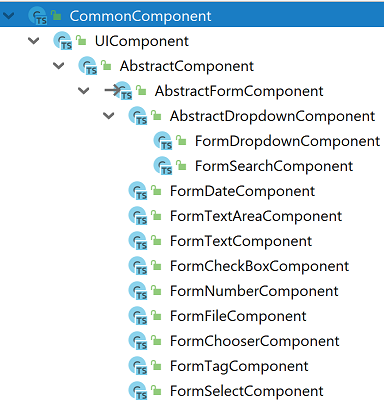
@JoostK , I've tried removing input aliases and it did not help, then I tried copy-paste inputs to the inherited classes - it worked, so I'm 100% sure that inputs are not properly inherited (there are no typescript errors, tsconfig is pretty strict). Without it I can not continue testing, because inheritance is used heavily in our application. Creating reproduction on stackblitz may take some time.
See hierarchy screenshot, all parent classes are abstract:
Another problem with hyphens, it will not compile:
I want to skip processing of certain unused libraries, to minimize build times on CI.
[-]ngc can not find AppModule ngfactory when Ivy is enabled[/-][+]Inputs are not inherited when Ivy is enabled[/+]54 remaining items
dannyskoog commentedon Oct 8, 2019
Thanks for re-confirming @JoostK. I just wanted to point that out in order for that specific issue not to end up in the shadow of all other base class related matters
sharikovvladislav commentedon Oct 8, 2019
@pkozlowski-opensource
Nope. I am using stable 8.2.9 at the moment. I am trying to get ivy working on it in my project.
Nice to hear it. Thank you for the answer.
Is there any opened issue? So we can track it?
kara commentedon Oct 8, 2019
@trotyl In that case, you would have to copy over the decorator (that's what the schematic does for you automatically). It is slightly more boilerplate, but it's more explicit, so it's easier for anyone to look at the directive and figure out what its selector is without having to drill down the inheritance tree. You do have to know what the selector is, though. It could be an argument for another feature down the line, but probably not for v9.
In any case, thanks for pointing out the ambiguity. Seems like we need to add another FAQ to the guide about this. cc @kapunahelewong
Splaktar commentedon Oct 10, 2019
@sharikovvladislav I don't believe that selectorless
@Directive()and the intelligence around not needing to import them into a NgModule is in8.x. I believe that it first went into9.0.0-next.3, but you would want to grab9.0.0-next.10to get the most fixes related to this issue.With
8.x, you would need to add a fake selector to your@Directive()and import it into a module. For library authors, even if you are targeting9.x, you still need to do this for your library to support Angular8.xapps.fr0 commentedon Oct 14, 2019
Using
9.0.0-next.10andenableIvy=true, I am having trouble using a base class component with a generic type.Using this component yields the following error:
Note that
DerivedComponentis imported into the module, butBaseComponent<T>is not (how would I even do this with a generic class?)I also get an error from the Angular language service about "BaseComponent is not declared in any Angular module" but that seems like a bug in the language service.
If I add
BaseComponentto the module, I still get the error, plus an additional error:JoostK commentedon Oct 14, 2019
@fr0 thanks for the additional info. The first error you're getting is exactly this issue, for which I opened #33131 yesterday that fixes that.
The second error is surprising to me, could it be that it's due to a hot-reload (or does the same error persist after restarting
ng serve?). The reason why I'm asking is that in #32416 a very similar error is mentioned, so it may just be that issue.fr0 commentedon Oct 14, 2019
Thanks, glad to hear it.
It happens after restarting
ng serve, so I don't think it's related to that. When trying to create a reproduction repo, I discovered that it only occurs ifBaseComponentis in thedeclarationslist and theexportslist. Removing it from theexportslist "fixes" that particular error. Here's a reproduction repo if you think this is worth looking into: https://github.com/fr0/angular-ivy-testangular package minor version upgrade.
angular-automatic-lock-bot commentedon Nov 24, 2019
This issue has been automatically locked due to inactivity.
Please file a new issue if you are encountering a similar or related problem.
Read more about our automatic conversation locking policy.
This action has been performed automatically by a bot.