Repository navigation
HTTP 503 in Chrome -- angular.io is currently unable to handle this request. #25834
Description

I'm submitting a...
[ ] Regression (a behavior that used to work and stopped working in a new release)
[ ] Bug report
[ ] Performance issue
[ ] Feature request
[ ] Documentation issue or request
[ ] Support request => Please do not submit support request here, instead see https://github.com/angular/angular/blob/master/CONTRIBUTING.md#question
[X] Other... Please describe: Frequent 503 when attempting to access angular.io docs over the last week
Current behavior
Randomly, angular.io docs will stop working from within Chrome. Reloading the page in Chrome, clearing cache, etc. does not resolve the issue. However, curl https://angular.io/ will produce valid HTML, suggesting an issue with how docs are served to browsers.
Minimal reproduction of the problem with instructions
Enter https://angular.io/ in the Chrome omnibar. See 503 server error. Clear cache, force reload (SHIFT-F5), still see 503.
Environment
Window 10
Browser:
- Chrome 69.0.3497.81 (Official Build) (64-bit) (cohort: 69_win_81)
-> up to date, current stable/public version - Chrome (Android) version XX
- Chrome (iOS) version XX
- Firefox version XX
- Safari (desktop) version XX
- Safari (iOS) version XX
- IE version XX
- Edge version XX
Activity
fredsa commentedon Sep 6, 2018
Here's the Chrome HAR file for one sample failed request:
503.har.txt
fredsa commentedon Sep 6, 2018
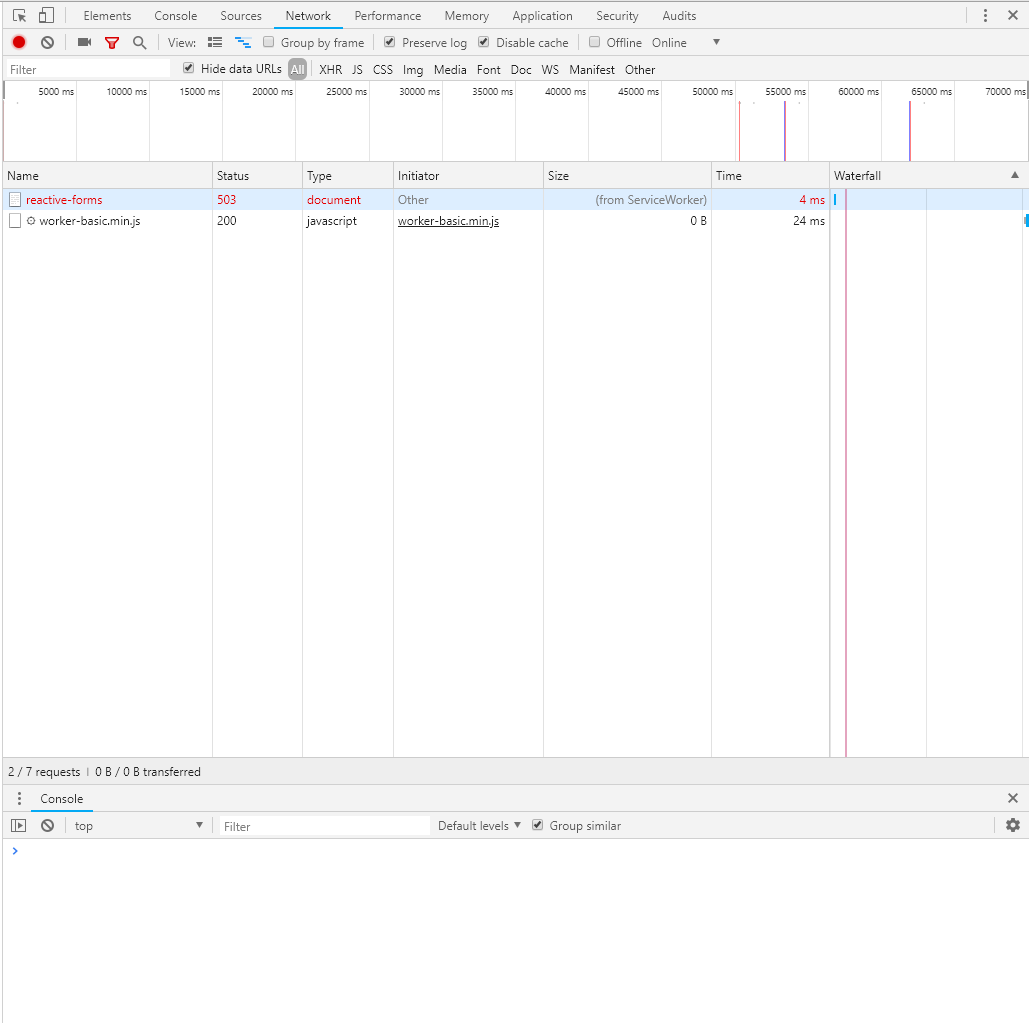
Screenshots with Chrome dev tools open:

fredsa commentedon Sep 6, 2018
formatted--worker-basic.min.js.txt
gkalpak commentedon Sep 6, 2018
503 usually comes from the ServiceWorker 😕
You can unregister the ServiceWorker in
DevTools > Application > Service Workers > unregistertiagomsmagalhaes commentedon Sep 6, 2018
I also face this issue..
@gkalpak and next.angular.io works. Also tried the unregistration but with no effect
macOS 10.13.6
Chrome Canary Versão 71.0.3544.0 canary (64 bits)
gkalpak commentedon Sep 6, 2018
How about clearing the caches (e.g.
DevTools > Application > Clear storage > clear site data(with theCache storageoption checked)?Before doing that, though, I am curious what you guys have in the SW caches. What does the following snippet return:
tiagomsmagalhaes commentedon Sep 6, 2018
Now it's working without doing anything. But I think this is the time that was "out of service". From time to time I have been experiencing this.
@gkalpak Output to your snippet
gkalpak commentedon Sep 6, 2018
Thx for following up. Nothing stands out (except there's a lot of caches 😅).
Anyway, I think this is a probably a SW issue (although can't rule our Firebase hosting entirely - they've had updates recently that broke a couple of things).
This is really hard to debug without getting my hands on it and there's no point, since angular.io is using a quite old version of the SW. We are rolling out a new (more stable and powerful 💪) SW implementation (it's already deployed to next.angular.io and angular.io will follow in the next few days ™️), so hopefully such issues won't happen in the future.
I'm going to close this. @fredsa, if neither #25834 (comment) nor #25834 (comment) fix it for you, feel free to comment below and I will re-open the issue.
fredsa commentedon Sep 6, 2018
I've been seeing the 503s intermittently for quite some time now. It's obviously a really bad "getting started" experience when you're constantly "getting stopped" because the documentation is unavailable.
Didn't know about next.angular.io though. Worth a persistent banner on angular.io to point developers at next.angular.io?
I hope it's "next few days". Any longer and I think we need another solution.
fredsa commentedon Sep 6, 2018
I found Chrome's standard builtin HTTP ERROR page very misleading as it did not let me know about the service worker being responsible for the issue. Filed https://bugs.chromium.org/p/chromium/issues/detail?id=881421
gkalpak commentedon Sep 6, 2018
Maybe we could return a more descriptive error response from the SW. But, like I said, angular.io uses a very old implementation of
@angular/service-worker. If you see this on next.angular.io (or again on angular.io once it is migrated to the new SW), please open a new issue and we'll try to find out what is causing it and how to better surface useful infromation/guidelines to the end-user.(BTW, the new SW exposes a
/ngsw/statepage, that shows information about its internal state. This is useful for debugging.)ericmartinezr commentedon Sep 6, 2018
@gkalpak would you mind updating the link to the /ngsw/state page? :D It's pointing to angularjs.org :D, ty 👍
ngiebel commentedon Sep 27, 2018
I know this is closed, but it is occurring for me every time there is an update published (recently every new patch version) and once it occurs the only way to fix it seems to be to unregister the angular.io service worker. Not sure how it factors in, but it seems like opening a link from the api documentation in a new tab triggers whatever is happening and then continues to occur for any part of the angular.io site. I am able to continue using the site in the original tab as long as I don't reload, including navigating to pages that have not been visited.
gkalpak commentedon Sep 27, 2018
Sorry you are having this issue. We are really really close (famous last words) to updating angular.io with the latest SW (which should make these issues go away). You can track it here: #25997
angular-automatic-lock-bot commentedon Sep 14, 2019
This issue has been automatically locked due to inactivity.
Please file a new issue if you are encountering a similar or related problem.
Read more about our automatic conversation locking policy.
This action has been performed automatically by a bot.