Repository navigation
WebP file overwritten if filename has the same name with extension of jpeg and jpg #358
Description

Bug Description
This may be a misconfiguration issue, but at the moment if a file is uploaded with the same filename but the extension is jpeg or jpg, the corresponding webp file generated is overwritten by the last file uploaded.
Steps to reproduce
- Create 2 files, for example,
Paul-Test.jpegandPaul-Test.jpg - Go to Media Gallery
- Click on Add New
- Upload
Paul-Test.jpeg - Check
~/wp-content/uploads/2022/06/Paul-Test.jpeg - Check
~/wp-content/uploads/2022/06/Paul-Test.webp - Upload
Paul-Test.jpg - Check
~/wp-content/uploads/2022/06/Paul-Test.jpg - Check
~/wp-content/uploads/2022/06/Paul-Test.webp - The file
Paul-Test.webpcreated fromPaul-Test.jpegis overwritten with the webp generated fromPaul-Test.jpg
Additional Context
I have added this to functions.php:
/* Image conversion attributes */
add_filter('webp_uploads_upload_image_mime_transforms', function () {

    return [
        'image/jpeg' =>  [ 'image/jpeg', 'image/webp' ],
        'image/png' =>  [ 'image/png', 'image/webp' ],
        'image/webp' =>  [ 'image/webp', 'image/jpeg' ],
    ];
});
- PHP Version: 7.4
- OS: RHEL 8.6
- Browser: Firefox
- Plugin Version: 1.1.0
To note, PNGs with the same filename do not overwrite the webp image (an image is not created at all).
Activity
mxbclang commentedon Jun 8, 2022
Thanks for reporting this, @pixel-paul! We'll take a look.
mukeshpanchal27 commentedon Jun 9, 2022
Thanks for reporting the issue.
I reproduce the same issue in my setup and check the internal process of how it generates the WebP for the images.
WordPress core store
image/jpegmime type for all three image formats.jpg,.jpegandjpe.The Performance plugin checks the attachment image mime type for validation when it tries to generate a WebP image in the function webp_uploads_create_sources_property() with below code snippets. This function allows
.jpgto formate images for the WebP generation because WP stores it asimage/jpegand it will enable this format for WebP.WordPress allows the same image name with different image types like
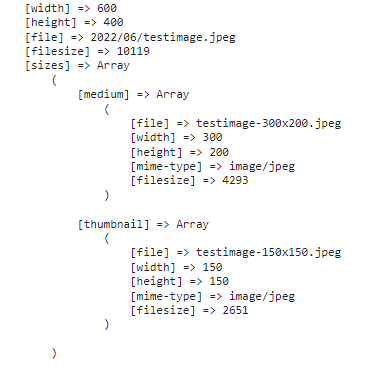
testimage.jpgandtestimage.jpegbut when it comes to the Performace plugin we get both images withtestimage.jpegso it overrides previous WebP images.Check the attached
$metadataresult array for both types of images.JPG image:

JPEG image:
Here we have two options for skipping the duplicate WebP image.
Before generating any new WebP image we have to check if the same file already exists on the folder and then skip the project so it will generate a WebP image for the first image only and the second image will be skipped.
Along with the mime type checking we also check image format if we find
.jpgor.jpewill skip it.mxbclang commentedon Jun 9, 2022
Thanks for taking a look, @mukeshpanchal27. @felixarntz Assigning this to you to confirm next steps based upon the options that Mukesh has outlined in his comment.
felixarntz commentedon Jun 9, 2022
Great catch @pixel-paul!
@mukeshpanchal27 Since this is a bit of an edge-case, I'd argue as a first stop gap to this bug we can go with your suggested approach 1. That way we will miss out on WebP for such uploads, but at least not break anything.
I would eventually suggest to find a cleaner solution where we can generate WebP for both uploads, e.g. appending something like
-2to the file name or so. But that's more complicated, and given this is not going to happen a ton, I think it doesn't need to be a launch blocker. We definitely need to avoid the overwrite from happening though.I think we can move ahead with approach 1 and implement a PR to ensure WebP images are not overwritten in this situation.
pixel-paul commentedon Jun 9, 2022
Thanks @bethanylang, @mukeshpanchal27 and @felixarntz for looking into this.
Adding some context to our issue, we have had 3 reported cases where this bug has happened (since we implemented usage of WebP with this plugin, which was around 3 days ago).
Daily customer upload averages around 200 - 400 photos, taken with a phone or digital camera - we are occasionally seeing files being uploaded with the same name but different extensions. As an example, we have in the
uploads/2022/06folder:The issue appears to mainly be with users uploading files with names such as:
1.jpg1.jpeg2.jpg2.jpegPicture-19.jpgPicture-19.jpegConsidering the solutions mentioned above, perhaps another would be where the original file extension is prepended to the WebP file extension. For example:
Paul-Test.jpeg --> Paul-Test.jpeg.webpPaul-Test.jpg --> Paul-Test.jpg.webpThis would also work in the case of PNGs which have the same name but different content:
Paul-Test.png --> Paul-Test.png.webp