Repository navigation
Conversation


|
|


|
👋 Thanks for your first Pull Request and for helping build the future of Gutenberg and WordPress, @sdnunca! In case you missed it, we'd love to have you join us in our Slack community, where we hold regularly weekly meetings open to anyone to coordinate with each other. If you want to learn more about WordPress development in general, check out the Core Handbook full of helpful information. |
 github-actions
Bot
added
the
First-time Contributor
github-actions
Bot
added
the
First-time Contributor
8a43327 to
545fd11
Compare
 noisysocks
added
[Type] Enhancement
noisysocks
added
[Type] Enhancement

|
I see a bug happening when testing:
Expected: Visual mode shows the changes made in HTML mode It might be related to the block only being updated |
|
Yep - it's here, as suspected it only updates on blur: A simple fix might be to also make it update on unmount using a |


545fd11 to
c2351f3
Compare

|
@talldan I've updated the PR to use the approach from https://github.com/WordPress/gutenberg/blob/trunk/packages/edit-site/src/components/code-editor/code-editor-text-area.js Calling Thank you so much for all your help. |

 noisysocks
left a comment
noisysocks
left a comment
noisysocks
left a comment
There was a problem hiding this comment.
Works well in my testing! Nice one. Just a couple of minor comments. Would be good to test the extra logic we've added to the selector.
It's interesting that BlockHTML has so many similarities to CodeEditorTextArea in @wordpress/edit-site (and assumedly the code editor in @wordpress/edit-post, too?). Would be nice to create a component for all three code editors to use that contains all of this finicky state wrangling.
I suppose that's out of scope for this PR though 😀
| if ( ! clientId ) { | ||
| return; | ||
| } | ||
| const block = select.getBlocksByClientId( clientId )[ 0 ]; |
There was a problem hiding this comment.
Minor nitpick to get rid of those unsightly [ 0 ]s 😛
| const block = select.getBlocksByClientId( clientId )[ 0 ]; | |
| const [ block ] = select.getBlocksByClientId( clientId ); |
| return; | ||
| } | ||
| const block = select.getBlocksByClientId( clientId )[ 0 ]; | ||
| if ( ! hasBlockSupport( block.name, 'html', true ) ) { |
There was a problem hiding this comment.
Is it possible that block could be null here?
| @@ -770,7 +770,21 @@ describe( 'actions', () => { | |||
| describe( 'toggleBlockMode', () => { | |||
| it( 'should return TOGGLE_BLOCK_MODE action', () => { | |||
There was a problem hiding this comment.
Should we add tests for the cases where either codeEditingEnabled or hasBlockSupport( ... ) is falsey?
| select.getSettings().codeEditingEnabled ?? true; | ||
| if ( ! isCodeEditingEnabled ) { | ||
| return; | ||
| } |
There was a problem hiding this comment.
Just noting that this logic will also prevent a block that doesn't support html etc. from being switched to visual mode. That is probably fine since assumedly the block supports and editor settings won't change after the app is initialised.
 priethor
added
[Focus] Accessibility (a11y)
priethor
added
[Focus] Accessibility (a11y)


What?
Add a keyboard shortcut to switch to HTML editing on a block level.
I've tried to integrate feedback from previous attempts into this PR. The shortcut shows in the help modal:
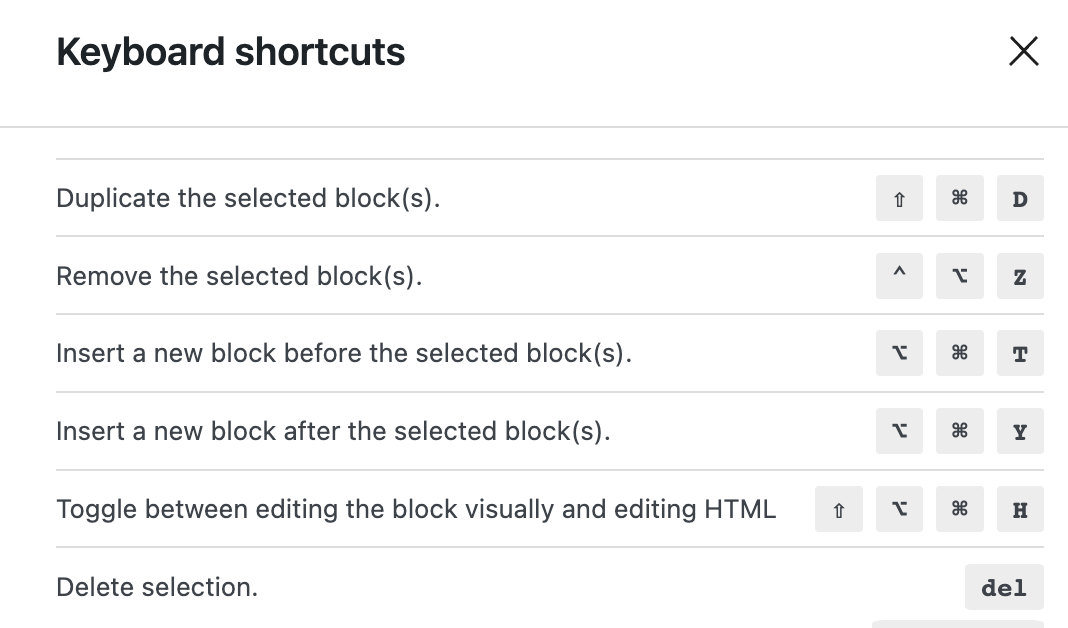
with the text previously agreed upon. The shortcut is also triggered only in context where the Edit as HTML option would show (when having exactly 1 block selected, for blocks that support the option).
Why?
To solve #9723
How?
Testing Instructions
Shift + Option + Command + HShift + Option + Command + HShift + Option + Command + Hand confirm that nothing happens.Edit as HTMLoption available, pressShift + Option + Command + Hand confirm that nothing happens.