I'm trying to grab the command line arguments using [...$vararg], which gets resolved to {...} in Lua.
Unfortunately, using [...$vararg] in the top level of the Lua bundle file results in the {...} to be placed inside a function, and no longer resolve the command line arguments.
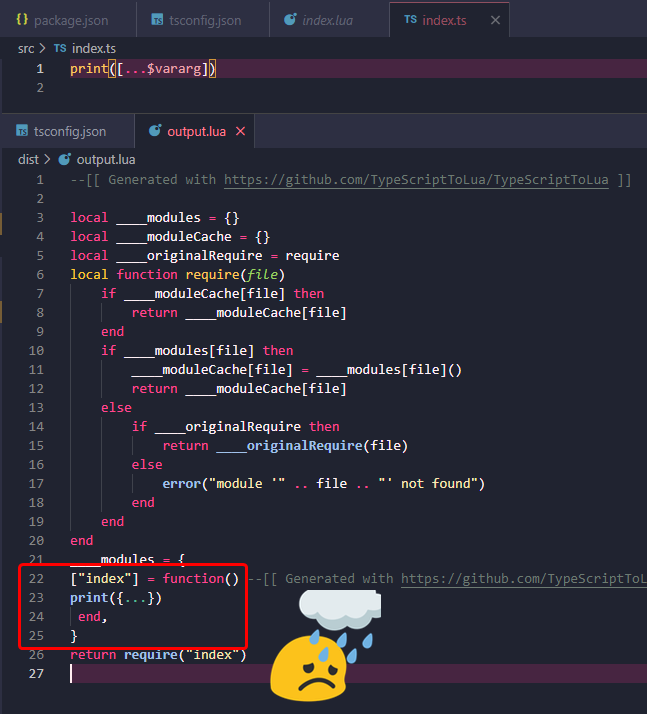
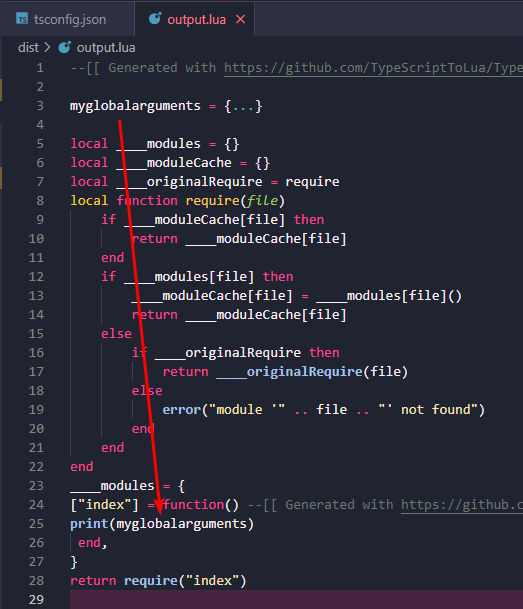
As a temporary fix, I instead created a new global variable at the top of the generated file with the contents of {...}, and using that variable to access the argv's.
I'm not an avid Lua user, but I might suggest somehow passing the command line arguments to (only?) the main module.
tsconfig.json
{
  "compilerOptions": {
    "target": "esnext",
    "lib": [
      "esnext"
    ],
    "moduleResolution": "node",
    "types": ["lua-types/5.1"],
    "strict": true,
    "outDir": "dist/"
  },
  "tstl": {
    "luaTarget": "5.1",
    "luaBundle": "output.lua",
    "luaBundleEntry": "src/index.ts"
  }
}
I'm trying to grab the command line arguments using
[...$vararg], which gets resolved to{...}in Lua.Unfortunately, using
[...$vararg]in the top level of the Lua bundle file results in the{...}to be placed inside a function, and no longer resolve the command line arguments.As a temporary fix, I instead created a new global variable at the top of the generated file with the contents of
{...}, and using that variable to access the argv's.I'm not an avid Lua user, but I might suggest somehow passing the command line arguments to (only?) the main module.
tsconfig.json
{ "compilerOptions": { "target": "esnext", "lib": [ "esnext" ], "moduleResolution": "node", "types": ["lua-types/5.1"], "strict": true, "outDir": "dist/" }, "tstl": { "luaTarget": "5.1", "luaBundle": "output.lua", "luaBundleEntry": "src/index.ts" } }