A grid-based level editor for Unity, built with UI Toolkit. It lets you author, manage and preview tile-and-block levels stored as ScriptableObjects — directly in the editor and at runtime.
Current version: 2.1.0 · Unity 2023.2+ · UI Toolkit
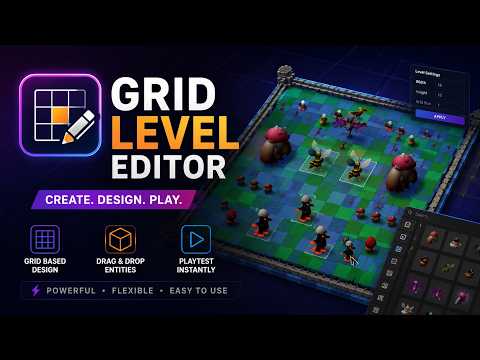

The tool is split into two editor windows and a runtime generator:
- Block Library — define reusable block types (id, icon, prefab, footprint).
- Level Editor — paint levels on a grid using drag-and-drop, with selection, rotation, copy/paste and undo/redo.
- Runtime Generator — spawns the authored level in the scene with staggered DOTween animations and optional auto-switching between levels.
Levels and blocks are plain ScriptableObjects under Assets/Resources/StaticData, so they are versionable and load through the standard static-data pipeline.
- Dedicated window (
Tools → Grid Level Editor → Block Window). - Create, rename and delete block types; assign id, prefab and an optional icon.
- Auto icons: when a block has no icon sprite, the editor shows the prefab's auto-generated preview (Unity
AssetPreview) everywhere — palette, grid, plates and drag ghosts. The icon sprite is just a manual override. - Define multi-cell footprints (rectangle, L, T, cross, …) on a paint grid.
- Search and sort by id, prefab or icon name.

- Visual grid editor (
Tools → Grid Level Editor → Level Window). - Create, rename, resize and delete levels.
- Drag blocks from the palette onto the grid; multi-cell objects render as a single merged plate that follows their exact footprint.
- Range selection, rotation, copy/paste and a per-level undo/redo history.
- Context menu (right click) for block selection, rotation, copy/paste and clearing.
- Zoom for large grids (− / + / 1:1 buttons or Ctrl + mouse wheel).
- Free pan: hold the middle mouse button to drag the map anywhere inside a clipped viewport; a ⊕ button recenters it.
- "No space here" flash when a block or paste can't fit — including the blocking multi-cell object's plate.
- Built-in log panel and a controls overlay.


- Spawns floor tiles and blocks from the authored level data through injected factories.
- Staggered show/hide animations via DOTween.
- One block per object is spawned at the object's geometric center.
- Optional auto-switching to the next level on a configurable interval.
 |
 |
 |
| Action | Input |
|---|---|
| Place a block | Drag a tile from the palette onto the grid |
| Move a block / object | Left-click drag |
| Select cells (range) | Ctrl + Left-click |
| Block context menu | Right-click |
| Copy / paste selection | Ctrl + C / Ctrl + V |
| Undo / redo | Ctrl + Z / Ctrl + Y (or Ctrl + Shift + Z) |
| Clear selection | Backspace / Delete |
| Zoom in / out | Ctrl + Mouse Wheel (or − / + buttons) |
| Reset zoom | 1:1 button |
| Pan the map | Middle-mouse drag |
| Recenter the map | ⊕ button |
Undo/redo is window-local and scoped to the current level: the history resets when you switch levels and when the window is closed.
- Open the project in Unity 2023.2 or newer.
- Open
Tools → Grid Level Editor → Block Windowand create a few blocks (only the id is required; without an icon sprite the prefab's preview is used). - Open
Tools → Grid Level Editor → Level Window, create a level, then drag blocks onto the grid. - Enter Play mode to see the level spawned by the runtime generator.
Data locations:
- Levels —
Assets/Resources/StaticData/LevelsData - Blocks & library —
Assets/Resources/StaticData/BlocksData
| Path | Responsibility |
|---|---|
Assets/Code/LevelEditor |
Runtime data model (LevelMatrixEditor, LevelCell, BlockDataEditor, BlockLibrary, LevelDataDTO) |
Assets/Code/LevelEditor/Editor |
UI Toolkit editor windows, grid view, palette, popups and undo history |
Assets/Code/LevelEditor/Editor/Grid |
Focused grid components (zoom, selection, hit-testing, highlight, plates, cell render, drag/move, pan, palette placement, shortcuts) split out of the grid view |
Assets/Code/Infrastructure |
Runtime generator, factories, static-data and save/load services |
The grid is stored as a flat, row-major LevelCell[] (Unity cannot serialize 2D arrays) and addressed through Index(x, y). Multi-cell blocks share a positive InstanceId; standalone cells use 0.
- Unity 2023.2
- UI Toolkit (editor UI)
- Zenject (dependency injection)
- DOTween (runtime animation)
- Odin Inspector (serialization in
SaveLoadService)
- Auto block icons: a block's prefab preview is used when no icon sprite is set (icon is now optional).
- Free middle-mouse panning of the grid inside a clipped viewport, with a ⊕ recenter button.
- Grid zoom controls (− / + / 1:1, Ctrl + mouse wheel) documented.
- "No space" flash now also blinks the blocking multi-cell object's plate.
- Internal: the monolithic grid view was refactored into focused single-responsibility components under
Editor/Grid.
- UI Toolkit rewrite (migrated off Odin): drag-and-drop grid editor, multi-cell footprints, range selection, rotation, copy/paste, per-level undo/redo and the runtime generator.