Repository navigation
Cannot load Tensorflow DLL error. #144


Description

Any idea? obviously tensorflow.dll is in bin folder
Setting Eager mode... System.TypeInitializationException: The type initializer for 'Tensorflow.tf' thr ew an exception. ---> System.DllNotFoundException: Unable to load DLL 'tensorflo w' or one of its dependencies: Exception from HRESULT: 0xC000001D at Tensorflow.c_api.TF_NewGraph() at Tensorflow.Graph..ctor() in C:\Users\Sviluppo\Desktop\TensorFlow.NET-maste r\src\TensorFlowNET.Core\Graphs\Graph.cs:line 37 at Tensorflow.tf..cctor() in C:\Users\Sviluppo\Desktop\TensorFlow.NET-master\ src\TensorFlowNET.Core\tf.cs:line 18 --- End of inner exception stack trace --- at Tensorflow.tf.enable_eager_execution() in C:\Users\Sviluppo\Desktop\Tensor Flow.NET-master\src\TensorFlowNET.Core\tf.cs:line 33 at TensorFlowNET.Examples.BasicEagerApi.Run() in C:\Users\Sviluppo\Desktop\Te nsorFlow.NET-master\test\TensorFlowNET.Examples\BasicEagerApi.cs:line 19 at TensorFlowNET.Examples.Program.Main(String[] args) in C:\Users\Sviluppo\De sktop\TensorFlow.NET-master\test\TensorFlowNET.Examples\Program.cs:line 21 System.TypeInitializationException: The type initializer for 'Tensorflow.tf' thr ew an exception. ---> System.DllNotFoundException: Unable to load DLL 'tensorflo w' or one of its dependencies: Exception from HRESULT: 0xC000001D at Tensorflow.c_api.TF_NewGraph() at Tensorflow.Graph..ctor() in C:\Users\Sviluppo\Desktop\TensorFlow.NET-maste r\src\TensorFlowNET.Core\Graphs\Graph.cs:line 37 at Tensorflow.tf..cctor() in C:\Users\Sviluppo\Desktop\TensorFlow.NET-master\ src\TensorFlowNET.Core\tf.cs:line 18 --- End of inner exception stack trace --- at Tensorflow.tf.Graph() in C:\Users\Sviluppo\Desktop\TensorFlow.NET-master\s rc\TensorFlowNET.Core\tf.cs:line 45 at Tensorflow.ops.get_default_graph() in C:\Users\Sviluppo\Desktop\TensorFlow .NET-master\src\TensorFlowNET.Core\ops.py.cs:line 48 at Tensorflow.constant_op.Constant(NDArray nd, String name, Boolean verify_sh ape) in C:\Users\Sviluppo\Desktop\TensorFlow.NET-master\src\TensorFlowNET.Core\T ensors\constant_op.cs:line 24 at Tensorflow.tf.constant(NDArray nd, String name, Boolean verify_shape) in C :\Users\Sviluppo\Desktop\TensorFlow.NET-master\src\TensorFlowNET.Core\Tensors\tf .constant.cs:line 12 at TensorFlowNET.Examples.BasicOperations.Run() in C:\Users\Sviluppo\Desktop\ TensorFlow.NET-master\test\TensorFlowNET.Examples\BasicOperations.cs:line 22 at TensorFlowNET.Examples.Program.Main(String[] args) in C:\Users\Sviluppo\De sktop\TensorFlow.NET-master\test\TensorFlowNET.Examples\Program.cs:line 21 System.TypeInitializationException: The type initializer for 'Tensorflow.tf' thr ew an exception. ---> System.DllNotFoundException: Unable to load DLL 'tensorflo w' or one of its dependencies: Exception from HRESULT: 0xC000001D at Tensorflow.c_api.TF_NewGraph() at Tensorflow.Graph..ctor() in C:\Users\Sviluppo\Desktop\TensorFlow.NET-maste r\src\TensorFlowNET.Core\Graphs\Graph.cs:line 37 at Tensorflow.tf..cctor() in C:\Users\Sviluppo\Desktop\TensorFlow.NET-master\ src\TensorFlowNET.Core\tf.cs:line 18 --- End of inner exception stack trace --- at Tensorflow.tf.Graph() in C:\Users\Sviluppo\Desktop\TensorFlow.NET-master\s rc\TensorFlowNET.Core\tf.cs:line 45 at Tensorflow.ops.get_default_graph() in C:\Users\Sviluppo\Desktop\TensorFlow .NET-master\src\TensorFlowNET.Core\ops.py.cs:line 48 at Tensorflow.constant_op.Constant(NDArray nd, String name, Boolean verify_sh ape) in C:\Users\Sviluppo\Desktop\TensorFlow.NET-master\src\TensorFlowNET.Core\T ensors\constant_op.cs:line 24 at Tensorflow.tf.constant(NDArray nd, String name, Boolean verify_shape) in C :\Users\Sviluppo\Desktop\TensorFlow.NET-master\src\TensorFlowNET.Core\Tensors\tf .constant.cs:line 12 at TensorFlowNET.Examples.HelloWorld.Run() in C:\Users\Sviluppo\Desktop\Tenso rFlow.NET-master\test\TensorFlowNET.Examples\HelloWorld.cs:line 21 at TensorFlowNET.Examples.Program.Main(String[] args) in C:\Users\Sviluppo\De sktop\TensorFlow.NET-master\test\TensorFlowNET.Examples\Program.cs:line 21 System.TypeInitializationException: The type initializer for 'Tensorflow.tf' thr ew an exception. ---> System.DllNotFoundException: Unable to load DLL 'tensorflo w' or one of its dependencies: Exception from HRESULT: 0xC000001D at Tensorflow.c_api.TF_NewGraph() at Tensorflow.Graph..ctor() in C:\Users\Sviluppo\Desktop\TensorFlow.NET-maste r\src\TensorFlowNET.Core\Graphs\Graph.cs:line 37 at Tensorflow.tf..cctor() in C:\Users\Sviluppo\Desktop\TensorFlow.NET-master\ src\TensorFlowNET.Core\tf.cs:line 18 --- End of inner exception stack trace --- at TensorFlowNET.Examples.LinearRegression.Run() in C:\Users\Sviluppo\Desktop \TensorFlow.NET-master\test\TensorFlowNET.Examples\LinearRegression.cs:line 32 at TensorFlowNET.Examples.Program.Main(String[] args) in C:\Users\Sviluppo\De sktop\TensorFlow.NET-master\test\TensorFlowNET.Examples\Program.cs:line 21
Activity
Oceania2018 commentedon Jan 29, 2019
@JTrotta I noticed there is a space in the lib name.

Please check the dll name:

JTrotta commentedon Jan 29, 2019
@Oceania2018 No. The space is just a copy and paste error. The question is much more complicated.
It seems that on some processor some Tensorfow dll does not work, because it lacks of AVX support, have a look here https://github.com/fo40225/tensorflow-windows-wheel.
Now I'm using a custom DLL from https://github.com/fo40225/tensorflow-windows-wheel, and it'working. But during session dispose I receive a new error:

Any help on this?
Oceania2018 commentedon Jan 29, 2019
@JTrotta I use Windows 10 and compile the latest TensorFlow from source code. I've tested on several machines. So what's your environment? Actually, I can't open the link in your above post.
Did you try the simplest test like in the
public void ScalarConst()?JTrotta commentedon Jan 29, 2019
@Oceania2018 I just updated links.
Yes, the error you see in picture, raises using this basic instructions:
// Launch the default graph. using(sess = tf.Session()) { var feed_dict = new Dictionary<Tensor, NDArray>(); feed_dict.Add(a, (short)2); feed_dict.Add(b, (short)3); // Run every operation with variable input Console.WriteLine($"Addition with variables: {sess.run(add, feed_dict)}"); Console.WriteLine($"Multiplication with variables: {sess.run(mul, feed_dict)}"); }My enviroment is W7, with :

Fix BasicOperations error. #144
Oceania2018 commentedon Jan 29, 2019
@JTrotta Try to use 1.12 download from https://storage.googleapis.com/tensorflow/libtensorflow/libtensorflow-cpu-windows-x86_64-1.12.0.zip
I just pushed some changes. pull and retry.
Oceania2018 commentedon Jan 29, 2019
@JTrotta Are you running
BasicOperationsin TensorFlowNET.Examples ?JTrotta commentedon Jan 29, 2019
@Oceania2018 Yes basic operations...Just trying ....
Nothing changes. Using this https://storage.googleapis.com/tensorflow/libtensorflow/libtensorflow-cpu-windows-x86_64-1.12.0.zip I got the error "DLL not found" as before. Using this customized https://github.com/fo40225/tensorflow-windows-wheel/tree/master/1.12.0/py36/CPU/sse2, the addition and the mutiplcation are done, but session dispose goes in error.
Oceania2018 commentedon Jan 29, 2019
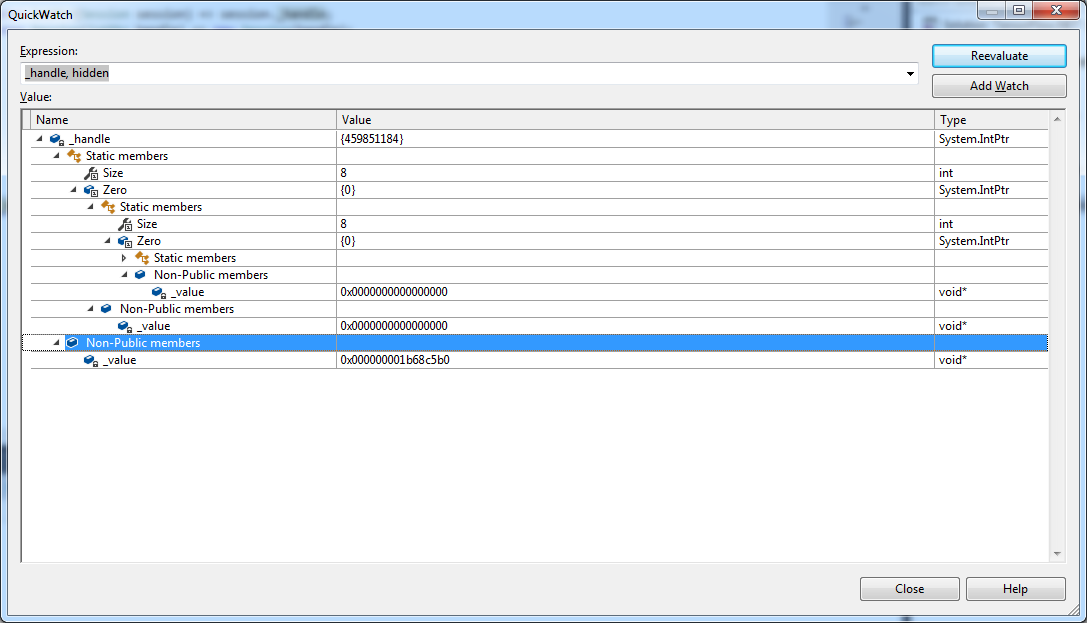
@JTrotta Can you check if the
_handleof theSessionisIntPtr.Zero? I can't reproduce on my local.JTrotta commentedon Jan 29, 2019
@Oceania2018 It does not seem:
Oceania2018 commentedon Jan 29, 2019
@JTrotta It's not an empty pointer. Will investigate more for this issue. Thanks for using TensorFlow.NET.
dotChris90 commentedon Jan 29, 2019
@JTrotta hm did you fork tensorflow.net? if yes you could commit your whole workspace to your repo (except bin and obj folder but with the tensorflow dll). don't do commit to main repo but to your fork.
We could clone your fork and check on our systems so we ensure we have some workspaces.
:) just a suggestion for better reproducing the error.
#144
Oceania2018 commentedon Jan 30, 2019
@JTrotta Can you try again? Don't forget to pull latest code.
JTrotta commentedon Jan 30, 2019
@Oceania2018 @dotChris90 , can't do it this morning , I will try this evening (in about 9 hours from now). Sorry and thank you for your work.
JTrotta commentedon Jan 30, 2019
@Oceania2018 @dotChris90 Hello, just tried.
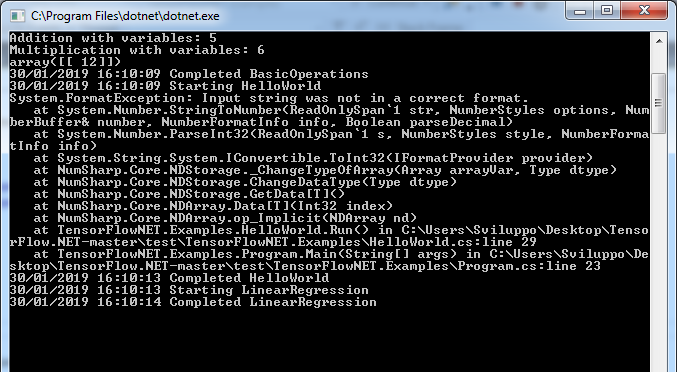
using the tensorflow.dll "unmodified" it does not work, I got the error "dll not found".
Using the tensorflow.dll "modified" form https://storage.googleapis.com/tensorflow/libtensorflow/libtensorflow-cpu-windows-x86_64-1.12.0.zip it works, the dispose error disappeared, but look here:
What's the format exception?
Oceania2018 commentedon Jan 30, 2019
@JTrotta Basically, You are running TF.NET successfully. I just fixed the
HelloWorldexample.Oceania2018 commentedon Jan 30, 2019
Will close this issue. If you have another issue, please create new one. @JTrotta Thanks for testing.
JTrotta commentedon Jan 30, 2019
Thank you both so much!
pardont commentedon Nov 25, 2020
Hi, @JTrotta how to get tensorflow.dll from https://github.com/fo40225/tensorflow-windows-wheel ?
would you mind send me your built dll? my email pardont@me.com
Thanks.