Add option to add explorer context menu in Windows installer #5774
Conversation


Because this is the first custom dialog, I had to take in the source code of WixUI_InstallDir and modify as it is officially recommended http://wixtoolset.org/documentation/manual/v3/wixui/wixui_customizations.html
…entries as requested by Steve Lee
…o wix_explorer_contextmenu
…he future.

refactor common usage of pwsh.exe path
… error). I found that New-MsiPackage does not cleanup the temporary wix files and therefore did not see the errors myself first locally.
Due to a limitation of the registry, the admin prompt has to launch from a PS process. the only alternative would be to use sub menus: https://blogs.msdn.microsoft.com/andrew_richards/2017/03/01/enhancing-the-open-command-prompt-here-shift-right-click-context-menu-experience/

|
@bergmeister Thanks for doing this. I think I prefer the submenu to starting a process to start elevated PowerShell. cc @joeyaiello |

|
Ok. Any preference on the naming of the menu? I am thinking of |
|
@SteveL-MSFT I changed it to use submenus to properly elevate it. This is how it looks now (the logic whether the submenu pops out on the left or right hand side is handled by Windows depending on where one right-clicks): |

…for return key. This makes it also possible to tick/untick the checkbox using the space key.
|
NB: I also tweaked the tabbing index on the new installer page to be consistent with other WiX dialogues and to be able to use the spacebar to toggle the checkbox. Additionally, the context menus also have accessibility shortcuts now, which means that the top context menu can be selected using the |

 SteveL-MSFT
left a comment
SteveL-MSFT
left a comment
SteveL-MSFT
left a comment
There was a problem hiding this comment.
LGTM, built off your branch and works for me. Great work!
|
Thanks. Do you think we should document the new property |
 SteveL-MSFT
added
the
Documentation Needed in this repo
SteveL-MSFT
added
the
Documentation Needed in this repo
|
@bergmeister yes, we should document it. However, since this msi is new, we don't have an existing doc to put it. @sdwheeler can you suggest how we should document the property that can be passed to the msi installer for non-interactive (quiet) installs? |

|
@bergmeister @SteveL-MSFT Please create an issue for this in the PowerShell-Docs repo. It should probably be assigned to @joeyaiello. He is working on the V6 setup docs. Joey and I can work out how and where this should be documented. Also include all possible MSI properties that could be used so we can be complete. |
|
@sdwheeler The new property is the only one as far as I am aware. But I thought that this would go only into 6.1 or this a candidate for merge to the release branch @SteveL-MSFT ? |
|
@bergmeister this is planned for 6.1 |

|
Currently we have a nuget package to set |

Maybe |

…RER_CONTEXT_MENU_OPENPOWERSHELL
|
@iSazonov I applied your renaming suggestion. Please open an issue about your |
|
@bergmeister Thanks! |

 joeyaiello
removed
Documentation Needed in this repo
joeyaiello
removed
Documentation Needed in this repo

| <Publish Dialog="LicenseAgreementDlg" Control="Back" Event="NewDialog" Value="WelcomeDlg">1</Publish> | ||
| <Publish Dialog="LicenseAgreementDlg" Control="Next" Event="NewDialog" Value="InstallDirDlg">LicenseAccepted = "1"</Publish> | ||
|
|
||
| <Publish Dialog="ExplorerContextMenuDialog" Control="Back" Event="NewDialog" Value="InstallDirDlg">1</Publish> |

There was a problem hiding this comment.
This implementation of the Back button looks OK, does not have bug #12055 yet.
6 participants


PR Summary
A new dialogue is added in the Windows installer to offer the option of adding explorer.exe context menus to open PowerShell in the current location as a normal shell or as administrator. The context menu entries are achiveven via registry entries and is available when right-clicking on:
Adding the new custom dialog required copy-pasting the WiX source code of WixUI_InstallDir.wxs as a base as described in the official WiX documentation here.
The registry entries are quite standard but the approach for the context menu of opening PowerShell as an Administrator must be discussed:
The Windows registry has the limitation that it only offers a
runas/commandstructure but not arunas/proogram/commandstructure, which means there can only be one main context entry to open PowerShell as an Admin. Since a user might have alerady configured this context menu, I decided that it is best to not stomp over it but rather open PowerShell normally but then elevate it. This of course has the disadvantage that it takes a bit longer and a window is visible for a brief moment. The only alternative that would allow to launch PowerShell elevated the first time is to have the 2 context menu in a submenu, see hereThe registry keys contain the PowerShell version to cater for side by side installations of future versions.
Some stuff had to be created in a WiX fragment, which means that this XML section could be factored out into its own file (with the disadvantage of having to linkt this file then into the compilation process of candle,, light, etc.)
The best person to review is probably @SteveL-MSFT
This is how it currently looks like:
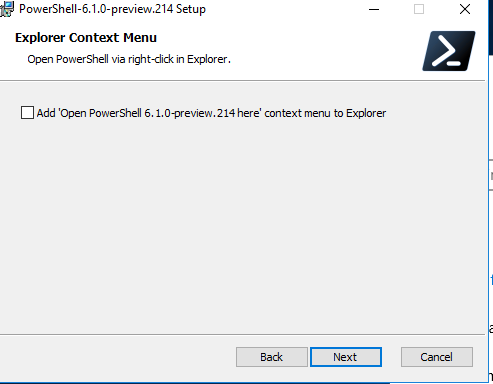

Installer:
Explorer context menu:
PR Checklist
Note: Please mark anything not applicable to this PR
NA.[feature]if the change is significant or affectes feature testsWIP:to the beginning of the title and remove the prefix when the PR is ready.