Repository navigation
PowerShell Core for Windows - add the "Run as Administrator" action to taskbar button. #6649
Description

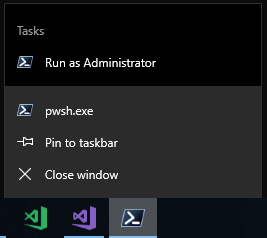
With Windows PowerShell pinned to my taskbar, I can easily run it as an administrator with the action at the top:

But with PowerShell Core, this action is missing:

Yeah, I know I can right click on PowerShell-6.x.x and then get the option to run as admin but that is buried UI and is harder to find than it should be.
Reacted by Christoph Bergmeister and ExE Boss
Activity
KevinMarquette commentedon Apr 14, 2018
I did some quick research on this one and it looks like the old code for this is still here:
PowerShell/src/powershell-native/nativemsh/pwrshexe/MainEntry.cpp
Line 1270 in c1c5344
SteveL-MSFT commentedon Apr 18, 2018
Kevin Marquette (@KevinMarquette) the
nativemshcode is no longer built as of PSCore6 we've gone with a full managed code host. Seems like we should reuse that code in the managed host on Windows.bergmeister commentedon Apr 29, 2018
Thanks Kevin Marquette (@KevinMarquette) for the research. I will take a look at this one as I would be interested in having this feature as well.
bergmeister commentedon May 13, 2018
Steve Lee (@SteveL-MSFT)
I got a simple prototype that works but does not do the elevation. Before proceeding I would like to discuss if my approach is acceptable.
To avoid having to write unsafe code, I used the Microsoft.WindowsAPICodePack-Shell and Microsoft.WindowsAPICodePack-Core NuGet packages from MSFT that are compiled in full .Net 3.5 (but work in netcore 2.1 for our purposes due to fallback) and therefore I have to suppress NU1701 for the
Microsoft.PowerShell.ConsoleHostproject. The 2 DLLs add 634KB of footprint in total. Would you be OK with that? I exclude Linux in the custom code, I assume Win-ARM needs to be excluded as well? Due to missing methods in the NuGet packes, elevation is outstanding and I would need a COM pointer to the shelllink for calling the IShellLinkDataList interface on it. Unfortunately the NuGet packages are a complete COM wrapper and do not expose the private low level pointers to the shell objects (or do you maybe you know a trick for that?) and theICustomDestinationListinterfaces also do not offerGetmethods. The Microsoft.WindowsAPICodePack package is not maintained/supported by Microsoft any more by the way.To conclude: It seems I would need to modify and recompile the WindowsAPICodePacks in order to add the missing methods for elevation or one would would have to rewrite all that C++ code from Windows PowerShell to C# but since it is mainly using COM to talk to the Windows API it is not really managed code anyway and it will be quite a bit of work. What are your thoughts on the direction?
My crude prototype is here. Any comments/pointers on the code, like e.g. its place in ConsoleHost would be appreciated. By looking at the test results, it seems I need to check if the account running pwsh is interactive (I would check `Environment.UserInteractive) and also if the current pwsh process is the parent process and was not launched from a different shell (e.g. Windows PowerShell or when calling pwsh from pwsh).
SteveL-MSFT commentedon May 14, 2018
Christoph Bergmeister (@bergmeister) it seems that with the additions you would need to add to that library, it's not really providing good value to cost. My recommendation would be to write new C# code to wrap the COM code.
bergmeister commentedon May 16, 2018
Thanks for the feedback, I had some success.
I first gave it a try to convert the C++ code to C# myself but it is kind of hairy due to the APIs requiring special structures like PropVariant that are non-trivial to implement in C#. I then took the approach of decompiling some of those structural equivalents from the WindowApiPack NuGet packages and when I finally had the bits together, the COM calls started to fail in the middle of it.
My second, more successful approach was to take the whole source code of the WindowApiPack packages and port it to .Net Core by removing various classes/methods referencing stuff like WinForms, etc. I added then my needed
IShellLinkDataListcalls for elevation and voila, I have now a working proof of concept 😃Armed with that now, I will try to see if I can get my first, more minimal approach working or otherwise I will look into minimising the code of my customised WindowApiPack packages.
bergmeister commentedon May 27, 2018
Keith Hill (@rkeithhill) Can you please amend the title to remove the word
Installersince nothing happens at install time.[-]PowerShell Core Installer for Windows - add the "Run as Administrator" action to taskbar button.[/-][+]PowerShell Core for Windows - add the "Run as Administrator" action to taskbar button.[/+]Add Jumplist 'Run as Administrator' to Taskbar on Windows (#6913)
Add Jumplist 'Run as Administrator' to Taskbar on Windows (PowerShell…