Import-Module with UseWindowsPowerShell parameter as LOCALSYSTEM account fails if $HOME\Documents\Powershell\Modules directory does not exist. #17744

Description

Prerequisites
- Write a descriptive title.
- Make sure you are able to repro it on the latest released version
- Search the existing issues.
- Refer to the FAQ.
- Refer to Differences between Windows PowerShell 5.1 and PowerShell.
Steps to reproduce
We have a Windows Service that runs as LOCALSYSTEM that uses the PowerShell SDK to periodically run pwsh commands. The calls to import modules with the UseWindowsPowershell parameter are failing.
I was able to narrow the down the scope of the repro steps to what I have below. I used the ActiveDirectory module as my example to import, but we are also seeing this behavior on other modules we import with the UseWindowsPowershell parameter.
- Open pwsh as LOCAL SYSTEM Account. (I used
psexec -s -i pwsh.exefrom a command prompt on a test machine). - Run
Import-Module ActiveDirectory -UseWindowsPowerShell. If you don't have the ActiveDirectory module installed, see here: https://docs.microsoft.com/en-us/powershell/module/activedirectory/?view=windowsserver2022-ps. I've also found running this command will produce the same results,Import-Module Microsoft.Powershell.Management -UseWindowsPowerShell -NoClobber - Import-Module fails.

- Message logged to the PowerShell Core Operational Event logs is misleading as it seems to indicate it failed to create module in c:\windows\temp folder.
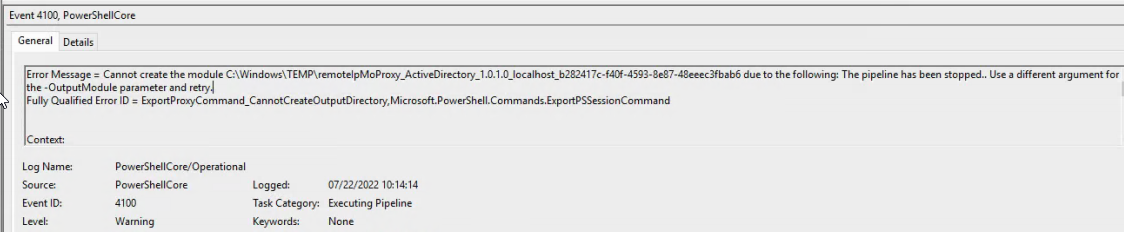


WORKAROUND:
- Close the pwsh window.
- Create the directory: c:\windows\system32\config\systemprofile\documents\powershell\modules. C:\windows\system32\config\systemprofile is the $HOME folder for the LOCAL SYSTEM account.
- Open pwsh as LOCAL SYSTEM Account (I used
psexec -s -i pwsh.exefrom a command prompt). - Run
Import-Module ActiveDirectory -UseWindowsPowerShell - ActiveDirectory module successfully imports.


Expected behavior
Module is successfully imported.Actual behavior
Module is not imported and a failure message is returned.Error details
Import-Module: Failed to generate proxies for remote module 'ActiveDirectory'. The -OutputModule parameter does not resolve to a path, and a user module path cannot be found for the provided name.Environment data
Name                           Value
----                           -----
PSVersion                      7.2.5
PSEdition                      Core
GitCommitId                    7.2.5
OS                             Microsoft Windows 10.0.17763
Platform                       Win32NT
PSCompatibleVersions           {1.0, 2.0, 3.0, 4.0…}
PSRemotingProtocolVersion      2.3
SerializationVersion           1.1.0.1
WSManStackVersion              3.0
Visuals
No response