Failed to generate proxies for remote module 'AzureAD' using the latest PowerShell SDK 7.0.11 #17662

Description

Prerequisites
- Write a descriptive title.
- Make sure you are able to repro it on the latest released version
- Search the existing issues.
- Refer to the FAQ.
- Refer to Differences between Windows PowerShell 5.1 and PowerShell.
Steps to reproduce
Failed to generate proxies for remote module 'AzureAD' using the latest PowerShell SDK 7.0.11
Repro:
- Install AzureAD module version 2.0.2.135
- Create a PowerShell session using the PowerShell SDK 7.0.11
- Run the line of code below
Import-Module -Name 'AzureAD' -UseWindowsPowershell -ErrorAction Stop
Expected behavior
Proxy module is generatedActual behavior
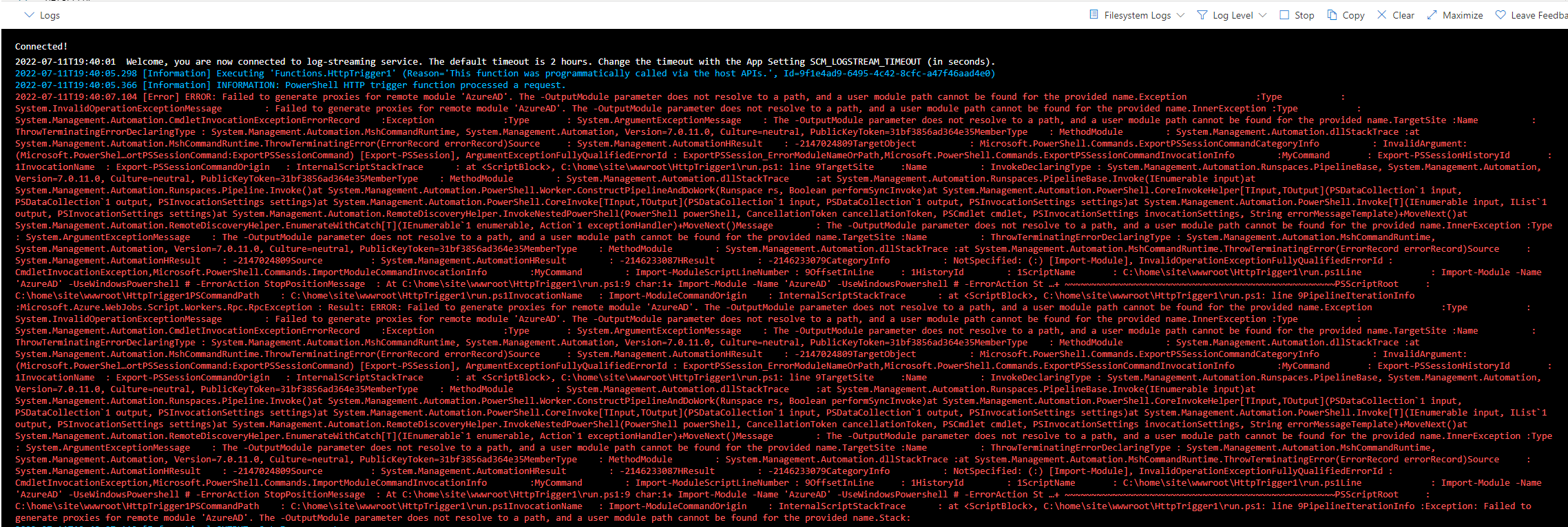
2022-07-11T18:26:08.570 [Error] EXCEPTION: Failed to generate proxies for remote module 'AzureAD'. The -OutputModule parameter does not resolve to a path, and a user module path cannot be found for the provided name.Exception :Type : System.InvalidOperationExceptionMessage : Failed to generate proxies for remote module 'AzureAD'. The -OutputModule parameter does not resolve to a path, and a user module path cannot be found for the provided name.InnerException :Type : System.Management.Automation.CmdletInvocationExceptionErrorRecord :Exception :Type : System.ArgumentExceptionMessage : The -OutputModule parameter does not resolve to a path, and a user module path cannot be found for the provided name.TargetSite :Name : ThrowTerminatingErrorDeclaringType : System.Management.Automation.MshCommandRuntime, System.Management.Automation, Version=7.0.11.0, Culture=neutral, PublicKeyToken=31bf3856ad364e35MemberType : MethodModule : System.Management.Automation.dllStackTrace :at System.Management.Automation.MshCommandRuntime.ThrowTerminatingError(ErrorRecord errorRecord)Source : System.Management.AutomationHResult : -2147024809TargetObject : Microsoft.PowerShell.Commands.ExportPSSessionCommandCategoryInfo : InvalidArgument: (Microsoft.PowerShel…ortPSSessionCommand:ExportPSSessionCommand) [Export-PSSession], ArgumentExceptionFullyQualifiedErrorId : ExportPSSession_ErrorModuleNameOrPath,Microsoft.PowerShell.Commands.ExportPSSessionCommandInvocationInfo :MyCommand : Export-PSSessionHistoryId : 1InvocationName : Export-PSSessionCommandOrigin : InternalScriptStackTrace : at <ScriptBlock>, C:\home\site\wwwroot\HttpTrigger1\run.ps1: line 9TargetSite :Name : InvokeDeclaringType : System.Management.Automation.Runspaces.PipelineBase, System.Management.Automation, Version=7.0.11.0, Culture=neutral, PublicKeyToken=31bf3856ad364e35MemberType : MethodModule : System.Management.Automation.dllStackTrace :at System.Management.Automation.Runspaces.PipelineBase.Invoke(IEnumerable input)at System.Management.Automation.Runspaces.Pipeline.Invoke()at System.Management.Automation.PowerShell.Worker.ConstructPipelineAndDoWork(Runspace rs, Boolean performSyncInvoke)at System.Management.Automation.PowerShell.CoreInvokeHelper[TInput,TOutput](PSDataCollection`1 input, PSDataCollection`1 output, PSInvocationSettings settings)at System.Management.Automation.PowerShell.CoreInvoke[TInput,TOutput](PSDataCollection`1 input, PSDataCollection`1 output, PSInvocationSettings settings)at System.Management.Automation.PowerShell.Invoke[T](IEnumerable input, IList`1 output, PSInvocationSettings settings)at System.Management.Automation.RemoteDiscoveryHelper.InvokeNestedPowerShell(PowerShell powerShell, CancellationToken cancellationToken, PSCmdlet cmdlet, PSInvocationSettings invocationSettings, String errorMessageTemplate)+MoveNext()at System.Management.Automation.RemoteDiscoveryHelper.EnumerateWithCatch[T](IEnumerable`1 enumerable, Action`1 exceptionHandler)+MoveNext()Message : The -OutputModule parameter does not resolve to a path, and a user module path cannot be found for the provided name.InnerException :Type : System.ArgumentExceptionMessage : The -OutputModule parameter does not resolve to a path, and a user module path cannot be found for the provided name.TargetSite :Name : ThrowTerminatingErrorDeclaringType : System.Management.Automation.MshCommandRuntime, System.Management.Automation, Version=7.0.11.0, Culture=neutral, PublicKeyToken=31bf3856ad364e35MemberType : MethodModule : System.Management.Automation.dllStackTrace :at System.Management.Automation.MshCommandRuntime.ThrowTerminatingError(ErrorRecord errorRecord)Source : System.Management.AutomationHResult : -2147024809Source : System.Management.AutomationHResult : -2146233087HResult : -2146233079CategoryInfo : NotSpecified: (:) [Import-Module], InvalidOperationExceptionFullyQualifiedErrorId : CmdletInvocationException,Microsoft.PowerShell.Commands.ImportModuleCommandInvocationInfo :MyCommand : Import-ModuleScriptLineNumber : 9OffsetInLine : 1HistoryId : 1ScriptName : C:\home\site\wwwroot\HttpTrigger1\run.ps1Line : Import-Module -Name 'AzureAD' -UseWindowsPowershell -ErrorAction StopPositionMessage : At C:\home\site\wwwroot\HttpTrigger1\run.ps1:9 char:1+ Import-Module -Name 'AzureAD' -UseWindowsPowershell -ErrorAction Stop+ ~~~~~~~~~~~~~~~~~~~~~~~~~~~~~~~~~~~~~~~~~~~~~~~~~~~~~~~~~~~~~~~~~~~~~
### Error details

```console
2022-07-11T19:40:07.119 [Information] OUTPUT: Get-Error ouput:
2022-07-11T19:40:07.120 [Information] OUTPUT:
2022-07-11T19:40:07.120 [Information] OUTPUT: Exception             :
2022-07-11T19:40:07.120 [Information] OUTPUT:     Type           : System.InvalidOperationException
2022-07-11T19:40:07.126 [Information] OUTPUT:     Message        : Failed to generate proxies for remote module 'AzureAD'. The -OutputModule parameter does not resolve to a path, and a user module path cannot be found for the provided name.
2022-07-11T19:40:07.126 [Information] OUTPUT:     InnerException :
2022-07-11T19:40:07.126 [Information] OUTPUT:         Type           : System.Management.Automation.CmdletInvocationException
2022-07-11T19:40:07.127 [Information] OUTPUT:         ErrorRecord    :
2022-07-11T19:40:07.127 [Information] OUTPUT:             Exception             :
2022-07-11T19:40:07.127 [Information] OUTPUT:                 Type       : System.ArgumentException
2022-07-11T19:40:07.127 [Information] OUTPUT:                 Message    : The -OutputModule parameter does not resolve to a path, and a user module path cannot be found for the provided name.
2022-07-11T19:40:07.127 [Information] OUTPUT:                 TargetSite :
2022-07-11T19:40:07.127 [Information] OUTPUT:                     Name          : ThrowTerminatingError
2022-07-11T19:40:07.128 [Information] OUTPUT:                     DeclaringType : System.Management.Automation.MshCommandRuntime, System.Management.Automation, Version=7.0.11.0, Culture=neutral, PublicKeyToken=31bf3856ad364e35
2022-07-11T19:40:07.128 [Information] OUTPUT:                     MemberType    : Method
2022-07-11T19:40:07.128 [Information] OUTPUT:                     Module        : System.Management.Automation.dll
2022-07-11T19:40:07.128 [Information] OUTPUT:                 StackTrace :
2022-07-11T19:40:07.129 [Information] OUTPUT:    at System.Management.Automation.MshCommandRuntime.ThrowTerminatingError(ErrorRecord errorRecord)
2022-07-11T19:40:07.129 [Information] OUTPUT:                 Source     : System.Management.Automation
2022-07-11T19:40:07.129 [Information] OUTPUT:                 HResult    : -2147024809
2022-07-11T19:40:07.130 [Information] OUTPUT:             TargetObject          : Microsoft.PowerShell.Commands.ExportPSSessionCommand
2022-07-11T19:40:07.130 [Information] OUTPUT:             CategoryInfo          : InvalidArgument: (Microsoft.PowerShel…ortPSSessionCommand:ExportPSSessionCommand) [Export-PSSession], ArgumentException
2022-07-11T19:40:07.130 [Information] OUTPUT:             FullyQualifiedErrorId : ExportPSSession_ErrorModuleNameOrPath,Microsoft.PowerShell.Commands.ExportPSSessionCommand
2022-07-11T19:40:07.130 [Information] OUTPUT:             InvocationInfo        :
2022-07-11T19:40:07.186 [Information] OUTPUT:                 MyCommand       : Export-PSSession
2022-07-11T19:40:07.186 [Information] OUTPUT:                 HistoryId       : 1
2022-07-11T19:40:07.186 [Information] OUTPUT:                 InvocationName  : Export-PSSession
2022-07-11T19:40:07.186 [Information] OUTPUT:                 CommandOrigin   : Internal
2022-07-11T19:40:07.186 [Information] OUTPUT:             ScriptStackTrace      : at <ScriptBlock>, C:\home\site\wwwroot\HttpTrigger1\run.ps1: line 9
2022-07-11T19:40:07.206 [Information] OUTPUT:         TargetSite     :
2022-07-11T19:40:07.206 [Information] OUTPUT:             Name          : Invoke
2022-07-11T19:40:07.206 [Information] OUTPUT:             DeclaringType : System.Management.Automation.Runspaces.PipelineBase, System.Management.Automation, Version=7.0.11.0, Culture=neutral, PublicKeyToken=31bf3856ad364e35
2022-07-11T19:40:07.206 [Information] OUTPUT:             MemberType    : Method
2022-07-11T19:40:07.206 [Information] OUTPUT:             Module        : System.Management.Automation.dll
2022-07-11T19:40:07.207 [Information] OUTPUT:         StackTrace     :
2022-07-11T19:40:07.207 [Information] OUTPUT:    at System.Management.Automation.Runspaces.PipelineBase.Invoke(IEnumerable input)
2022-07-11T19:40:07.207 [Information] OUTPUT:    at System.Management.Automation.Runspaces.Pipeline.Invoke()
2022-07-11T19:40:07.207 [Information] OUTPUT:    at System.Management.Automation.PowerShell.Worker.ConstructPipelineAndDoWork(Runspace rs, Boolean performSyncInvoke)
2022-07-11T19:40:07.207 [Information] OUTPUT:    at System.Management.Automation.PowerShell.CoreInvokeHelper[TInput,TOutput](PSDataCollection`1 input, PSDataCollection`1 output, PSInvocationSettings settings)
2022-07-11T19:40:07.207 [Information] OUTPUT:    at System.Management.Automation.PowerShell.CoreInvoke[TInput,TOutput](PSDataCollection`1 input, PSDataCollection`1 output, PSInvocationSettings settings)
2022-07-11T19:40:07.207 [Information] OUTPUT:    at System.Management.Automation.PowerShell.Invoke[T](IEnumerable input, IList`1 output, PSInvocationSettings settings)
2022-07-11T19:40:07.207 [Information] OUTPUT:    at System.Management.Automation.RemoteDiscoveryHelper.InvokeNestedPowerShell(PowerShell powerShell, CancellationToken cancellationToken, PSCmdlet cmdlet, PSInvocationSettings invocationSettings, String errorMessageTemplate)+MoveNext()
2022-07-11T19:40:07.207 [Information] OUTPUT:    at System.Management.Automation.RemoteDiscoveryHelper.EnumerateWithCatch[T](IEnumerable`1 enumerable, Action`1 exceptionHandler)+MoveNext()
2022-07-11T19:40:07.208 [Information] OUTPUT:         Message        : The -OutputModule parameter does not resolve to a path, and a user module path cannot be found for the provided name.
2022-07-11T19:40:07.208 [Information] OUTPUT:         InnerException :
2022-07-11T19:40:07.208 [Information] OUTPUT:             Type       : System.ArgumentException
2022-07-11T19:40:07.208 [Information] OUTPUT:             Message    : The -OutputModule parameter does not resolve to a path, and a user module path cannot be found for the provided name.
2022-07-11T19:40:07.208 [Information] OUTPUT:             TargetSite :
2022-07-11T19:40:07.208 [Information] OUTPUT:                 Name          : ThrowTerminatingError
2022-07-11T19:40:07.208 [Information] OUTPUT:                 DeclaringType : System.Management.Automation.MshCommandRuntime, System.Management.Automation, Version=7.0.11.0, Culture=neutral, PublicKeyToken=31bf3856ad364e35
2022-07-11T19:40:07.208 [Information] OUTPUT:                 MemberType    : Method
2022-07-11T19:40:07.208 [Information] OUTPUT:                 Module        : System.Management.Automation.dll
2022-07-11T19:40:07.208 [Information] OUTPUT:             StackTrace :
2022-07-11T19:40:07.209 [Information] OUTPUT:    at System.Management.Automation.MshCommandRuntime.ThrowTerminatingError(ErrorRecord errorRecord)
2022-07-11T19:40:07.209 [Information] OUTPUT:             Source     : System.Management.Automation
2022-07-11T19:40:07.209 [Information] OUTPUT:             HResult    : -2147024809
2022-07-11T19:40:07.209 [Information] OUTPUT:         Source         : System.Management.Automation
2022-07-11T19:40:07.209 [Information] OUTPUT:         HResult        : -2146233087
2022-07-11T19:40:07.209 [Information] OUTPUT:     HResult        : -2146233079
2022-07-11T19:40:07.215 [Information] OUTPUT: CategoryInfo          : NotSpecified: (:) [Import-Module], InvalidOperationException
2022-07-11T19:40:07.215 [Information] OUTPUT: FullyQualifiedErrorId : CmdletInvocationException,Microsoft.PowerShell.Commands.ImportModuleCommand
2022-07-11T19:40:07.215 [Information] OUTPUT: InvocationInfo        :
2022-07-11T19:40:07.216 [Information] OUTPUT:     MyCommand        : Import-Module
2022-07-11T19:40:07.216 [Information] OUTPUT:     ScriptLineNumber : 9
2022-07-11T19:40:07.216 [Information] OUTPUT:     OffsetInLine     : 1
2022-07-11T19:40:07.216 [Information] OUTPUT:     HistoryId        : 1
2022-07-11T19:40:07.216 [Information] OUTPUT:     ScriptName       : C:\home\site\wwwroot\HttpTrigger1\run.ps1
2022-07-11T19:40:07.216 [Information] OUTPUT:     Line             : Import-Module -Name 'AzureAD' -UseWindowsPowershell # -ErrorAction Stop
2022-07-11T19:40:07.216 [Information] OUTPUT:
2022-07-11T19:40:07.216 [Information] OUTPUT:     PositionMessage  : At C:\home\site\wwwroot\HttpTrigger1\run.ps1:9 char:1
2022-07-11T19:40:07.216 [Information] OUTPUT:                        + Import-Module -Name 'AzureAD' -UseWindowsPowershell # -ErrorAction St …
2022-07-11T19:40:07.217 [Information] OUTPUT:                        + ~~~~~~~~~~~~~~~~~~~~~~~~~~~~~~~~~~~~~~~~~~~~~~~~~~~
2022-07-11T19:40:07.217 [Information] OUTPUT:     PSScriptRoot     : C:\home\site\wwwroot\HttpTrigger1
2022-07-11T19:40:07.217 [Information] OUTPUT:     PSCommandPath    : C:\home\site\wwwroot\HttpTrigger1\run.ps1
2022-07-11T19:40:07.217 [Information] OUTPUT:     InvocationName   : Import-Module
2022-07-11T19:40:07.217 [Information] OUTPUT:     CommandOrigin    : Internal
2022-07-11T19:40:07.217 [Information] OUTPUT: ScriptStackTrace      : at <ScriptBlock>, C:\home\site\wwwroot\HttpTrigger1\run.ps1: line 9
2022-07-11T19:40:07.217 [Information] OUTPUT: PipelineIterationInfo :
### Environment data

```powershell
This is the output of $PSVersionTable:


2022-07-11T19:42:16.583 [Information] OUTPUT: Name                           Value
2022-07-11T19:42:19.050 [Information] OUTPUT: ----                           -----
2022-07-11T19:42:19.050 [Information] OUTPUT: PSVersion                      7.0.11
2022-07-11T19:42:19.050 [Information] OUTPUT: PSEdition                      Core
2022-07-11T19:42:19.050 [Information] OUTPUT: GitCommitId                    7.0.11
2022-07-11T19:42:19.050 [Information] OUTPUT: OS                             Microsoft Windows 10.0.14393
2022-07-11T19:42:19.050 [Information] OUTPUT: Platform                       Win32NT
2022-07-11T19:42:19.050 [Information] OUTPUT: PSCompatibleVersions           {1.0, 2.0, 3.0, 4.0…}
2022-07-11T19:42:19.051 [Information] OUTPUT: PSRemotingProtocolVersion      2.3
2022-07-11T19:42:19.051 [Information] OUTPUT: SerializationVersion           1.1.0.1
2022-07-11T19:42:19.051 [Information] OUTPUT: WSManStackVersion              3.0
### Visuals

To repro this issue, you will have to build an app that uses the PowerShell SDK version 7.0.11. Alternatively, you can create a PowerShell 7.0 function app running on Functions V3 or V4.

Create an HttpTrigger function with the following code snippet
using namespace System.Net
Input bindings are passed in via param block.
param($Request, $TriggerMetadata)
Write to the Azure Functions log stream.
Write-Host "PowerShell HTTP trigger function processed a request."
Import-Module -Name 'AzureAD' -UseWindowsPowershell -ErrorAction Stop
$cmdlets = Get-Command -Module AzureAD | % name
Associate values to output bindings by calling 'Push-OutputBinding'.
Push-OutputBinding -Name Response -Value ([HttpResponseContext]@{
StatusCode = [HttpStatusCode]::OK
Body = $body
})
After this, invoke the http trigger function.