Prerequisites
Steps to reproduce
After upgrading to Powershell 7.2.2, 7.2.3 or 7.2.4 when I run the Register-PSSessionConfiguration, it seems to complete with no errors from the command line, but I can no longer connect to the JEA configuration. This is a CI/CD deployment that has worked for months until we upgraded to 7.2.2 on the JEA server. The configuration will still work after the powershell upgrade from 7.2.1 until I reregister the configuration and then it will fail. It seems like something in the registration process. I also can uninstall post 7.2.1 versions, reinstall 7.2.1 and it will work again with no other changes.
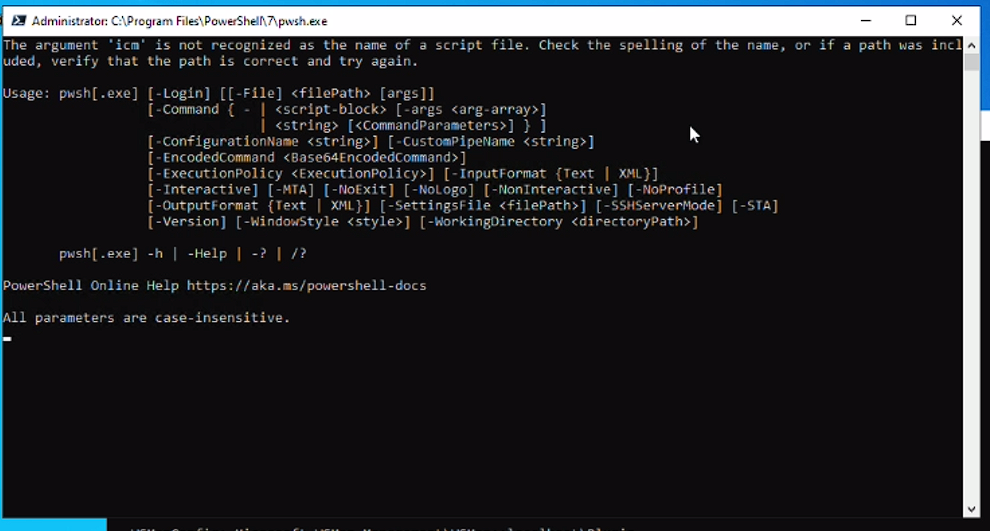
The only other thing I noticed was that when I would register the configuration I would sometimes see two windows pop up in succession quickly with an error from pwsh.exe saying "the argument 'icm' is not recognized as the name of a script file". I'm attaching a screenshot.
Connection command:
etsn cmjea.$env:USERDNSDOMAIN -ConfigurationName ums-cm-jea -UseSSL
Expected behavior
JEA session ums-cm-jea would connect. I can connect to the standard WinRM session using "etsn cmjea.$env:USERDNSDOMAIN -UseSSL".
Actual behavior
Receive the following errors when trying to connect to the config:

etsn : Connecting to remote server cmjea.mydomain.com failed with the following error message : <f:WSManFault
xmlns:f="http://schemas.microsoft.com/wbem/wsman/1/wsmanfault" Code="2689860592"
Machine="cmjea.mydomain.com"><f:Message><f:ProviderFault provider="UMS-CM-JEA"
path="C:\Windows\system32\PowerShell\7.2.4\pwrshplugin.dll"></f:ProviderFault></f:Message></f:WSManFault> For more
information, see the about_Remote_Troubleshooting Help topic.
At line:1 char:1
+ etsn cmjea.$env:USERDNSDOMAIN -ConfigurationName ums-cm-jea -UseSSL
+ ~~~~~~~~~~~~~~~~~~~~~~~~~~~~~~~~~~~~~~~~~~~~~~~~~~~~~~~~~~~~~~~~~~~
    + CategoryInfo          : InvalidArgument: (cmjea.mydomain.com:String) [Enter-PSSession], PSRemotingTransport
   Exception
    + FullyQualifiedErrorId : CreateRemoteRunspaceFailed
Error details
There are events in the PowerShellCore/Operational log that are generated when registering the configuration indicating there is some problem. One references an issue connecting to localhost. I am able to connect to the default configurations via localhost.
Below are ethe events from newest to oldest:
==================================
Log Name: PowerShellCore/Operational
Source: PowerShellCore
Date: 5/17/2022 4:36:36 PM
Event ID: 4100
Task Category: Executing Pipeline
Level: Warning
Keywords: None
User: CONTOSO\my-adm
Computer: server.mydomain.com
Description:
Error Message = The running command stopped because the preference variable "ErrorActionPreference" or common parameter is set to Stop: [localhost] Connecting to remote server localhost failed with the following error message : <f:WSManFault xmlns:f="http://schemas.microsoft.com/wbem/wsman/1/wsmanfault" Code="2689860592" Machine="localhost"><f:Message><f:ProviderFault provider="UMS-CM-JEA" path="C:\Windows\system32\PowerShell\7.2.4\pwrshplugin.dll"></f:ProviderFault></f:Message></f:WSManFault> For more information, see the about_Remote_Troubleshooting Help topic.
Fully Qualified Error ID = -1605106704,PSSessionOpenFailed
Recommended Action =
Context:
Severity = Warning
Host Name = ConsoleHost
Host Version = 7.2.4
Host ID = 48dddc3b-232d-4c5f-9d6d-3f1c56b621c1
Host Application = C:\Program Files\PowerShell\7\pwsh.dll -WorkingDirectory ~
Engine Version = 7.2.4
Runspace ID = eee9a7a6-5768-411f-80b4-06f356a26ba1
Pipeline ID = 115
Command Name = New-PSSession
Command Type = Cmdlet
Script Name =
Command Path =
Sequence Number = 45
User = CONTOSO\my-adm
Connected User =
Shell ID = Microsoft.PowerShell
User Data:
Event Xml:
<Event xmlns="http://schemas.microsoft.com/win/2004/08/events/event">
<System>
<Provider Name="PowerShellCore" Guid="{f90714a8-5509-434a-bf6d-b1624c8a19a2}" />
<EventID>4100</EventID>
<Version>1</Version>
<Level>3</Level>
<Task>106</Task>
<Opcode>19</Opcode>
<Keywords>0x0</Keywords>
<TimeCreated SystemTime="2022-05-17T20:36:36.9369428Z" />
<EventRecordID>428267</EventRecordID>
<Correlation ActivityID="{e3e592f7-c42e-4002-aff6-f1885ab8923a}" />
<Execution ProcessID="4056" ThreadID="6764" />
<Channel>PowerShellCore/Operational</Channel>
<Computer>server.mydomain.com</Computer>
<Security UserID="S-1-5-21-2147491999-1103789872-2603493700-327614" />
</System>
<EventData>
<Data Name="ContextInfo"> Severity = Warning
Host Name = ConsoleHost
Host Version = 7.2.4
Host ID = 48dddc3b-232d-4c5f-9d6d-3f1c56b621c1
Host Application = C:\Program Files\PowerShell\7\pwsh.dll -WorkingDirectory ~
Engine Version = 7.2.4
Runspace ID = eee9a7a6-5768-411f-80b4-06f356a26ba1
Pipeline ID = 115
Command Name = New-PSSession
Command Type = Cmdlet
Script Name =
Command Path =
Sequence Number = 45
User = CONTOSO\my-adm
Connected User =
Shell ID = Microsoft.PowerShell
</Data>
<Data Name="UserData">
</Data>
<Data Name="Payload">Error Message = The running command stopped because the preference variable "ErrorActionPreference" or common parameter is set to Stop: [localhost] Connecting to remote server localhost failed with the following error message : <f:WSManFault xmlns:f="http://schemas.microsoft.com/wbem/wsman/1/wsmanfault" Code="2689860592" Machine="localhost"><f:Message><f:ProviderFault provider="UMS-CM-JEA" path="C:\Windows\system32\PowerShell\7.2.4\pwrshplugin.dll"></f:ProviderFault></f:Message></f:WSManFault> For more information, see the about_Remote_Troubleshooting Help topic.
Fully Qualified Error ID = -1605106704,PSSessionOpenFailed
Recommended Action =
</Data>
</EventData>
</Event>
Log Name: PowerShellCore/Operational
Source: PowerShellCore
Date: 5/17/2022 4:36:36 PM
Event ID: 8197
Task Category: Connect
Level: Verbose
Keywords: None
User: CONTOSO\my-adm
Computer: server.mydomain.com
Description:
Runspace state changed to Broken
Event Xml:
<Event xmlns="http://schemas.microsoft.com/win/2004/08/events/event">
<System>
<Provider Name="PowerShellCore" Guid="{f90714a8-5509-434a-bf6d-b1624c8a19a2}" />
<EventID>8197</EventID>
<Version>1</Version>
<Level>5</Level>
<Task>1</Task>
<Opcode>10</Opcode>
<Keywords>0x0</Keywords>
<TimeCreated SystemTime="2022-05-17T20:36:36.9366393Z" />
<EventRecordID>428266</EventRecordID>
<Correlation ActivityID="{e3e592f7-c42e-4002-aff6-f1885ab8923a}" />
<Execution ProcessID="4056" ThreadID="7144" />
<Channel>PowerShellCore/Operational</Channel>
<Computer>server.mydomain.com</Computer>
<Security UserID="S-1-5-21-2147491999-1103789872-2603493700-327614" />
</System>
<EventData>
<Data Name="param1">Broken</Data>
</EventData>
</Event>
Log Name: PowerShellCore/Operational
Source: PowerShellCore
Date: 5/17/2022 4:36:36 PM
Event ID: 32784
Task Category: None
Level: Error
Keywords: None
User: CONTOSO\my-adm
Computer: server.mydomain.com
Description:
Runspace Id: e3e592f7-c42e-4002-aff6-f1885ab8923a Pipeline Id: 00000000-0000-0000-0000-000000000000. WSMan reported an error with error code: -1605106704.
Error message: Connecting to remote server localhost failed with the following error message : <f:WSManFault xmlns:f="http://schemas.microsoft.com/wbem/wsman/1/wsmanfault" Code="2689860592" Machine="localhost"><f:Message><f:ProviderFault provider="UMS-CM-JEA" path="C:\Windows\system32\PowerShell\7.2.4\pwrshplugin.dll"></f:ProviderFault></f:Message></f:WSManFault> For more information, see the about_Remote_Troubleshooting Help topic.
StackTrace:
Event Xml:
<Event xmlns="http://schemas.microsoft.com/win/2004/08/events/event">
<System>
<Provider Name="PowerShellCore" Guid="{f90714a8-5509-434a-bf6d-b1624c8a19a2}" />
<EventID>32784</EventID>
<Version>1</Version>
<Level>2</Level>
<Task>0</Task>
<Opcode>10</Opcode>
<Keywords>0x0</Keywords>
<TimeCreated SystemTime="2022-05-17T20:36:36.9365236Z" />
<EventRecordID>428265</EventRecordID>
<Correlation ActivityID="{e3e592f7-c42e-4002-aff6-f1885ab8923a}" />
<Execution ProcessID="4056" ThreadID="7144" />
<Channel>PowerShellCore/Operational</Channel>
<Computer>server.mydomain.com</Computer>
<Security UserID="S-1-5-21-2147491999-1103789872-2603493700-327614" />
</System>
<EventData>
<Data Name="SessionId">e3e592f7-c42e-4002-aff6-f1885ab8923a</Data>
<Data Name="PipelineId">00000000-0000-0000-0000-000000000000</Data>
<Data Name="ErrorCode">-1605106704</Data>
<Data Name="ErrorMessage">Connecting to remote server localhost failed with the following error message : <f:WSManFault xmlns:f="http://schemas.microsoft.com/wbem/wsman/1/wsmanfault" Code="2689860592" Machine="localhost"><f:Message><f:ProviderFault provider="UMS-CM-JEA" path="C:\Windows\system32\PowerShell\7.2.4\pwrshplugin.dll"></f:ProviderFault></f:Message></f:WSManFault> For more information, see the about_Remote_Troubleshooting Help topic.</Data>
<Data Name="StackTrace">
</Data>
</EventData>
</Event>
Log Name: PowerShellCore/Operational
Source: PowerShellCore
Date: 5/17/2022 4:36:36 PM
Event ID: 12039
Task Category: None
Level: Information
Keywords: None
User: CONTOSO\my-adm
Computer: server.mydomain.com
Description:
Modifying activity Id and correlating
Event Xml:
<Event xmlns="http://schemas.microsoft.com/win/2004/08/events/event">
<System>
<Provider Name="PowerShellCore" Guid="{f90714a8-5509-434a-bf6d-b1624c8a19a2}" />
<EventID>12039</EventID>
<Version>1</Version>
<Level>4</Level>
<Task>0</Task>
<Opcode>20</Opcode>
<Keywords>0x0</Keywords>
<TimeCreated SystemTime="2022-05-17T20:36:36.9365143Z" />
<EventRecordID>428264</EventRecordID>
<Correlation ActivityID="{e3e592f7-c42e-4002-aff6-f1885ab8923a}" />
<Execution ProcessID="4056" ThreadID="7144" />
<Channel>PowerShellCore/Operational</Channel>
<Computer>server.mydomain.com</Computer>
<Security UserID="S-1-5-21-2147491999-1103789872-2603493700-327614" />
</System>
<EventData>
</EventData>
</Event>
Log Name: PowerShellCore/Operational
Source: PowerShellCore
Date: 5/17/2022 4:36:36 PM
Event ID: 8196
Task Category: None
Level: Information
Keywords: None
User: CONTOSO\my-adm
Computer: server.mydomain.com
Description:
Modifying activity Id and correlating
Event Xml:
<Event xmlns="http://schemas.microsoft.com/win/2004/08/events/event">
<System>
<Provider Name="PowerShellCore" Guid="{f90714a8-5509-434a-bf6d-b1624c8a19a2}" />
<EventID>8196</EventID>
<Version>1</Version>
<Level>4</Level>
<Task>0</Task>
<Opcode>20</Opcode>
<Keywords>0x0</Keywords>
<TimeCreated SystemTime="2022-05-17T20:36:36.9365122Z" />
<EventRecordID>428263</EventRecordID>
<Correlation ActivityID="{e3e592f7-c42e-4002-aff6-f1885ab8923a}" />
<Execution ProcessID="4056" ThreadID="7144" />
<Channel>PowerShellCore/Operational</Channel>
<Computer>server.mydomain.com</Computer>
<Security UserID="S-1-5-21-2147491999-1103789872-2603493700-327614" />
</System>
<EventData>
</EventData>
</Event>
Log Name: PowerShellCore/Operational
Source: PowerShellCore
Date: 5/17/2022 4:36:36 PM
Event ID: 8197
Task Category: Connect
Level: Verbose
Keywords: None
User: CONTOSO\my-adm
Computer: server.mydomain.com
Description:
Runspace state changed to Opening
Event Xml:
<Event xmlns="http://schemas.microsoft.com/win/2004/08/events/event">
<System>
<Provider Name="PowerShellCore" Guid="{f90714a8-5509-434a-bf6d-b1624c8a19a2}" />
<EventID>8197</EventID>
<Version>1</Version>
<Level>5</Level>
<Task>1</Task>
<Opcode>10</Opcode>
<Keywords>0x0</Keywords>
<TimeCreated SystemTime="2022-05-17T20:36:36.7011496Z" />
<EventRecordID>428262</EventRecordID>
<Correlation ActivityID="{e3e592f7-c42e-4002-aff6-f1885ab8923a}" />
<Execution ProcessID="4056" ThreadID="6764" />
<Channel>PowerShellCore/Operational</Channel>
<Computer>server.mydomain.com</Computer>
<Security UserID="S-1-5-21-2147491999-1103789872-2603493700-327614" />
</System>
<EventData>
<Data Name="param1">Opening</Data>
</EventData>
</Event>
Log Name: PowerShellCore/Operational
Source: PowerShellCore
Date: 5/17/2022 4:36:36 PM
Event ID: 8195
Task Category: Connect
Level: Verbose
Keywords: None
User: CONTOSO\my-adm
Computer: server.mydomain.com
Description:
Opening RunspacePool
Event Xml:
<Event xmlns="http://schemas.microsoft.com/win/2004/08/events/event">
<System>
<Provider Name="PowerShellCore" Guid="{f90714a8-5509-434a-bf6d-b1624c8a19a2}" />
<EventID>8195</EventID>
<Version>1</Version>
<Level>5</Level>
<Task>1</Task>
<Opcode>10</Opcode>
<Keywords>0x0</Keywords>
<TimeCreated SystemTime="2022-05-17T20:36:36.7010924Z" />
<EventRecordID>428261</EventRecordID>
<Correlation ActivityID="{e3e592f7-c42e-4002-aff6-f1885ab8923a}" />
<Execution ProcessID="4056" ThreadID="6764" />
<Channel>PowerShellCore/Operational</Channel>
<Computer>server.mydomain.com</Computer>
<Security UserID="S-1-5-21-2147491999-1103789872-2603493700-327614" />
</System>
<EventData>
</EventData>
</Event>
Log Name: PowerShellCore/Operational
Source: PowerShellCore
Date: 5/17/2022 4:36:36 PM
Event ID: 8194
Task Category: Connect
Level: Verbose
Keywords: None
User: CONTOSO\my-adm
Computer: server.mydomain.com
Description:
Creating RunspacePool object
InstanceId e3e592f7-c42e-4002-aff6-f1885ab8923a
MinRunspaces 1
MaxRunspaces 1
Event Xml:
<Event xmlns="http://schemas.microsoft.com/win/2004/08/events/event">
<System>
<Provider Name="PowerShellCore" Guid="{f90714a8-5509-434a-bf6d-b1624c8a19a2}" />
<EventID>8194</EventID>
<Version>1</Version>
<Level>5</Level>
<Task>1</Task>
<Opcode>16</Opcode>
<Keywords>0x0</Keywords>
<TimeCreated SystemTime="2022-05-17T20:36:36.7005569Z" />
<EventRecordID>428260</EventRecordID>
<Correlation ActivityID="{e3e592f7-c42e-4002-aff6-f1885ab8923a}" />
<Execution ProcessID="4056" ThreadID="6764" />
<Channel>PowerShellCore/Operational</Channel>
<Computer>server.mydomain.com</Computer>
<Security UserID="S-1-5-21-2147491999-1103789872-2603493700-327614" />
</System>
<EventData>
<Data Name="InstanceId">e3e592f7-c42e-4002-aff6-f1885ab8923a</Data>
<Data Name="MaxRunspaces">1</Data>
<Data Name="MinRunspaces">1</Data>
</EventData>
</Event>
Log Name: PowerShellCore/Operational
Source: PowerShellCore
Date: 5/17/2022 4:36:36 PM
Event ID: 8193
Task Category: Connect
Level: Verbose
Keywords: None
User: CONTOSO\my-adm
Computer: server.mydomain.com
Description:
Creating Runspace object
Instance Id: e3a8b992-3755-491f-85cd-c4425679dd64
Event Xml:
<Event xmlns="http://schemas.microsoft.com/win/2004/08/events/event">
<System>
<Provider Name="PowerShellCore" Guid="{f90714a8-5509-434a-bf6d-b1624c8a19a2}" />
<EventID>8193</EventID>
<Version>1</Version>
<Level>5</Level>
<Task>1</Task>
<Opcode>16</Opcode>
<Keywords>0x0</Keywords>
<TimeCreated SystemTime="2022-05-17T20:36:36.7005390Z" />
<EventRecordID>428259</EventRecordID>
<Correlation ActivityID="{e3a8b992-3755-491f-85cd-c4425679dd64}" />
<Execution ProcessID="4056" ThreadID="6764" />
<Channel>PowerShellCore/Operational</Channel>
<Computer>server.mydomain.com</Computer>
<Security UserID="S-1-5-21-2147491999-1103789872-2603493700-327614" />
</System>
<EventData>
<Data Name="param1">e3a8b992-3755-491f-85cd-c4425679dd64</Data>
</EventData>
</Event>Environment data
Name                           Value
----                           -----
PSVersion                      7.2.4
PSEdition                      Core
GitCommitId                    7.2.4
OS                             Microsoft Windows 10.0.20348
Platform                       Win32NT
PSCompatibleVersions           {1.0, 2.0, 3.0, 4.0…}
PSRemotingProtocolVersion      2.3
SerializationVersion           1.1.0.1
WSManStackVersion              3.0
Visuals
Prerequisites
Steps to reproduce
After upgrading to Powershell 7.2.2, 7.2.3 or 7.2.4 when I run the Register-PSSessionConfiguration, it seems to complete with no errors from the command line, but I can no longer connect to the JEA configuration. This is a CI/CD deployment that has worked for months until we upgraded to 7.2.2 on the JEA server. The configuration will still work after the powershell upgrade from 7.2.1 until I reregister the configuration and then it will fail. It seems like something in the registration process. I also can uninstall post 7.2.1 versions, reinstall 7.2.1 and it will work again with no other changes.
The only other thing I noticed was that when I would register the configuration I would sometimes see two windows pop up in succession quickly with an error from pwsh.exe saying "the argument 'icm' is not recognized as the name of a script file". I'm attaching a screenshot.
Connection command:
etsn cmjea.$env:USERDNSDOMAIN -ConfigurationName ums-cm-jea -UseSSL
Expected behavior
JEA session ums-cm-jea would connect. I can connect to the standard WinRM session using "etsn cmjea.$env:USERDNSDOMAIN -UseSSL".Actual behavior
Error details
Environment data
Visuals