Repository navigation
Windows Server Best Practices module does load properly in PowerShell 7 P6 #11202
Description

The BestPractices module can, apparently, be loaded using Import-Module (In P6). Using -Verbose shows the module at least partly loading. But no commands are available and Get-BPAModule does not run.
In earlier preview versions of PowerShell 7, This module did NOT load using Import-module OR using the earlier Import-WinModule. Now the module seems to load but is not available. And there are not any error/warning messages to guide the IT Pro. If anything, this is WORSE than the behaviour of using the older PSWIndowsCompatibility module.
Steps to reproduce
# Import the BestPracticesmodule
Import-module BestPractices   # produces no error
Get-Module                    # Produces no output
Import-module BestPractices -Verbose
VERBOSE: Loading module from path 'C:\Windows\system32\WindowsPowerShell\v1.0\Modules\BestPractices\BestPractices.psd1'.
VERBOSE: Loading 'TypesToProcess' from path 'C:\Windows\system32\WindowsPowerShell\v1.0\Modules\BestPractices\Microsoft.BestPractices.Types.ps1xml'.
VERBOSE: Loading 'FormatsToProcess' from path 'C:\Windows\system32\WindowsPowerShell\v1.0\Modules\BestPractices\Microsoft.BestPractices.Cmdlets.Formats.ps1xml'.
# Test it out
Get-BPAModel                  # produces no output (and no errors!)
Expected behaviour
The expected behaviour is that Get-BPAModel returns the BPA models available.
Actual behaviour
No error messages and Get-BPAModel returns no output (or errors).
Environment data
PS C:\Windows\System32> $PSVersionTable

Name                           Value
----                           -----
PSVersion                      7.0.0-preview.6
PSEdition                      Core
GitCommitId                    7.0.0-preview.6
OS                             Microsoft Windows 10.0.17763
Platform                       Win32NT
PSCompatibleVersions           {1.0, 2.0, 3.0, 4.0…}
PSRemotingProtocolVersion      2.3
SerializationVersion           1.1.0.1
WSManStackVersion              3.0
Activity
SteveL-MSFT commentedon Nov 26, 2019
Andrew (@anmenaga) can you take a look?
anmenaga commentedon Nov 26, 2019
Interesting... Importing
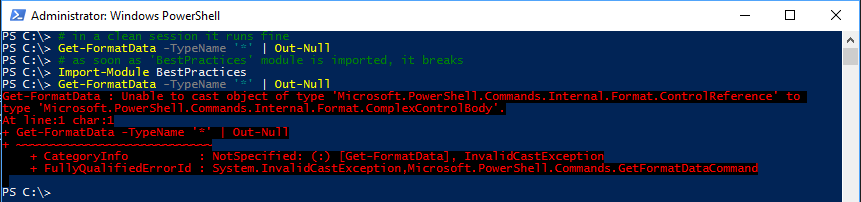
BestPracticesmodule in Windows PS actually breaksGet-FormatDatacmdlet:This breaks
WinCompatbecauseGet-FormatDatais used in implicit remoting call chain:Import-Module -UseWindowsPowerShell -> [implicit PS remoting code] -> Export-PSSession -FormatTypeName "*" -Session $s -> [in session $s] Get-FormatData -TypeName '*'Another issue is that we are missing an error-reporting path in one case in implicit remoting code; this should be fixed independently.
SteveL-MSFT commentedon Nov 26, 2019
I think the priority here is to fix it so that an error is reported to the user.
doctordns commentedon Nov 28, 2019
I'd LIKE the priority to be getting the module to work either natively or via the new compat logic.
But if that can't happen, then at least an error message back to the user.
doctordns commentedon Jan 11, 2020
In RC1, there is a new and different error message. The best practices module still does not load fully:
anmenaga commentedon Jan 30, 2020
Basically the remaining issue here is that implicit PS Remoting code is doing a blanket
Export-PSSession -FormatTypeName "*". It needs to collect data only for types needed by the remote module; this is not trivial; needs some prototyping.anmenaga commentedon Jan 30, 2020
An important side effect - importing
BestPracticesmodule through WinCompat, makes it impossible to load any other module into that WinCompat session.alx9r commentedon Apr 23, 2020
Andrew (@anmenaga) Should I expect that the fix for this would have to come via an update to Windows PowerShell? Or do you foresee a workaround being implemented in PowerShell core edition?
microsoft-github-policy-service commentedon Nov 16, 2023
This issue has not had any activity in 6 months, if this is a bug please try to reproduce on the latest version of PowerShell and reopen a new issue and reference this issue if this is still a blocker for you.
microsoft-github-policy-service commentedon Nov 16, 2023
This issue has not had any activity in 6 months, if this is a bug please try to reproduce on the latest version of PowerShell and reopen a new issue and reference this issue if this is still a blocker for you.
microsoft-github-policy-service commentedon Nov 16, 2023
This issue has not had any activity in 6 months, if this is a bug please try to reproduce on the latest version of PowerShell and reopen a new issue and reference this issue if this is still a blocker for you.
microsoft-github-policy-service commentedon Nov 23, 2023
This issue has been marked as "No Activity" as there has been no activity for 6 months. It has been closed for housekeeping purposes.